

This is my first article for the beginners of the C# Programming. Here in this article, I will show you how to connect a C# application with MS Access 2013, 2016 or Office 365 database.
Open MS Access, click on a Blank Desktop Database, since I have Office 365 so it will look like the following screenshot,
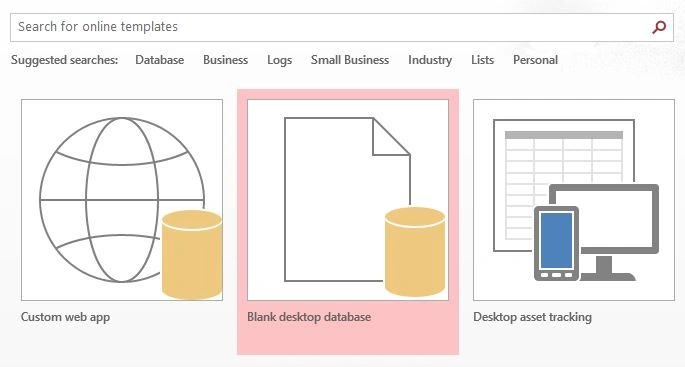
Now you can give any name to the database and then click Create.
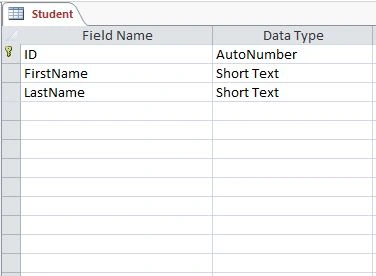
Now create a Table in database, You can name a table anything you want, here I named it "Student" . There are three columns in the table ID, FirstName and LastName like the following,
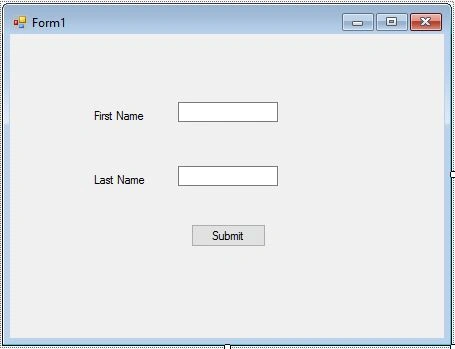
Now open Visual Studio, start a new Windows Form Application and give any name you want. Now Drag and Drop database file from the Documents to the Project Directory folder in Solution Explore which we created with MS Access. Design the form like the following,
Double Click on the Submit Button.
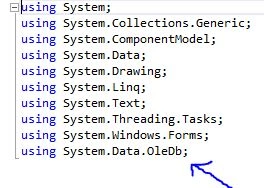
Write a Namespace for connectivity as in the following code snippet:
Open MS Access, click on a Blank Desktop Database, since I have Office 365 so it will look like the following screenshot,
Now you can give any name to the database and then click Create.
Now create a Table in database, You can name a table anything you want, here I named it "Student" . There are three columns in the table ID, FirstName and LastName like the following,
Now open Visual Studio, start a new Windows Form Application and give any name you want. Now Drag and Drop database file from the Documents to the Project Directory folder in Solution Explore which we created with MS Access. Design the form like the following,
Double Click on the Submit Button.
Write a Namespace for connectivity as in the following code snippet:
- using System.Data.OleDb;
Now get a connection string, Go to Tools menu and select connect to the database and browse database from the Project Directory.
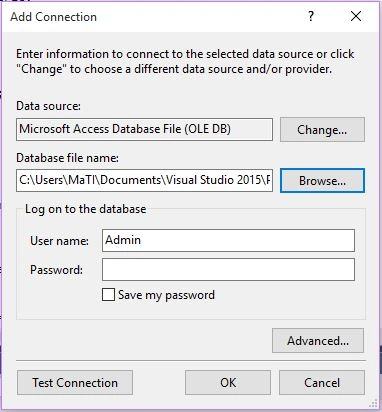
Click on Advanced and copy the highlighted text as your connection string.
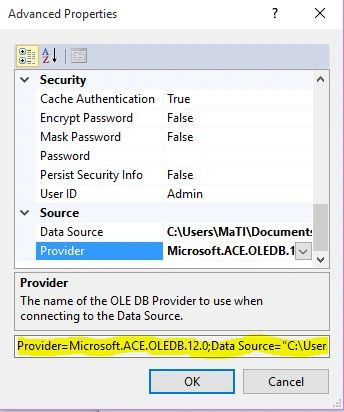
Now make connection using the following code:
- OleDbConnection con = new OleDbConnection("Provider=Microsoft.ACE.OLEDB.12.0;Data Source=testapp.accdb");
And write the following code:
- OleDbCommand cmd = con.CreateCommand();
- con.Open();
- cmd.CommandText = "Insert into Student(FirstName,LastName)Values('" + textBox1.Text + "','" + textBox2.Text + "')";
- cmd.Connection = con;
- cmd.ExecuteNonQuery();
- MessageBox.Show("Record Submitted","Congrats");
- con.Close();
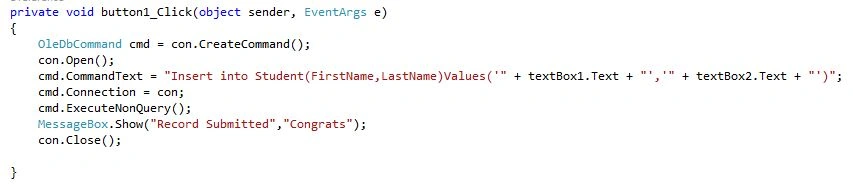
Now you are all set to run your application. Keep coding!
Martin GraupnerPosted Mar 10, 2022, 4:48 PM
And to add to this: If I run the "testapp" solution: there is an exception thrown: System.InvalidOperationException: 'The 'Microsoft.ACE.OLEDB.12.0' provider is not registered on the local machine.' However: I have the Database Engine 2016 Redistributable installed, I use Visual Studio 2022, my Windows and my MS Access run as a 64-bit process. What could be the error?
Martin GraupnerPosted Mar 9, 2022, 10:41 PM
I wonder why this is not working anymore (using VisualStudio 2022). Database Engine 2016 Redistributable is downloaded and installed. The make connection command yields an error: "Syntax error ',' expected". It seems like ACE is not recognized. Running the entire solution yields: "The debug executable 'C:\...\..\FormsApp.exe' specified in the 'FormsApp' debug profile does not exist."
SANTHOSHKUMAR SPosted Mar 30, 2020, 8:34 AM
I need update code and delete simple example using asp.net using c# ?
rech 001Posted Oct 16, 2019, 1:05 PM
The 'Microsoft.ACE.OLEDB.12.0' provider is not registered on the local machine.
Ibad AhmedPosted Apr 23, 2019, 10:51 AM
Browse wala kaam samajh nhi araha kaha ka address dena he
brent georgePosted Jul 30, 2018, 11:58 AM
How do i get the data to be saved into the database? I get the confirmation that the record is added but isn`t in the database when i open it.
Mohammed AkhtarPosted Mar 19, 2018, 9:51 AM
Thank you so much, Very nice work.
Azer CabbarliPosted Jan 30, 2018, 9:24 AM
Use the data from database.
Azer CabbarliPosted Jan 30, 2018, 9:24 AM
Thank you very much for info! But I wanna check input with the data in the database and
Niv (Dindibo4)Posted Dec 25, 2017, 2:55 PM
Great guide, thank you very much. By the way is there a way to read the data from the database into the C# form?
Arwin FortunPosted Oct 9, 2017, 1:28 PM
I just do not know in what part of the program I should insert the code for provider to make a connection
Shivam KumarPosted May 5, 2017, 9:24 AM
The program compiles and the connection to the database file is successful. I run the program and enter the details and I get the confirmation message box pop up, but when I open up the testapp.accdb file, there isn't any data in it. Anyone know why this is happening?
Charlotte MolefePosted Feb 20, 2017, 4:48 AM
Im getting an error message that says "Microsoft.ACE.OLEDB.12.0 Provider is not registered on de local machine", how do i fix it?
Anis Ben KhirounPosted Nov 8, 2016, 3:41 AM
It's not working, (the 'Microsoft.ACE.OLEDB.12.0' provider is not registered on the local machine.') and I changed the platform target to x86 but same error appear.
Santhakumar MunuswamyPosted Nov 11, 2015, 10:45 AM
Good one
Ali AhmedPosted Nov 5, 2015, 3:10 AM
Nice..but you can write it little broadly...
Sibeesh VenuPosted Nov 4, 2015, 11:24 PM
Nice Share
Jose PeraPosted Nov 4, 2015, 12:02 PM
Great now that you're connected how do you transfer information into the database, say off a cd ?
parvez khanPosted Nov 4, 2015, 5:18 AM
i want share window application in network but database sql is not connect clinte to servar