

Introduction
Before starting my article about connecting SQL Server to Python, I would suggest that new learners check the fundamental concept of Python from Python web site or any other websites suggested on Google. We can connect Python with various kinds of databases, including MySQL, SQL Server, Oracle, and Sybase, etc.
So, in this tutorial, I will explain how we are able to connect with SQL Server. To connect with any database, we mainly follow 4 steps.
- Importing the API module (similar to Namespace used in .Net).
- Establishing Connection with the database using connect constructor.
connect ( parameters... )It takes a number of parameters like-Driver, Server, Database, Uid, PwdDriver- It mainly depends on the database you are using. According to the database, this driver will change.
Server- This is the name of the server where the database exists.
Database- Name of the database.
Uid- This is the userId for your database.
Pwd- This is the password for your database. - Passing your Query in a command object.
- Creating a Cursor for executing the Query.
- Closing the Connection (optional).
Now, open Visual Studio. Create a New Project, and then go to Python Template as follows.
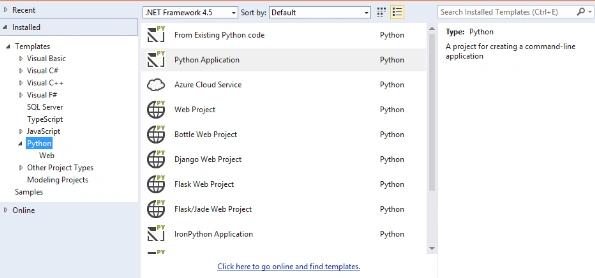

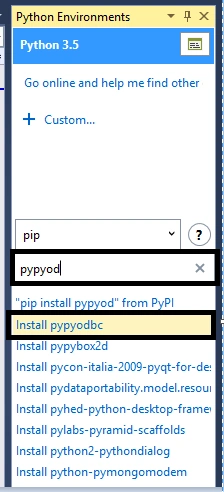
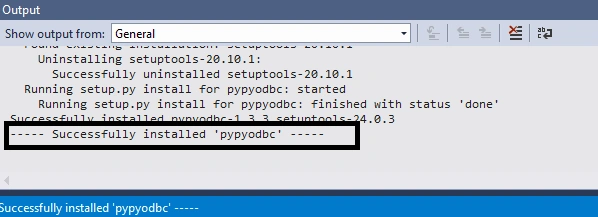
Now, open the Python application and write the following code.
- #importing module Like Namespace in .Net
- import pypyodbc
- #creating connection Object which will contain SQL Server Connection
- connection = pypyodbc.connect('Driver={SQL Server};Server=Debendra;Database=CodeX;uid=sa;pwd=123')
- print("Connected.")
- #closing connection
- connection.close()
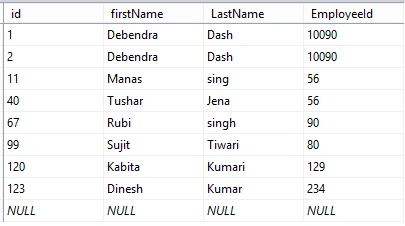
Now, I will write the code to input the data from the user and save the data in the database, as follows.
- #importing module
- import pypyodbc
- connection = pypyodbc.connect('Driver={SQL Server};Server=Debendra;Database=CodeX;uid=sa;pwd=123')
- print("Enter a Unique Id")
- Id=int(input())
- print("Enter first Name")
- firstname=input()
- print("Enter last Name")
- LastName=input()
- print("Enter Regno")
- RegisterNo=int(input())
- cursor = connection.cursor()
- SQLCommand = ("INSERT INTO tbl_employee(id,firstName, LastName, EmployeeId) VALUES (?,?,?,?)")
- Values = [Id,firstname,LastName,RegisterNo]
- #Processing Query
- cursor.execute(SQLCommand,Values)
- #Commiting any pending transaction to the database.
- connection.commit()
- #closing connection
- print("Data Successfully Inserted")
- connection.close()

Press Enter to save the data in the database.

Go to the database and check for the Record.
 Thus, in this way, we can connect Python to the SQL Server. Hope this tutorial will help all those who are new to Python and trying to learn it.
JosephsPosted Aug 7, 2019, 1:12 AM
Can you tell me how to use them
JosephsPosted Aug 7, 2019, 1:12 AM
Install pypyodbc no action there
Gagan SikriPosted Aug 15, 2016, 2:23 AM
Good One :)
Shobana JPosted Jul 19, 2016, 2:46 AM
Nice one
kalu singh raoPosted Jul 19, 2016, 1:28 AM
Nice...
Vignesh ManiPosted Jul 18, 2016, 6:20 PM
Nice one