

Introduction
- In this article, I am going to explain about connecting the PIR with Arduino In Python.The output will be displayed on both sides in Python and the Arduino. It will send the message of what we have given to print in the input.
Parts Of List
Hardware Requirement
- Arduino Uno
- PIR Sensor
- IR Sensor
- Bread Board
- Hook Up wires
Software Requirement
- Arduino IDE
- Python 3.5.2
PIR Sensor
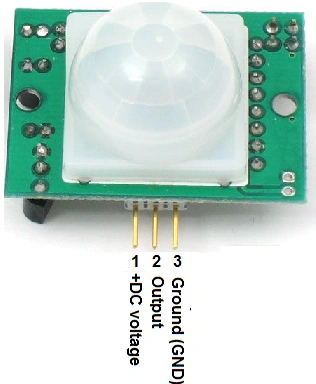
Figure 1: PIR Sensor
- It is used to detect human movement around approximately 10m from the sensor.
- The actual range is between 5m to 12m.
- It is of high sensitivity and low noise.
Programming
Arduino Programming
- int pirPin = 2;
- int minSecsBetweenEmails = 60; // 1 min
- long lastSend = -minSecsBetweenEmails * 1000l;
- void setup()
- {
- pinMode(pirPin, INPUT);
- Serial.begin(9600);
- }
- void loop()
- {
- long now = millis();
- if (digitalRead(pirPin) == HIGH)
- {
- if (now > (lastSend + minSecsBetweenEmails * 1000l))
- {
- Serial.println("MOVEMENT");
- lastSend = now;
- }
- else
- {
- Serial.println("Too soon");
- }
- }
- delay(500);
- }
- In the Arduino part, it has been explained about the distance of the person at the time, it will have the output at the Serial monitor.
- The output will be displayed as "Too Soon".
Python Program
- import time
- import serial
- import smtplib
- TO = '[email protected]'
- GMAIL_USER = '[email protected]'
- GMAIL_PASS = 'putyourpasswordhere'
- SUBJECT = 'Intrusion!!'
- TEXT = 'Your PIR sensor detected movement'
- ser = serial.Serial('COM4', 9600)
- def send_email():
- print("Sending Email")
- smtpserver = smtplib.SMTP("smtp.gmail.com",587)
- smtpserver.ehlo()
- smtpserver.starttls()
- smtpserver.ehlo
- smtpserver.login(GMAIL_USER, GMAIL_PASS)
- header = 'To:' + TO + '\n' + 'From: ' + GMAIL_USER
- header = header + '\n' + 'Subject:' + SUBJECT + '\n'
- print header
- msg = header + '\n' + TEXT + ' \n\n'
- smtpserver.sendmail(GMAIL_USER, TO, msg)
- smtpserver.close()
- while True:
- message = ser.readline()
- print(message)
- if message[0] == 'M' :
- send_email()
- time.sleep(0.5)
- In this Python coding, it will be used to connect the PIR sensor and will give the output in Python shield. It will also be displayed as Too Soon.
Output
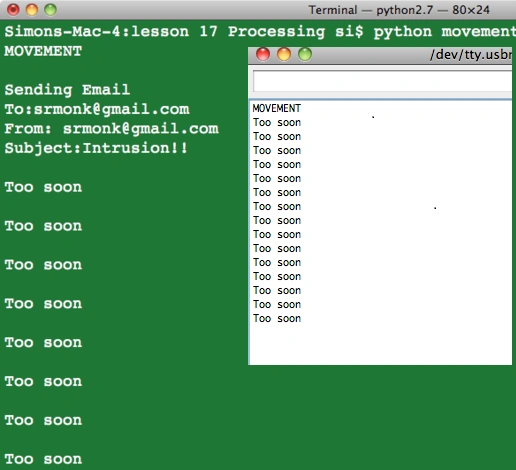
Figure 2:Output
Hussain PatelPosted Nov 2, 2016, 10:38 AM
Nice article
RajaPosted Aug 17, 2016, 5:23 AM
Good One..
Anu VPosted Aug 5, 2016, 7:47 AM
Nice
Vignesh ManiPosted Aug 5, 2016, 6:52 AM
Good One
Prasanna MuraliPosted Aug 4, 2016, 10:57 AM
Nice share..