

Introduction
We can access the device's cellular and WiFi information using the connection object. This object is accessed under the navigator.network interface. The only property of the connection object is connection.type. The supported platforms are Android, Bada, BlackBerry WebWorks, iOS, webOS and Windows Phone. The Constants values of connections are:
Connection.UNKNOWN
Connection.ETHERNET
Connection.WIFI
Connection.CELL_2G
Connection.CELL_3G
Connection.CELL_4G
Connection.NONE
Connection.type : This will check the network connection that is active and to be used, which means it will check which active network connection is being used. This property has an easy way to determine the device's network connection state and the type of the connection. The supported platforms are iOS, Android, BlackBerry WebWorks (OS 5.0 and higher), Windows Phone 7 (Mango), Bada 2.x and webOS.
The function to find the connection is written as:
function checkConnection() {
var networkState = navigator.network.connection.type;
var states = {};
states[Connection.UNKNOWN] = 'Unknown connection';
states[Connection.ETHERNET] = 'Ethernet connection';
states[Connection.WIFI] = 'WiFi connection';
states[Connection.CELL_2G] = 'Cell 2G connection';
states[Connection.CELL_3G] = 'Cell 3G connection';
states[Connection.CELL_4G] = 'Cell 4G connection';
states[Connection.NONE] = 'No network connection';
alert('Connection type: ' + states[networkState]);
}
checkConnection();
Now let's take an example:
<!DOCTYPE html>
<html>
<head>
<meta name="viewport" content="width=device-width, height=device-height, initial-scale=1.0, maximum-scale=1.0, user-scalable=no;" />
<meta http-equiv="Content-type" content="text/html; charset=utf-8" />
<title>Connections in Cordova</title>
<link rel="stylesheet" href="master.css" type="text/css" media="screen" title="no title"
charset="utf-8" />
<script type="text/javascript" charset="utf-8" src="cordova-1.9.0.js"></script>
<script type="text/javascript">
// Wait for Cordova to load
document.addEventListener("deviceready", onDeviceReady, false);
// Cordova is loaded and it is now safe to make calls Cordova methods
function onDeviceReady() {
checkConnection();
}
function checkConnection() {
var networkState = navigator.network.connection.type;
var states = {};
states[Connection.UNKNOWN] = 'Unknown connection';
states[Connection.ETHERNET] = 'Ethernet connection';
states[Connection.WIFI] = 'WiFi connection';
states[Connection.CELL_2G] = 'Cell 2G connection';
states[Connection.CELL_3G] = 'Cell 3G connection';
states[Connection.CELL_4G] = 'Cell 4G connection';
states[Connection.NONE] = 'No network connection';
alert('Connection type: ' + states[networkState]);
}
</script>
</head>
<body>
<p>
A dialog box will report the network state.</p>
</body>
</html>
This code can be written in the index.html file which resides in the www folder. Now In order to run the application press F5. The Cordova emulator will first be loaded and then when Cordova is installed succefully the output will look like: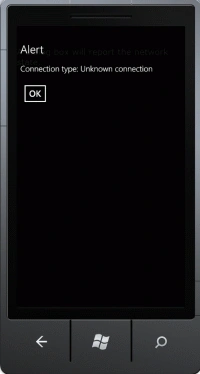
When we click on the Ok button then: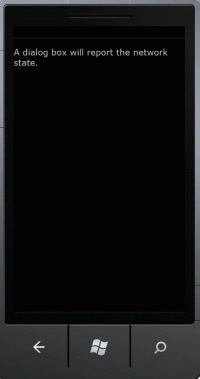
Summary : In this article I explained how to find the active connection using Apache Cordova or PhoneGap.
SubashPosted Jul 14, 2016, 6:25 AM
Good