

In our software development life, sometimes we get a requirement such as to execute a task on a daily, weekly and monthly basis.
For instance, we need to send an e-mail or do a file transfer on a specified frequency based on a condition.
How to do it
As in the preceding scenario we can have multiple solutions for that:
- Create a Windows Service, implement your logic and a set timer.
- Create a console application and implement your logic, then create a scheduler and refer action as console application .exe file.
- Any third-party scheduler like Quartz scheduler.
Here we will explain use of a console application with the Windows Scheduler.
To accomplish the preceding task please find the following procedure.
Step 1
First we need to create a console application in Visual Studio. Please see the following screenshot, I have created a console app with starter logic: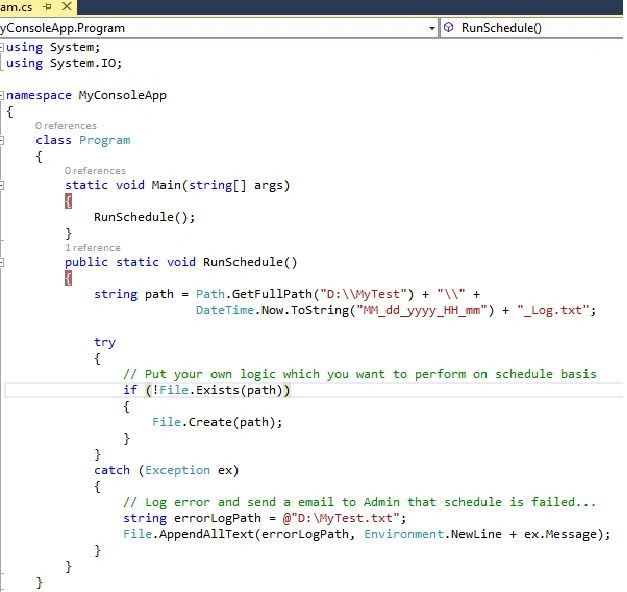
Step 2
After implementing our logic we need to build the application in release mode. Once it builds successfully, it creates one .exe file in your directory. Please see the following screenshot:
Step 3
Now my application is ready for setting up in the Windows Scheduler.
Before you start the scheduler you should have Admin Rights in system.
To open Windows Scheduler go to the Start menu and in the search box type "Scheduler", then it will display the Task Scheduler. Click on that.
Please see the following screenshot: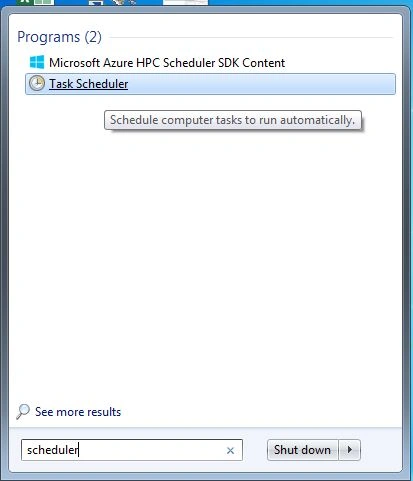
Step 4
After clicking on it, a window will open where you can create a task. Click on the "Create Task" link on the right side and it opens the "Create Task" window. In this window we have a couple of tabs, like General, Triggers, Actions and so on.
In the General tab we need to provide the scheduler name and description details. Please see the following screenshot: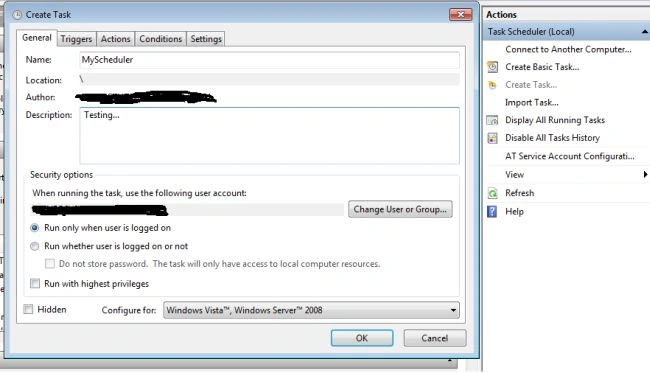
In the Triggers tab we need to set when the scheduler will start and what the time interval details are.
In the following screenshot, I have set it depending on my requirements. In other words I have set here that my .exe should execute at one minute intervals for an indefinite amount of time. In the screen I have checked Daily, Repeat task every day with 1 minute.
So you need to set it depending on your requirements, either daily, weekly or monthly.
In the Actions tab we need to set only what the scheduler will execute.
In the following screenshot I have selected the Action as "Select Program" because we need to execute an .exe file.
Next browse to where your exe file is present in your directory. I have already discussed when our console app successfully executes. It generates an exe file (please refer to the Step 2 screenshot). Click OK.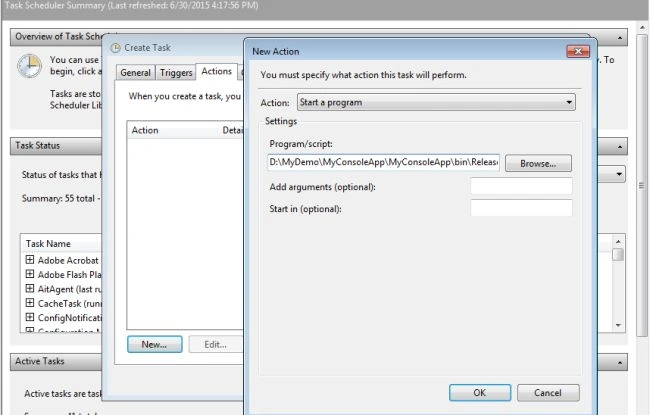
Step 5
Once everything is set up, our scheduler will begin to run.
If everything is properly coded then you will get correct output as in the screenshot. My scheduler is generating text files at 1 minute intervals.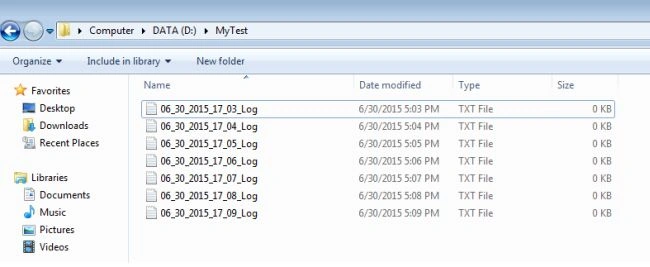
I hope this will help you.
Happy coding !!!
PreetiPosted Nov 6, 2020, 6:03 AM
How can I redirect logs of my c# code to some file while running job through task scheduler , because I am not able to see the logs as Console is not open.
sankeerth mPosted May 18, 2020, 7:58 PM
Hi i want to implement in UK Time using task scheduler.
Manoj DeshpandePosted Apr 11, 2019, 12:31 PM
Thanks for the article. I have an issue that I haven't been able to resolve. I have a console application that should read a date from a JSON file and process some data. After processing it should update the JSON file with the date. This runs fine when local debugging and also when run with a command prompt on the server. But when scheduled Task Scheduler, it doesn't read/write to the JSON file. What could be the problem?
Haribansh Kumar AgrawalPosted May 11, 2018, 7:00 AM
Nice Explanation. looking for same reply
Neha AmbastaPosted Mar 9, 2018, 1:00 AM
Awesome explanation
Mohammad RiyazuddinPosted Jan 23, 2018, 1:17 AM
How to call the same app in linux without mono or wine installed in it?
Hamid KhanPosted Dec 25, 2017, 11:23 PM
Nice explanation dear....................
Vishal GundagePosted Dec 19, 2017, 3:50 AM
Sir i want to code for getting multiple remote machine drive info and when the diskspace is low give the timer..i have no idea how to do beacuse i m begginers here
Alberto CandiaPosted Sep 9, 2016, 11:03 AM
I had been working recently with console app and scheduled task, my console app didn't run and no error logs was generated. The issue in my case was I had Class Library projects in my solution, and had to create a strong key and sign every assembly in my solution. You could put this as a comment in your article, as help for someone else. Greeting from Chile, and nice post.
Musab AlRianiPosted Jul 4, 2015, 4:40 AM
That's been useful,thanks.
Neeraj KumarPosted Jul 3, 2015, 2:53 PM
Good
Santhakumar MunuswamyPosted Jul 3, 2015, 2:28 PM
Thanks for nice article.:)
Vipul MalhotraPosted Jul 3, 2015, 5:43 AM
Nice article