

Phase 01 — System Design Foundation | Topic 06
When developers hear “System Design,” they often think about scalability, microservices, databases, caching, and cloud infrastructure.
But there is one important thing we often forget:
Real-world systems are not designed with unlimited resources.
You may have a limited budget.
You may have only a small development team.
You may already have an old application that cannot be replaced.
Your organization may require you to use a specific technology.
These limitations are called constraints, and they can strongly influence your system design.
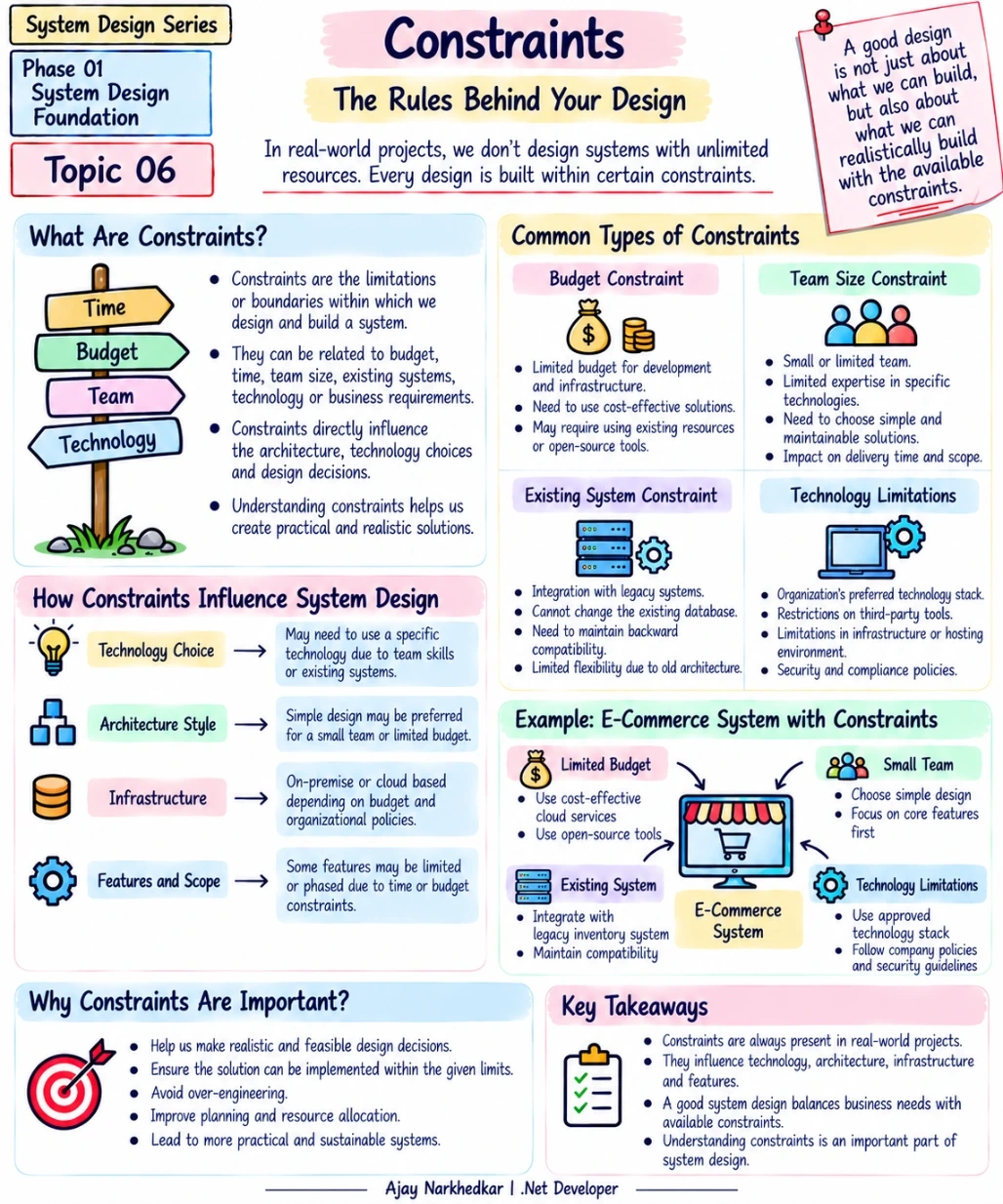
What Are Constraints in System Design?
A constraint is a limitation or boundary that we must consider while designing and building a system.
In simple words:
Constraints define what we can and cannot realistically do.
For example, imagine a company wants to build a new e-commerce application.
The business requirement may sound simple:
“Build a scalable e-commerce platform that can support a large number of customers.”
But the actual project may have additional conditions:
The company has a limited development budget.
Only four developers are available.
An existing inventory system must continue to be used.
The company has an approved .NET and Azure technology stack.
The first version must be delivered within three months.
Now the system cannot be designed only based on technical possibilities.
It must be designed based on business requirements + available constraints.
Why Do Constraints Matter?
Suppose you are given unlimited time, unlimited developers, unlimited infrastructure, and unlimited budget.
You could choose almost any architecture you want.
Real projects are different.
A design that looks technically impressive may not be practical for the business.
For example, a small application with a team of three developers probably does not need a complex microservices architecture simply because microservices are popular.
A simpler architecture may be easier for the team to develop, test, deploy, monitor, and maintain.
This is an important System Design mindset:
The best design is not necessarily the most complex design. It is the design that fits the actual problem and its constraints.
Common Types of Constraints
There are many types of constraints in real-world software projects. Let's understand the most common ones.
1. Budget Constraints
Budget is one of the most common constraints.
Every system requires resources such as:
Development effort
Servers or cloud infrastructure
Databases
Monitoring tools
Third-party services
Storage
Networking
Suppose a startup has a small budget.
The architecture should consider cost-effective infrastructure rather than immediately selecting expensive services for every requirement.
For example, the team might start with a simple ASP.NET Core application and a managed database instead of building a large distributed architecture from day one.
The important question is not:
“What is the most powerful technology?”
It is:
“What solution can we build within the available budget?”
2. Team Size and Skill Constraints
The people building the system are also a constraint.
Imagine a project has four developers:
Two .NET developers
One frontend developer
One tester
Now imagine someone proposes:
“Let's build ten microservices, introduce event-driven communication, add multiple message brokers, and deploy everything using a complex Kubernetes setup.”
Technically, it may be possible.
But can the team comfortably develop, test, deploy, monitor, and maintain it?
The answer depends on the team's experience and available resources.
A smaller team may benefit from a simpler architecture that they understand well.
This does not mean a small team can never use microservices.
It means the architecture should consider:
Who will build and operate this system?
3. Existing System Constraints
This is extremely common in enterprise applications.
You may be building a new application, but the organization already has several existing systems.
For example:
New Order Management System
          |
          +---- Customer Database
          |
          +---- Existing Inventory System
          |
          +---- Existing Payment System
The new application may need to communicate with these systems.
You may not be allowed to change their database structure.
You may need to maintain compatibility with an old API.
You may even need to support an older authentication mechanism.
These existing systems become constraints on your new design.
This is why real-world System Design is often different from designing a completely new application from scratch.
4. Technology Constraints
Organizations often have technology standards.
For example, a company may already have a strong .NET ecosystem.
Its standard technology stack might include:
ASP.NET Core
SQL Server
Azure
Redis
Azure Service Bus
The architecture team may require new applications to follow these standards.
Similarly, a company may restrict certain third-party libraries because of security, licensing, or compliance requirements.
So even if another technology looks attractive, it may not be an available option.
A system designer needs to understand these limitations before making architecture decisions.
5. Time Constraints
Time is another important constraint.
Suppose the business says:
“The first version must be released within three months.”
You cannot design the project as if you have two years.
You may need to prioritize the most important features and postpone less important functionality.
This can lead to a phased approach:
Phase 1
Core Ordering

Phase 2
Notifications

Phase 3
Advanced Reporting

Phase 4
Additional Integrations
The goal is to deliver business value within the available time while keeping the system maintainable.
How Constraints Influence System Design
Constraints can affect almost every major architecture decision.
For example, consider a limited team.
That constraint may influence the:
Architecture
The team may prefer a modular monolith because it is easier to manage.
Technology
The team may choose technologies they already understand well.
Infrastructure
The organization may choose managed cloud services to reduce operational complexity.
Features
Non-essential features may be postponed to a later release.
So constraints do not simply affect project management.
They can directly influence architecture, technology, infrastructure, and scope.
Real-World Example: E-Commerce System
Let's take a practical example.
Suppose a company wants to build an e-commerce system with these requirements:
Customers should be able to browse products, place orders, make payments, and track deliveries.
Now consider the constraints:
Limited Budget
The company cannot spend heavily on infrastructure during the initial stage.
This may encourage the team to choose cost-effective cloud resources and avoid unnecessary infrastructure.
Small Development Team
Only four developers are available.
The team may choose a simpler architecture that they can comfortably maintain.
Existing Inventory System
The company already has an inventory application.
The new system needs to integrate with it instead of replacing it immediately.
Technology Standards
The organization requires the application to use ASP.NET Core and SQL Server.
The design should work within that technology ecosystem.
Now look at how the final design is shaped.
The system is not designed only from the question:
“What architecture is technically possible?”
It is designed from:
“What architecture is practical for this business, this team, this budget, this technology environment, and this timeline?”
That is real-world System Design.
Constraints Can Prevent Over-Engineering
One of the biggest benefits of understanding constraints is avoiding unnecessary complexity.
Imagine you are building an internal application used by 500 employees.
The application needs basic CRUD operations and reports.
You could technically introduce:
Multiple microservices
Event-driven architecture
Distributed caching
Multiple message brokers
Complex deployment infrastructure
But do you actually need all of them?
If the requirements and constraints do not justify that complexity, you may be creating more problems than you are solving.
More components mean more things to:
Develop
Deploy
Monitor
Test
Debug
Maintain
Therefore:
Constraints can help us choose a simpler and more practical design.
Constraints Are Not Always Negative
It is easy to think of constraints as problems.
But constraints can also help us make better decisions.
For example, a limited budget forces us to think about cost.
A small team forces us to think about operational simplicity.
A fixed technology stack prevents unnecessary technology decisions.
A short delivery timeline forces us to prioritize business-critical functionality.
Constraints give us boundaries.
Those boundaries help us focus.
A Simple Way to Analyze Constraints
Before starting your system design, ask these questions:
Budget
How much money is available for development, infrastructure, and third-party services?
Team
How many developers are available, and what technologies do they already understand?
Existing Systems
Which applications, databases, APIs, or integrations must continue to work?
Technology
Are there organizational standards or technology restrictions that we must follow?
Time
When does the business need the first usable version?
Scope
Which features are essential for the first release, and which can be delivered later?
These questions can reveal constraints before you start making architecture decisions.
Constraints vs Requirements
It is also important to understand the difference.
A requirement describes what the business needs from the system.
For example:
“Customers should be able to place orders.”
A constraint describes a limitation within which we need to build the system.
For example:
“The application must use the company's existing SQL Server database.”
So:
Requirement: What does the business need?
Constraint: What boundaries must our solution follow?
Both are important inputs for System Design.
The System Designer's Mindset
When designing a system, don't ask only:
“What would be the perfect architecture?”
Ask:
“What architecture makes sense for this situation?”
Consider:
Business requirements
Expected users
Traffic
Budget
Team size
Existing systems
Technology restrictions
Delivery timeline
Security requirements
Future growth
A good design balances all of these factors.
IMPORTANT Takeaway
Real-world System Design is not about creating the biggest or most advanced architecture.
It is about creating a solution that is:
Technically appropriate.
Business-friendly.
Within budget.
Maintainable by the available team.
Compatible with existing systems.
Realistic within the available time.
The next time you design a system, don't start by drawing microservices or choosing technologies.
First ask:
“What constraints do I need to design within?”
Because understanding the boundaries is just as important as understanding the requirements.
What's Next?
We have now covered requirements and constraints.
The next step is to understand who actually interacts with the system and what each user is allowed to do.
Phase 01 — System Design Foundation | Topic 07 — Users, Roles and Use Cases
We will learn how to identify different users, define their responsibilities, and convert those responsibilities into clear use cases.
Join the conversation! Your thoughts help the community grow.