

Here I will explain it in detail, how we can construct the ICS file and send as an attachment in the email.
First create a method
public void SendmailWithIcsAttachment()
{

//Now we have
to set the value to Mail message properties. As shown below.
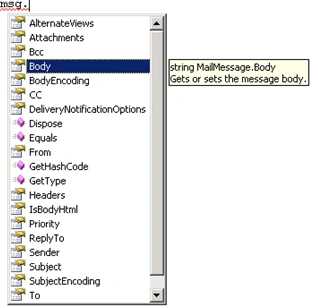
//Note Please change it to correct mail-id to use
this in your application
msg.From = new MailAddress("[email protected]", "ABC");
msg.To.Add(new MailAddress("[email protected]", "BCD"));
msg.CC.Add(new MailAddress("[email protected]", "DEF"));// it is optional,
only if required
msg.Subject
= "Send mail with ICS file as an Attachment";
msg.Body = "Please Attend the meeting with this schedule";
msg.Subject = "Send
mail with ICS file as an Attachment";
msg.Body
= "Please Attend the meeting with this
schedule";
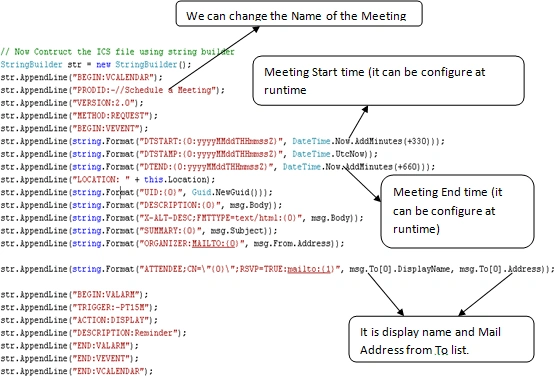
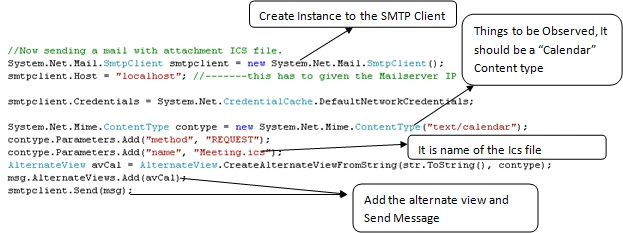
Now will see the Sending mail part
}
Happy Coding!!!
Dattatray ArsulePosted Apr 4, 2022, 5:47 AM
How did you get value of Location property
pinaki swainPosted Feb 24, 2022, 6:49 AM
Where to store the send email user mail password>
pinaki swainPosted Feb 24, 2022, 6:48 AM
Where to set the send mail id password?
Yolanda IePosted Aug 12, 2015, 10:34 AM
Hi Suri, your code is so useful. thanks a lot.
D v KootenPosted Mar 11, 2014, 2:50 PM
Very useful code, thanks. We used it to add the creation of .ICS files from our software, creating a mail was already part of our software. For future readers, below seems to be the minimum requirement to get the file working extended with 2 roles and a creation date/time. Dick, IC2. BEGIN:VCALENDAR PRODID:-//Schedule a Meeting VERSION:2.0 METHOD:REQUEST BEGIN:VEVENT DTSTART:20140312T140000 DTSTAMP:20140311T152649 DTEND:20140312T150000 DESCRIPTION:Something ORGANIZER:MAILTO:[email protected] ATTENDEE;ROLE=CHAIR;PARTSTAT=ACCEPTED ;CN="Mr Organizer";RSVP=FALSE :mailto:[email protected] ATTENDEE;ROLE=REQ-PARTICIPANT;PARTSTAT=NEEDS-ACTION ;CN="Mr Guest";RSVP=TRUE :mailto:[email protected] UID:{31BFE9CA-6C7B-4FEB-A9FC-4AE98B02B154} END:VEVENT END:VCALENDAR
Sujana RaghunathPosted Oct 11, 2013, 2:42 AM
Hi Suri, nice article. Can you please post host, how to embed an image in the ics mail.
Periasamy KanagavelPosted Mar 13, 2013, 7:25 AM
Hi, the article is good. Any idea how to specify recurrences in .ics?
rakesh kumarPosted Oct 25, 2012, 5:50 AM
Hi Suri, I am using the same code but i am attachment is not their. Basically i am using this in sharepoint sequencial workflow.i.e where every manager approves the request, he will get this ics file with calender invitation. Can you please suggest meor do i need to make any settings. Thanks & Regards Rakesh
Abeetha de silvaPosted Oct 17, 2012, 2:36 AM
Thanks, Great article !!!
Yashesvee BhutaniPosted Aug 31, 2012, 12:11 PM
Hi Suri..I implemented this it works fine in outlook but when i try to open it in windows phone 7 it doesn't give me any option to accept or decline the meeting...whereas when i send the meeting request directly from outlook it works fine in wp7...any suggestions?
Nevern GovenderPosted Jul 31, 2012, 8:50 AM
Hi Suri, I tried to implement this in my MVC web app but when I deployed it to the server I got this error: "System.Net.WebException: Unable to connect to the remote server ---> System.Net.Sockets.SocketException: No connection could be made because the target machine actively refused it 127.0.0.1:25" Is this a permissions problem by any chance?
Suri Meenakshi SundaramPosted Jul 26, 2012, 6:23 AM
Hi John, Do you able to see the calender Icon in the attachment? If you are using MS outlook as your mail client,it will show, once you double click the attachment, it will ask for open or save option. if you click open, then it will open as normal outlook message with Meeting appointment details
Johan Van DykPosted Jun 25, 2012, 11:48 AM
Hi Suri What does the 'VERSION:2.0' mean in the line - str.AppendLine("VERSION:2.0"); Does it have anything to do with compatibility of Outlook?
Luis LedesmaPosted May 3, 2012, 5:34 PM
Hi Suri, I tried the "AlternateView", and it works fine. Thanks. The problem I'm facing now is that when there are attachments to the message, then the Calendar Event (.ics) is not displayed. It displays as an standard Outlook message with the attachment. Any ideas?