

Introduction
This article will cover, How to consume Sharepoint online CSOM (REST API) operation using .NET Core 3.1 framework into a console application.
The topic needs to cover here:
- Create Azure AD Instance with Delegate Permission.
- Create Console Application and Add Microsoft.SharePointOnline.CSOM Nuget Package.
- Add Authentication Manager Class to generate the access token.
- Get Access Token & access SharePoint Online List data
Step 1 - Create Azure AD Instance with Delegate Permission
Note
Users should have access to Azure Active Directory.
- Login to https://portal.azure.com
- Search and Select Azure Active Directory
Once the user selects Azure AD, the App registration page will appear.
- Select App registrations
- Select +New registration
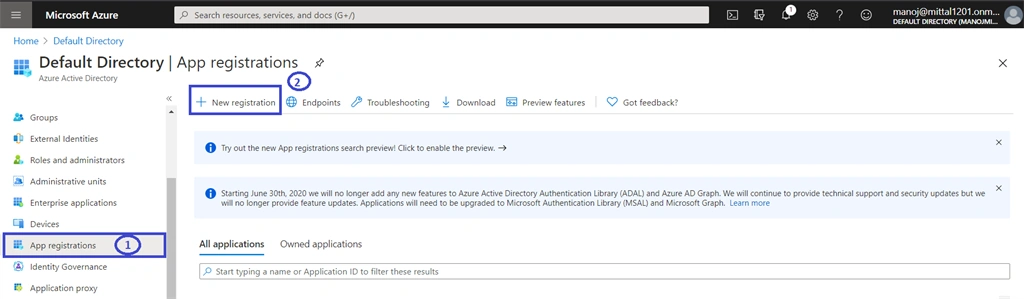
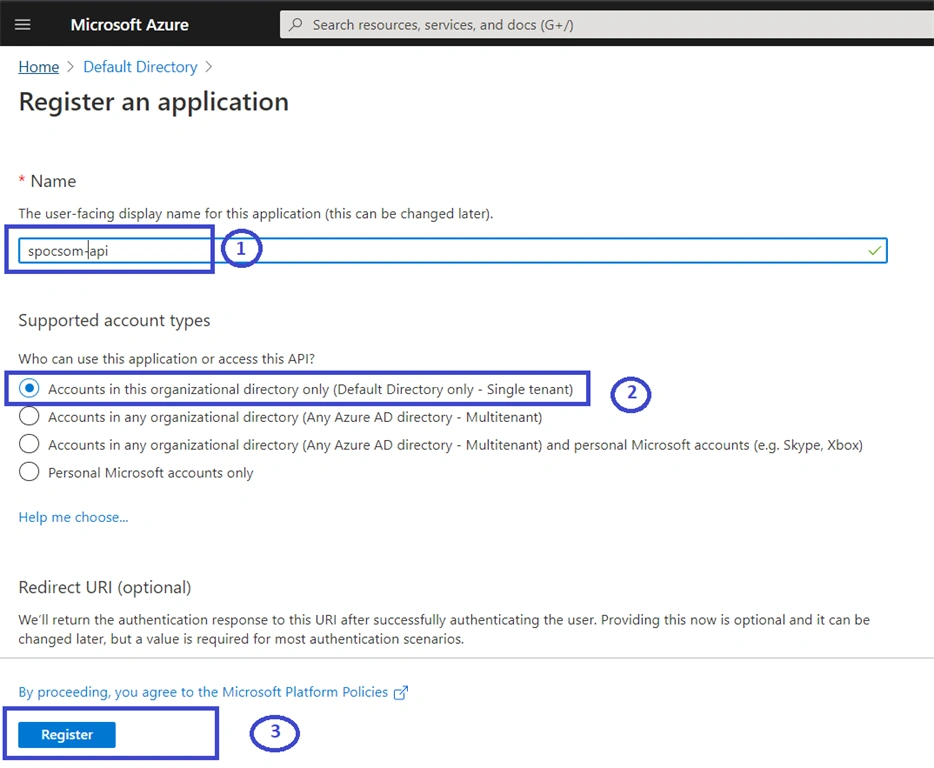
Once the user selects new registration, add below details
- Name "spocsom-api", user can add as per project namespace or naming convention guidelines.
- Select "Account in this organization (single-tenant)
- Click on the Register button
Grant access to SharePoint Online.
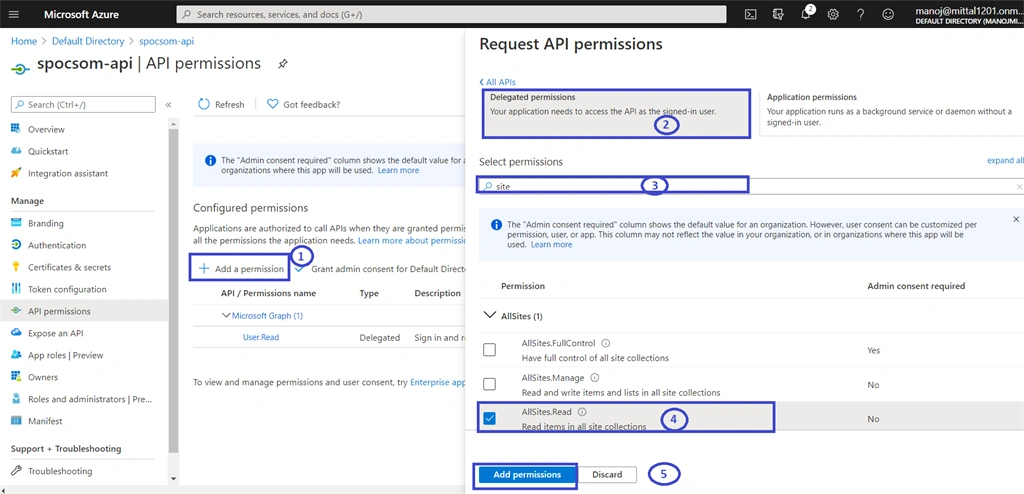
- Select API Permission
- Click to Add Permission
- Search and Add SharePoint from Request API Permission

Delegate Permission, It required where user application needs to access data as the signed-in user.
- Select Add a Permission
- Selection Delegate Permission
- Search and Select Sites
- Choose "All Site.Read" -> This is not site specific but quite secure , It will just come into use to generate token, not going to grant access to the site to access the content.
- Click to "Add Permission"
Grant Admin Consent
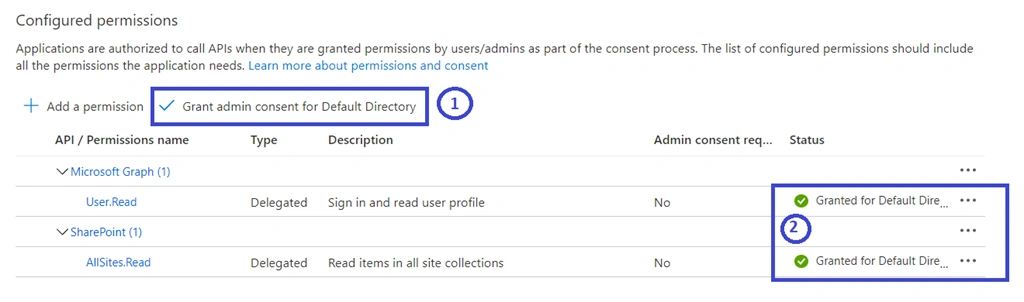
Grant permission by admin or user as part of the consent process.
- Select "Grant admin consent for default directory and click ok to proceed.
- All added api will show granted admin consent on behalf of the user. so it will not prompt for consent.
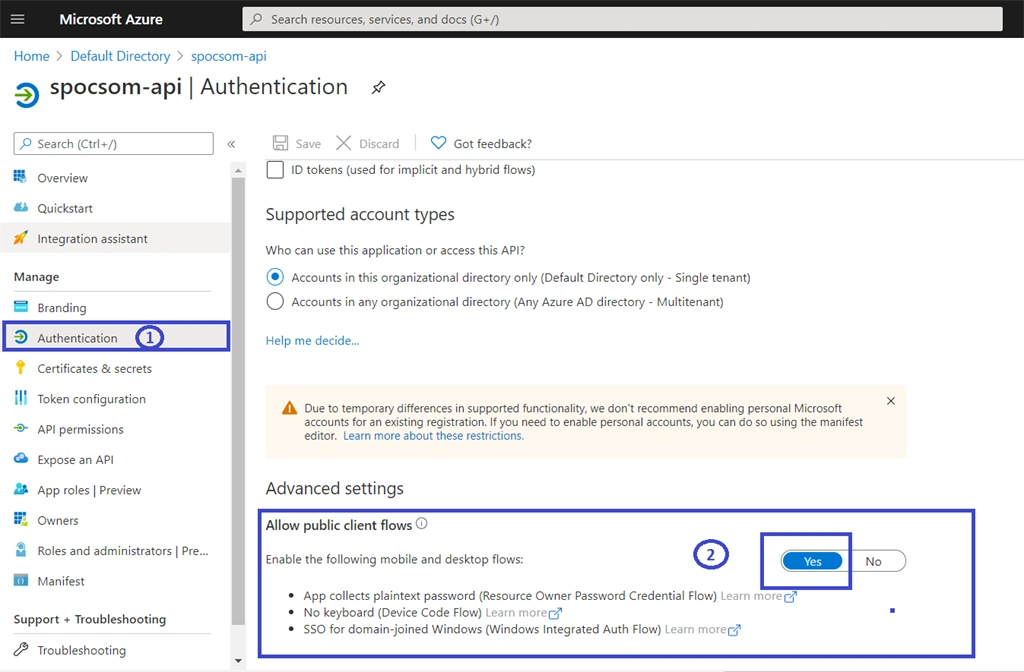
Allow Public Client Flows
The app is going to collect username and password into plain text, so it should allow to yes.
- Select authentication and scroll down till the end
- Under advance settings -> select Allow Public client flows -> Select Yes -> Click on Save to Proceed.
Step 2 - Create Console Application and Add Microsoft.SharePointOnline.CSOM Nuget Package
- Login to Visual Studio 2019 and Create New Project
- Select ConsoleApp (.Net Core) and Ok to proceed.

Install NuGet Package
Select solution and right-click on dependencies and NuGet Packages
Install the below packages:
- Microsoft.SharepointOnline.CSOM
- Newtonsoft.Json
- System.IdentityModel.Token.Jwt

Step 3 - Add Authentication Manager Class to generate the access token
This class helps us to generate access tokens based on application URI, UserName, Password & Azurre AD App Client ID.
Create Auth Manager Class and Copy paste the below codebase:
- public class AuthManager : IDisposable
- {
- private static readonly HttpClient httpClient = new HttpClient();
- private const string tokenEndpoint = "https://login.microsoftonline.com/common/oauth2/token";
- // Replace with Azure AD Client ID -Generated in above Steps
- private const string defaultAADAppId = "Azure Active Director Client ID";
- // Token cache handling
- private static readonly SemaphoreSlim semaphoreSlimTokens = new SemaphoreSlim(1);
- private AutoResetEvent tokenResetEvent = null;
- private readonly ConcurrentDictionary<string, string> tokenCache = new ConcurrentDictionary<string, string>();
- private bool disposedValue;
- internal class TokenWaitInfo
- {
- public RegisteredWaitHandle Handle = null;
- }
- public ClientContext GetContext(Uri web, string userPrincipalName, SecureString userPassword)
- {
- var context = new ClientContext(web);
- context.ExecutingWebRequest += (sender, e) =>
- {
- string accessToken = EnsureAccessTokenAsync(new Uri($"{web.Scheme}://{web.DnsSafeHost}"), userPrincipalName, new System.Net.NetworkCredential(string.Empty, userPassword).Password).GetAwaiter().GetResult();
- e.WebRequestExecutor.RequestHeaders["Authorization"] = "Bearer " + accessToken;
- };
- return context;
- }
- public async Task<string> EnsureAccessTokenAsync(Uri resourceUri, string userPrincipalName, string userPassword)
- {
- string accessTokenFromCache = TokenFromCache(resourceUri, tokenCache);
- if (accessTokenFromCache == null)
- {
- await semaphoreSlimTokens.WaitAsync().ConfigureAwait(false);
- try
- {
- // No async methods are allowed in a lock section
- string accessToken = await AcquireTokenAsync(resourceUri, userPrincipalName, userPassword).ConfigureAwait(false);
- Console.WriteLine($"Successfully requested new access token resource {resourceUri.DnsSafeHost} for user {userPrincipalName}");
- AddTokenToCache(resourceUri, tokenCache, accessToken);
- // Register a thread to invalidate the access token once's it's expired
- tokenResetEvent = new AutoResetEvent(false);
- TokenWaitInfo wi = new TokenWaitInfo();
- wi.Handle = ThreadPool.RegisterWaitForSingleObject(
- tokenResetEvent,
- async (state, timedOut) =>
- {
- if (!timedOut)
- {
- TokenWaitInfo internalWaitToken = (TokenWaitInfo)state;
- if (internalWaitToken.Handle != null)
- {
- internalWaitToken.Handle.Unregister(null);
- }
- }
- else
- {
- try
- {
- // Take a lock to ensure no other threads are updating the SharePoint Access token at this time
- await semaphoreSlimTokens.WaitAsync().ConfigureAwait(false);
- RemoveTokenFromCache(resourceUri, tokenCache);
- Console.WriteLine($"Cached token for resource {resourceUri.DnsSafeHost} and user {userPrincipalName} expired");
- }
- catch (Exception ex)
- {
- Console.WriteLine($"Something went wrong during cache token invalidation: {ex.Message}");
- RemoveTokenFromCache(resourceUri, tokenCache);
- }
- finally
- {
- semaphoreSlimTokens.Release();
- }
- }
- },
- wi,
- (uint)CalculateThreadSleep(accessToken).TotalMilliseconds,
- true
- );
- return accessToken;
- }
- finally
- {
- semaphoreSlimTokens.Release();
- }
- }
- else
- {
- Console.WriteLine($"Returning token from cache for resource {resourceUri.DnsSafeHost} and user {userPrincipalName}");
- return accessTokenFromCache;
- }
- }
- public async Task<string> AcquireTokenAsync(Uri resourceUri, string username, string password)
- {
- string resource = $"{resourceUri.Scheme}://{resourceUri.DnsSafeHost}";
- var clientId = defaultAADAppId;
- var body = $"resource={resource}&client_id={clientId}&grant_type=password&username={HttpUtility.UrlEncode(username)}&password={HttpUtility.UrlEncode(password)}";
- using (var stringContent = new StringContent(body, Encoding.UTF8, "application/x-www-form-urlencoded"))
- {
- var result = await httpClient.PostAsync(tokenEndpoint, stringContent).ContinueWith((response) =>
- {
- return response.Result.Content.ReadAsStringAsync().Result;
- }).ConfigureAwait(false);
- var tokenResult = JsonSerializer.Deserialize<JsonElement>(result);
- var token = tokenResult.GetProperty("access_token").GetString();
- return token;
- }
- }
- private static string TokenFromCache(Uri web, ConcurrentDictionary<string, string> tokenCache)
- {
- if (tokenCache.TryGetValue(web.DnsSafeHost, out string accessToken))
- {
- return accessToken;
- }
- return null;
- }
- private static void AddTokenToCache(Uri web, ConcurrentDictionary<string, string> tokenCache, string newAccessToken)
- {
- if (tokenCache.TryGetValue(web.DnsSafeHost, out string currentAccessToken))
- {
- tokenCache.TryUpdate(web.DnsSafeHost, newAccessToken, currentAccessToken);
- }
- else
- {
- tokenCache.TryAdd(web.DnsSafeHost, newAccessToken);
- }
- }
- private static void RemoveTokenFromCache(Uri web, ConcurrentDictionary<string, string> tokenCache)
- {
- tokenCache.TryRemove(web.DnsSafeHost, out string currentAccessToken);
- }
- private static TimeSpan CalculateThreadSleep(string accessToken)
- {
- var token = new System.IdentityModel.Tokens.Jwt.JwtSecurityToken(accessToken);
- var lease = GetAccessTokenLease(token.ValidTo);
- lease = TimeSpan.FromSeconds(lease.TotalSeconds - TimeSpan.FromMinutes(5).TotalSeconds > 0 ? lease.TotalSeconds - TimeSpan.FromMinutes(5).TotalSeconds : lease.TotalSeconds);
- return lease;
- }
- private static TimeSpan GetAccessTokenLease(DateTime expiresOn)
- {
- DateTime now = DateTime.UtcNow;
- DateTime expires = expiresOn.Kind == DateTimeKind.Utc ? expiresOn : TimeZoneInfo.ConvertTimeToUtc(expiresOn);
- TimeSpan lease = expires - now;
- return lease;
- }
- protected virtual void Dispose(bool disposing)
- {
- if (!disposedValue)
- {
- if (disposing)
- {
- if (tokenResetEvent != null)
- {
- tokenResetEvent.Set();
- tokenResetEvent.Dispose();
- }
- }
- disposedValue = true;
- }
- }
- public void Dispose()
- {
- // Do not change this code. Put cleanup code in 'Dispose(bool disposing)' method
- Dispose(disposing: true);
- GC.SuppressFinalize(this);
- }
- }


Saliegh AzizPosted Sep 5, 2022, 2:26 PM
Hi Manoj. Thank you for this tutorial. We managed to use this method instead of the age-old way. Is this authentication a modern pattern, as apposed to basic authentication?
Harshit GuptaPosted Sep 14, 2021, 10:44 AM
Getting below Error while generating Token. The used credentials is SCA on the site and is valid.>>>>error:invalid_grant, error_description:AADSTS50126: Error validating credentials due to invalid username or password.
Alexander BrownPosted Jul 8, 2021, 8:02 PM
I'd love a followup article on what modifications would be necessary to move this csom client app into the Azure Cloud as well. Specifically, where does the certificate go?
Fabrizio PascottoPosted Apr 29, 2021, 2:50 PM
JsonSerializer where is the Class or the using