This article explains you how to consume a live web service in an ASP.NET web applicationwith screenshots and required code snippets.
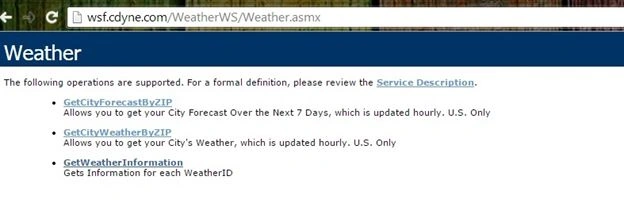
- GetCityForecastByZIP
- GetCityWeatherByZip
- GetWeatherInformation.
If you click the “Service Description” link, you'll be taken to the Web Service Description Language (WSDL). Visual Studio uses this WSDL to generate proxy classes, so that the client can use those proxy classes to invoke the web methods of the web service.
Here, I will use the “GetCityWeatherByZip” method. Click on this method, you'll be able to see the following screen.
Provide any valid Zip Code (only a United States Zip Code), I'm giving here “64131” and clicking the invoke method to get the weather information in that area Zip code.
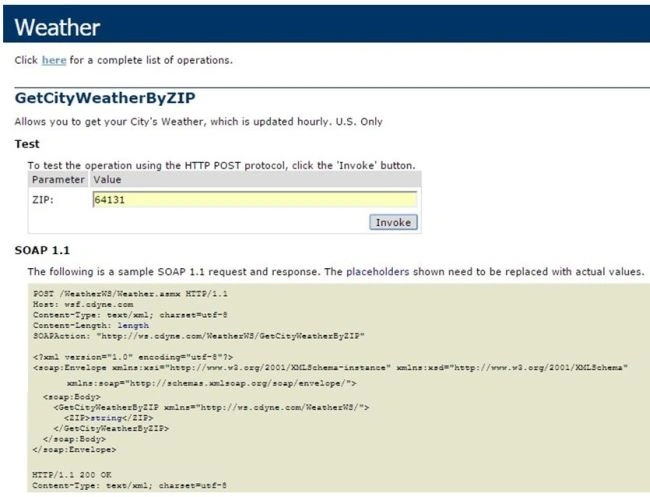
Here I entered 64131 (Kansas City area) Zip code, so I'm getting weather information in that area in XML format.
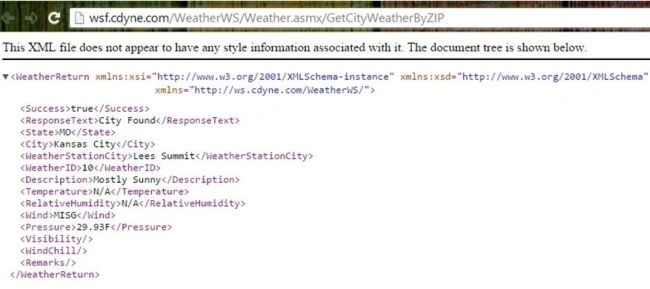
We can notice the following elements in the preceding XML file.
- <Success>true</Success> (true means the zip code we’ve given is valid)
- <ResponseText>City Found</ResponseText> (City Found means It’s a valid zip otherwise It returns “Invalid Zip Code” message)
- <State>MO</State>
- <City>Kansas City</City>
- <WeatherStationCity>Lees Summit</WeatherStationCity>
- <WeatherID>10</WeatherID>
- <Description>Mostly Sunny</Description>
- <Temperature>N/A</Temperature>
- <RelativeHumidity>N/A</RelativeHumidity>
- <Wind>MISG</Wind>
- <Pressure>29.93F</Pressure>
Now let's create an ASP.NET application to consume the weather forecast web service in real time.
Step 1: Create an ASP.NET Empty Web Application.
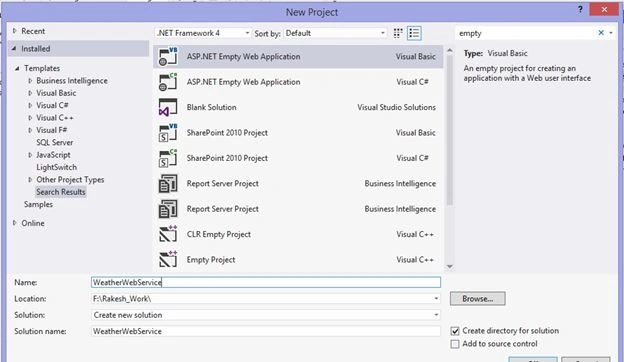
Step 2: Add Service reference.
After creating ASP.NET Web Application, our next step is to add a service reference to it. This can be done by right-clicking on References then selecting Add service reference then in the Address field enter the URL of the weather service then click “Go”. You will then see the Weather service then expand the Weather service then click WeatherSoap.
It will show you all the methods of the Weather Web Service. Finally provide a meaningful name in the Namespace field and click “OK”. Please refer to the following screenshot for a better understanding.
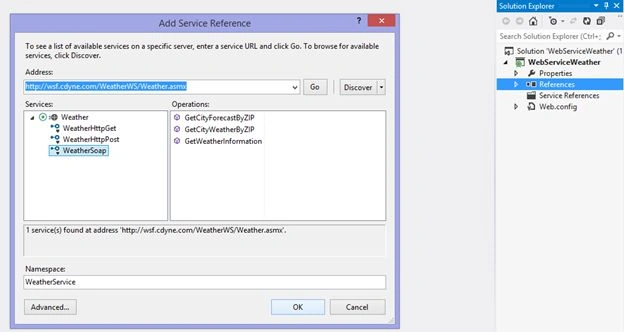
After adding the service reference, it will generate proxy classes. Have a look at the following screen shot to determine the proxy classes in the project.
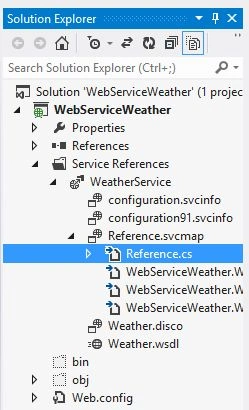
Here the Refrence class is the auto-generated proxy class.
Step 3: Create a Web From.
Now let's create a Web Form with some controls that looks as in this.
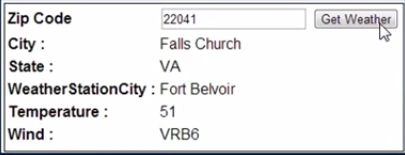
I want to display the City, State, Weather Station City, Temperature and Wind Direction in the web form when the user enters a valid zip code.
(Note: If you want to display more properties, please refer to the XML file as in Figure 3.)
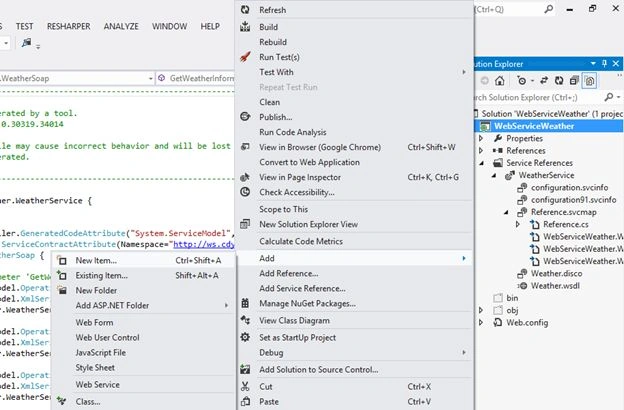
Now I will create a Web form. You can find the procedure in the following screenshot.
Right-click on the project then seelct Add->New Item then select Web form then provide a name then click ”OK”.
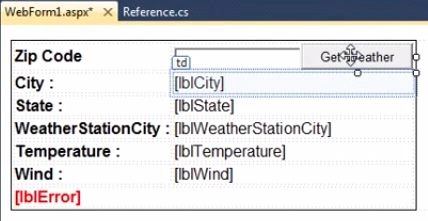
Create your web form with some labels, TextBox and a button as shown below.
Now click the button in the web form to generate a click event handler. It will generate a button click event, you will see that in the following screen.
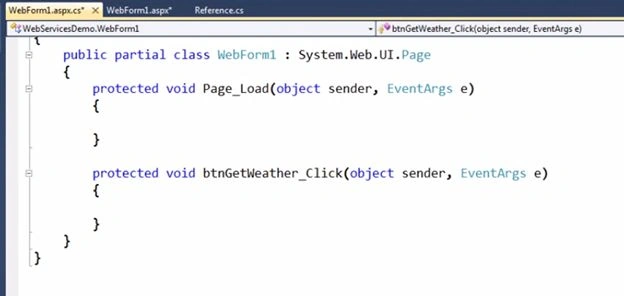
Write the following code in the button click event. (Note that in the following code you'll find “WeatherService” is the namespace I've given when adding the service reference, you can give your own namespace. Refer to Figure 5.)
And also ensure your label, button and TextBox properties are correct. Don't use mine.
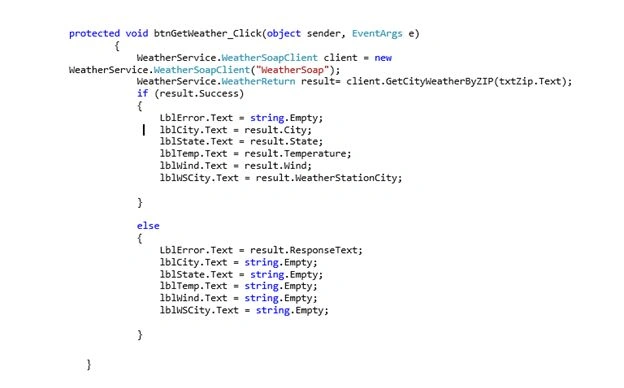
Don't worry about the code above. It is easy to understand. In the first line I created an object for WeatherSoapClient that invokes WeatherService.
- WeatherService.WeatherSoapClient client=new WeatherService.WeatherSoapClient("WeatherSoap");
In line 2, I am invoking the GetCityWeatherByZIP method (because we are trying to get the weather information using a Zip code) and ing a Zip code as an argument.
- WeatherService.WeatherReturn result= client.GetCityWeatherByZIP(txtZip.Text);
Inside the “if” I am validating the Zip code to ensure that the Zip Code is correct, in other words result.success is true. Then all the details should be displayed in the web form.
For example, here result.City displays the name of the City based on the Zip Code.
If Zip Code is incorrect, in other words result.success is false, then control goes to else part and displays only an error message.
- result.ResponseText gives Invalid Zip Code (for more clarity, refer to the XML file Figure).
- string.Empty means it clears all the label values (displays nothing).
Step 4: Run the application
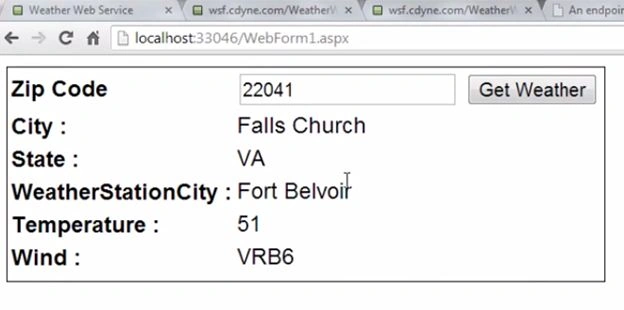
Press Ctrl+F5 to run the application. The enter any valid USA Zip code. I entered 22041.
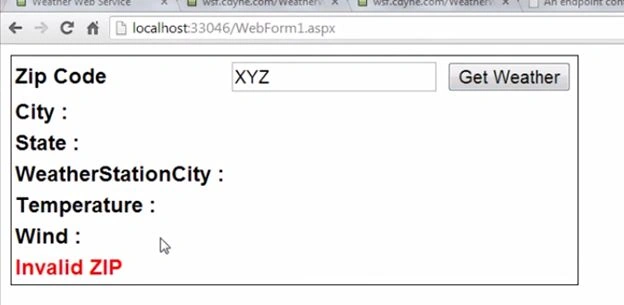
If the Zip Code is wrong tehn:
Thank you for reading, please leave a comment if you have any doubts or didn't understand.

keshav taurahPosted Apr 29, 2019, 12:34 PM
In my scenario, i have a web service that allows me to search for people by name or ID. when using the ID to search the proxy class work correctly and return that ONE person details but if i try to search by name which meas a list of person with that name should be return it only return the last person in that list. I have check using soap ui and am getting the list if person correctly. Should i modify the proxy class? and how if yes
Kunal PanchalPosted May 31, 2017, 4:39 AM
I dont understand why we use webservices
Manav PandyaPosted Jan 17, 2017, 1:42 AM
Thanks for sharing this sir Kumar ....
Manav PandyaPosted Jan 17, 2017, 1:42 AM
How can we use in multi layer architecture
Pradeep SahooPosted May 9, 2016, 10:30 PM
Nice . Thanks for sharing
Ravindra MorePosted Feb 19, 2016, 3:25 AM
[WebException: The request was aborted: The operation has timed out.] System.Net.HttpWebRequest.GetResponse() +6542104 System.ServiceModel.Channels.HttpChannelRequest.WaitForReply(TimeSpan timeout) +55 [TimeoutException: The HTTP request to 'http://wsf.cdyne.com/WeatherWS/Weather.asmx' has exceeded the allotted timeout of 00:00:59.9920000. The time allotted to this operation may have been a portion of a longer timeout.] System.ServiceModel.Channels.HttpChannelUtilities.ProcessGetResponseWebException(WebException webException, HttpWebRequest request, HttpAbortReason abortReason) +4428301 System.ServiceModel.Channels.HttpChannelRequest.WaitForReply(TimeSpan timeout) +420 System.ServiceModel.Channels.RequestChannel.Request(Message message, TimeSpan timeout) +349 [TimeoutException: The request channel timed out while waiting for a reply after 00:00:59.7679362. Increase the timeout value passed to the call to Request or increase the SendTimeout value on the Binding. The time allotted to this operation may have been a portion of a longer timeout.] System.Runtime.Remoting.Proxies.RealProxy.HandleReturnMessage(IMessage reqMsg, IMessage retMsg) +10818447 System.Runtime.Remoting.Proxies.RealProxy.PrivateInvoke(MessageData& msgData, Int32 type) +336 WebServiceConsumeDemo.ServiceReference1.WeatherSoap.GetCityWeatherByZIP(String ZIP) +0 WebServiceConsumeDemo.ServiceReference1.WeatherSoapClient.GetCityWeatherByZIP(String ZIP) in c:\Users\nq434d\Documents\Visual Studio 2012\Projects\WebServiceConsumeDemo\WebServiceConsumeDemo\Service References\ServiceReference1\Reference.cs:682 WebServiceConsumeDemo.index.Button1_Click(Object sender, EventArgs e) in c:\Users\nq434d\Documents\Visual Studio 2012\Projects\WebServiceConsumeDemo\WebServiceConsumeDemo\index.aspx.cs:42 System.Web.UI.WebControls.Button.OnClick(EventArgs e) +9628442 System.Web.UI.WebControls.Button.RaisePostBackEvent(String eventArgument) +103 System.Web.UI.WebControls.Button.System.Web.UI.IPostBackEventHandler.RaisePostBackEvent(String eventArgument) +10 System.Web.UI.Page.RaisePostBackEvent(IPostBackEventHandler sourceControl, String eventArgument) +13 System.Web.UI.Page.RaisePostBackEvent(NameValueCollection postData) +35 System.Web.UI.Page.ProcessRequestMain(Boolean includeStagesBeforeAsyncPoint, Boolean includeStagesAfterAsyncPoint) +1724
Ravindra MorePosted Feb 19, 2016, 3:25 AM
i am using this web service. i am getting Exception
Bilal GhafoorPosted Aug 24, 2015, 8:13 AM
show proxy authentication error
RakeshPosted Jul 9, 2015, 8:26 AM
I am glad it helped you :)
Rakesh LankapalliPosted Jul 9, 2015, 6:50 AM
Great article...Simple understanding..
Santhakumar MunuswamyPosted Apr 13, 2015, 2:58 PM
Thanks for nice one
Gowtham RajamanickamPosted Mar 16, 2015, 2:27 AM
good...
Humayun Kabir MamunPosted Mar 6, 2015, 5:22 AM
Nice...
Steven WoolstonPosted Mar 5, 2015, 4:53 PM
Nice article, Rakesh. I found this very easy to read.Could you write an article about building the web service?