
Introduction: Here we will discuss jQuery and call a web service through jQuery. As we know, jQuery is a light weight process to write JavaScript code. It's usually a JavaScript Library having cross browser compatibility which is designed to use client side scripting. It is really great to simplify the JavaScript programming and it is also easy to learn. It is basically depend upon the concept of "write less, do more." Now, we are going to see that how to call a web service using jQuery, but first we have to make teh web service.
Let's start the application project to make a web service.
Step 1: Firstly we have to create a web Application
- Go to Visual Studio 2010
- Crete the web Application
- Click OK.
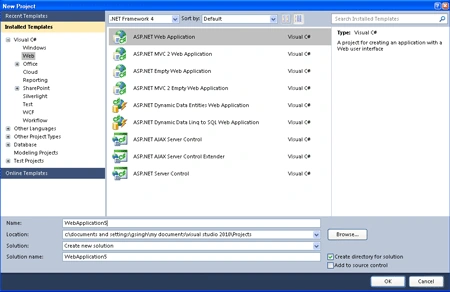
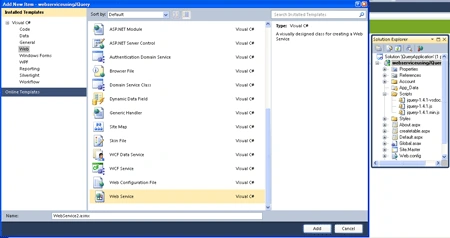
Step 2: Now we have to add a web service named as web service1.
- Now Go to web application project
- Right Click on the project
- Add new Item
- Choose the Web Service
- Click OK.
Step 3: If we want to write a method which will invoke at the server then we have to make it as [WebMethod] by using it you can access your method on web. Let's have look how it will appear and also look at the code of the webservice1.asmx.cs file.
Code:
using
System;
using
System.Collections.Generic;
using
System.Linq;
using
System.Web;
using
System.Web.Services;
namespace
WebApplication5
{
///
<summary>
///
Summary description for WebService1
///
</summary>
[WebService(Namespace =
"http://tempuri.org/")]
[WebServiceBinding(ConformsTo =
WsiProfiles.BasicProfile1_1)]
[System.ComponentModel.ToolboxItem(false)]
// To allow this Web Service to be called from
script, using ASP.NET AJAX, uncomment the following line.
[System.Web.Script.Services.ScriptService]
public class
WebService1 : System.Web.Services.WebService
{
[WebMethod]
public string
HelloWorld()
{
return
"Hello World";
}
[WebMethod]
public string
say(string s)
{
return
"Welcome " + s;
}
}
}
Code Description: Here we are going to describe the code given above; it's the code for web service if we want to call the web service through script and ASP.NET ajax then we have to add the [System.Web.Script.Services.ScriptService]. Now we are making a web method name as say in which we are passing an argument name as string s and it will return the name of string by adding welcome to it. It is the method that we are going to invoke with the jQuery Script.
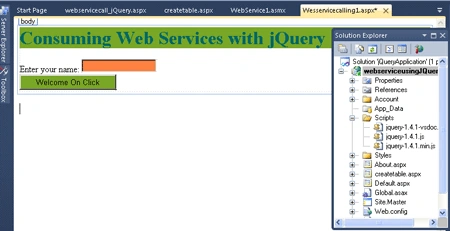
Step 4: Now we have to add a web page named as webservicecalling1.aspx.
-
To add a web page go to the project.
-
And right click on it
-
Add a web page
Step 5: If we want to add a jQuery to our project to use it's method then we have to write the code to the source file of webservicecalling1.aspx.
Code:
<%@
Import Namespace="System.Web.Services"
%>
<script
type="text/javascript"
src="..\Scripts\jquery-1.4.1.min.js"></script>
Description: First of all we have to add a namespace to the file at the top of the .aspx source file. As we know that JavaScript always write in the head section that is the line which we have to add to use it's method defined in the jQuery. Here src have the path of jQuery at which it is placed it must be included in your project if you are using 2010 then it have already included in your web application or you are using lower version than it then you have to add the jQuery to his project for it you will have to download it from the site.
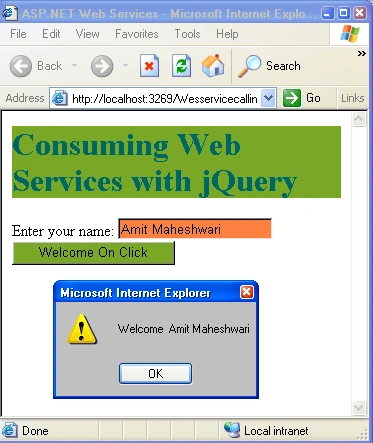
Step 6: Now You have to write the code of the jQuery script
Anand KrishnaPosted Jun 2, 2015, 1:37 AM
it does get error in my machine
kandarp vyasPosted Jul 10, 2014, 4:14 AM
it only Works on IE not in Chrome
SIVAPosted Jun 7, 2012, 11:12 AM
Hi, If the service is in local machine its fine. when i try to access the service from IIS its giving error. Can i know what is the problem?