

Software Requirement
- Windows 8
- Visual Studio 2012 RC
- MVC 4.0
In my previous article, I had explained the steps for creating a Web API. So I assume that after reading my previous article, you are able to create a Web API.
Build and run this project on your local computer. The client will access the API at http://localhost:1234/api/Users.
Currently, Windows Metro style apps don't support Web API Client Libraries but you can still use HttpClient in Windows Metro style apps, without the media-formatter capabilities provided by the Web API Client Libraries.
Now I am going to create one Metro style app for consuming a Web API.
Steps for creating a Metro Style Project
Start Visual Studio 2012 RC and select New Project from the Start page. Or, from the File menu, select New and then Project.
Select Installed Templates and expand the Visual C# node. Under Visual C#, select Windows Metro Style. In the list of project templates, select Blank App (XAML). Name the project "FirstMetroStyleApp" and click OK.
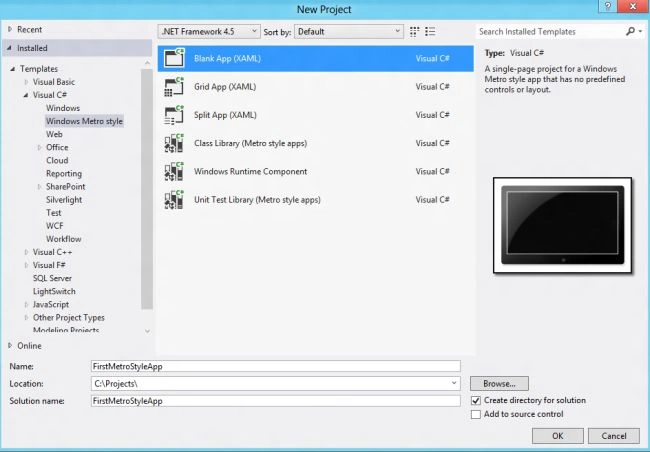
Now open the MainPage.xaml and write this code:
<Page
x:Class="FirstMetroStyleApp.MainPage"
IsTabStop="false"
xmlns="http://schemas.microsoft.com/winfx/2006/xaml/presentation"
xmlns:x="http://schemas.microsoft.com/winfx/2006/xaml"
xmlns:local="using:FirstMetroStyleApp"
xmlns:d="http://schemas.microsoft.com/expression/blend/2008"
xmlns:mc="http://schemas.openxmlformats.org/markup-compatibility/2006"
mc:Ignorable="d">
<Grid Background="{StaticResource ApplicationPageBackgroundThemeBrush}">
<StackPanel Orientation="Vertical">
<StackPanel Orientation="Horizontal">
<Button x:Name="btnGetUsers" Click="GetUser" Content="Get Users"/>
</StackPanel>
<Grid
Grid.Column="1" Margin="15,0,0,0">
<Grid.RowDefinitions>
<RowDefinition Height="Auto" />
<RowDefinition Height="*" />
</Grid.RowDefinitions>
<TextBlock x:Name="OutputView" FontSize="16" Height="Auto" Margin="15,0,0,0" TextWrapping="Wrap" />
</Grid>
</StackPanel>
</Grid>
</Page>
And now open MainPage.XAML.cs and write this code:
private HttpClient httpClient;
public MainPage()
{
this.InitializeComponent();
httpClient = new HttpClient();
httpClient.BaseAddress = new Uri("http://localhost:1234/");
httpClient.DefaultRequestHeaders.Accept.Add(new MediaTypeWithQualityHeaderValue("application/json"));
// Limit the max buffer size for the response so we don't get overwhelmed
httpClient.MaxResponseContentBufferSize = 256000;
}
/// <summary>
/// Invoked when this page is about to be displayed in a Frame.
/// </summary>
/// <param name="e">Event data that describes how this page was reached. The Parameter
/// property is typically used to configure the page.</param>
protected override void OnNavigatedTo(NavigationEventArgs e)
{
}
private async void GetUser(object sender, RoutedEventArgs e)
{
btnGetUsers.IsEnabled = false;
var response = await httpClient.GetAsync("api/users");
response.EnsureSuccessStatusCode(); // Throw on error code.
var users = await response.Content.ReadAsStringAsync();
OutputView.Text = users;
}
In this I have taken one button; when the user clicks on this button, it fetches the user list and shows it on the screen. Now build the application and see the result.

By this way we can consume an ASP.Net Web API in a Windows Metro Style App.
That's All.
Mary CarstensenPosted Sep 29, 2012, 4:08 AM
Thanks! Fun to try. It just took VS a while to get the wsdl:binding sorted out, but after several minutes it all worked.