
Introduction:
Here, we will learn to consume/use a web service in a windows application. This is the second method by which we can use a web service in a windows application ( You can
get the first method here). First we should have a web service, so let's create a simple
web service. Create an ASP.NET Web Service
page and
modify the code as given below.
using System;
using System.Collections.Generic;
using System.Linq;
using System.Web;
using System.Web.Services;
[WebService(Namespace
= "http://tempuri.org/")]
[WebServiceBinding(ConformsTo
= WsiProfiles.BasicProfile1_1)]
// To allow this Web Service to be
called from script, using ASP.NET AJAX, uncomment the following line.
// [System.Web.Script.Services.ScriptService]
public class
Service : System.Web.Services.WebService
{
public Service
() {
//Uncomment the
following line if using designed components
//InitializeComponent();
}
[WebMethod(Description="Show
Message")]
public
string msgshow()
{
return
"Hello, Web Service...";
}
[WebMethod(Description="Addition
Of Two Integers")]
public
int add(int a,
int b)
{
return a +
b;
}
}
Run the service.
Output:
To consume the web service in a windows form application, follow the given steps.
- Create a Windows Form Application.
- Go to Solution Explorer and right click on your project. A pop-up menu will open.
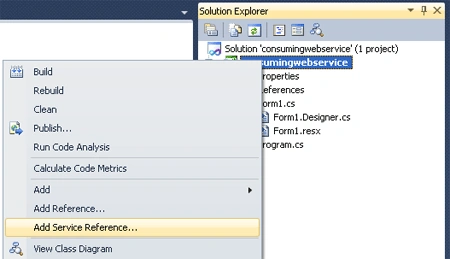
- Select Add Service Reference. A new window will open like the below figure.

- Click on Advanced ( Look at above figure). A new window will open
like the below figure.

- Click on Add Web Reference.

- Copy the URL of your running web service and paste it at the URL (Look at the above figure.) and Click the Go button. A new window will open like the below figure.
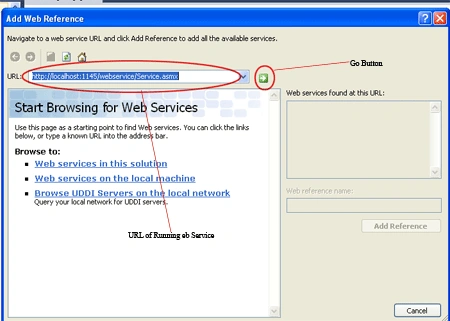
- Click Add Reference. Now Service Reference has been added to your project. Create some controls on the design page and write code to
call the methods of your web service.
using System;
using
System.Collections.Generic;
using
System.ComponentModel;
using
System.Data;
using
System.Drawing;
using
System.Linq;
using
System.Text;
using
System.Windows.Forms;
namespace
consumingwebservice
{
public partial
class Form1 :
Form
{
public Form1()
{
InitializeComponent();
}
private void
btnadd_Click(object sender,
EventArgs e)
{
localhost.Service obj =
new localhost.Service();
txtresult.Text = obj.add(Convert.ToInt32(txtfirstno.Text),
Convert.ToInt32(txtsecondno.Text)).ToString();
}
private void
btnmsgshow_Click(object sender,
EventArgs e)
{
localhost.Service obj =
new localhost.Service();
MessageBox.Show(obj.msgshow());
}
}
}
You can write the same code in another way by adding NameSpace as
YourProjectName.Webreferencename. Look below the full code for this example
after adding namespace.
using
System;
using
System.Collections.Generic;
using
System.ComponentModel;
using
System.Data;
using
System.Drawing;
using
System.Linq;
using
System.Text;
using
System.Windows.Forms;
using
consumingwebservice.localhost;
namespace
consumingwebservice
{
public partial
class Form1 :
Form
{
public Form1()
{
InitializeComponent();
}
private void
btnadd_Click(object sender,
EventArgs e)
{
localhost.Service obj =
new localhost.Service();
txtresult.Text = obj.add(Convert.ToInt32(txtfirstno.Text),
Convert.ToInt32(txtsecondno.Text)).ToString();
}
private void
btnmsgshow_Click(object sender,
EventArgs e)
{
Service obj =
new Service();
MessageBox.Show(obj.msgshow());
}
}
}
Run the windows application.
Output:
Write the first and second number and click the "Add" button.
Click the "Message Show" button.
SubashPosted Sep 1, 2016, 5:36 AM
Thank you
Paniz RPosted Feb 17, 2014, 3:10 AM
Thanks alot ;)
kannan kaliyasamyeditedPosted Sep 10, 2012, 2:10 AMEdited Sep 10, 2012, 2:11 AM
Nice