
Introduction:
In this article we will learn to use (consume) a web service in our web
application using Ajax (Asynchronous JavaScript and XML). We use Ajax in those
applications where we do not want the page to be reloaded for a specific event. Here
at first we will create a simple web service with two methods - One for showing
message and another for adding two numbers and then we will use this web service
into web application using Ajax. So, Let's create a web service. Follow given
steps.
- Go to Visual Studeo 2010 and take a New Project.
- Take a ASP.NET Web Service Application.
- Give it a name and click ok button.
Now modify the code of .asmx.cs with the following
code.
using System;
using System.Collections.Generic;
using System.Linq;
using System.Web;
using System.Web.Services;
namespace wsuingAjax
{
///
<summary>
/// Summary
description for Service1
///
</summary>
[WebService(Namespace =
"http://tempuri.org/")]
[WebServiceBinding(ConformsTo =
WsiProfiles.BasicProfile1_1)]
[System.ComponentModel.ToolboxItem(false)]
// To allow this Web Service to be called from
script, using ASP.NET AJAX, uncomment the
following line.
// [System.Web.Script.Services.ScriptService]
public class
Service1 : System.Web.Services.WebService
{
[WebMethod(Description="Show
Message")]
public string
show()
{
return
"Hello Web Service!!!";
}
[WebMethod(Description =
"Addition of Two Numbers")]
public int
add(int a, int
b)
{
return a + b;
}
}
}
Now run the application.
Output:

Now we use this service using Ajax in our web application. Follow the given
steps.
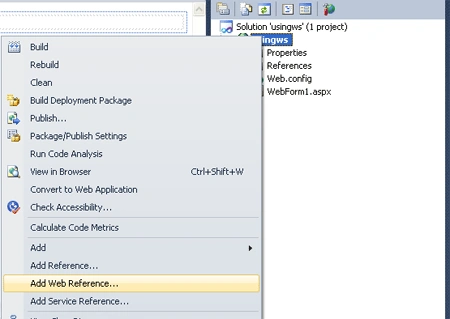
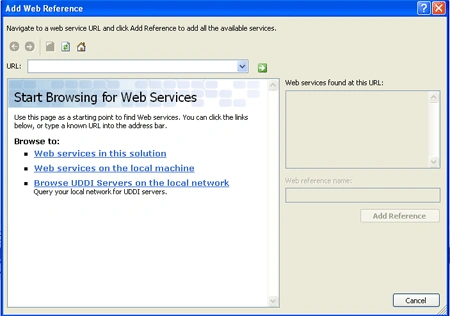

order.

Code (WebForm.aspx):
<%@ Page Language="C#" AutoEventWireup="true" CodeBehind="WebForm1.aspx.cs" Inherits="usingws.WebForm1" %>
<!DOCTYPE html PUBLIC "-//W3C//DTD XHTML 1.0 Transitional//EN" "http://www.w3.org/TR/xhtml1/DTD/xhtml1-transitional.dtd">
<html xmlns="http://www.w3.org/1999/xhtml">
<head runat="server">
<title></title>
<style type="text/css">
.style1
{
width: 118px;
}
.style2
{
width: 114px;
}
</style>
</head>
<body>
<form id="form1" runat="server">
<div>
<asp:ScriptManager ID="ScriptManager1" runat="server">
</asp:ScriptManager>
<br />
<asp:UpdatePanel ID="UpdatePanel1" runat="server">
<ContentTemplate>
<asp:Button ID="btnshow" runat="server" BackColor="#999966" Height="26px"
Text="Show " Width="71px" onclick="btnshow_Click" />
<asp:Button ID="btnadd" runat="server" BackColor="#999966" Text="Add"
onclick="btnadd_Click" />
<br /><br />
<table style="height: 69px; width: 466px">
<tr>
<td class="style2">
<asp:Label ID="lblfn" runat="server" Text="First No."></asp:Label>
</td>
<td class="style1">
<asp:TextBox ID="txtfirst" runat="server"></asp:TextBox>
</td>
<td>
<asp:Label ID="lblshow" runat="server" Text=" "></asp:Label>
</td>
</tr>
<tr>
<td class="style2">
<asp:Label ID="lblsn" runat="server" Text="Second No."></asp:Label>
</td>
<td class="style1">
<asp:TextBox ID="txtsecond" runat="server"></asp:TextBox>
</td>
<td></td>
</tr>
<tr>
<td class="style2">
<asp:Label ID="lbladdition" runat="server" Text="Addition"></asp:Label>
</td>
<td class="style1">
<asp:TextBox ID="txtresult" runat="server"></asp:TextBox>
</td>
<td></td>
</tr>
</table>
</ContentTemplate>
</asp:UpdatePanel>
</div>
</form>
</body>
</html>
Code (WebForm.aspx.cs):
using System;
using System.Collections.Generic;
using System.Linq;
using System.Web;
using System.Web.UI;
using System.Web.UI.WebControls;
namespace usingws
{
public partial class WebForm1 : System.Web.UI.Page
{
protected void btnadd_Click(object sender, EventArgs e)
{
localhost.Service1 obj = new localhost.Service1();
txtresult.Text = obj.add(Convert.ToInt32(txtfirst.Text), Convert.ToInt32(txtsecond.Text)).ToString();
}
protected void btnshow_Click(object sender, EventArgs e)
{
localhost.Service1 obj = new localhost.Service1();
lblshow.Text = obj.show();
}
}
}
Run the web application.
Output:

Click show button to show message (which is specified in web service) and Add button to get addition of two numbers.
Output:
Join the conversation! Your thoughts help the community grow.