

In this article, we will look into steps for a contact application - upgrade ASP.NET Core 2.0 to 2.1. Please see my previous articles about how we developed a contact application.
- Contact Application using ASP.NET Core Web API, Angular 6.0, and Visual Studio Code Part One
In the article, we will set up an ASP.NET Core Web API project and develop the Web API for contacting CRUD operations. - Contact Application using ASP.NET Core Web API, Angular 6.0, and Visual Studio Code Part Two
In the article, we will set up Angular 6 within ASP.NET Core Web API Project, and develop the contact form & list component using Angular Material UI that will consume Web API which we have created in Part One. - Contact Application Azure Deployment
In this article, we are going to deploy/host a contact application with Visual Studio Code to Azure Web Apps.
Please note
This is the download link for .NET Core where you can find the appropriate version of the SDK and Runtime. I have installed .NET Core 2.1.5.
Please see What's new in ASP.NET Core 2.1 to know the new features of ASP.NET Core 2.1.
Let’s start the upgrading process.
- Go to the root folder of the "contact-app" project. Open ‘contact-app.csproj’ file.
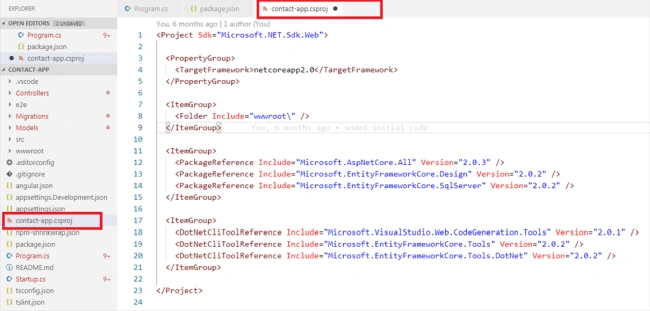
- Now, change the target framework to .NET Core 2.1.
<TargetFramework>netcoreapp2.1</TargetFramework>
- Replace the package reference for ‘Microsoft.AspNetCore.All’ with a package reference for ‘Microsoft.AspNetCore.App’ and remove the ‘Version’ attributes on the package reference to ‘Microsoft.AspNetCore.App’. Then, set ‘Version’ to 2.1.4 for other package reference.
- Please refer to this link for more details of ‘Microsoft.AspNetCore.All’ & ‘Microsoft.AspNetCore.App’ meta package.
- Microsoft.AspNetCore.All metapackage for ASP.NET Core 2.0
- Microsoft.AspNetCore.App metapackage for ASP.NET Core 2.1 and later
- Remove references to <DotNetCliToolReference> elements.
- Save ‘contact-app.csproj’ file and final ‘contact-app.csproj’ file will look like the below screenshot.

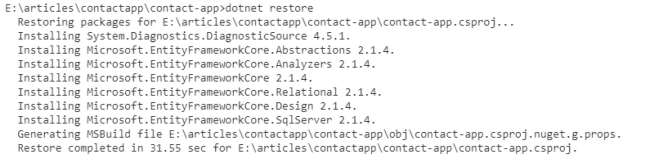
Now, restore the project by entering the following command: "dotnet restore".
Change the main program
In .NET Core 2.1, the main part is to replace the call to ‘BuildWebHost’ with CreateWebHostBuilder. IWebHostBuilder was added to support a new integration test infrastructure.
So, we have updated “IWebHostBuilder“ in the program.cs file as shown below.
- public class Program {
- public static void Main(string[] args) {
- CreateWebHostBuilder(args).Build().Run();
- }
- public static IWebHostBuilder CreateWebHostBuilder(string[] args) => WebHost.CreateDefaultBuilder(args).UseStartup < Startup > ();
- }
Our application is now upgraded into ASP.NET Core 2.1. We can run the application by “dotnet run“ and verify the functionality.
Conclusion
This is how we can upgrade our ASP.NET Core 2.0 application to 2.1. You can find the full code in the attachment or on this GitHub link.
Join the conversation! Your thoughts help the community grow.