

Basically, in every device that a person owns, it is bound to have contacts database built in to it. The contact database
contains all the contacts that a person stores in mobile device but it does not
give any guarantee that every phone manufacturer provides a standard when it
comes to the contact field that it stores and retrieves.
Thus, PhoneGap contacts API does a good job of allowing users
to create, update, and find contacts, all of which we will discuss here.The
Contacts object in PhoneGap allow access to the device contacts database.
Learning about Creating Contact
The easiest way of how to use the Contacts API is to create contact. The contacts.create() is a method that allow you to create contact as
var myContact = navigator.contacts.create(properties);
When you use this method, it
automatically creates a new contact object that we can then manipulate.
This method does not persist the contact object to
the device contacts database. To persist the contact object to the device,
invoke the contact.save
method.
Following is an Example.
function
onDeviceReady() {
var myContact =
navigator.contacts.create();
myContact.displayName = "Sanjoli Gupta";
myContact.gender = "Female";
console.log("The contact, " +
myContact.displayName + ", is of the " +
myContact.gender + " gender");
}
Some of the Properties of contact are as follows:
-
id : It is a globally unique identifier(GUID).
-
displayName : It is the name of this contact that is suitable for display to end-users.
-
name : It contains all component of a person's name.
-
nickname : It is an informal name that we can address the contact.
-
phoneNumber : It contains an array of all the contact's phone number.
-
emails : It contains an array of all the contact's email addresses.
-
addresses : It contains an array of all the contact's addresses.
-
ims : This is an array of all the contact's instant messaging (IM) addresses
-
organizations : It contains an array of all the contact's organizations.
-
birthday : It contains the birthday of the contact.
-
note : This is a note about the contact.
-
photos : It contains an array of the contact's photos.
-
categories : It contains an array of all the contact's user-defined categories.
-
urls - It contains an array of web pages associated with the contact.
The best way to save lots of information is to use ContactField object especially in the case of phoneNumbers. For example if you want to store a number of e-mails for a contact, we use the following code:
<!DOCTYPE
html>
<html>
<head>
<title>Contact
Example</title>
<script
type="text/javascript"
charset="utf-8"
src="phonegap-1.3.0.js"></script>
<script
type="text/javascript"
charset="utf-8">
// Wait for PhoneGap to load
//
document.addEventListener("deviceready",
onDeviceReady, false);
// PhoneGap is ready
//
function onDeviceReady() {
var myContact =
navigator.contacts.create();
//store emails
var emails = [2];
emails[0] = new ContactField('work',
'[email protected]',
false);
emails[1] = new ContactField('home',
'[email protected]',
false);
myContact.emails = emails;
myContact.save();
}
</script>
</head>
<body>
<h1>Example_for_Contact</h1>
<p>Contact</p>
</body>
</html>
When we run the program. The
output would be like as below figure.

and when we click on phone option, it will ask you to write your complete information as display in the output.

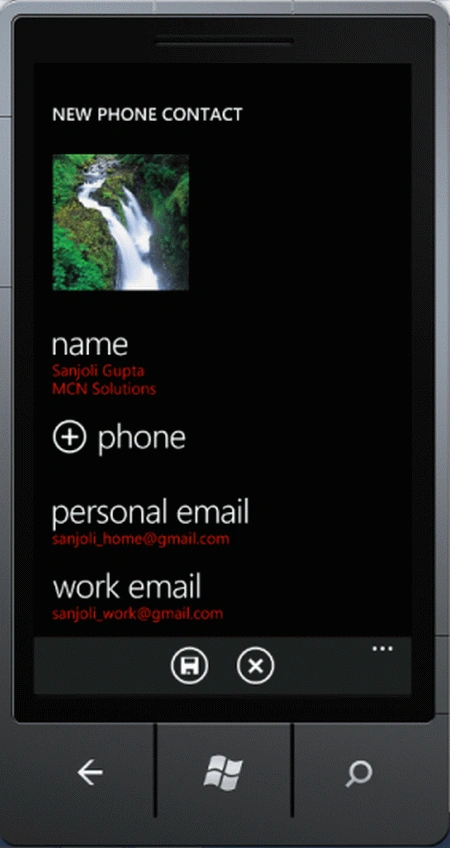
Thus, When we fill all the fields of the given option the final output will be like as below figure.
Resources
Some of the useful resources are as follows.
Media in PhoneGap.Introduction to Phone Gap.FileSystem-DirectoryEntry Objects in PhoneGap.
alan heywoodPosted Mar 15, 2012, 10:33 AM
Hi. Have you ever managed to retrieve the Birthday field from a WP7 contact using PhoneGap? Whatever I try it always comes back as 'undefined'. Same thing happens with the 'notes' field.
Ankit MittalPosted Feb 24, 2012, 12:42 AM
this one is best for add contacts in phone gap, but can u tell me the same system for anroid phones.. thankx in advance...............