

Introduction
In this article, we are going to discuss a few basics of Docker and Kubernetes, as well as the step-by-step implementation of product services using the .NET Core 7 Web API and the containerization of product services with the help of Docker and Kubernetes.
Agenda
- What is Docker?
- Why use Docker?
- Benefits of Docker
- What is Kubernetes?
- Why Kubernetes?
- Benefits of Kubernetes
- Step-by-step implementation of Product Service
- Containerization of Applications using Docker and Kubernetes
Prerequisites
- Visual Studio 2022
- Docker and Kubernetes
- .NET Core 7 SDK
What is Docker?
- Docker is an open-source containerization platform that enables developers to build, run, and deploy applications quickly. Docker package application, including all its libraries, configurations, and dependencies.
- Its primary focus is to automate the deployment of applications inside containers that boot up in seconds.
Why use Docker?
- In the tech world, I think you've heard the phrase “It works on my machine,” and mostly, this happens because of the different libraries, configurations, and dependencies required for the application to run under the operating system.
- Managing application dependencies and configuration is a crucial task for the DevOps team, and Docker has all the capabilities to handle this kind of problem in the software development lifecycle.
- Docker helps us build and deploy distributed microservice applications with the help of continuous integration and a continuous deployment pipeline, which saves a lot of time.
- Docker uses the container as a unit of software that packages application code with all its dependencies so the application can run quickly in isolated environments.
Benefits of Docker
- Application portability: Docker is the container platform and allows running containers on a physical machine, virtual machine, or any other cloud provider in less time without modification
- Faster delivery and deployment: Docker enables us to build and deploy application images across every step of the deployment phase efficiently.
- Scalability: Docker is scalable because it has the ability to increase and decrease the number of application instances easily in different environments.
- Isolation: Docker containerizes and runs the application in an isolated environment with all dependencies and configurations.
- Security: Docker ensures the applications running inside the different containers are isolated from each other, and it has different security layers and tools to manage that.
- High Performance: Docker is generally faster and takes fewer resources than VMs.
- Version Control Management: Docker provides versioning-related things that can track container versions and roll back the same if required.
If you want to learn more about Docker and its basic components, then check out the following article:
https://www.c-sharpcorner.com/article/docker
What is Kubernetes?
- Kubernetes is a portable, extensible, open-source container orchestration platform for managing containerized workloads and services.
- Kubernetes, also called K8s, is basically a numeronym standard that has been used since the 1980s. For example, in Kubernetes, there are 8 words in between K and S like that.
- Google developed an internal system called Borg and later Omega, which they used to orchestrate the data center.
- In 2014, Google introduced Kubernetes as an open-source project, and it is written in the Go language. Later on, she donated to the Cloud Native Computing Foundation (CNCF).
- Kubernetes has all the capabilities to automate container deployment, load balancing, and auto-scaling.
Why Kubernetes?
- Containers are a good way to bundle and run applications in an isolated environment, but with that, we need to manage containers efficiently without any downtime. For example, if the application is running in a production environment and the running container goes down, you will need to create a new container using different commands or some other things. But, at a large level, it’s really hard to manage a number of containers.
- As a solution, Kubernetes comes into the picture because it is a container orchestration platform and has all kinds of capabilities like auto-scaling, load-balancing, version control, health monitoring, auto-scheduling, and many more.
- Kubernetes monitors everything; if multiple users login at the same time and traffic suddenly increases, it will auto-scale and provide other resources to different containers that are running inside the node.
Benefits of Kubernetes
- Auto Scaling: Kubernetes automatically increases and decreases the number of pods based on network traffic and allocates different resources.
- Automate Deployment: Kubernetes automates the deployment of applications with the help of different cloud providers.
- Fault Tolerance: Kubernetes manages all things related to the container. If he finds one of the pods and the container goes down due to high network traffic, it will automatically start a new instance and provide different resources for it.
- Load Balancing: Kubernetes load balances and manages all incoming requests from outside the cluster, and it continuously looks at the running pods under different nodes and sends a request to a particular service using the load balancing technique.
- Rollout and Rollback: Kubernetes rollout and rollback if anything wrong happens with the application after certain changes and managing to version
- Health Monitoring: Kubernetes continuously checks the health of the running node to see if the containers and pods are working fine or not.
- Platform Independent: Kubernetes is an open-source tool, which is why it can move workloads and applications anywhere on public cloud, on-premises, hybrid, and public cloud infrastructure.
If you want to learn more about Kubernetes and its basic components, then check out the following article:
https://www.c-sharpcorner.com/article/kubernetes
Step-by-step implementation of Product Service
Step 1
Create a new .NET Core Web API Project.
Step 2
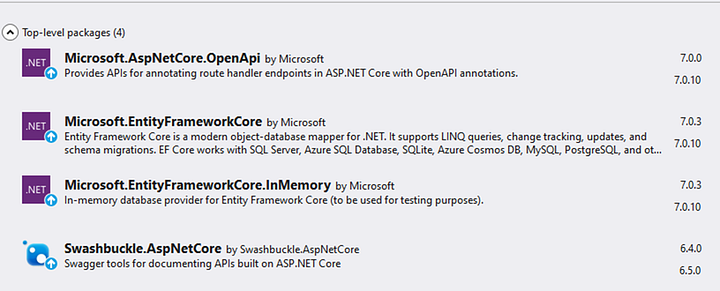
Install the following NuGet packages for the newly created project:
Step 3
Add a new Product Details entity with different properties related to the product.
namespace NET_Core_WebAPI_Kubernetes_Demo.Entities
{
    public class ProductDetails
    {
        public int Id { get; set; }
        public string ProductName { get; set; }
        public string ProductDescription { get; set; }
        public int ProductPrice { get; set; }
        public int ProductStock { get; set; }
    }
}
Step 4
Create a DbContextClass class inside the project for managing database-related things and configuration and a SeedData class to insert some data initially while running an application.
DbContextClass.cs
using Microsoft.EntityFrameworkCore;
using NET_Core_WebAPI_Kubernetes_Demo.Entities;

namespace NET_Core_WebAPI_Kubernetes_Demo.Data
{
    public class DbContextClass : DbContext
    {

        public DbContextClass(DbContextOptions<DbContextClass>
options) : base(options)
        {

        }

        public DbSet<ProductDetails> Products { get; set; }
    }
}
SeedData.cs
using Microsoft.EntityFrameworkCore;
using NET_Core_WebAPI_Kubernetes_Demo.Entities;

namespace NET_Core_WebAPI_Kubernetes_Demo.Data
{
    public class SeedData
    {
        public static void Initialize(IServiceProvider serviceProvider)
        {
            using (var context = new DbContextClass(
                serviceProvider.GetRequiredService<DbContextOptions<DbContextClass>>()))
            {
                if (context.Products.Any())
                {
                    return;
                }

                context.Products.AddRange(
                    new ProductDetails
                    {
                        Id = 1,
                        ProductName = "IPhone",
                        ProductDescription = "IPhone 14",
                        ProductPrice = 120000,
                        ProductStock = 100
                    },
                    new ProductDetails
                    {
                        Id = 2,
                        ProductName = "Samsung TV",
                        ProductDescription = "Smart TV",
                        ProductPrice = 400000,
                        ProductStock = 120
                    });
                context.SaveChanges();
            }
        }
    }
}
Step 5
Add product service repository to perform different database-related operations using DbContext after simply injecting from the Product Controller.
IProductService
using NET_Core_WebAPI_Kubernetes_Demo.Entities;

namespace NET_Core_WebAPI_Kubernetes_Demo.Repositories
{
    public interface IProductService
    {
        public Task<List<ProductDetails>> ProductListAsync();

        public Task<ProductDetails> GetProductDetailByIdAsync(int productId);

        public Task<bool> AddProductAsync(ProductDetails productDetails);

        public Task<bool> UpdateProductAsync(ProductDetails productDetails);

        public Task<bool> DeleteProductAsync(int productId);
    }
}
ProductService
using Microsoft.EntityFrameworkCore;
using NET_Core_WebAPI_Kubernetes_Demo.Data;
using NET_Core_WebAPI_Kubernetes_Demo.Entities;

namespace NET_Core_WebAPI_Kubernetes_Demo.Repositories
{
    public class ProductService : IProductService
    {
        private readonly DbContextClass dbContextClass;

        public ProductService(DbContextClass dbContextClass)
        {
            this.dbContextClass = dbContextClass;
        }

        public async Task<List<ProductDetails>> ProductListAsync()
        {
            return await dbContextClass.Products.ToListAsync();
        }

        public async Task<ProductDetails> GetProductDetailByIdAsync(int productId)
        {
            return await dbContextClass.Products.Where(ele => ele.Id == productId).FirstOrDefaultAsync();
        }

        public async Task<bool> AddProductAsync(ProductDetails productDetails)
        {
            await dbContextClass.Products.AddAsync(productDetails);
            var result = await dbContextClass.SaveChangesAsync();
            if (result > 0)
            {
                return true;
            }
            else
            {
                return false;
            }
        }

        public async Task<bool> UpdateProductAsync(ProductDetails productDetails)
        {
            var isProduct = ProductDetailsExists(productDetails.Id);
            if (isProduct)
            {
                dbContextClass.Products.Update(productDetails);
                var result = await dbContextClass.SaveChangesAsync();
                if (result > 0)
                {
                    return true;
                }
                else
                {
                    return false;
                }
            }
            return false;
        }

        public async Task<bool> DeleteProductAsync(int productId)
        {
            var findProductData = dbContextClass.Products.Where(_ => _.Id == productId).FirstOrDefault();
            if (findProductData != null)
            {
                dbContextClass.Products.Remove(findProductData);
                var result = await dbContextClass.SaveChangesAsync();
                if (result > 0)
                {
                    return true;
                }
                else
                {
                    return false;
                }
            }
            return false;
        }

        private bool ProductDetailsExists(int productId)
        {
            return dbContextClass.Products.Any(e => e.Id == productId);
        }
    }
}
Step 6
Create a new Product Controller with different endpoints.
using Microsoft.AspNetCore.Mvc;
using NET_Core_WebAPI_Kubernetes_Demo.Entities;
using NET_Core_WebAPI_Kubernetes_Demo.Repositories;

namespace NET_Core_WebAPI_Kubernetes_Demo.Controllers
{
    [Route("api/[controller]")]
    [ApiController]
    public class ProductsController : ControllerBase
    {
        private readonly IProductService _productService;

        public ProductsController(IProductService productService)
        {
            _productService = productService;
        }

        /// <summary>
        /// Product List
        /// </summary>
        /// <returns></returns>
        [HttpGet]
        public async Task<IActionResult> ProductListAsync()
        {
            var productList = await _productService.ProductListAsync();
            if (productList != null)
            {
                return Ok(productList);
            }
            else
            {
                return NoContent();
            }
        }

        /// <summary>
        /// Get Product By Id
        /// </summary>
        /// <param name="productId"></param>
        /// <returns></returns>
        [HttpGet("{productId}")]
        public async Task<IActionResult> GetProductDetailsByIdAsync(int productId)
        {
            var productDetails = await _productService.GetProductDetailByIdAsync(productId);
            if (productDetails != null)
            {
                return Ok(productDetails);
            }
            else
            {
                return NotFound();
            }
        }

        /// <summary>
        /// Add a new product
        /// </summary>
        /// <param name="productDetails"></param>
        /// <returns></returns>
        [HttpPost]
        public async Task<IActionResult> AddProductAsync(ProductDetails productDetails)
        {
            var isProductInserted = await _productService.AddProductAsync(productDetails);
            if (isProductInserted)
            {
                return Ok(isProductInserted);
            }
            else
            {
                return BadRequest();
            }
        }

        /// <summary>
        /// Update product details
        /// </summary>
        /// <param name="productDetails"></param>
        /// <returns></returns>
        [HttpPut]
        public async Task<IActionResult> UpdateProductAsync(ProductDetails productDetails)
        {
            var isProductUpdated = await _productService.UpdateProductAsync(productDetails);
            if (isProductUpdated)
            {
                return Ok(isProductUpdated);
            }
            else
            {
                return BadRequest();
            }
        }

        /// <summary>
        /// Delete product by id
        /// </summary>
        /// <param name="productId"></param>
        /// <returns></returns>
        [HttpDelete]
        public async Task<IActionResult> DeleteProductAsync(int productId)
        {
            var isProductDeleted = await _productService.DeleteProductAsync(productId);
            if (isProductDeleted)
            {
                return Ok(isProductDeleted);
            }
            else
            {
                return BadRequest();
            }
        }
    }
}
Step 7
Configure a few services inside the program class related to DbContext, Product Service In-Memory database, etc.
using Microsoft.EntityFrameworkCore;
using NET_Core_WebAPI_Kubernetes_Demo.Data;
using NET_Core_WebAPI_Kubernetes_Demo.Repositories;

var builder = WebApplication.CreateBuilder(args);

// Add services to the container.
builder.Services.AddScoped<IProductService, ProductService>();
builder.Services.AddDbContext<DbContextClass>
(o => o.UseInMemoryDatabase("NET_Core_WebAPI_Kubernetes_Demo"));

builder.Services.AddControllers();
// Learn more about configuring Swagger/OpenAPI at https://aka.ms/aspnetcore/swashbuckle
builder.Services.AddEndpointsApiExplorer();
builder.Services.AddSwaggerGen();

var app = builder.Build();

using (var scope = app.Services.CreateScope())
{
    var services = scope.ServiceProvider;
    var context = services.GetRequiredService<DbContextClass>();

    SeedData.Initialize(services);
}

// Configure the HTTP request pipeline.
app.UseSwagger();
app.UseSwaggerUI();

app.UseHttpsRedirection();

app.UseAuthorization();

app.MapControllers();

app.Run();
Step 8
Run and verify the product service.

Containerization of Applications using Docker and Kubernetes
Note: Please make sure Docker and Kubernetes are running on your system.
Step 1
Create a docker image for our newly created application.
# Use the official .NET Core SDK as a parent image
FROM mcr.microsoft.com/dotnet/sdk:7.0 AS build
WORKDIR /app

# Copy the project file and restore any dependencies (use .csproj for the project name)
COPY *.csproj ./
RUN dotnet restore

# Copy the rest of the application code
COPY . .

# Publish the application
RUN dotnet publish -c Release -o out

# Build the runtime image
FROM mcr.microsoft.com/dotnet/aspnet:7.0 AS runtime
WORKDIR /app
COPY --from=build /app/out ./

# Expose the port your application will run on
EXPOSE 80

# Start the application
ENTRYPOINT ["dotnet", "NET_Core_WebAPI_Kubernetes_Demo.dll"]
Explanation
# Use the official .NET Core SDK as a parent image
FROM mcr.microsoft.com/dotnet/sdk:7.0 AS build
WORKDIR /app
- Start with the base image, for your Docker container, which is specified as mcr.microsoft.com/dotnet/sdk:7.0. This image uses the official.NET Core SDK 7.0, as its starting point. To later refer to this stage it is given the alias “build”.
- Next set the working directory within the container to /app. This is where your application files will be copied and built.
# Copy the project file and restore any dependencies (use .csproj for the project name) COPY *.csproj ./ RUN dotnet restore - To copy the project files (*.csproj) from your computer to the /app directory in the container you need to use the command “COPY *.csproj./”. This step is separated from the one to optimize Docker’s layer caching. It ensures that when there are changes in your project file the subsequent steps will be executed.
- To restore the project’s dependencies and make sure that all required packages are downloaded and available, for building the application you can use the command “RUN dotnet restore”. This command will take care of restoring all dependencies.
# Copy the rest of the application code COPY . . - Next, Copy the remaining source code and files from the local directory to the app directory and build the application
# Publish the application RUN dotnet publish -c Release -o out - “RUN dotnet publish -c Release -o out” This command restores project dependencies and all required packages.
- This command builds the .NET Core Web API Application in Release mode and publishes the output to the out directory. The -o out flag specifies the output directory.
# Build the runtime image FROM mcr.microsoft.com/dotnet/aspnet:7.0 AS runtime WORKDIR /app COPY --from=build /app/out ./ - FROM mcr.microsoft.com/dotnet/runtime:7.0: This section starts a new phase using the runtime image. This image is small and contains only the runtime needed to run .NET Core applications, unlike the SDK image, which is used for builds.
- WORKDIR /app: Set the working directory as /app in this new section.
- COPY — from=build /app/out .: Copies the compiled application from the build component to the current runtime component. This ensures that only necessary features are added to the final runtime image.
# Expose the port your application will run on EXPOSE 80 - EXPOSE 80: This line specifies that the container will expose port 80.
# Start the application ENTRYPOINT ["dotnet", "NET_Core_WebAPI_Kubernetes_Demo.dll"] - ENTRYPOINT [“dotnet”, “NET_Core_WebAPI_Kubernetes_Demo”]: Specifies the command to be executed when an object based on this image is started. In this case, it creates your .NET Core Web API Application by calling the dotnet NET_Core_WebAPI_Kubernetes_Demo.dll.
Step 2
Build the docker image.
docker build -t web-api .
The docker build command is used to build a Docker image from a Docker file. It includes a variety of options, including the -t option to specify a tag for an image.
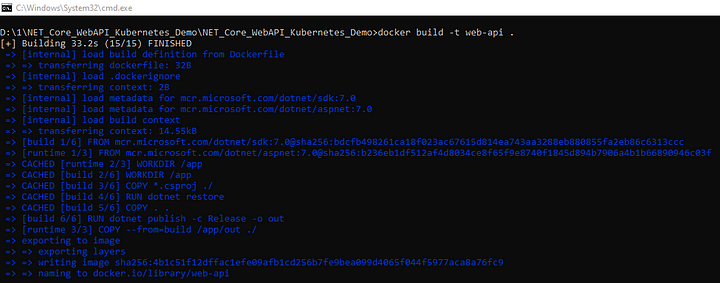
This command creates a Docker image that uses the Dockerfile in the current directory (.) and marks it as web-api.
Step 3
Run the docker image inside a docker container.
docker run -d -p 5001:80 — name web-api-container web-api
-d: Detached mode (run in the background).
-p 5001:80: Map port 5001 on your local machine to port 80 inside the container.
— name web-api-container: Assign a name to the container.
web-api: Use the image you built earlier.

Step 4
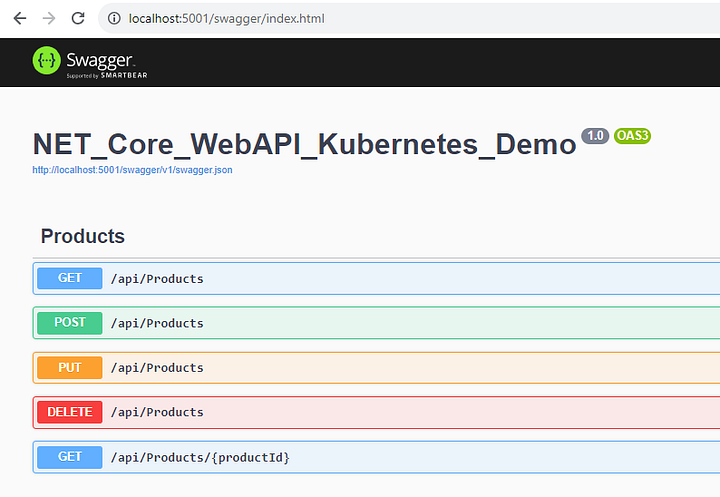
Open the browser and hit the API URL to execute different endpoints.
Step 5
Create a deployment and service YAML file for Kubernetes to create deployments, pods, and services for our product service.
Deployment.YAML
apiVersion: apps/v1
kind: Deployment
metadata:
  name: product-app-deployment  # Name of the deployment
spec:
  replicas: 3  # Number of desired replicas (pods)
  selector:
    matchLabels:
      app: product-app  # Label selector to match pods controlled by this deployment
  template:
    metadata:
      labels:
        app: product-app  # Labels applied to pods created by this deployment
    spec:
      containers:
        - name: product-app  # Name of the container
          image: web-api:latest  # Docker image to use
          imagePullPolicy: Never #Docker image pull policy
          ports:
            - containerPort: 80  # Port to expose within the pod
Service.YAML
apiVersion: v1
kind: Service
metadata:
  name: product-app-service  # Name of the service
spec:
  selector:
    app: product-app  # Label selector to target pods with this label
  ports:
    - protocol: TCP
      port: 80
      targetPort: 80
  type: NodePort  # Type of service (other options include ClusterIP, LoadBalancer, etc.)
- apiVersion: Specifies the API version of the Service resource.
- kind: Specifies the type of object, like service and deployment.
- metadata: Contains the metadata of the service, including its name.
- spec: Describes the desired state of the service.
- selector: Defines a label selector that selects the fruit to be displayed by the service.
- ports: Specifies how traffic is routed to pods.
- protocol: Specifies the network protocol, like TCP and UDP.
- port: The port on which the service listens.
- targetPort: The port on which the pods selected by the selector listen.
- type: Specifies the type of service to be performed. The most common types are:
- NodePort: Displays the service on a particular port to all nodes.
Step 6
Apply deployment and service YAML files with kubectl commands.
kubectl apply -f deployment.yml
kubectl apply -f service.yml
Step 7
Check and verify deployment, instances, services, pods, logs, etc.

Step 8
Open the browser and hit the localhost URL with the Kubernetes service port as shown in the above image.
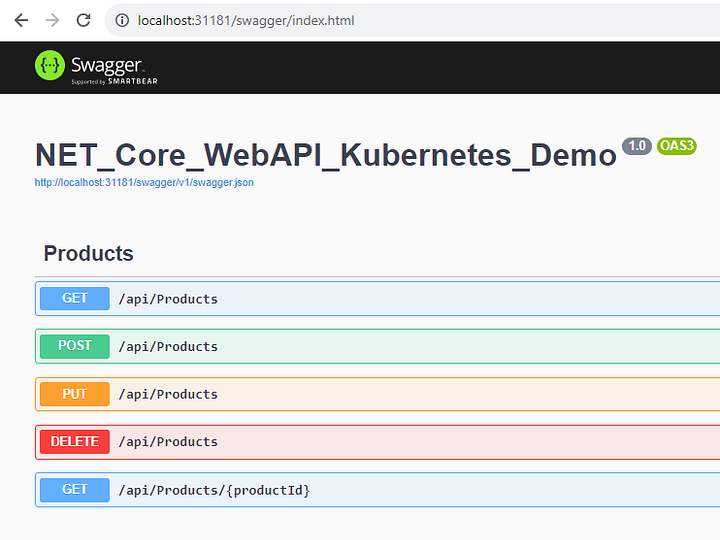
In a real-time scenario, you can create multiple instances of service, versioning with deployment, and apply different load balancing techniques as per requirements.
GitHub
https://github.com/Jaydeep-007/NET_Core_WebAPI_Kubernetes_Demo
Conclusion
In this article, we discussed about a few basics of Docker and Kubernetes. Also, the step-by-step implementation and creation of product service using .NET Core 7 Web API and containerization for the same with Docker and Kubernetes.
Join the conversation! Your thoughts help the community grow.