

Scenario
Assume you have many divs in your aspx page and you have some string values inside these DIVs. Now let say you want to check if a DIV has "XXX" string values that make the background colorful. The following is my ASPX to do that:
- <%@ Page Language="C#" AutoEventWireup="true" CodeBehind="Default.aspx.cs" Inherits="Contains_In_jQuery.Default" %>
- <!DOCTYPE html>
- <html xmlns="http://www.w3.org/1999/xhtml">
- <head runat="server">
- <title>Contains in jQuery</title>
- <script src="Scripts/jquery-2.1.4.min.js"></script>
- <script>
- $(document).ready(function () {
- $("div:contains('AMX')").css("background-color", "red");
- });
- </script>
- </head>
- <body>
- <form id="form1" runat="server">
- <div>Amol Malhotra - AMX</div>
- <div>Shambhu Sharma - AMX</div>
- <div>Hemant Chopra - HWN</div>
- <div>Rahul Saxena - AMX</div>
- <div>Yogesh Gupta - AMX</div>
- <div>Shraddha Gaur - AMX</div>
- <div>Abhishek Nigam - HWN</div>
- <div>Shweta Kashyap - AMX</div>
- <div>Saurabh Mehrotra - PHNX</div>
- <div>Mayank Dhulekar - USA</div>
- <div>Mehak Jain - HWN</div>
- <div>Rakesh Dixit - AMX</div>
- <div>Akhilesh Atwal - KS</div>
- </form>
- </body>
- </html>
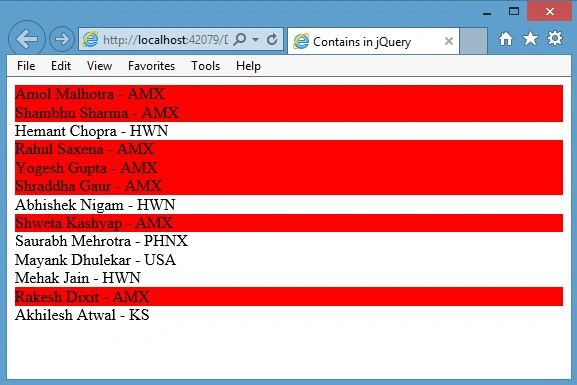
Figure 1
If you want to set more than one setting in CSS properties:
- <%@ Page Language="C#" AutoEventWireup="true" CodeBehind="Default.aspx.cs" Inherits="Contains_In_jQuery.Default" %>
- <!DOCTYPE html>
- <html xmlns="http://www.w3.org/1999/xhtml">
- <head runat="server">
- <title>Contains in jQuery</title>
- <script src="Scripts/jquery-2.1.4.min.js"></script>
- <script>
- $(document).ready(function () {
- //$("div:contains('AMX')").css("background-color", "red");
- $("div:contains('AMX')").css({ "background-color": "yellow", "font-size": "140%", "color":"red" });
- });
- </script>
- </head>
- <body>
- <form id="form1" runat="server">
- <div>Amol Malhotra - AMX</div>
- <div>Shambhu Sharma - AMX</div>
- <div>Hemant Chopra - HWN</div>
- <div>Rahul Saxena - AMX</div>
- <div>Yogesh Gupta - AMX</div>
- <div>Shraddha Gaur - AMX</div>
- <div>Abhishek Nigam - HWN</div>
- <div>Shweta Kashyap - AMX</div>
- <div>Saurabh Mehrotra - PHNX</div>
- <div>Mayank Dhulekar - USA</div>
- <div>Mehak Jain - HWN</div>
- <div>Rakesh Dixit - AMX</div>
- <div>Akhilesh Atwal - KS</div>
- </form>
- </body>
- </html>
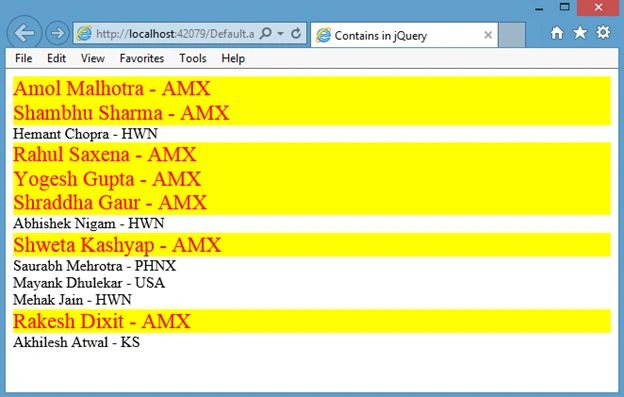
Figure 2
You can use more than one check as in the following:
- <script>
- $(document).ready(function () {
- //$("div:contains('AMX')").css("background-color", "red");
- $("div:contains('AMX')").css({ "background-color": "yellow", "font-size": "100%", "color": "red" });
- $("div:contains('HWN')").css({ "background-color": "Skyblue", "font-size": "100%", "color": "white" });
- });
- </script>
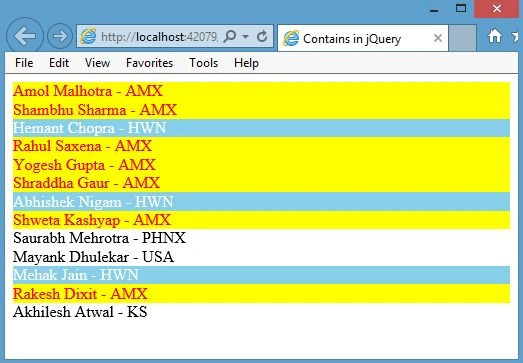
Figure 3
Rahul Kumar SaxenaPosted Jul 23, 2015, 11:33 PM
Thanks Santhakumar Munuswamy
Rahul Kumar SaxenaPosted Jul 23, 2015, 11:33 PM
Thanks Debasis Saha
Santhakumar MunuswamyPosted Jul 23, 2015, 3:13 PM
Thanks for nice article:)
Debasis SahaPosted Jul 21, 2015, 12:54 AM
Good One..
Rahul Kumar SaxenaPosted Jul 20, 2015, 1:36 PM
Thanks Gopi Chand
Gopi ChandPosted Jul 20, 2015, 12:52 PM
Nice article
Rahul Kumar SaxenaPosted Jul 20, 2015, 10:53 AM
Thanks Nilesh Jadav
Rahul Kumar SaxenaPosted Jul 20, 2015, 10:53 AM
Thanks Sibeesh Venu
Nilesh JadavPosted Jul 20, 2015, 9:48 AM
Nice article sir
Sibeesh VenuPosted Jul 20, 2015, 9:07 AM
Good one :)
Rahul Kumar SaxenaPosted Jul 20, 2015, 9:04 AM
Thanks Sharad
Rahul Kumar SaxenaPosted Jul 20, 2015, 9:04 AM
Thanks Vipul Malhotra
Vipul MalhotraPosted Jul 20, 2015, 8:11 AM
nice Article sir.Thanks for sharing
SharadPosted Jul 20, 2015, 8:02 AM
nice..
Rahul Kumar SaxenaPosted Jul 20, 2015, 7:54 AM
Thanks Rakesh Chavda
RakeshPosted Jul 20, 2015, 7:35 AM
Good one sir