

Searching for a particular word or phrase often yields hundreds and thousands of search results for users. The user can further filter the results with standard refiners like Location, People, Document Type, Year and so on. Adding more context-specific refinements will help the user further reduce the result set. SharePoint 2013 has enabled developers to add more context-specific refiners such that developers can modify the managed properties of crawled items before they are indexed by calling out to an external content enrichment web service.
The content enrichment web service is a SOAP-based service that a developer can create to receive a callout from the web service client inside the content processing component as shown in the figure below search architecture.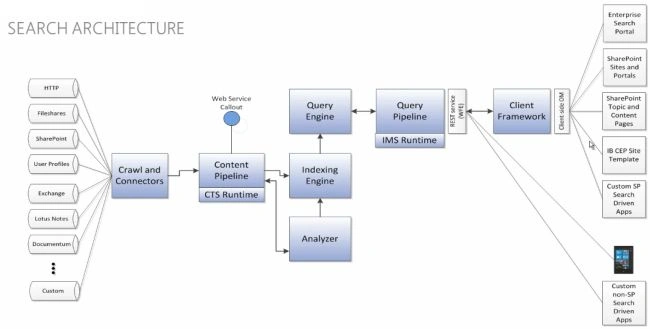
Figure 1: SharePoint 2013 Search Architecture
Content Enrichment Web Service Callout
A Web Service Callout allows us to receive information about managed properties that are being set up for the content that is currently being crawled. When you receive those managed properties into your web service callout you can modify information about the crawled properties and send it back into the Content Pipeline. This is useful when you need to perform some specific actions on these managed properties to modify them before they can get into the index.
The ability to modify managed properties for items during content processing is helpful when performing tasks such as:
- Data Cleansing
- Entity Extraction
- Classification and tagging
Data Cleansing
An example of when data cleansing is useful is as follows. In my company some people use the abbreviation TCS and others use Tata Consultancy Services in documents (Word, Excel and PowerPoint). I get two refiners in the search UI as these are considered separate companies. Let's say I want to show a single refiner Tata Consultancy Services in the search UI which should be able to filter document types referring to both terms. This is possible in SharePoint 2013. I can receive the Company Name managed property into the web service callout, modify the information where the company name is TCS to Tata Consultancy Services and send it back to the content pipeline so that the modified value gets into the index for the property Company Name.
Entity Extraction
In Fast Search there was a concept of entity extraction through extending the content process pipeline. You would create a custom property extractor that enables you to automatically extract entities or concepts from the visible text content of an item and map that to a managed property.
For example if I am dealing with data from a Finance sub site, I would like to add custom refiners such as Deal Price Range, Deal Status (Win, Loss, In-Progress) and so on but unfortunately that metadata is not available in SharePoint at this point. What we can do in SharePoint 2013 is create a new managed property called Deal Status and build a web service to populate the managed property values based on our custom business logic. The Deal Status managed property can then be used as a refiner on the search results page.
Classification and Tagging
Let's say you are getting Indian classical music to show in your SharePoint search page. In addition to the tags that are normally associated with music like Artist Name, Collection, Date, Category and so on you want to classify and add additional tags for suitable listening time such as Early Morning, Morning, Afternoon, Late Afternoon, Evening, Late Evening and Night. You can do so in SharePoint 2013 by extending the content pipeline. The following are the detailes of how to build and configure such a web service.
The steps to build and configure the Content Enrichment Web Service Callout
The following 5 steps are required to build and configure the web service callout:
Zeeshan GPosted Sep 21, 2015, 10:01 AM
Hi, Thanks for putting up a well drafted article on this topic. I was looking for an ability to query one of the site properties from the content enrichment web service extension code and push it to a new managed (output) property. Somehow querying the current client context doesn't work in here. Any help will be greatly appreciated.
Veena SardaPosted Sep 22, 2013, 5:32 AM
You can pass the search application name as an input property to the service and do not map it to an output property. Use this property for your internal logic. Also if you need to create multiple content enrichment services aimed at different type of content a very good blog post is http://blogs.msdn.com/b/sharepointdev/archive/2012/11/21/content-enrichment-service-scaling-and-aggregation.aspx
Miran VulicPosted Sep 18, 2013, 7:12 AM
Very nice article. One question, what about multiple search applications? How would you suggest implementation, one service per search application or one service for all search applications?