

Background
For our SharePoint online application we were working on new custom page layout. Our page layout is very simple and as such no major changes. So we just downloaded OOB “Article Page” layout and opened it in Visual Studio (Visual Studio 2015 community edition), modified it and manually uploaded in “Master Page” gallery. Set the “Content Type” as “Page Layout” content type and “Associated Content Type” as our custom content type. We made page layout available from the “Page Layout and Site Template Settings” for creating the pages.
So next step is to create the content page from our custom page layout and verify it. Content page successfully get created but when we open the page it throws the following exception,
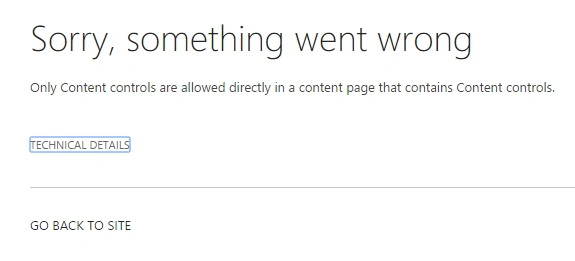
Figure 1: Exception on page which is created from new custom page layout
Sorry, something went wrong.
Only Content controls are allowed directly in a content page that contains Content controls.
Technical Details
Troubleshoot issues with Microsoft SharePoint Foundation.
Correlation ID: 034a449d-d02b-2000-1648-733d4593b008
Date and Time: 11/22/2015 7:46:39 PM
Only the above exception and not much details. Googled bit, but no luck. Also went through the page layout in Visual Studio again but seems to be no issues.
So, finally I downloaded our page layout from “Master Page” gallery and surprisingly found that there were the following extra commented code added at the bottom of the page layout after the closing section of “PlaceHolderMain” control place holder:
So next step is to create the content page from our custom page layout and verify it. Content page successfully get created but when we open the page it throws the following exception,
Figure 1: Exception on page which is created from new custom page layout
Sorry, something went wrong.
Only Content controls are allowed directly in a content page that contains Content controls.
Technical Details
Troubleshoot issues with Microsoft SharePoint Foundation.
Correlation ID: 034a449d-d02b-2000-1648-733d4593b008
Date and Time: 11/22/2015 7:46:39 PM
Only the above exception and not much details. Googled bit, but no luck. Also went through the page layout in Visual Studio again but seems to be no issues.
So, finally I downloaded our page layout from “Master Page” gallery and surprisingly found that there were the following extra commented code added at the bottom of the page layout after the closing section of “PlaceHolderMain” control place holder:
<%--<div class="captioned-image">
<div class="image">
<PublishingWebControls:RichImageField FieldName="PublishingPageImage" runat="server"/>
</div>
<div class="caption">
<PublishingWebControls:RichHtmlField FieldName="PublishingImageCaption" AllowTextMarkup="false" AllowTables="false" AllowLists="false" AllowHeadings="false" AllowStyles="false" AllowFontColorsMenu="false" AllowParagraphFormatting="false" AllowFonts="false" PreviewValueSize="Small" AllowInsert="false" AllowEmbedding="false" AllowDragDrop="false" runat="server"/>
</div>
</div>--%>
<div class="image">
<PublishingWebControls:RichImageField FieldName="PublishingPageImage" runat="server"/>
</div>
<div class="caption">
<PublishingWebControls:RichHtmlField FieldName="PublishingImageCaption" AllowTextMarkup="false" AllowTables="false" AllowLists="false" AllowHeadings="false" AllowStyles="false" AllowFontColorsMenu="false" AllowParagraphFormatting="false" AllowFonts="false" PreviewValueSize="Small" AllowInsert="false" AllowEmbedding="false" AllowDragDrop="false" runat="server"/>
</div>
</div>--%>
Root Cause / Solution
This type of issue there also previously we have in on premises but with different exception message like "No parameterless constructor defined for this object".
Opening tag is - <asp:Content> : C in Content is capital case and closing tag is - </asp:content> : c in Content is small case.
It should always be capital ‘C’ in Content of opening as well as in closing tag like <asp:Content> </asp:Content>.
We corrected our page layout and problem went away.
Thanks!
Rupali ShindePosted Nov 29, 2015, 11:50 PM
please check below link for reference http://www.c-sharpcorner.com/forums/thread/328153/only-content-controls-are-allowed-directly-in-a-content-page.aspx
Rupali ShindePosted Nov 29, 2015, 11:50 PM
i am having same issue for my custom page layout. my case is - i made custom page layout in 2010. now i want to add webpart of pages ( out of box pages library) onto this custom page layout. so when i am try to add code , it is showing me same error "Only Content controls are allowed directly in a content page that contains Content controls."
Prasham SabadraPosted Nov 29, 2015, 12:28 AM
Thanks all !!!
Sibeesh VenuPosted Nov 28, 2015, 2:39 AM
Nice Share
Santhakumar MunuswamyPosted Nov 28, 2015, 2:36 AM
Nice share
Harshad PansuriyaPosted Nov 27, 2015, 11:08 PM
Nice one