

What is Content Type?
A content type is a reusable collection of metadata (columns), workflow behavior and other settings for a category of items or documents.

We can manage Content Types through the "Site Actions" > "Site Settings" > "Content Types" page.
Advantages of Content Type
Reusability
We can create a content type & reuse it across the site. For example, we can create a content type named Expense & reuse it in multiple departments like HR, Marketing, Research and so on.

In addition to columns, we can reuse the workflows and custom forms associated with the Expense content type. The reusability feature helps to reduce the amount of time required to create redundant items.
Standardization
Content Type allows quick standardization of items through definition in one place.
Centralized Control
We can apply changes to existing content type & the associated list or library will reflect the changes automatically.
For example, if we add a Description column to the preceding Expense Content type then the change will be reflected in all associated libraries.
In another example, we can create custom new/edit forms for a content type & the changes should be reflected everywhere. So, quick standardization is possible through content type.
Default Content Type
We can add a new content type to a library or list & make it the default. The default Content Type will be invoked while using the Add Document or Add Item links.
Multiple Associations
We can associate multiple content types to a list or library. For example a Project Library can have a different content type associated wit it, like: Plan, Expense, Meeting, Discussion and so on.
Creating Content Type
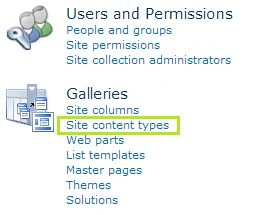
In this step, we can quickly create a content type. Open "Site Actions" > "Site Settings" > "Site content types" link as shown below:
In the page that appears, click the "Create" button.

You should get the screen below to enter the Content Type detail. You can create a content type inheriting from existing content types like Item, Document, Folder and so on.


Join the conversation! Your thoughts help the community grow.