Introduction
Validation means some validation control, it checks the user input data as per your requirements. If the validation is successful, then the data will be processed for further steps, otherwise the data has never been processed for further steps and control will show some warning message to the end user.
Like ASP.NET, we used some validation controls to validate the Server controls, as given below.
RequiredFieldValidator,RangeValidator,CompareValidator,RegularExpressionValidator, CustomValidator,ValidationSummary etc.
Today, I will show you how to implement validation in MVC Controls/ Html Helper Controls.
Step 1
Create one class in Models folder named “Student.cs”
Code Ref
- using System;
- using System.Collections.Generic;
- using System.ComponentModel.DataAnnotations;
- using System.Linq;
- using System.Web;
-
- namespace val.Models
- {
- public class Student
- {
-
- [Key]
-
- public int CustomerID { get; set; }
-
-
-
- [Required(ErrorMessage = "Enter Your Name")]
- [StringLength(4, ErrorMessage = "Name should be less than or equal to four characters.")]
- public string Name { get; set; }
-
-
-
- [Required(ErrorMessage = "Enter Your Address")]
- [StringLength(10, ErrorMessage = "Address should be less than or equal to ten characters.")]
- public string Address { get; set; }
-
-
- [Required(ErrorMessage = "Your must provide a PhoneNumber")]
- [Display(Name = "Home Phone")]
- [DataType(DataType.PhoneNumber)]
- [RegularExpression(@"^\(?([0-9]{3})\)?[-. ]?([0-9]{3})[-. ]?([0-9]{4})$", ErrorMessage = "Not a valid Phone number")]
- public string Mobileno { get; set; }
-
-
-
- [DataType(DataType.Date)]
- [Required(ErrorMessage = "Enter Your DOB.")]
- [DisplayFormat(DataFormatString = "{0:MM/dd/yyyy}", ApplyFormatInEditMode = true)]
- [val.Models.UserCustomValidation.ValidBirthDate(ErrorMessage = "Birth Date can not be greater than current date")]
- public DateTime Birthdate { get; set; }
-
-
-
- [Required(ErrorMessage = "Enter Your EmailID")]
- [RegularExpression(@"^[\w-\._\+%]+@(?:[\w-]+\.)+[\w]{2,6}$", ErrorMessage = "Please enter a valid email address")]
- public string EmailID { get; set; }
-
-
- }
- }
Code Description
Here, I declare 6 different entities to access the user and inputs. For every entity, I required an attribute to show the validation message failed for the end users.
e.g. [Required(ErrorMessage = "Enter Your Name")]
Like this required attribute, I used StringLength, Display, DisplayFormat, RegularExpression attributes.
We have used some attributes. For this, we have to add one namespace.
- using System.ComponentModel.DataAnnotations;
You can get the DLL file to access this Namepsace. Inside References folder, we get the screenshot, as shown below.
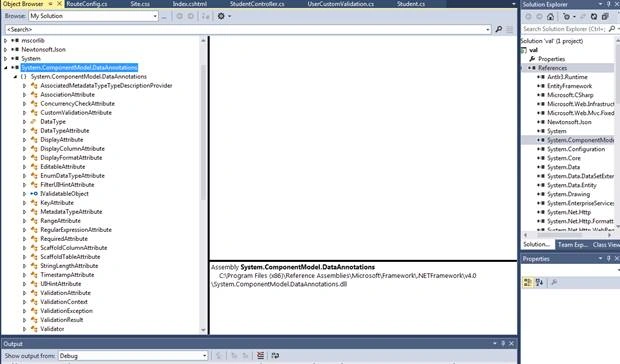
In name part, I can enter up to 4 characters.
[StringLength(4, ErrorMessage = "Name should be less than or equal to four characters.")]
In address part, I can enter up to 10 characters.
[StringLength(10, ErrorMessage = "Address should be less than or equal to ten characters.")]
In MobileNo. part, I can enter only 10 digit valid phone no.
- [DataType(DataType.PhoneNumber)]
- [RegularExpression(@"^\(?([0-9]{3})\)?[-. ]?([0-9]{3})[-. ]?([0-9]{4})$", ErrorMessage = "Not a valid Phone number")]
In E-mail Id part, I can enter only a valid E-mail Id with @ symbol.
- [RegularExpression(@"^[\w-\._\+%]+@(?:[\w-]+\.)+[\w]{2,6}$", ErrorMessage = "Please enter a valid email address")]
In Date Time part, I can enter only valid date, which should be less than current date.
- [DisplayFormat(DataFormatString = "{0:MM/dd/yyyy}", ApplyFormatInEditMode = true)]
- [val.Models.UserCustomValidation.ValidBirthDate(ErrorMessage = "Birth Date can not be greater than current date")]
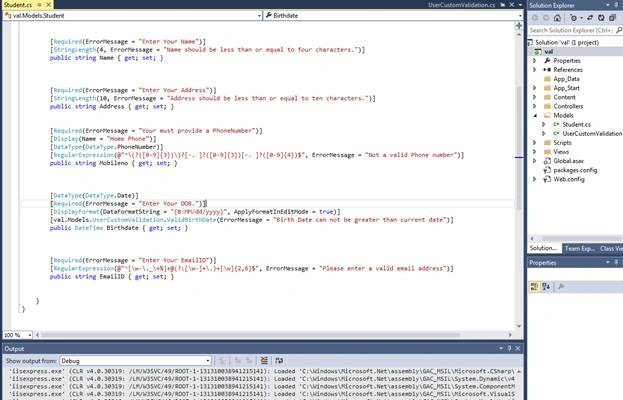
Here, I have used one Custom Validation class to customize your Date time Validation. For this, I created one class file in Models folder named “UserCustomValidation.cs” .
Code Ref
- using System;
- using System.Collections.Generic;
- using System.ComponentModel.DataAnnotations;
- using System.Linq;
- using System.Web;
-
- namespace val.Models
- {
- public class UserCustomValidation
- {
- [AttributeUsage(AttributeTargets.Property, AllowMultiple = false, Inherited = true)]
- public sealed class ValidBirthDate : ValidationAttribute
- {
- protected override ValidationResult IsValid(object value, ValidationContext validationContext)
- {
- if (value != null)
- {
- DateTime _birthJoin = Convert.ToDateTime(value);
- if (_birthJoin > DateTime.Now)
- {
- return new ValidationResult("Birth date can not be greater than current date.");
- }
- }
- return ValidationResult.Success;
- }
- }
- }
- }
Code Description
Here, I used one date time variable to access date time .
- DateTime _birthJoin = Convert.ToDateTime(value);
Thus, I put some code to take the user’s birth date. Birth date should always be less than today’s date.
- if (_birthJoin > DateTime.Now)
- {
- return new ValidationResult("Birth date can not be greater than current date.");
- }
Here, I used one class, ValidBirthDate, that is inherited from ValidationAttribute class.
- public sealed class ValidBirthDate : ValidationAttribute
It serves as a base class for all the validation attributes.
Go to the definition of this ValidationAttribute class.
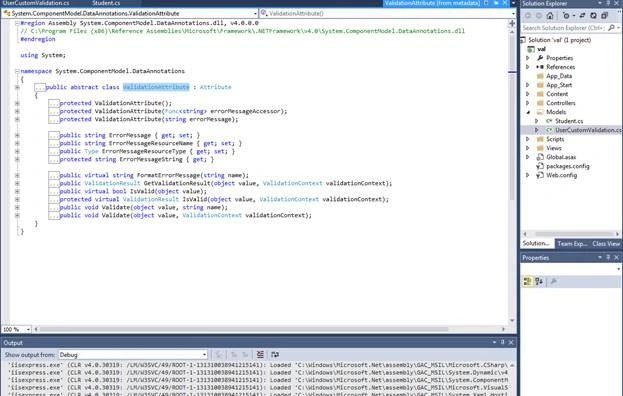
Here, the System.ComponentModel.DataAnnotations.dll file references for this class files.
- #region Assembly System.ComponentModel.DataAnnotations.dll, v4.0.0.0
-
- #endregion
The ValidationResult override method is used to represent a container for the result of the validation request. The ValidationContext class acts as a parameter inside ValidationResult override method. It is used for describing a context in which validation check is performed.
- protected override ValidationResult IsValid(object value, ValidationContext validationContext)
- return new ValidationResult("Birth date can not be greater than current date.");
- return ValidationResult.Success;
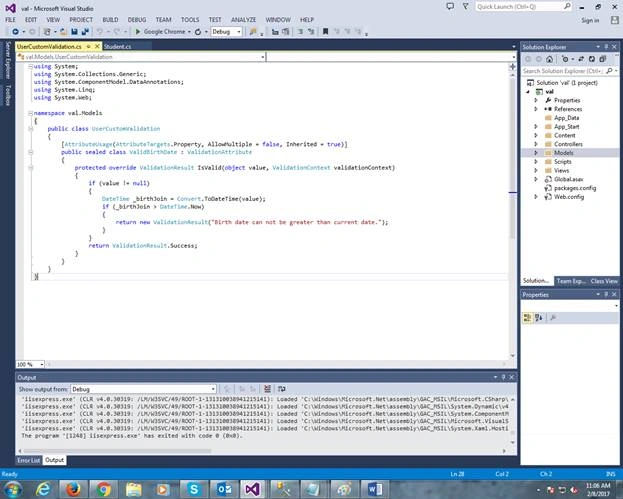
In custom validation class, I used Student.cs for DATE TIME entity . According to this, the user input date should be less than today’s date.
- [val.Models.UserCustomValidation.ValidBirthDate(ErrorMessage = "Birth Date can not be greater than current date")]
Here, UserCustomValidation is the name of the Model Class and ValidBirthDate class is the child class of ValidateAttribute base class.
Step 2
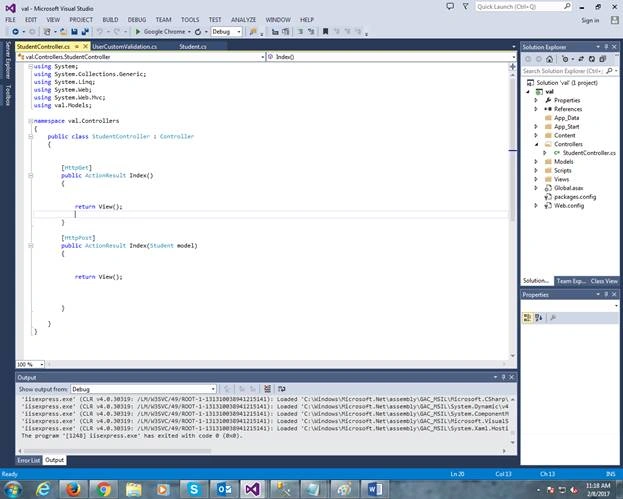
Here, I create one controller class file named “StudentController.cs”
Code Ref
- using System;
- using System.Collections.Generic;
- using System.Linq;
- using System.Web;
- using System.Web.Mvc;
- using val.Models;
-
- namespace val.Controllers
- {
- public class StudentController : Controller
- {
-
-
- [HttpGet]
- public ActionResult Index()
- {
-
-
- return View();
-
- }
-
- [HttpPost]
- public ActionResult Index(Student model)
- {
-
-
- return View();
-
-
-
- }
-
- }
- }
Code Description
Here, I used namespace, using val.Models;
Due to all the related entities, we can access any related properties by assigning the class file inside controller action method.
- [HttpPost]
- public ActionResult Index(Student model)
- {
- return View();
-
- }
Here, Index is the Controller Action Method and Student is the model class file inside Models folder.
 Step 3
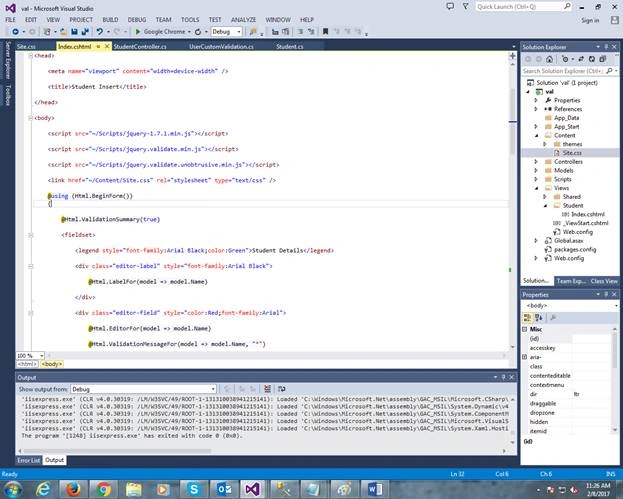
Here, I created one Chtml file for view to EndUser named “Index.cshtml”.
Code Ref
 Code Description
Here, I have added Model Class Reference Student in cshtml file.
- @model val.Models.Student
We need to add some script file and style sheet to customize validation style formats.
- <script src="~/Scripts/jquery-1.7.1.min.js"></script>
- <script src="~/Scripts/jquery.validate.min.js"></script>
- <script src="~/Scripts/jquery.validate.unobtrusive.min.js"></script>
- <link href="~/Content/Site.css" rel="stylesheet" type="text/css" />
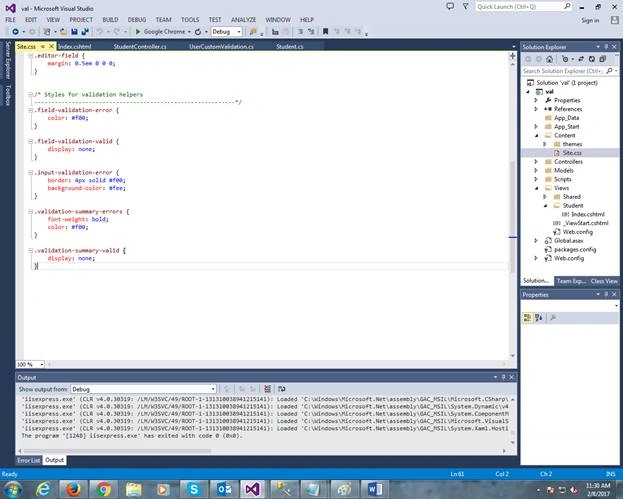
Here Site.css takes an important role to show validation message to the end user in a format and color like this.
Inside Content folder, the “Site.css” file is there.
Code Ref
- body {
- font-size: .85em;
- font-family: "Segoe UI", Verdana, Helvetica, Sans-Serif;
- color: #232323;
- background-color: #fff;
- }
-
- header, footer, nav, section {
- display: block;
- }
-
-
-
-
- fieldset {
- border: 1px solid #ddd;
- padding: 0 1.4em 1.4em 1.4em;
- margin: 0 0 1.5em 0;
- }
-
- legend {
- font-size: 1.2em;
- font-weight: bold;
- }
-
- textarea {
- min-height: 75px;
- }
-
- .editor-label {
- margin: 1em 0 0 0;
- }
-
- .editor-field {
- margin: 0.5em 0 0 0;
- }
-
-
-
-
- .field-validation-error {
- color: #f00;
- }
-
- .field-validation-valid {
- display: none;
- }
-
- .input-validation-error {
- border: 4px solid #f00;
- background-color: #fee;
- }
-
- .validation-summary-errors {
- font-weight: bold;
- color: #f00;
- }
-
- .validation-summary-valid {
- display: none;
- }
Code Description
The .field-validation-error, .field-validation-valid, .input-validation-error, .validation-summary-errors, .validation-summary-valid CSS class files are important for making validation messages with eye catching formats.
As per your requirement, you can customize your validation summary style formats here.
-
-
- .field-validation-error {
- color: #f00;
- }
-
- .field-validation-valid {
- display: none;
- }
-
- .input-validation-error {
- border: 4px solid #f00;
- background-color: #fee;
- }
-
- .validation-summary-errors {
- font-weight: bold;
- color: #f00;
- }
-
- .validation-summary-valid {
- display: none;
- }
Here, I put the code for validation summary.
@Html.ValidationSummary(true)
Now, every entity in student class file is assigned, as shown below to make the validation messages, if the input by the user fails or empty.
@Html.LabelFor(model => model.Name)
Here, I will use label heading for this entity.
@Html.EditorFor(model => model.Name)
Here, I use Editor control for this entity.
@Html.ValidationMessageFor(model => model.Name, "*")
Here, I need to use validation message which will be shown for this entity. Here, I used asterisk symbol which will be shown on the right hand side of control validation. Like above mentioned control, I used the same method for other controls for validation purposes. Subsequently, I used Submit and Reset button
If validation fails, then the control validation message will be shown to the end user after clicking submit button.
- <input type="submit" value="Insert" style="color:Navy;font-family:Arial; font-size:large" />
With the help of the reset button, you can reset the Inputs inside the control or make empty control inputs by clicking the reset button.
- <input type="reset" value="Reset" style="color:Navy;font-family:Arial; font-size:large" />
The most important thing that I used is validation summary control with main heading about validation along with individual validation messages of the individual MVC controls.
@Html.ValidationSummary(false, "Please Check Your Inputs And Try Again !")
Step 4
Here, I need to mention Start page in RouteConfig.cs file.
Code Ref
- defaults: new { controller = "Student", action = "Index", id = UrlParameter.Optional }
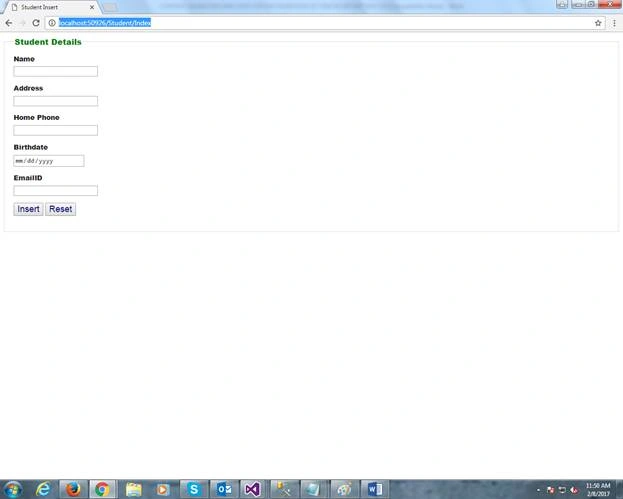
The URL is -
http://localhost:50926/Student/Index
See all design entities are shown, as mentioned In Views. Without putting in any data, if we click Submit button, then validation message will come. Please check your inputs and try again.
- Enter your Name
- Enter your Address
- You must provide a PhoneNumber
- Enter your DOB.
- Enter your E-mail ID
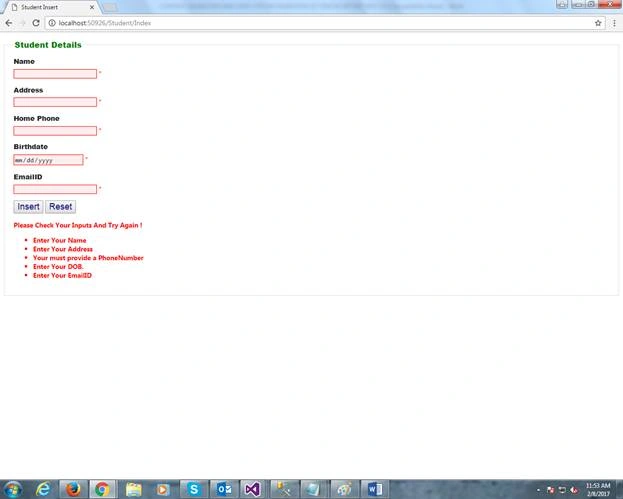
The asterisks are shown with Red highlighted control in the right hand side.
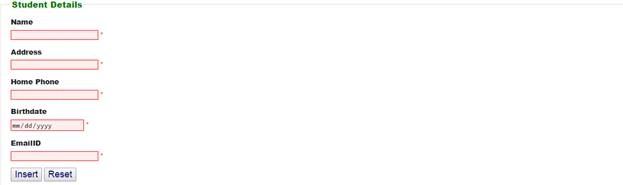
Now, check for custom validations. For this, we have to put some data.
When I put some invalid data, it will not satisfy the conditions in Student.Cs file, then a different validation message will show.
Please check your inputs and try again.
- Name should be less than or equal to four characters.
- Address should be less than or equal to ten characters.
- Not a valid Phone number.
- Birth date can not be greater than the current date.
- Please enter a valid email address.
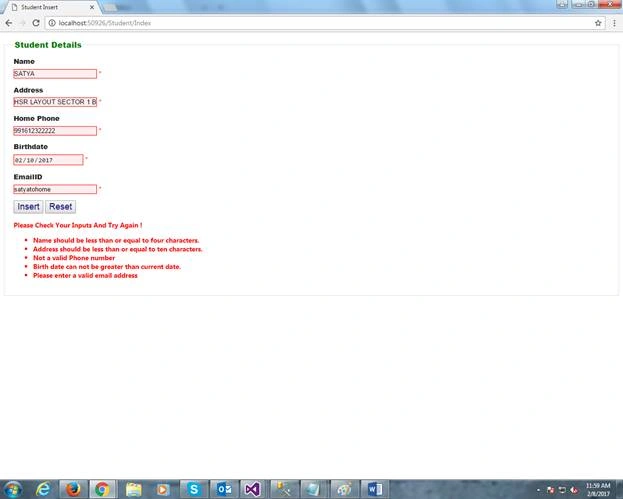
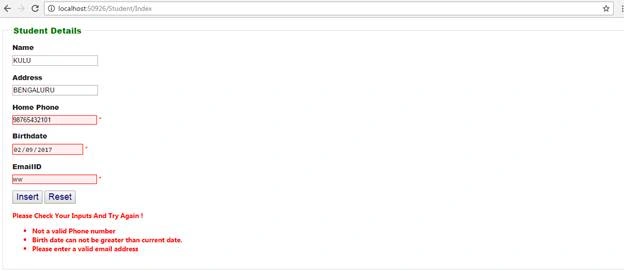
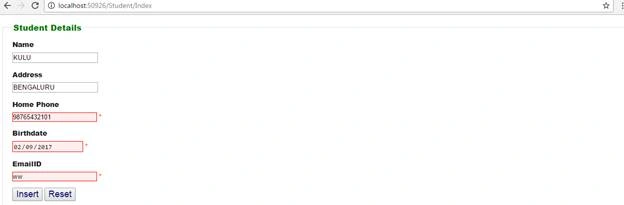
See that the above mentioned controls are shown with an invalid input data with red highlighted mark with asterisk and validation summary message which is shown below the controls with a red mark.
Now, we need to check for the valid data and the satisfied condition in Student.cs file. Hence, no validation message appears.
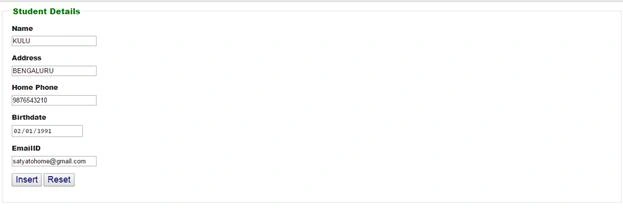
Here is the output for the selected controls validation message instead of ALL. I entered Invalid data for Home Phone , Birth Date and Email ID, so validation message will appear as shown below.
Please check your inputs and try again
- Not a valid Phone number.
- Birth date can not be greater than the current date.
- Please enter a valid email address.
Before clicking Insert button, we can test it for Reset button.
Before clicking Reset button, I entered some records.
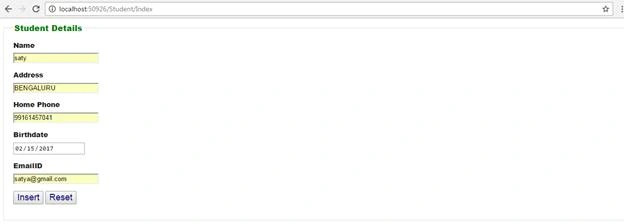
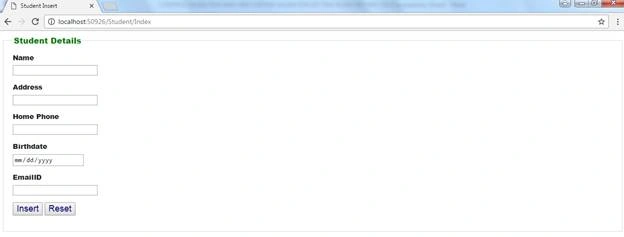
After clicking on Reset button, all control values are blank.
Based on this process and method, we can implement validation message and validation summary message as well as customize validation messages.
Summary
- How to set for validation message, if controls are blank.
- How to set for validation message, if controls have the invalid value.
- How to customize validation message and validation summary messages, as per client requirements.
- How to set CSS and scripting file to customize the style format of validation message and validation summary message.


Ben BenPosted Aug 31, 2023, 1:00 PM
Hi again, I have another question, bro. Why should we use [Custom Validator] (server-side) along with [Unobsrusive] (client-side) at the same time and with the same exact code (validation filters, I mean)?
Ben BenPosted Aug 28, 2023, 10:32 PM
Thanks a lot. But, how we can prevent _PostBack?
Sandip G PatilPosted Feb 10, 2017, 2:52 AM
Nice article.......Well explained...