

This is something I have been working with for some time. The goal is to control my remote controlled car using my computer's keyboard. Isn't it cool? I haven't used any complicated circuit diagrams etc! The idea is really simple; the only base theory used is, "a transistor can act as a switch".
There are 2 major modules
- Building the intermediate circuit that connects the PC interface to the car remote controller
- Creating the program that writes the values to the parallel port
MODULE (1)
Dispatching the remote controlled car
Inside the car (we don't need to do anything here; I have just dispatched it).

Inside of your toy car remote controller;
I have marked the important components for us.
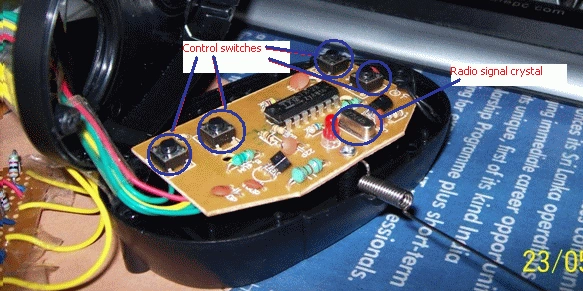
We are going to control these 4 switches via our computer parallel port.
TRANSISTOR CAN ACT AS SWITCH!
A transistor can act as a switch, which means theoretically a small current flowing to the base controls the larger collector's current.
Please refer if you need more info.
http://www.kpsec.freeuk.com/trancirc.htm
http://www.kpsec.freeuk.com/components/tran.htm
The idea is based on this concept... so I used a BC548c transistor for mine (previously I used a 2SC828). You can use any general-purpose NPN transistor. And I used my serial port to send a signal to the transistor base, which makes the transistor act as a switch!!
So, here we are getting started:

WAIT!!!
Do not implement this circuit and try to use it, there's one more thing left to do which is essential. Note what I said above, that we should send a small current (pulse) to the transistor's base, otherwise the transistor will be explode. So how can we do this?
The answer is simple; use a resistor to control your base current.
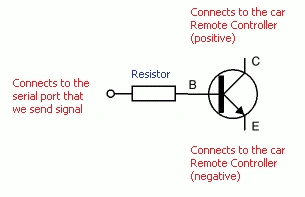
Ok, so far so good...But again, how much resistance do I need? The answer is it depends on the transistor you are using. Here is the way you can calculate the resistance you need.
Calculation of Resistance
For 2SC828 Transistor
Supply Volt = 3v
Load = 50MA
HFE = 65MA
Min base current = 50/65 = 0.77MA
R = supply volt / (load/hfe * (0.77+= (0.77*30%)))
R = 4K (nearly)
For BC548c Transistor use the fallowing figures
Load =100MA
HFE = 110MA
Please refer to the transistor data sheets for the above info.
Attaching wires to the control points of the remote controller

You have to find the four control points (four points for four switches) of the remote controller and there's one common wire (in Red). After finding those points attach wires to them.
Completed circuit
So the completed module contains four transistors inline with four resistors which connects the car remote controller to the parallel port of the computer through it.

MODULE (2)
Writing the code
You have to write values (on/off pins) to the data pins of the parallel port. It will depend upon the pins you have chosen (D0 to D7).
I have used C# to do this. Since C# does not allow writing values directly to the parallel port I have used the 'Inpout32.dll' that you can download from:
http://logix4u.net/parallel-port/16-inpout32dll-for-windows-982000ntxp
If you are using any other language such as C++ where you can directly write to the parallel port, then you should be aware that it will be depend on the Operating System you are using. For example my experience is that Windows 7 will block you from directly writing to the port.
Here is my program in C#:
- [DllImport("inpout32.dll")]
- public static extern void Out32(short PortAddress, short data);
- /* Parallel port number in decimal */
- private short zPort = 888;
- Keys k = Keys.None;
- /* Constructor */
- public RC_CAR()
- {
- InitializeComponent();
- Out32(zPort, 0);
- Thread.Sleep(100);
- }
Handler of the key down event of the user:
- /*
- * up 1
- * down 2
- * left 4
- * right 8
- * */
- private void RC_CAR_KeyDown(object sender, KeyEventArgs e)
- {
- if (e.KeyCode == Keys.Up)
- {
- if (k == Keys.Left)
- {
- Out32(zPort, 5);
- Thread.Sleep(100);
- return;
- }
- else if(k == Keys.Right)
- {
- Out32(zPort, 9);
- Thread.Sleep(100);
- return;
- }
- else{}
- Out32(zPort, 1);
- Thread.Sleep(100);
- k = Keys.Up;
- return;
- }
- else if (e.KeyCode == Keys.Down)
- {
- if (k == Keys.Left)
- {
- Out32(zPort, 6);
- Thread.Sleep(100);
- return;
- }
- else if (k == Keys.Right)
- {
- Out32(zPort, 10);
- Thread.Sleep(100);
- return;
- }
- else { }
- Out32(zPort, 2);
- k = Keys.Down;
- return;
- }
- else if (e.KeyCode == Keys.Left)
- {
- if (k == Keys.Up)
- {
- Out32(zPort, 5);
- Thread.Sleep(100);
- return;
- }
- if (k == Keys.Down)
- {
- Out32(zPort, 6);
- Thread.Sleep(100);
- return;
- }
- if (k == Keys.None)
- {
- Out32(zPort, 4);
- Thread.Sleep(100);
- k = Keys.Left;
- return;
- }
- }
- else if (e.KeyCode == Keys.Right)
- {
- if (k == Keys.Up)
- {
- Out32(zPort, 9);
- Thread.Sleep(100);
- return;
- }
- if (k == Keys.Down)
- {
- Out32(zPort, 10);
- Thread.Sleep(100);
- return;
- }
- if (k == Keys.None)
- {
- Out32(zPort, 8);
- Thread.Sleep(100);
- k = Keys.Right;
- return;
- }
- }
- else { }
- }
Handler for the key up event of the user:
- private void RC_CAR_KeyUp(object sender, KeyEventArgs e)
- {
- if (e.KeyCode == Keys.Up || e.KeyCode == Keys.Down)
- {
- Out32(zPort, 0);
- Thread.Sleep(100);
- k = Keys.None;
- return;
- }
- if (e.KeyCode == Keys.Left || e.KeyCode == Keys.Right)
- {
- if (k == Keys.Up)
- {
- Out32(zPort, 1);
- return;
- }
- if (k == Keys.Down)
- {
- Out32(zPort, 2);
- return;
- }
- Out32(zPort, 0);
- Thread.Sleep(100);
- k = Keys.None;
- }
- }
You can download the full source code, including executables, in the attached zip file.
Feel Free to contact me anytime!
Fun Coding
Cheers!
Prince AdnanPosted Sep 16, 2015, 12:48 PM
good job :)
ashrith raoPosted Jul 30, 2015, 6:12 AM
sir how can we use the code where can we use the code how can we execute it?
Manish Kumar ChoudharyPosted Mar 18, 2015, 7:04 AM
Nice one.
Akshay PattarPosted Mar 17, 2015, 9:41 PM
Please tell me sir.. How to create that circuit board....
Akshay PattarPosted Mar 17, 2015, 9:37 PM
Sir i saw ur video clip.. In begining u told that "this is my circuit" but u didnt inform us what is that, and role of that circuit in this beautifull project....
siva kumar SPosted Aug 5, 2014, 2:07 AM
Please quick to replay with me i need my school project so please send the link my friend,How to connect in your pc explain put in video my friend
Faizan MirzaPosted Apr 4, 2014, 2:45 PM
hello, i loved your work, I HAVE A GENUINE QUESTION HERE, CAN YOU PLEASE TELL ME THAT IS AT WHICH COMPILER THIS CODE CAN BE OPERATED AND OTHER THAN C# CAN YOU TELL ME HOW TO MAKE THIS CODE ON MATLAB, PLEASE I NEED YOUR ASSISTANCE.
vignesh VPosted Nov 30, 2012, 12:00 PM
Sir i am doing the same project for my cols science exhibition but in my laptop there's no serial port.. can u help me how to connect it with usb drives. I am also doing the same project wht u have done.. Working the RC car using the keyboard movement keys.. I am also planned to use the same logic.. Going to use the RC CAR remote but without the keys in remote i am going use the keyboard movement keys.... pls help me in this and my mail id is [email protected].............
saad abdPosted May 17, 2012, 4:19 AM
hello,please i want to see circuit diagram.
saad abdPosted May 17, 2012, 4:19 AM
hello,please i want to see circuit diagram.
saad abdPosted May 4, 2012, 7:11 AM
hello, good job and nice article,please I want to see full image of the board with the interface and i want to see main function of the above code in text format....... thanks
Eranda HoranagamaPosted Apr 3, 2012, 3:11 AM
You can view video at http://youtu.be/WG1BVR-lvvY
Leung JiaJun RandsonPosted Apr 2, 2012, 1:24 AM
Hi sir, I am randson. I actually the same project as yours. But regarding the programming part, i had a problem. Are you kind enough to guide me through the programming process? I really need help on that. I don't know when to insert what and where to insert what. And do i need to add in the serial port in the Forms? Thank you so much.
Arjun PanwarPosted Mar 21, 2012, 11:56 PM
Hi, It is very nice work and thanks for sharing.
Amit MaheshwariPosted Mar 21, 2012, 12:07 AM
Hi, Eranda It's a great effort to accomplish such kind of task about the remote control with keyboard, Having cool concept and thanks for sharing.......
Akash AhlawatPosted Mar 20, 2012, 11:58 PM
It's really an excellent concept..