

Introduction
Suppose we have a C# DataTable and we want to translate it into a List of custom data types. We can easily do this by looping through the rows of the data table and add an instance of that data type for each row. For example consider this DataTable.
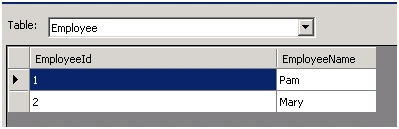
And we have a custom data type “Employee” that is defined as.
public class Employee
{
   public int EmployeeId{ get; set; }
   public stringEmployeeName { get; set;}
}
To convert this DataTable to List<Employee> we can simply do like this.
List<Employee>employees = new List<Employee>();
foreach (DataRow row in dt.Rows)
{
   employees.Add(new Employee
   {
      EmployeeId= Convert.ToInt32(row["EmployeeId"]), EmployeeName =row["EmployeeName"].ToString()
   });
}
But what if we have different data in the DataTable (populated from a database, XML file and so on), we need to repeat this process again and again for the other data types. So if we create a generic function that accepts a DataTable and custom data type at run time then with just one method we can convert any DataTable to the type we want (given that the columns in the DataTable matches with that of the properties of the custom type).
For example, an Employee DataTable as said above can be converted to a List<Employee>.
A Customer DataTable can be converted into List<Customer> and so on.
Example
Here is the code snippet for converting the DataTable to a generic list. Here is the procedure involved.
Step 1. Since we need to create a List<T>, define an instance and in this list we need to add our custom type T.
Step 2. For each row we need to add the custom type T to our generic list so for each row of the DataTable I am doing that and for fetching the custom type, I used a separate function GetItem<T>.
Step 3. In the GetType<T> function I am using reflection to fetch the properties of the custom type passed and am comparing the same with column names present in the DataTable since these columns will act as properties of each type.
private static List<T> ConvertDataTable<T>(DataTable dt)
{
   List<T> data = newList<T>();
   foreach (DataRowrow in dt.Rows)
   {
      Titem = GetItem<T>(row);
      data.Add(item);
   }
   return data;
}

private static TGetItem<T>(DataRow dr)
{
   Type temp = typeof(T);
   T obj =Activator.CreateInstance<T>();
   foreach (DataColumncolumn in dr.Table.Columns)
   {
      foreach (PropertyInfopro in temp.GetProperties())
      {
         if (pro.Name == column.ColumnName)
         pro.SetValue(obj,dr[column.ColumnName], null);
         else
         continue;
      }
   }
   return obj;
}
Please let me know if you have any doubts and please do suggest any improvements of the code if needed.
Happy Coding.
Ahsan IjazPosted Oct 12, 2022, 4:04 AM
Private static List<T> ConvertDataTable<T>(DataTable dt) { List<T> list = new List<T>(); foreach(DataRow row in dt.Rows) { Type type = typeof(T); T obj = Activator.CreateInstance<T>(); foreach(PropertyInfo property in type.GetProperties()) { property.SetValue(obj, row[property.Name], null); } list.Add(obj); } return list; } This function is enough.
Ahsan IjazPosted Oct 12, 2022, 4:02 AM
Foreach (DataColumncolumn in dr.Table.Columns) This loop is just increasing the time complexity and nothing else.
गौरव मिश्रPosted Jun 3, 2022, 7:06 PM
Very nice! little bit enhancement for null value and attributes assignment loop,_______________ private static T GetItem<T>(DataRow dr) { Type temp = typeof(T); T obj = Activator.CreateInstance<T>(); foreach (DataColumn column in dr.Table.Columns) { foreach (PropertyInfo pro in temp.GetProperties()) { if (pro.Name == column.ColumnName && dr[column.ColumnName]!= DBNull.Value) { var val = (pro.PropertyType.Name == "String") ? Convert.ToString(dr[column.ColumnName]) : dr[column.ColumnName]; pro.SetValue(obj, val, null); break; } } } return obj; }
naga rajanPosted Aug 30, 2019, 1:56 AM
Foreach(PropertyInfo pro in temp.GetProperties()) - This code does not effect and nat able to get property values of the temp variable
naga rajanPosted Aug 30, 2019, 1:54 AM
Foreach(PropertyInfo pro in temp.GetProperties()) - This code does not effect.
Gordon FreemanPosted May 13, 2017, 11:35 PM
Foreach (DataColumncolumn in dr.Table.Columns) >>>> foreach (DataColumn column in dr.Table.Columns)
Gordon FreemanPosted May 13, 2017, 11:32 PM
Foreach (DataRowrow in dt.Rows) >>> should be >>> foreach (DataRow row in dt.Rows)
Prasad BillupatiPosted Mar 11, 2016, 1:53 AM
thanks man great post its helped me a lot
Richardson dos Santos NevesPosted Dec 8, 2014, 6:55 AM
Nice post....An option use Dapper for more options.