

First of all you need to create an "ASP.NET Empty Web Site". Then use the following procedure.
Step 1
Create a ConvertDataTableToJson class in the App_Code folder and provide the following:
- Convert DataTable To JSON String.
- using System.Data
- using System.Text;
- public class ConvertDatatableToJson
- {
- public string DataTableToJson(DataTable dt)
- {
- DataSet ds = new DataSet();
- ds.Merge(dt);
- StringBuilder JsonStr = new StringBuilder();
- if (ds != null && ds.Tables[0].Rows.Count > 0)
- {
- JsonStr.Append("[");
- for (int i = 0; i < ds.Tables[0].Rows.Count; i++)
- {
- JsonStr.Append("{");
- for (int j = 0; j < ds.Tables[0].Columns.Count; j++)
- {
- if (j < ds.Tables[0].Columns.Count - 1)
- {
- JsonStr.Append("\"" + ds.Tables[0].Columns[j].ColumnName.ToString() + "\":" + "\"" + ds.Tables[0].Rows[i][j].ToString() + "\",");
- }
- else if (j == ds.Tables[0].Columns.Count - 1)
- {
- JsonStr.Append("\"" + ds.Tables[0].Columns[j].ColumnName.ToString() + "\":" + "\"" + ds.Tables[0].Rows[i][j].ToString() + "\"");
- }
- }
- if (i == ds.Tables[0].Rows.Count - 1)
- {
- JsonStr.Append("}");
- }
- else
- {
- JsonStr.Append("},");
- }
- }
- JsonStr.Append("]");
- return JsonStr.ToString();
- }
- else
- {
- return null;
- }
- }
Insert the grid view control into the Default.aspx page then write the following design code:
- <asp:GridView ID="ui_grdVw_EmployeeDetail" runat="server" Width="50%" AutoGenerateColumns="false" HeaderStyle-CssClass="pageheading">
- <Columns>
- <asp:TemplateField HeaderText="S.NO">
- <ItemTemplate>
- <%#Container.DataItemIndex+1 %>
- </ItemTemplate>
- </asp:TemplateField>
- <asp:TemplateField HeaderText="Employee ID">
- <ItemTemplate>
- <asp:Label ID="ui_lbl_EmployeeID" runat="server" Text='<%# DataBinder.Eval(Container.DataItem, "Emp_id") %>'></asp:Label>
- </ItemTemplate>
- </asp:TemplateField>
- <asp:TemplateField HeaderText="Employee Name">
- <ItemTemplate>
- <asp:Label ID="ui_lbl_EmployeeName" runat="server" Text='<%# DataBinder.Eval(Container.DataItem, "Emp_Name") %>'></asp:Label>
- </ItemTemplate>
- </asp:TemplateField>
- <asp:TemplateField HeaderText="Employee Post">
- <ItemTemplate>
- <asp:Label ID="ui_lbl_EmpJob" runat="server" Text='<%# DataBinder.Eval(Container.DataItem, "Emp_job") %>'></asp:Label>
- </ItemTemplate>
- </asp:TemplateField>
- <asp:TemplateField HeaderText="Department">
- <ItemTemplate>
- <asp:Label ID="ui_lbl_Department" runat="server" Text='<%# DataBinder.Eval(Container.DataItem, "Emp_Dep") %>'></asp:Label>
- </ItemTemplate>
- </asp:TemplateField>
- </Columns>
- </asp:GridView>
- <br />
- <asp:Button ID="ui_btn_Convert1" runat="server" Text="Manually Convert To Json" OnClick="ui_btn_Convert1_Click" /><br /><br /><br />
- <asp:Label ID="ui_lbl_JsonString1" runat="server"></asp:Label>
Step 3
Now, open the Deafult.asps.cs then write the following code:
- using System;
- using System.Data;
- public partial class _Default : System.Web.UI.Page
- {
- #region Global Variable
- DataTable dt;
- ConvertDatatableToJson dtJ;
- string JsonString = string.Empty;
- #endregion
- protected void Page_Load(object sender, EventArgs e)
- {
- if (!IsPostBack)
- {
- ui_grdvw_EmployeeDetail_Bind();
- }
- }
- protected void ui_grdvw_EmployeeDetail_Bind()
- {
- dt = new DataTable();
- EmployeeRecord employeeRecord = new EmployeeRecord();
- dt = employeeRecord.EmpRecord();
- ViewState["dt"] = dt;
- ui_grdVw_EmployeeDetail.DataSource = dt;
- ui_grdVw_EmployeeDetail.DataBind();
- }
- protected void ui_btn_Convert1_Click(object sender, EventArgs e)
- {
- dtJ = new ConvertDatatableToJson();
- JsonString = dtJ.DataTableToJson((DataTable)ViewState["dt"]);
- ui_lbl_JsonString1.Text = JsonString;
- }
- }
Step 4
Press F5, run the project.
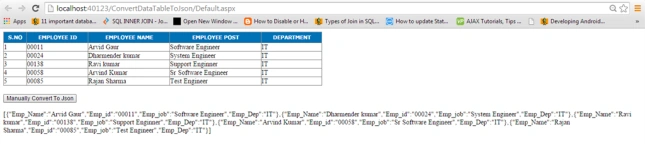
Now, convert the DataTable to a JSON string using the newtonsoft DLL.
Step 1
Download the Newtonsoft DLL and move it to the ASP.Net project's bin folder.
Step 2
Step 2
Then, insert a button and label UI Control in the Deafult.aspx page as in the following:
- <asp:Button ID="iu_btn_Convert2" runat="server" Text="Newtonsoft Convert To Json" OnClick="iu_btn_Convert2_Click" />
- <br />
- <br />
- <asp:Label ID="ui_lbl_JsonString2" runat="server"></asp:Label>
Step 3
Now, write the following code in Default.aspx.cs:
using this namespace.
- using Newtonsoft.Json;
- protected void iu_btn_Convert2_Click(object sender, EventArgs e)
- {
- dt = (DataTable)ViewState["dt"];
- JsonString = JsonConvert.SerializeObject((DataTable)ViewState["dt"]);
- ui_lbl_JsonString2.Text = JsonString;
- }
Now, run the project and click on the Newtonsoft Convert to JSON.
In the preceding code, I convert the DataTable to a JSON String.
I have attached the sample project for this, download and see how it works.
Thank you.
Nadeem QureshiPosted Jul 11, 2017, 2:59 AM
I need a bit of help. I was referring to one for your blogs where you did the converse of this project i.e., converting a Json string to a database. Is it possible to query anything from that database? If yes, can you help me understand how? i am a novice with very little c# experience and i;d like to learn. Thank you
Sonu ChaudharyPosted Mar 7, 2016, 1:41 AM
good one
Sarwar HussainPosted Feb 25, 2015, 11:34 PM
thanks..
Rahul Kumar SaxenaPosted Feb 25, 2015, 12:17 PM
Good Show...