
Introduction
My previous article explained how to convert a number expressed as an octal number into a number expressed as a decimal number. This article shows how to do the reverse (decimal to octal). So let us first understand the conversion.
Octal Number: A number expressed using the base 8 number system with digits 0 to 7.
Decimal Number: A number expressed using the base 10 number system with digits 0 to 9.
Conversion Example: suppose you want to convert the number 500 expressed as a decimal to a number expressed as an octal number. Then use the following procedure.
Step 1: 500/8 Then the remainder=4, Quotient=62
Step 2: 62/8 Then the remainder=6, Quotient=7
Step 3: 7/8 Then the remainder=7, Quotient=0
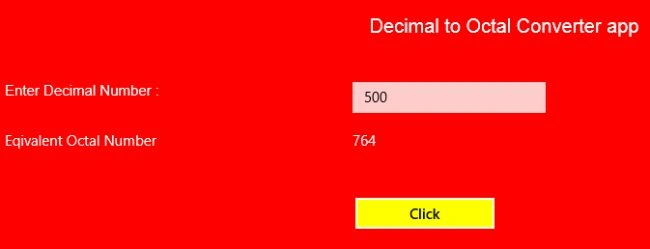
Hence the equivalent octal number = 764.
Use the following procedure to create it.
Step 1
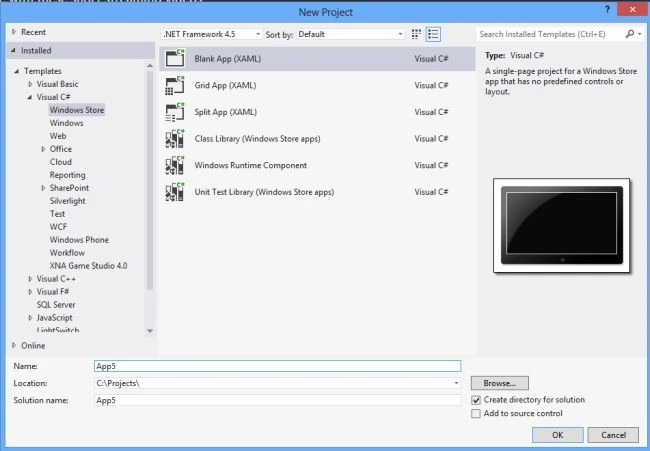
First of all you must create a new Windows Store Application.
Open Visual Studio 2012
"File" -> "New" -> "Project..."
Choose "Template" -> "Visual C#" -> "Window Store app"
Choose "Blank App (XAML)" then rename the application
Step 2
Write the following XAML code in "Mainpage.Xaml" (that is available in Solution Explorer):
<Page
x:Class="deimal_to_octal_conversion_app.MainPage"
xmlns="http://schemas.microsoft.com/winfx/2006/xaml/presentation"
xmlns:x="http://schemas.microsoft.com/winfx/2006/xaml"
xmlns:local="using:deimal_to_octal_conversion_app"
xmlns:d="http://schemas.microsoft.com/expression/blend/2008"
xmlns:mc="http://schemas.openxmlformats.org/markup-compatibility/2006"
mc:Ignorable="d">
<Grid Background="red">
<Grid.ColumnDefinitions>
<ColumnDefinition Width="313*"/>
<ColumnDefinition Width="254*"/>
<ColumnDefinition Width="788*"/>
</Grid.ColumnDefinitions>
<Grid.RowDefinitions>
<RowDefinition Height="78*"/>
<RowDefinition Height="49*"/>
<RowDefinition Height="37*"/>
<RowDefinition Height="40*"/>
<RowDefinition Height="39*"/>
<RowDefinition Height="525*"/>
</Grid.RowDefinitions>
<TextBlock Text="Decimal to Octal Converter app" Grid.ColumnSpan="3" Grid.Row="1" Foreground="White" FontSize="20" FontFamily="Arial" TextAlignment="Center"></TextBlock>
Join the conversation! Your thoughts help the community grow.