

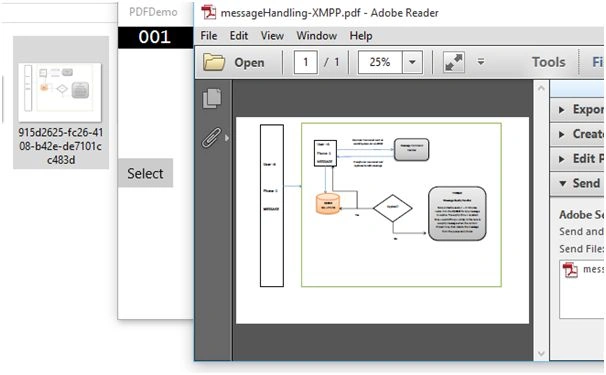
In my previous article we saw how to read PDF files in the Windows 10 universal app using the default PDF reader, but in some cases we need to read the PDF file within our application. For that we need to convert the PDF file to image and are able to see the PDF file within the application.
Let’s see the steps.
Create new Windows 10 Universal app. For creating a new Windows 10 universal project, refer to the following:
Now create one button to select the file. Go to the code behind and write the following code. Create instance for StorageFile class to store the file details.
- StorageFile file = null;
- StorageFile file = null;
- FileOpenPickerfilePicker = new FileOpenPicker();
- filePicker.FileTypeFilter.Add(".pdf");
- filePicker.ViewMode = PickerViewMode.Thumbnail;
- filePicker.SuggestedStartLocation = PickerLocationId.DocumentsLibrary;
- filePicker.SettingsIdentifier = "picker1";
- filePicker.CommitButtonText = "Open Pdf File";
- file = await filePicker.PickSingleFileAsync();
- PdfDocumentpdfDocument = await PdfDocument.LoadFromFileAsync(selectedFile);
To convert PDF to image write the following code.
- PdfDocumentpdfDocument = await PdfDocument.LoadFromFileAsync(selectedFile);;
- if(pdfDocument != null && pdfDocument.PageCount > 0)
- {
- for(intpageIndex = 0; pageIndex < pdfDocument.PageCount; pageIndex++)
- {
- varpdfPage = pdfDocument.GetPage((uint) pageIndex);
- if(pdfPage != null)
- {
- StorageFoldertempFolder = ApplicationData.Current.TemporaryFolder;
- StorageFiledestinationFile = await KnownFolders.CameraRoll.CreateFileAsync(Guid.NewGuid().ToString() + ".jpg");
- if(destinationFile != null)
- {
- IRandomAccessStreamrandomStream = await destinationFile.OpenAsync(FileAccessMode.ReadWrite);
- PdfPageRenderOptionspdfPageRenderOptions = new PdfPageRenderOptions();
- pdfPageRenderOptions.DestinationWidth = (uint)(this.ActualWidth - 130);
- awaitpdfPage.RenderToStreamAsync(randomStream, pdfPageRenderOptions);
- awaitrandomStream.FlushAsync();
- randomStream.Dispose();
- pdfPage.Dispose();
- }
- }
- }
- }
- private async void selectFile_Click(object sender, RoutedEventArgs e)
- {
- StorageFile file = null;
- FileOpenPickerfilePicker = new FileOpenPicker();
- filePicker.FileTypeFilter.Add(".pdf");
- filePicker.ViewMode = PickerViewMode.Thumbnail;
- filePicker.SuggestedStartLocation = PickerLocationId.DocumentsLibrary;
- filePicker.SettingsIdentifier = "picker1";
- filePicker.CommitButtonText = "Open Pdf File";
- file = await filePicker.PickSingleFileAsync();
- LoadPdfFileAsync(file);
- }
- private async System.Threading.Tasks.TaskLoadPdfFileAsync(StorageFileselectedFile)
- {
- try
- {
- PdfDocumentpdfDocument = await PdfDocument.LoadFromFileAsync(selectedFile);;
- if(pdfDocument != null && pdfDocument.PageCount > 0)
- {
- for(intpageIndex = 0; pageIndex < pdfDocument.PageCount; pageIndex++)
- {
- varpdfPage = pdfDocument.GetPage((uint) pageIndex);
- if(pdfPage != null)
- {
- StorageFoldertempFolder = ApplicationData.Current.TemporaryFolder;
- StorageFiledestinationFile = await KnownFolders.CameraRoll.CreateFileAsync(Guid.NewGuid().ToString() + ".jpg");
- if(destinationFile != null)
- {
- IRandomAccessStreamrandomStream = await destinationFile.OpenAsync(FileAccessMode.ReadWrite);
- PdfPageRenderOptionspdfPageRenderOptions = new PdfPageRenderOptions();
- pdfPageRenderOptions.DestinationWidth = (uint)(this.ActualWidth - 130);
- awaitpdfPage.RenderToStreamAsync(randomStream, pdfPageRenderOptions);
- awaitrandomStream.FlushAsync();
- randomStream.Dispose();
- pdfPage.Dispose();
- }
- }
- }
- }
- }
- catch(Exception ex)
- {
- throw ex;
- }
- }
Source Code.
For more information on Windows 10 UWP, refer to my eBook:
Read more articles on Universal Windows App:
Mohammed IbrahimPosted Mar 18, 2016, 6:49 AM
NICE
Kashif SohailPosted Mar 18, 2016, 12:08 AM
Great Suresh
Vignesh ManiPosted Mar 17, 2016, 4:56 PM
Good
Saillesh PawarPosted Mar 17, 2016, 3:55 PM
any specific library to do it?