

In this article, we will show how to convert rows to columns using Dynamic Pivot in SQL Server.
PIVOT rotates a table-valued expression by turning the unique values from one column in the expression into multiple columns in the output and performs aggregations where they are required on any remaining column values that are wanted in the final output.
Scenario
We have decided to build a dynamic database by creating only three tables as shown below.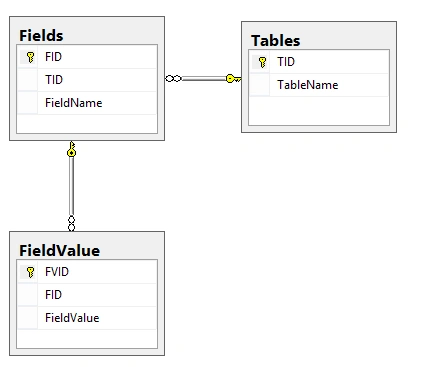
The “Tables” will be used to hold the table names like Users, Products….etc.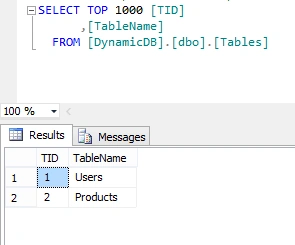
The “Fields” will be used to hold the fields name related to each table.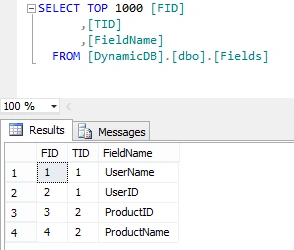
The “Field Value” will be used to hold the value of each field.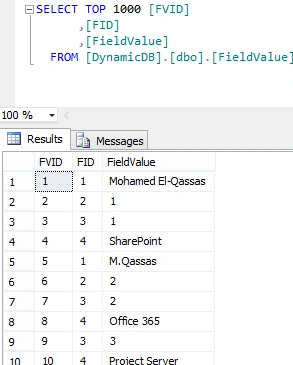
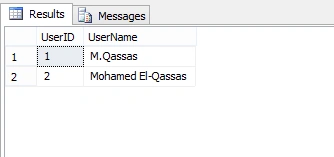
The available data
The desired data should look like
Steps
Get a list of the "Field Values" (Rows)
In this section, we will get a list of "Field Values" that should be shown as Rows by doing the following,
Create a table "dataquery" that will hold the field values data.
- BEGIN try
- DROP TABLE ##dataquery
- END try
- BEGIN catch
- END catch
- CREATE TABLE ##dataquery
- (
- id INT NOT NULL,
- tablename VARCHAR(50) NOT NULL,
- fieldname VARCHAR(50) NOT NULL,
- fieldvalue VARCHAR(50) NOT NULL
- );
- INSERT INTO ##dataquery
- SELECT Row_number()
- OVER (
- partition BY (fields.fieldname)
- ORDER BY fieldvalue.fieldvalue) ID,
- tables.tablename,
- fields.fieldname,
- fieldvalue.fieldvalue
- FROM tables
- INNER JOIN fields
- ON tables.tid = fields.tid
- INNER JOIN fieldvalue
- ON fields.fid = fieldvalue.fid
- WHERE tables.tid = @TableID
Output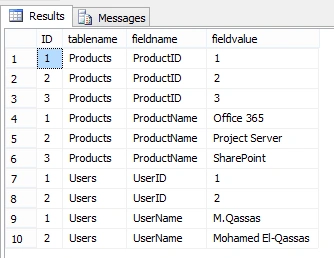
Get a list of the "Fields" (Columns)
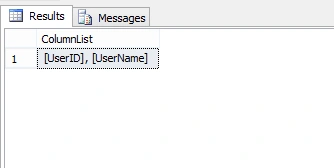
In this section, we will retrieve the list of the fields filtered by "TableID" by using the below SQL statement
- DECLARE @DynamicColumns AS VARCHAR(max)
- SELECT @DynamicColumns = COALESCE(@DynamicColumns + ', ', '')
- + Quotename(fieldname)
- FROM (SELECT DISTINCT fieldname
- FROM fields
- WHERE fields.tid = @TableID) AS FieldList
- COALESCE - Evaluates the arguments in order and returns the current value of the first expression that initially does not evaluate to NULL.
- Quotename - Returns a Unicode string with the delimiters added to make the input string a valid SQL Server delimited identifier.
In this section, we will combine the above two queries to build our Dynamic Pivot
- DECLARE @FinalTableStruct AS NVARCHAR(max)
- SET @FinalTableStruct = 'SELECT ' + @DynamicColumns +
- ' from ##DataQuery x pivot ( max( FieldValue ) for FieldName in (' + @DynamicColumns + ') ) p '
- EXECUTE(@FinalTableStruct)
Join the conversation! Your thoughts help the community grow.