

Introduction
The ToCharArray method of the string class converts a string to a character array. The following code snippet creates a string into a char array.
string sentence = "Mahesh Chand";
char[] charArr = sentence.ToCharArray();
foreach (char ch in charArr)
{
    Console.WriteLine(ch);
}
The ToCharArray method has the following two overloaded forms.
String.ToCharArray() - Copies characters of the string to a unicode character array.
String.ToCharArray(Int32, Int32)  - Copies characters of the substring to a unicode character array.
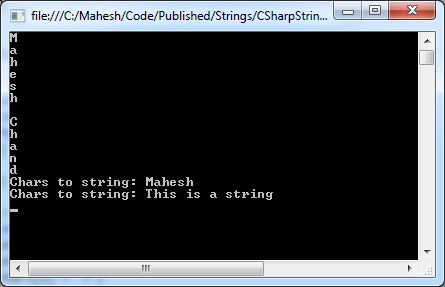
Here is a complete sample code.
public void StringToCharArray()
{

    // Convert string to char array
    string sentence = "Mahesh Chand";
    char[] charArr = sentence.ToCharArray();
    foreach (char ch in charArr)
    {

        Console.WriteLine(ch);
    }

    // Convert char array to string
    char[] chars = new char[10];
    chars[0] = 'M';
    chars[1] = 'a';
    chars[2] = 'h';
    chars[3] = 'e';
    chars[4] = 's';
    chars[5] = 'h';
    string charsStr = new string(chars);
    string charsStr2 = new string(new char[]
    {'T','h','i','s',' ','i','s',' ','a',' ','s','t','r','i','n','g'});
    Console.WriteLine("Chars to string: {0}", charsStr);
    Console.WriteLine("Chars to string: {0}", charsStr2);
}
The output looks like the following.
Genc YmeriPosted May 12, 2020, 4:00 PM
Using System.Linq; ..... char[] chars = s.ToArray<char>();
Dipak NilePosted Jan 13, 2020, 12:31 PM
Nice...thanks for sharing.
Jon HigginsPosted Jan 10, 2020, 2:22 PM
@Critic Programmer - I disagree, showing the usage of built-in methods is valuable in its own right. I found this content useful.
Critic ProgrammerPosted Aug 29, 2019, 6:02 AM
If we have to use built in function.. We don't need to read an article for that. Please always try to clarify things from their root.