When working with Power BI, we often spend a considerable amount of time building reports, designing data models, creating DAX measures, and developing visualisations that help businesses make better decisions.
But what happens when you want to reuse the same report structure for another department, another customer, or a different dataset without sharing the original data?
This is where Power BI templates come in.
In this article, I will demonstrate how to convert an existing Power BI report named sales_report.pbix into a Power BI Template file, sales_report.pbit, and explain why this is a useful feature for Power BI developers.
What is a Power BI .pbix file?
A .pbix file is the standard Power BI Desktop report file.
When you save a report in Power BI Desktop, it is typically saved in the .pbix format. This file contains the report definition, data model, queries, relationships, DAX measures, visualisations, and, depending on how the report was created, imported data.
For example, our sales_report.pbix file might contain:
Sales data loaded from an Excel workbook or SQL database.
A data model with Sales, Product, Customer, and Date tables.
DAX measures such as Total Sales, Total Profit, and Profit Margin.
Relationships between fact and dimension tables.
Report pages containing sales performance dashboards.
The .pbix format is ideal when you want to continue developing a report or distribute a report that includes its data.
However, there are situations where sharing the report with its existing data is unnecessary or undesirable.
What is a Power BI .pbit file?
A .pbit file is a Power BI Template file.
It contains the report structure and design without the imported data itself.
When you convert sales_report.pbix into sales_report.pbit, you preserve the report's queries, data model definition, relationships, DAX measures, report pages, and visualisations.
The actual imported data is not included in the template.
When another user opens the template, Power BI Desktop prompts them to provide the required parameters and data source credentials, where applicable, before loading the data.
This makes .pbit files particularly useful when you want to distribute a reusable report design.
How to convert sales_report.pbix to sales_report.pbit
Let's walk through the conversion process in Power BI Desktop.
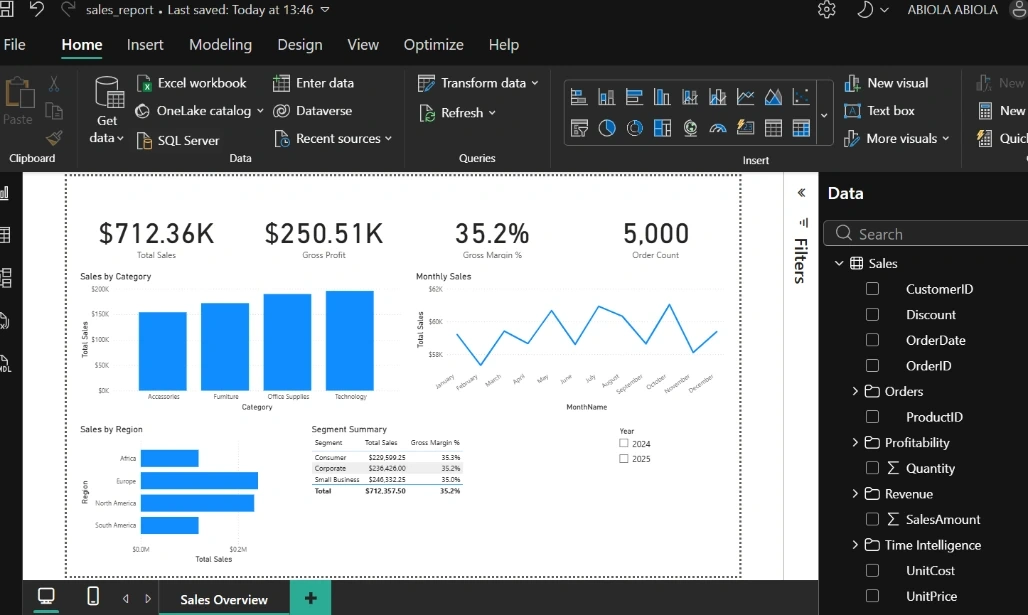
Step 1: Open the existing Power BI report
First, launch Power BI Desktop.
Open your existing report:
sales_report.pbix
Make sure the report is working correctly before converting it into a template.
For this example, our report contains sales performance visualisations, a data model, and several DAX measures.
Step 2: Navigate to File
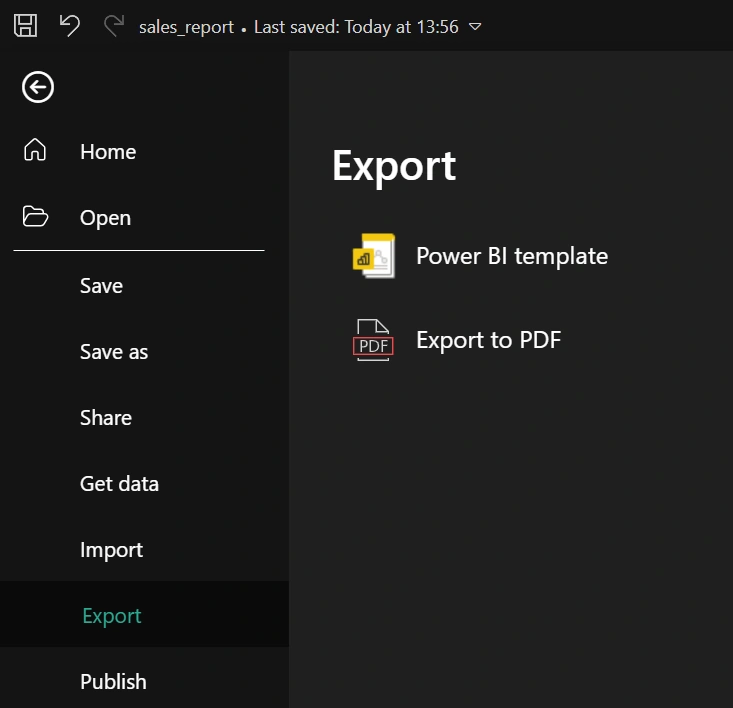
Once the report is open, click the File menu in the top-left corner of Power BI Desktop.
You will see several options, including Save, Save As, Export, and other report management features.
Step 3: Select Export
From the File menu, select:
Export → Power BI template
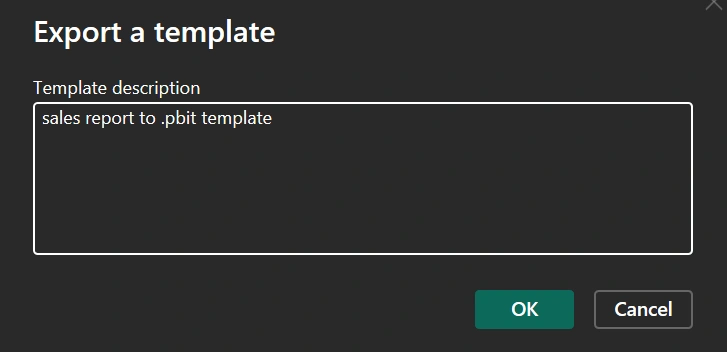
Power BI Desktop will then display a dialog box asking you to provide a description for the template.
You can enter a description such as:
"Reusable Sales Performance Report Template containing the sales data model, DAX measures, and report visualisations."
This description helps users understand the purpose of the template when they open it.
Step 4: Save the template
Choose the location where you want to save the template.
Enter the filename:
sales_report.pbit
Click Save.
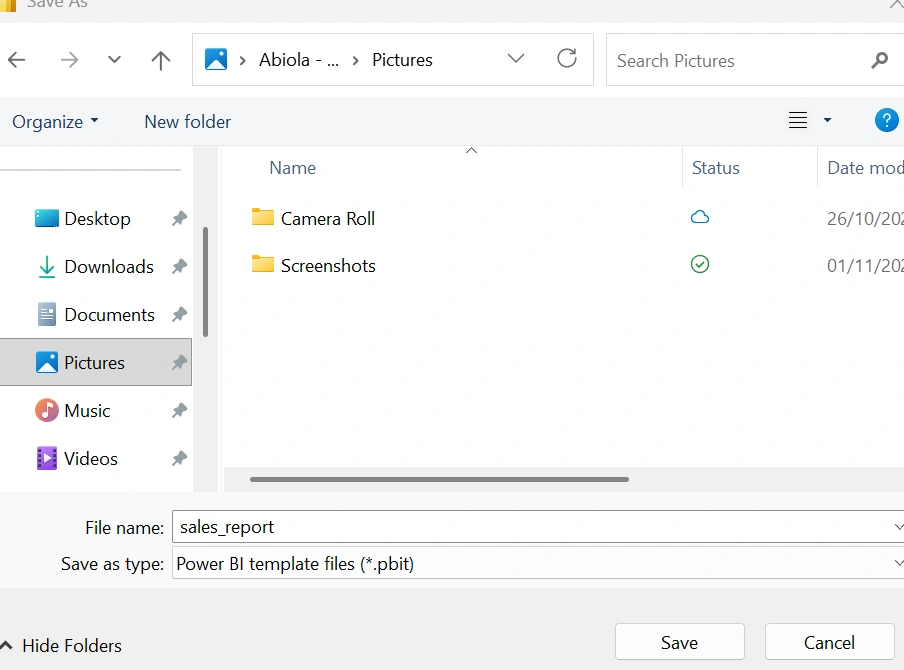
Power BI Desktop will export the report as a template file.
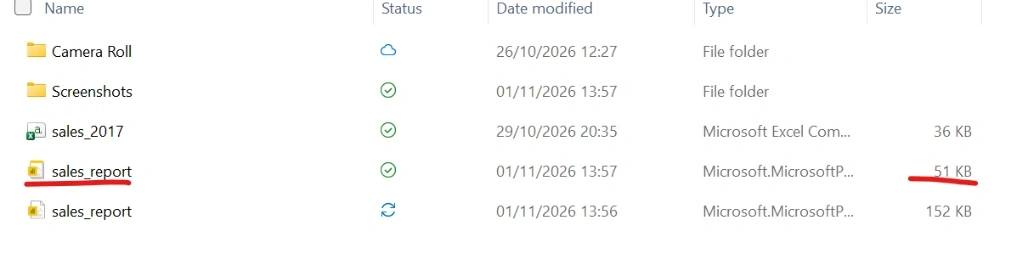
You now have two files:
File | Description |
|---|
sales_report.pbix | Original Power BI report containing the report definition and imported data |
sales_report.pbit | Reusable report template without the imported data |
The original .pbix file remains unchanged.
What happens when you open the .pbit file?
Now, let's understand what happens when another user opens sales_report.pbit.
When the user opens the template in Power BI Desktop, Power BI prompts them to provide the necessary information to connect to the data sources.
For example, if the original report connects to a SQL Server database, the user may need to provide the server name and database name.
If the report uses Power Query parameters, Power BI may prompt the user to enter values for those parameters.
Once the required information is provided, Power BI loads the data and recreates the report using the original report structure.
The user can then save the report as a new .pbix file.
This means the same report design can be reused for different datasets without rebuilding the report from scratch.
Benefits of converting .pbix to .pbit
1. Reusability
One of the biggest benefits of Power BI templates is reusability.
Imagine you have developed a sales report for a company operating in the United Kingdom.
Another business wants to use the same report design but has its own sales database.
Instead of rebuilding the report, you can provide the .pbit file.
The second business can connect the template to its own data source while retaining the original report structure.
2. Data privacy
A .pbit file does not contain the imported data from the original report.
This can be useful when sharing report designs with external users, clients, or colleagues.
For example, you might have developed a sales dashboard containing confidential sales figures.
You can distribute the template without including the original imported sales data.
However, it is important to remember that templates are not a complete security solution. Queries, connection details, parameters, and other metadata may still be present. Always review the template before sharing it.
3. Faster report development
Power BI developers often build similar reports for different departments or customers.
A template allows developers to reuse existing report designs, data models, measures, and visualisations.
This reduces repetitive development work and helps teams deliver reports more quickly.
4. Standardisation
Templates make it easier to maintain consistent reporting standards across an organisation.
For example, a company might want all its departments to use the same:
Report layout and navigation.
Colour schemes and branding.
DAX measures and calculations.
KPI definitions.
Visualisation styles.
By distributing a standardised Power BI template, developers can help ensure that different departments produce reports using a consistent design.
5. Easier distribution
A .pbit file is useful when distributing a reusable report design.
Instead of sharing a complete report containing imported data, you can share the template and allow users to connect it to their own data sources.
This is particularly useful for consultants, Power BI developers, and organisations that create reporting solutions for multiple clients.
Important considerations
Although Power BI templates provide several benefits, there are a few things to keep in mind.
First, a .pbit file does not automatically replace the original data source. Users still need access to the relevant data sources and must provide the required connection details.
Second, templates do not guarantee that every report will work with a completely different dataset. The new dataset must have compatible tables, columns, data types, and structures for the existing queries and model to function correctly.
Third, a template is not a substitute for proper access control. If you are sharing reports containing confidential information, always review the template and its metadata before distribution.
Finally, if your goal is to share the entire report, including its imported data, the .pbix format may be more appropriate.
In conclusion, converting a Power BI .pbix file into a .pbit template is a simple but powerful way to make your reports reusable.
By exporting sales_report.pbix as sales_report.pbit, you can retain the report design, data model, queries, and DAX measures while excluding the imported data.
This makes Power BI templates valuable for data privacy, standardisation, faster development, and distributing reusable reporting solutions.
For Power BI developers, understanding when to use .pbix and when to use .pbit is an important part of building scalable and maintainable reporting solutions.
The next time you develop a report that could be reused across multiple departments or organisations, consider converting it into a Power BI template.


Join the conversation! Your thoughts help the community grow.