

In my previous article about Knockout.js, I explained Computed Observables in Knockout.js.
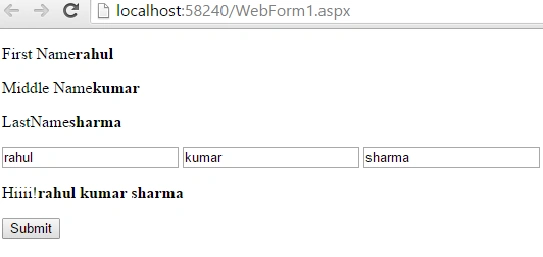
This article explains how to convert words into lowercase on the click of a button.
Step 1
Start Visual Studio.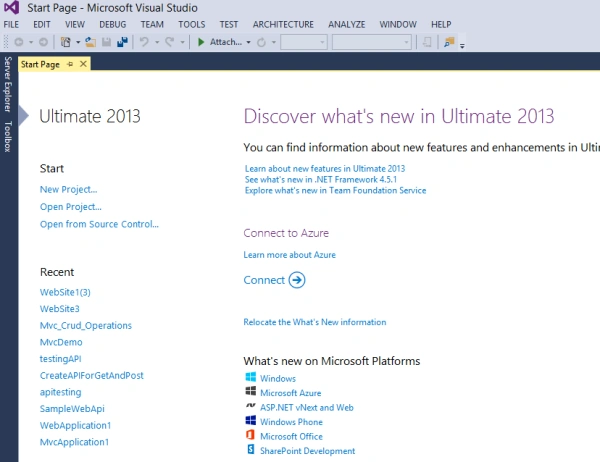
Step 2
For executing application in knockout.js we need to add the knockout.js library to our website. To do that we will manage the NuGet Package. For this, right-click on the website and click on the NuGet Packages.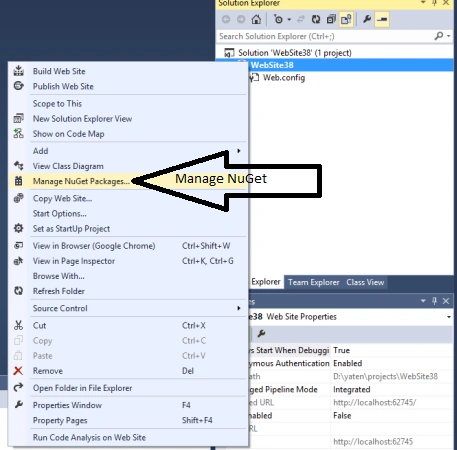
Step 3
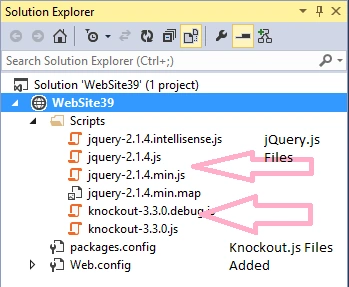
In the NuGet packages we will search for Knockout.js and install Knockout.js library.
Step 4
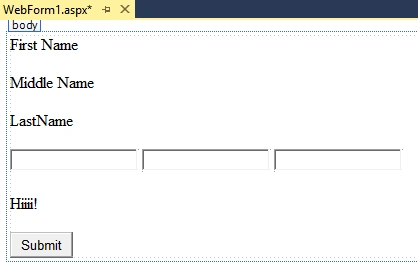
After adding the library, now we will design the web form like the following:
Step 5
Now we need to add the knockout.js file to our application.
- <head runat="server">
- <title></title>
- <script src="Scripts/knockout-3.3.0.js"></script>
- </head>
I have added the knockout-3.3.0.js file because without this we can't do the knockout.js operation.
We write the following code for designing the form:
- <div>
- <p>First Name<strong data-bind="text: StartName"></strong></p>
- <p>Middle Name<strong data-bind="text: middlename"></strong></p>
- <p>LastName<strong data-bind="text: EndName"></strong></p>
- <input data-bind="value: StartName" />
- <input data-bind="value: middlename"? />
- <input data-bind="value: EndName" />
- <p>Hiiii!<strong data-bind="text: completeName"></strong></p>
- <button data-bind="click: capsName">Submit</button>
- </div>
In this I have taken three labels that indicate the first name, middle name, last name and I have also taken three textboxes for input from the user. Also, I will add a button for performing the operations.
Step 6
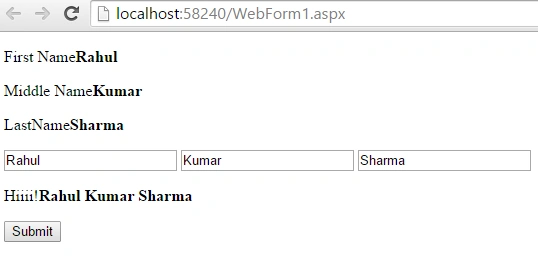
Now we will write the complete code for Knockout.js. By default I have taken the value Rahul kumar Sharma.
Complete Code
- <%@ Page Language="C#" AutoEventWireup="true" CodeBehind="WebForm1.aspx.cs" Inherits="WebApplication4.WebForm1" %>
- <!DOCTYPE html>
- <html xmlns="http://www.w3.org/1999/xhtml">
- <head runat="server">
- <title></title>
- <script src="Scripts/knockout-3.3.0.js"></script>
- </head>
- <body>
- <form id="form1" runat="server">
- <div>
- <p>First Name<strong data-bind="text: StartName"></strong></p>
- <p>Middle Name<strong data-bind="text: middlename"></strong></p>
- <p>LastName<strong data-bind="text: EndName"></strong></p>
- <input data-bind="value: StartName" />
- <input data-bind="value: middlename"? />
- <input data-bind="value: EndName" />
- <p>Hiiii!<strong data-bind="text: completeName"></strong></p>
- <button data-bind="click: capsName">Submit</button>
- </div>
- </form>
- <script>
- function x()
- {
- this.StartName = ko.observable("Rahul");
- this.middlename = ko.observable("Kumar");
- this.EndName = ko.observable("Sharma");
- this.completeName = ko.computed(function ()
- {
- return this.StartName() + " " + this.middlename() + " " + this.EndName();
- }, this);
- this.capsName = function ()
- {
- var firstCaps = this.StartName();
- this.StartName(firstCaps.toLowerCase());
- var middleCaps = this.middlename();
- this.middlename(middleCaps.toLowerCase());
- var lastCaps = this.EndName();
- this.EndName(lastCaps.toLowerCase());
- }
- }
- ko.applyBindings(new x());
- </script>
- </body>
- </html>
Now we will execute that code using the F5 key. After execution the following window appears on the screen.
If we click on the submit button then all words are converted into lowercase.
Summary
In this article I explained how to convert words into lowercase on the click of a button.
I hope this article will be helpful for beginners if they want to start working on knockout.js in Visual Studio 2013.
Ravi KandelPosted Aug 14, 2016, 3:12 AM
Nice
Bhuvanesh MohankumarPosted May 3, 2016, 12:40 PM
Good one..
Santhakumar MunuswamyPosted Jul 30, 2015, 6:22 AM
Thanks for nice article
Yatendra SharmaPosted Jul 30, 2015, 12:40 AM
Rakesh Chavda thanx
Yatendra SharmaPosted Jul 30, 2015, 12:39 AM
Gopi Chand thanx
Yatendra SharmaPosted Jul 30, 2015, 12:39 AM
Nilesh Jadav thanx sir
Yatendra SharmaPosted Jul 30, 2015, 12:39 AM
Sibeesh Venu thanx
Yatendra SharmaPosted Jul 30, 2015, 12:38 AM
Rajeesh Menoth thanx
Yatendra SharmaPosted Jul 30, 2015, 12:37 AM
Neeraj Kumar thanx
Shridhar SharmaPosted Jul 29, 2015, 6:11 PM
nice one keep it up.
sreenivasa kPosted Jul 29, 2015, 2:53 PM
good one
sreenivasa kPosted Jul 29, 2015, 2:53 PM
good
RakeshPosted Jul 29, 2015, 9:54 AM
Good one
Gopi ChandPosted Jul 29, 2015, 8:59 AM
Its good one
Nilesh JadavPosted Jul 29, 2015, 6:47 AM
Nice article sir
Sibeesh VenuPosted Jul 29, 2015, 6:08 AM
Nice Share.
Rajeesh MenothPosted Jul 29, 2015, 6:02 AM
Good One
Neeraj KumarPosted Jul 29, 2015, 5:58 AM
Good Work
Yatendra SharmaPosted Jul 29, 2015, 5:41 AM
Debasis Saha thanx
Yatendra SharmaPosted Jul 29, 2015, 5:40 AM
Atul Rawat thanx bro
Debasis SahaPosted Jul 29, 2015, 5:29 AM
Nice one..
Atul RawatPosted Jul 29, 2015, 5:23 AM
nice article