

Introduction
Authentication is the process of determining or giving an individual access to system or user based on their identity. There are multiple options to do authentication in .net core. This article demonstrates how to add cookie base authentication in .net core 3.0.
With .net core 3.0, you can use cookie-based authentication out of box without adding new additional NuGet packages.
Prerequisites
- Install .NET Core 3.0.0 or above SDK from here.
- Install the latest version of Visual Studio 2019 Community Edition from here.
Steps for creating a web application
Step 1
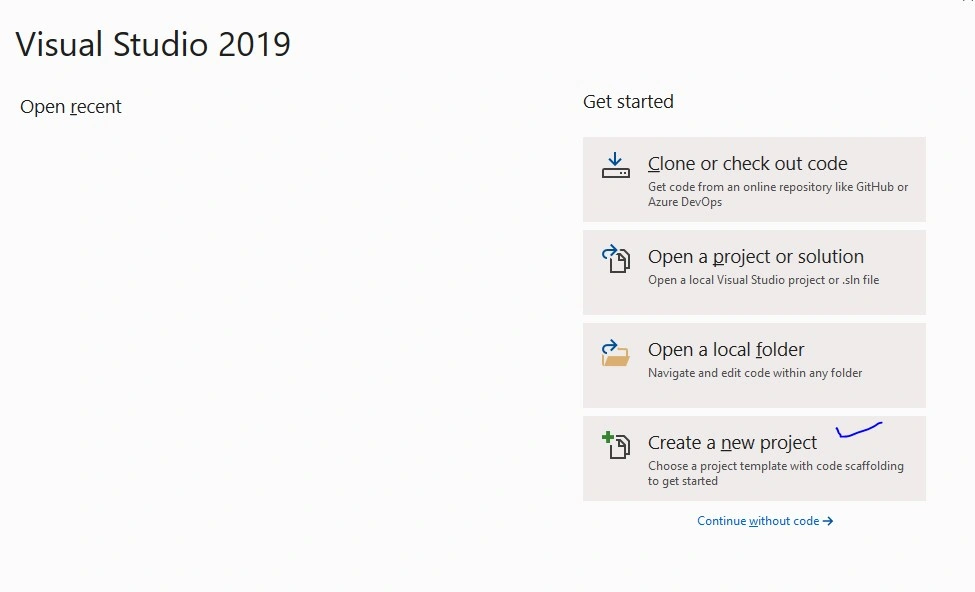
Go to Visual Studio 2019 then select Create new project option from option list.
Step 2
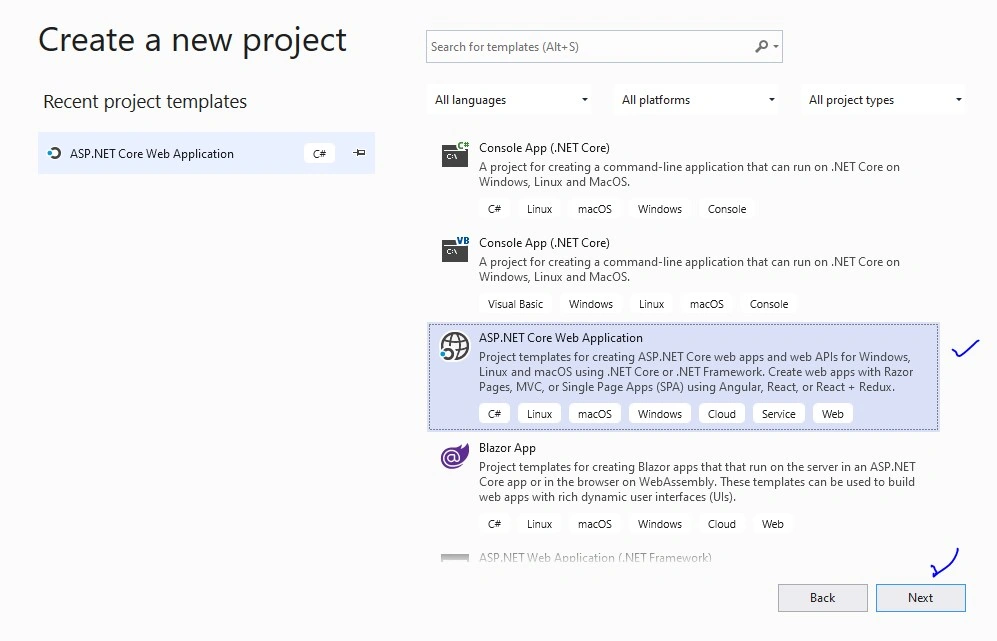
After selecting that, a new window will open to select project template.
Step 3
Select “ASP.NET Core Web Application” and click on Next button.
Step 4
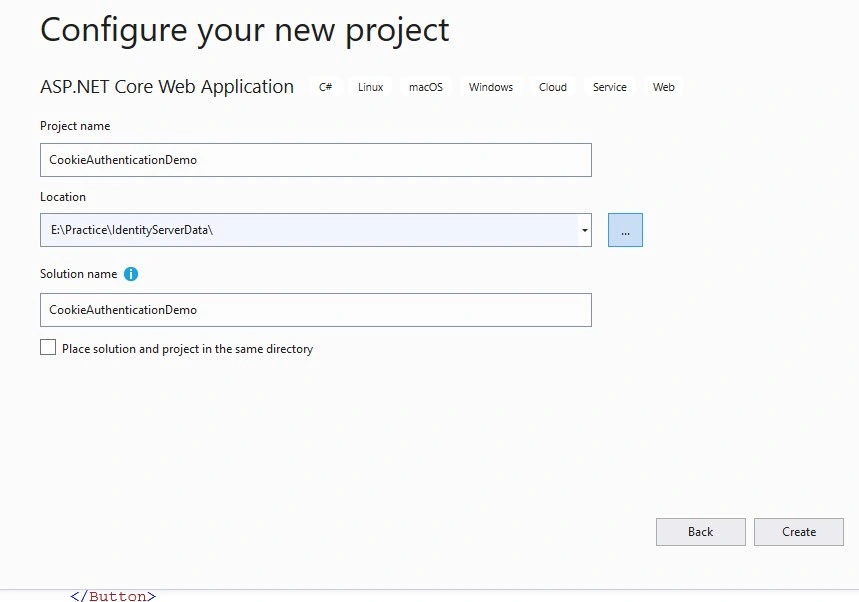
A new screen will open to configure your new project. Provide Project Name, Location, Solution Name as per your requirement. Press Create button.
Step 5
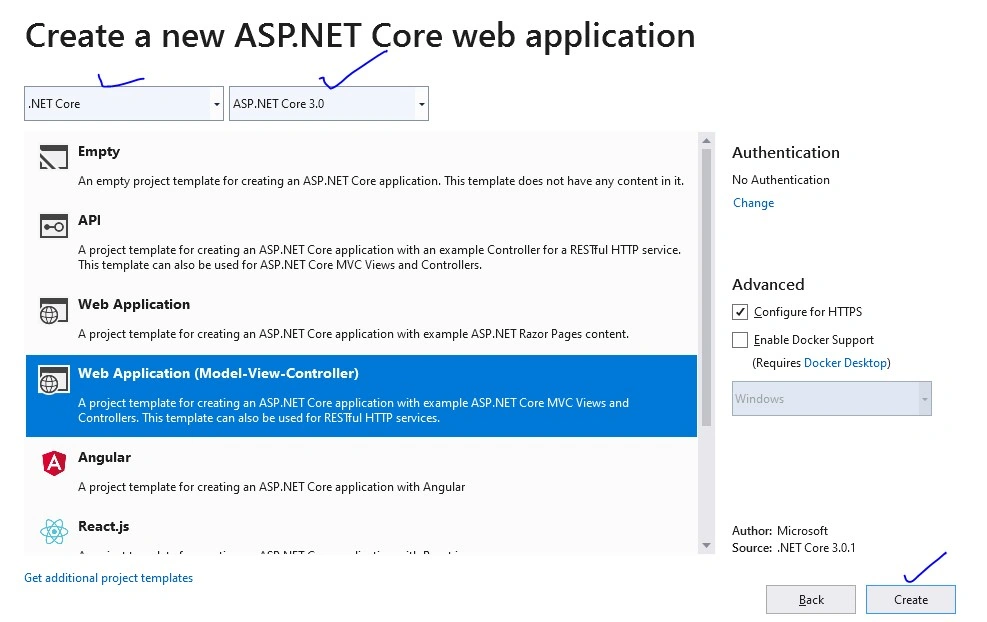
After clicking on the Create button, a new screen will open to configure your project related information like which environment do you want create for web application? .Net Framework or .Net Core. Select .Net Core and ASP.NET Core Version from drop down list. Then, select web application (Model-View-Controller) option from list and press create button to create a project.
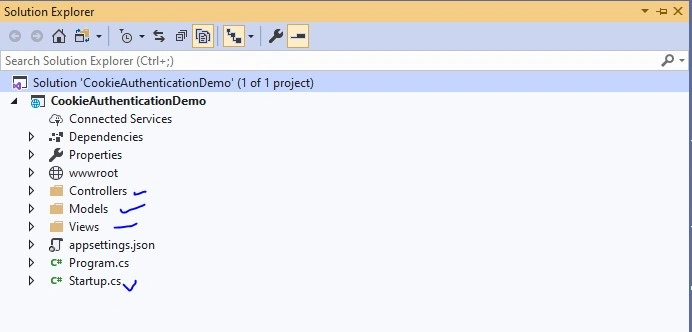
Now our project will open with the basic structure of .net core environment. You can observe in the solution explorer that will have Controllers, Models and Views folders with “Startup.cs” and other files as well like below image.
Step 6
Run your application to check if the created web application is running fine or not. By default, it will open a Home page (Index page of Home controller) of your project.
Integrate Cookie Authentication
- [Authorize] :- attribute helps to validate user to an access controller (User Information).
- Claim :- Contains user related information which will store into cookie.
- ClaimsIdentity :- Passes list of claims and AuthenticationTypes
- ClaimsPrincipal :- Accept an array of ClaimsIdentity.
- SignInAsync:- Passes ClaimsPrinciple to it as paramater and finally this method will create a cookie into the browser.
Statup.cs file code changes
Open “Statup.cs” file and add AddAuthentication service into ConfigureServices method like below. Provide login path to login user to check/verify if user is valid or not.
- public void ConfigureServices(IServiceCollection services)
- {
- services.AddAuthentication("CookieAuthentication")
- .AddCookie("CookieAuthentication", config =>
- {
- config.Cookie.Name = "UserLoginCookie";
- config.LoginPath = "/Login/UserLogin";
- });
- services.AddControllersWithViews();
- }
Add UseAuthentication and UseAuthorization extension method into Configure method of “Starup.cs”.
- UseAuthentication - helps us to check “Who are you?”
- UseAuthorization - helps to check “Are you allowed to access information?”
Complete code in Startup.cs file,
- using System;
- using System.Collections.Generic;
- using System.Linq;
- using System.Threading.Tasks;
- using Microsoft.AspNetCore.Builder;
- using Microsoft.AspNetCore.Hosting;
- using Microsoft.AspNetCore.HttpsPolicy;
- using Microsoft.Extensions.Configuration;
- using Microsoft.Extensions.DependencyInjection;
- using Microsoft.Extensions.Hosting;
- namespace CookieAuthenticationDemo
- {
- public class Startup
- {
- public Startup(IConfiguration configuration)
- {
- Configuration = configuration;
- }
- public IConfiguration Configuration { get; }
- // This method gets called by the runtime. Use this method to add services to the container.
- public void ConfigureServices(IServiceCollection services)
- {
- services.AddAuthentication("CookieAuthentication")
- .AddCookie("CookieAuthentication", config =>
- {
- config.Cookie.Name = "UserLoginCookie";
- config.LoginPath = "/Login/UserLogin";
- });
- services.AddControllersWithViews();
- }
- // This method gets called by the runtime. Use this method to configure the HTTP request pipeline.
- public void Configure(IApplicationBuilder app, IWebHostEnvironment env)
- {
- if (env.IsDevelopment())
- {
- app.UseDeveloperExceptionPage();
- }
- else
- {
- app.UseExceptionHandler("/Home/Error");
- // The default HSTS value is 30 days. You may want to change this for production scenarios, see https://aka.ms/aspnetcore-hsts.
- app.UseHsts();
- }
- app.UseHttpsRedirection();
- app.UseStaticFiles();
- app.UseRouting();
- // who are you?
- app.UseAuthentication();
- // are you allowed?
- app.UseAuthorization();
- app.UseEndpoints(endpoints =>
- {
- endpoints.MapControllerRoute(
- name: "default",
- pattern: "{controller=Home}/{action=Index}/{id?}");
- });
- }
- }
- }
Add User.cs file into Model folder
Add new class into Models folder with name Users and put the below lines of code into it.
- using System.Collections.Generic;
- namespace CookieAuthenticationDemo.Models
- {
- public class Users
- {
- public int Id { get; set; }
- public string UserName { get; set; }
- public string Name { get; set; }
- public string EmailId { get; set; }
- public string Password { get; set; }
- public IEnumerable<Users> GetUsers()
- {
- return new List<Users>() { new Users { Id = 101, UserName = "anet", Name = "Anet", EmailId = "[email protected]", Password = "anet123" } };
- }
- }
- }
Update HomeController with new action method
HomeController is default controller created by Visual Studio while creating a new project.
a) Add a new action method into HomeController to get list of users with Authorize attribute.
- using CookieAuthenticationDemo.Models;
- using Microsoft.AspNetCore.Authorization;
- using Microsoft.AspNetCore.Mvc;
- namespace CookieAuthenticationDemo.Controllers
- {
- public class HomeController : Controller
- {
- public IActionResult Index()
- {
- return View();
- }
- [Authorize]
- public ActionResult Users()
- {
- var uses = new Users();
- return View(uses.GetUsers());
- }
- }
- }
b) Add view for users
- Go to Views folder and select Home folder
- Right click on the Home folder to select add option and select view.
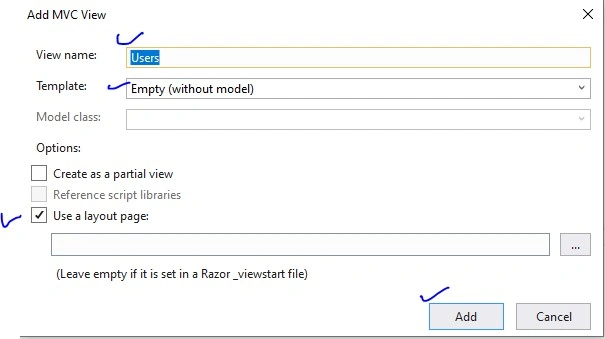
- A window popup will open to add View.
- Provide view name as User, select Template as Empty, select use layout page and press Add button. A new Users.cshtml file will create into Home folder. Refer to the below image to add view.
Put the below lines of code into it to show list of users
- @model IEnumerable<CookieAuthenticationDemo.Models.Users>
- @{
- ViewData["Title"] = "Users";
- }
- <h1>Users</h1>
- <table class="table">
- <thead>
- <tr>
- <th>
- @Html.DisplayNameFor(model => model.Id)
- </th>
- <th>
- @Html.DisplayNameFor(model => model.UserName)
- </th>
- <th>
- @Html.DisplayNameFor(model => model.Name)
- </th>
- <th>
- @Html.DisplayNameFor(model => model.EmailId)
- </th>
- <th></th>
- </tr>
- </thead>
- <tbody>
- @foreach (var item in Model) {
- <tr>
- <td>
- @Html.DisplayFor(modelItem => item.Id)
- </td>
- <td>
- @Html.DisplayFor(modelItem => item.UserName)
- </td>
- <td>
- @Html.DisplayFor(modelItem => item.Name)
- </td>
- <td>
- @Html.DisplayFor(modelItem => item.EmailId)
- </td>
- </tr>
- }
- </tbody>
- </table>
Add new controller with name Login
- Right click on controllers folder
- Select Add then select Controller and then select MVC empty controller and click on add button.
- Add controller with name Login as “LoginController”
- Add below code into that controller
- using CookieAuthenticationDemo.Models;
- using Microsoft.AspNetCore.Authentication;
- using Microsoft.AspNetCore.Mvc;
- using System.Collections.Generic;
- using System.Linq;
- using System.Security.Claims;
- namespace CookieAuthenticationDemo.Controllers
- {
- public class LoginController : Controller
- {
- [HttpGet]
- public ActionResult UserLogin()
- {
- return View();
- }
- [HttpPost]
- public ActionResult UserLogin([Bind] Users user)
- {
- // username = anet
- var users = new Users();
- var allUsers = users.GetUsers().FirstOrDefault();
- if (users.GetUsers().Any(u => u.UserName == user.UserName ))
- {
- var userClaims = new List<Claim>()
- {
- new Claim(ClaimTypes.Name, user.UserName),
- new Claim(ClaimTypes.Email, "[email protected]"),
- };
- var grandmaIdentity = new ClaimsIdentity(userClaims, "User Identity");
- var userPrincipal = new ClaimsPrincipal(new[] { grandmaIdentity });
- HttpContext.SignInAsync(userPrincipal);
- return RedirectToAction("Index", "Home");
- }
- return View(user);
- }
- }
- }
Add a UserLogin.cshtml(UserLogin view) page,
- Add new folder into Views folder with name User.
- Add UserLogin into User folder and add below lines of code into it to user login
Code for UserLogin.cshtml
- @model CookieAuthenticationDemo.Models.Users
- @{
- ViewData["Title"] = "User Login";
- }
- <hr />
- <div class="row">
- <div class="col-md-4">
- <form asp-action="UserLogin">
- <h2>User Login</h2>
- <div asp-validation-summary="ModelOnly" class="text-danger"></div>
- <div class="form-group">
- <label asp-for="UserName" class="control-label"></label>
- <input asp-for="UserName" class="form-control" />
- <span asp-validation-for="UserName" class="text-danger"></span>
- </div>
- <div class="form-group">
- <label asp-for="Password" class="control-label"></label>
- <input type="password" asp-for="Password" class="form-control" />
- <span asp-validation-for="Password" class="text-danger"></span>
- </div>
- <div class="form-group">
- <input type="submit" value="Login" class="btn btn-default btn-primary" />
- </div>
- </form>
- </div>
- </div>
Update _Layout.cshtml page
Update _Layout.cshtml page to add new tab/hyperlink to get list of users.
Code for _Layout.cshtml
- <!DOCTYPE html>
- <html lang="en">
- <head>
- <meta charset="utf-8" />
- <meta name="viewport" content="width=device-width, initial-scale=1.0" />
- <title>@ViewData["Title"] - CookieAuthenticationDemo</title>
- <link rel="stylesheet" href="~/lib/bootstrap/dist/css/bootstrap.min.css" />
- <link rel="stylesheet" href="~/css/site.css" />
- </head>
- <body>
- <header>
- <nav class="navbar navbar-expand-sm navbar-toggleable-sm navbar-light bg-white border-bottom box-shadow mb-3">
- <div class="container">
- <a class="navbar-brand" asp-area="" asp-controller="Home" asp-action="Index">CookieAuthenticationDemo</a>
- <button class="navbar-toggler" type="button" data-toggle="collapse" data-target=".navbar-collapse" aria-controls="navbarSupportedContent"
- aria-expanded="false" aria-label="Toggle navigation">
- <span class="navbar-toggler-icon"></span>
- </button>
- <div class="navbar-collapse collapse d-sm-inline-flex flex-sm-row-reverse">
- <ul class="navbar-nav flex-grow-1">
- <li class="nav-item">
- <a class="nav-link text-dark" asp-area="" asp-controller="Home" asp-action="Index">Home</a>
- </li>
- <li class="nav-item">
- <a class="nav-link text-dark" asp-area="" asp-controller="Home" asp-action="Users">Users</a>
- </li>
- </ul>
- </div>
- </div>
- </nav>
- </header>
- <div class="container">
- <main role="main" class="pb-3">
- @RenderBody()
- </main>
- </div>
- <footer class="border-top footer text-muted">
- <div class="container">
- © 2020 - CookieAuthenticationDemo - <a asp-area="" asp-controller="Home" asp-action="Privacy">Privacy</a>
- </div>
- </footer>
- <script src="~/lib/jquery/dist/jquery.min.js"></script>
- <script src="~/lib/bootstrap/dist/js/bootstrap.bundle.min.js"></script>
- <script src="~/js/site.js" asp-append-version="true"></script>
- @RenderSection("Scripts", required: false)
- </body>
- </html>
Run your application
After successfully running your application, the output of your application should be like the below screen,
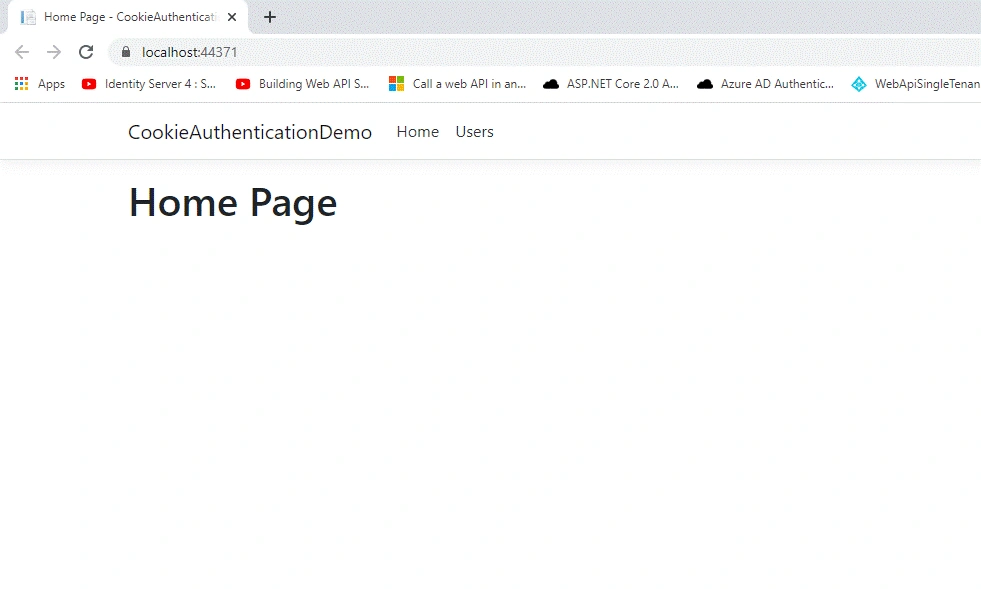
Click on Users tab to get a list of users, it will open a login page to log in a user.
Q) Why will it ask for login?
Ans - [Authorize] attribute restrict to access data/information for unauthorized requests and redirect to login page to check if user is valid or not. In our case we have added this attrubute over the Users action method of HomeController.
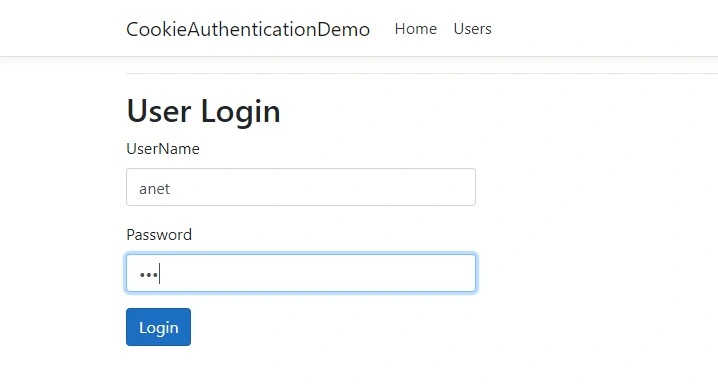
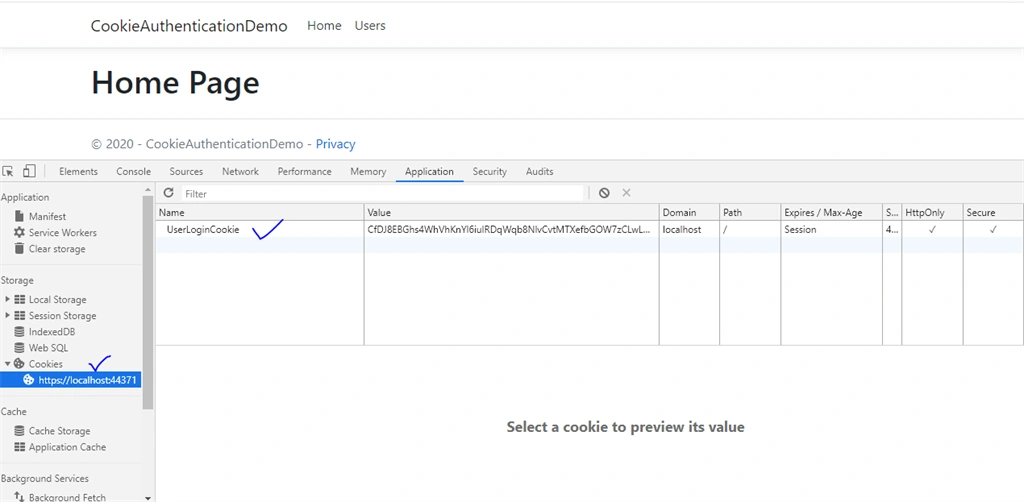
Provide username and password to login. After login, it will create a cookie in the browser like below.
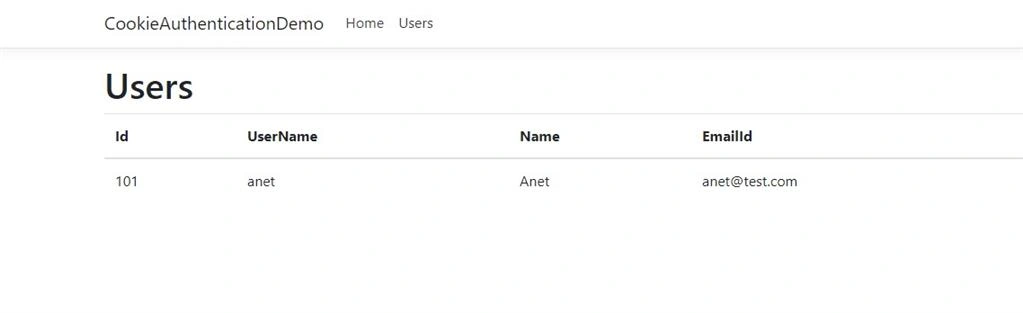
Click on the Users tab again and now you can find the final result of user list without asking for login screen.
To test your cookie base authentication, you can delete that created cookie from browser and click on the Users tab. It will ask for login again.
Summary
In this article, I discussed how to add cookie based authentication in .net core 3.0. We have also created a user login form to login a user to our application to access useful information. Please find attached code for better understanding.
Pradeep ShetPosted Jan 18, 2022, 12:48 PM
Nicely written
Владимир КириченкоPosted May 27, 2021, 2:33 PM
Good article! Thank you, author. It's works! But, the realization of [HttpPost] public ActionResult UserLogin([Bind] Users user) method is ugly. Password doesn't checking. Any other user except "FirstOrDefault" will not being authorize.
SidPosted Feb 15, 2021, 5:28 PM
I read that when cookie is created, a sessionId is generated and on relogin, aspnet checks for the sessionId. but if i inspect the User.Session object, it's null basically so where is the cookie information validated? thanks in advance
SidPosted Feb 15, 2021, 5:26 PM
Brilliant article... What piece of code checks the presence of cookie and looks for claims... what are these claims compared with to determine if authentication is success or not. There could be another cookie with same name but different claims so obviously that will not be a successful authentication. Can you point out which section does this checking take place in?
gunakar appalaPosted Feb 9, 2021, 6:11 PM
How to clear cookies after closing browser. it will store cookies and given access even after open the browser next time.
Duncan CarrPosted Jan 15, 2021, 11:23 AM
Hi Prashant. Thank you for your excellent tutorial. Must mention though - you have config.LoginPath = "/Login/UserLogin"; and you said "Add UserLogin into User folder". This crashed on me. I needed to change "User" folder to "Login" and then it worked. Thanks again. Duncan
Steve NapPosted Jul 21, 2020, 10:09 PM
Hi how can we access the claims in another controller?
xcalculusPosted Jun 29, 2020, 2:58 AM
How secure is cookie Authenticator over using signinmanager based authentication and does the client browser have to be configured to accept cookies for the Authentication to work?
xcalculusPosted Jun 29, 2020, 2:57 AM
How secure is cookie Authenticator over using signinmanager based authentication and does the client browser have to be configured to accept cookies for the Authentication to work?
chandrasirisPosted Mar 21, 2020, 1:47 PM
May I know how can I add more Users to the Ienmerable<Users> list?
chandrasirisPosted Mar 21, 2020, 1:43 PM
May I know how can we enable LOGOUT?
chandrasirisPosted Mar 21, 2020, 1:42 PM
Thank you for your article.
Guest UserPosted Feb 11, 2020, 3:10 PM
A concise article for realistic authentication, but joy oh joy without EF behemoth. great for us Dapper devs. Thank you. i will impliment this and look for your other articles.
Prashant RewatkarPosted Jan 18, 2020, 9:09 AM
Thanks for reading my an article @??
Sourav Kumar DasPosted Jan 17, 2020, 11:19 AM
Nice and useful article. Thanks for sharing.
Hamid KhanPosted Jan 16, 2020, 2:30 PM
Good Article...……….