

I hope you have a look at my article Part 1 Cool Features in Visual Studio 2013. You can get it from:
http://www.c-sharpcorner.com/UploadFile/a6fd36/cool-features-in-visual-studio-2013-part-1/
I would like to continue with the remaining features as in the following:
- HTML 5 Editor Enhancement
- Themes
- JavaScript Enhancements
- Auto Brace Complete
- Move Line Up and down (Alt+ and Alt+)
- Code Map Window
- Feedback and Notifications
- UI icons Enhancement
Feature 8: HTML 5 Editor Enhancement
HTML Code for Unicode characters now has autocomplete support. We can find the autocomplete Ampersand (&) as in the following.
Feature 9: Themes
We can find a new Blue Theme introduced in Visual Studio 2013 that provides a better and eye-catching look. We can also edit or import/export various themes that are clearly explained in http://blogs.msdn.com/b/visualstudio/archive/2010/01/04/changing-visual-studio-s-color-palette.aspx
Feature 10: JavaScript Enhancements
Now we can have a method listed in a dropdown and they are indented as per their scope. Also if we are working on that method, the method is highlighted.
Feature 11: Auto Brace Complete
We can find a new Blue Theme introduced in Visual Studio 2013.
Feature 12: Move Line Up/Down (Alt + up arrow and Alt + down arrow)
The move Line Up/ Down feature allows us to move a single line or multiple lines up and down in the code file using the keyboard shortcut Alt + Up Arrow and Alt + Down Arrow.
Feature 13: Code Map Window
We can find a code map option at the top near to debug that shows a visual representation of the execution flow.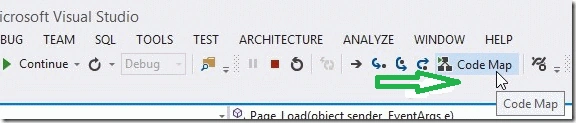

Feature 14: Feedback/Notifications
Now we will be able to easily provide feedback or issues about the product to Microsoft using the icon and the top right corner. And also receive notifications about the product and prereleases.
Feature 15: UI Icons Enhancements
We can find a new Blue Theme introduced in Visual Studio 2013.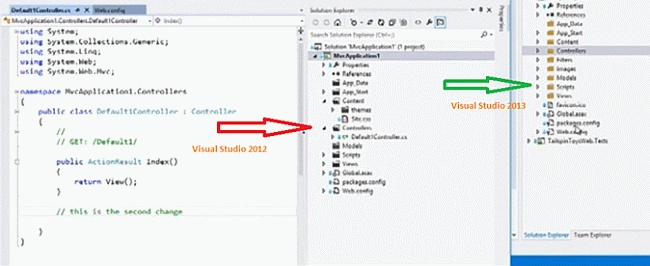
Conclusion
Even though I have covered all the main features I might have missed some of the features Please let me know through your comments. Thanks for having a look at my article with these new features. I hope we can have a better coding experience. Happy Coding.
siva saikrishnaPosted Aug 26, 2013, 12:46 AM
really nice