This article will help individuals who are looking for a solution to copy the list items from source site to destination site by retaining the ID's and item versions in SharePoint online without using any third-party tool.
When our SharePoint list crossed the thresold limit (5000), we are wanting to archive the items in a different list on the same site or different site. We can now archive the items on the same site or a different site using these scripts.
Prequisites
  • Download and install the SharePoint Online SDK from this article
  • Destination site list should have similar columns.
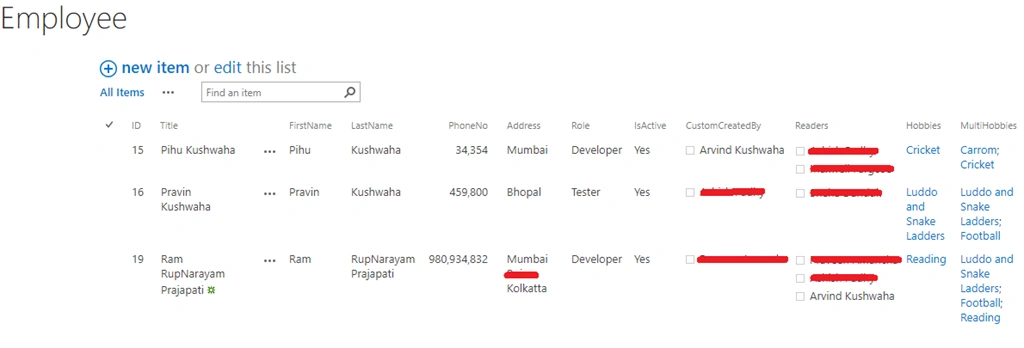
For demonstration purposes, I have created two lists on the source site; i.e. Hobbies and Employee
Source List
Copy List Items By Retaining ID In SharePoint Online
Employee List
Copy List Items By Retaining ID In SharePoint Online
Note
If source site list contains any lookup columns, then first copy the lookup list on the destination site before proceding with the actual list. Since my list Employee contains the lookup column, I will copy the Hobbies list first then Employee list.

Using Powershell

For demo, I have stored the credentials in the file. To learn more refer to my article.
As we know Id's in SharePoint lists are autogenerated, hence to retain Id's on destination site we use the following approach,
  • Create new item in destination list and compare with source list item
  • If source list item id is equal to destination list item id then continue copying items.
  • If source list item id is not equal to destination list item id then create and delete the dummy items in destination list till it matches with source item id.
Note
Run this script only if destination list doesn't have any items, If any record exists in list then delete the list and create a new one before running this script.
  1. #Passing Credentials
  2. $credPath = 'D:\Arvind\safe\secretfile.txt'
  3. $fileCred = Import-Clixml -path $credpath
Change the following parameters before running the script.
  1. #Set Parameters
  2. $todayDate = (Get-Date).toString("yyyy_MM_dd")
  3. $Logfile = "D:\Logs\copyListItems_" + $todayDate + ".txt"
  4. $srcListSiteUrl = "Your Source Site"
  5. $SourceListName = "Employee"
  6. $dstListSiteUrl = "Your Destionation Site"
  7. $TargetListName = "Employee"
  8. $sourceQuery = "<View>
  9. </View>"
Copy the list items from source site Employee list using this code.
  1. Function Copy-ListItems() {
  2. param
  3. (
  4. [Parameter(Mandatory = $true)] [string] $siteURL,
  5. [Parameter(Mandatory = $true)] [string] $destSiteURL,
  6. [Parameter(Mandatory = $true)] [string] $SourceListName,
  7. [Parameter(Mandatory = $true)] [string] $TargetListName,
  8. [Parameter(Mandatory = $true)] [string] $query,
  9. [Parameter(Mandatory = $true)] [string] $Logfile
  10. )
  11. Try {
  12. If (!(test-path $Logfile)) {
  13. New-Item -Path $Logfile -Type File -Force | Out-Null
  14. }
  15. LogWrite "Copy-ListItems Fuction Called"
  16. $Cred = New-Object Microsoft.SharePoint.Client.SharePointOnlineCredentials($fileCred.UserName, $fileCred.Password)
  17. #Setup the source context
  18. $sourceCtx = New-Object Microsoft.SharePoint.Client.ClientContext($siteURL)
  19. $sourceCtx.Credentials = $Cred
  20. #Setup the destination Context
  21. $destCtx = New-Object Microsoft.SharePoint.Client.ClientContext($destSiteURL)
  22. $destCtx.Credentials = $Cred
  23. LogWrite "User Credential is valid and It is Successfully Login"
  24. #Get Current loged User on destination Site
  25. $currentUser = $destCtx.Web.CurrentUser;
  26. $destCtx.Load($currentUser)
  27. $destCtx.ExecuteQuery()
  28. $currentUser = $destCtx.Web.EnsureUser($currentUser.Email)
  29. $destCtx.Load($currentUser)
  30. $destCtx.ExecuteQuery()
  31. #Get the Source List and Target Lists
  32. $SourceList = $sourceCtx.Web.Lists.GetByTitle($SourceListName)
  33. $TargetList = $destCtx.Web.Lists.GetByTitle($TargetListName)
  34. #Get CAML Query object
  35. $camlquery = New-Object Microsoft.SharePoint.Client.CamlQuery;
  36. $camlquery.ViewXml = $query
  37. LogWrite "Query:" $query
  38. #Get All Items from the Source List in batches
  39. Write-Progress -Activity "Reading Source..." -Status "Getting Items from Source List. Please wait..."
  40. $SourceListItems = $SourceList.GetItems($camlquery)
  41. $sourceCtx.Load($SourceListItems)
  42. $sourceCtx.ExecuteQuery()
  43. $SourceListItemsCount = $SourceListItems.count
  44. Write-host "Total Number of Items Found:"$SourceListItemsCount -foregroundcolor black -backgroundcolor Green
  45. LogWrite "Total Number of Items Found:" $SourceListItemsCount
  46. #Get All fields from Source List & Target List
  47. $SourceListFields = $SourceList.Fields
  48. $sourceCtx.Load($SourceListFields)
  49. $TargetListFields = $TargetList.Fields
  50. $destCtx.Load($TargetListFields)
  51. $sourceCtx.ExecuteQuery()
  52. $destCtx.ExecuteQuery()
  53. #Loop through each item in the source and Get column values, add them to target
  54. [int]$Counter = 1
  55. #Get each column value from source list and add them to target
  56. ForEach ($SourceItem in $SourceListItems) {
  57. $versionColl = $SourceItem.Versions
  58. $sourceCtx.Load($versionColl)
  59. $sourceCtx.ExecuteQuery()
  60. Write-Host "ID: "$SourceItem.ID "Version Count: " $versionColl.Count
  61. LogWrite "ID: "$SourceItem.ID "Version Count: " $versionColl.Count
  62. $ListItem = Create-Item -TargetList $TargetList -versionColl $versionColl -SourceListFields $SourceListFields -TargetListFields $TargetListFields -SourceItem $SourceItem -destCtx $destCtx -SourceListItemsCount $SourceListItemsCount -Counter $Counter
  63. $sourceId = $($SourceItem.Id)
  64. $destionationId = $($ListItem.Id)
  65. $dummyCount = [int]$sourceId - 1
  66. while($destionationId -ne $sourceId) {
  67. if($sourceId -ne $destionationId)
  68. {
  69. Write-Host "Deleting the Item from destionation Site $($destionationId) as not equal to Source Item $($sourceId)" -ForegroundColor Yellow
  70. $ListItem.DeleteObject()
  71. $destCtx.ExecuteQuery()
  72. }
  73. Write-Host "Destionation Id : $($destionationId) : $($dummyCount) : if($($destionationId) -lt $($dummyCount))"
  74. #check the destionation is less than source Id -1 to create dummy item in list.
  75. if($destionationId -lt $dummyCount)
  76. {
  77. $ListItem = Create-Dummy-Item -TargetList $TargetList -destCtx $destCtx
  78. }
  79. else
  80. {
  81. $ListItem = Create-Item -TargetList $TargetList -versionColl $versionColl -SourceListFields $SourceListFields -TargetListFields $TargetListFields -SourceItem $SourceItem -destCtx $destCtx -SourceListItemsCount $SourceListItemsCount -Counter $Counter
  82. }
  83. $destionationId = $($ListItem.Id)
  84. }
  85. Write-Host "Copied Item ID from Source to Target List:$($SourceItem.Id) ($($Counter) of $($SourceListItemsCount))"
  86. $Counter++
  87. }
  88. write-host -f Green "Total List Items Copied from '$SourceListName' to '$TargetListName' : $($SourceListItems.count)"
  89. LogWrite "Total List Items Copied from '$SourceListName' to '$TargetListName' : $($SourceListItems.count)"
  90. }
  91. Catch {
  92. write-host -f Red "Error Copying List Items!" $_.Exception.Message
  93. LogWrite "Error Copying List Items!" $_.Exception.Message
  94. }
  95. }
Create items on destination site with this code.
  1. Function Create-Item(){
  2. param(
  3. [Parameter(Mandatory = $true)] [Microsoft.SharePoint.Client.List] $TargetList,
  4. [Parameter(Mandatory = $true)] [Microsoft.SharePoint.Client.ListItemVersionCollection] $versionColl,
  5. [Parameter(Mandatory = $true)] [Microsoft.SharePoint.Client.FieldCollection] $SourceListFields,
  6. [Parameter(Mandatory = $true)] [Microsoft.SharePoint.Client.FieldCollection] $TargetListFields,
  7. [Parameter(Mandatory = $true)] [Microsoft.SharePoint.Client.ListItem] $SourceItem,
  8. [Parameter(Mandatory = $true)] [Microsoft.SharePoint.Client.ClientContext] $destCtx,
  9. [Parameter(Mandatory = $true)] [int] $SourceListItemsCount,
  10. [Parameter(Mandatory = $true)] [int] $Counter
  11. )
  12. $NewItem = New-Object Microsoft.SharePoint.Client.ListItemCreationInformation
  13. $ListItem = $TargetList.AddItem($NewItem)
  14. #check the number of version available. If version is greater than 1.0 then create item by iterating the for loop with descending order.
  15. Write-Progress -Activity "Copying List Items:" -Status "Copying Item ID '$($SourceItem.Id)' from Source List ($($Counter) of $($SourceListItemsCount))" -PercentComplete (($Counter / $SourceListItemsCount) * 100)
  16. #check the number of version.
  17. if ($versionColl.Count -gt 1) {
  18. for ($i = $versionColl.Count - 1; $i -ge 0; $i--) {
  19. $version = $versionColl[$i];
  20. Foreach ($SourceField in $SourceListFields) {
  21. #Handle Special Fields
  22. $FieldType = $SourceField.TypeAsString
  23. #Write-Host "FieldType:" $FieldType
  24. #Skip Read only, hidden fields, content type and attachments and fields is not User fields
  25. If ((-Not ($SourceField.ReadOnlyField)) -and (-Not ($SourceField.Hidden)) -and ($SourceField.InternalName -ne "ContentType") -and ($SourceField.InternalName -ne "Attachments") ) {
  26. $TargetField = $TargetListFields | Where-Object { $_.Internalname -eq $SourceField.Internalname }
  27. if ($null -ne $TargetField -and ($FieldType -ne "User") -and ($FieldType -ne "UserMulti") -and $SourceField.InternalName -ne "Author" -and $SourceField.InternalName -ne "Editor" -and $SourceField.InternalName -ne "Created" -and $SourceField.InternalName -ne "Modified") {
  28. $ListItem[$TargetField.InternalName] = $version[$SourceField.InternalName]
  29. }
  30. elseif ((($FieldType -eq "User") -or ($FieldType -eq "UserMulti")) -and $SourceField.InternalName -ne "Author" -and $SourceField.InternalName -ne "Editor") {
  31. $ListItem = Update-User $FieldType $SourceField $TargetField $version $ListItem $destCtx
  32. }
  33. }
  34. }
  35. #To change the CreatedBy and Modified By.
  36. if ($i -eq $versionColl.Count - 1) {
  37. $ListItem = UpdateSystemCol $SourceItem $ListItem $destCtx
  38. }
  39. else { #To Changed Modified by only
  40. $editorUser = ""
  41. if (!([string]::IsNullOrEmpty($SourceItem["Editor"].Email))) {
  42. #check user present in hashtable
  43. if ($global:spoUsers.ContainsKey($SourceItem["Editor"].Email)) {
  44. $ListItem["Editor"] = $global:spoUsers[$SourceItem["Editor"].Email]
  45. }
  46. else {
  47. $editorUser = Ensure-SPOUser $SourceItem["Editor"].Email $destCtx -isMulitUser $false
  48. $ListItem["Editor"] = $editorUser
  49. }
  50. }
  51. elseif (([string]::IsNullOrEmpty($SourceItem["Editor"].Email)) -or $editorUser -eq $null) {
  52. $ListItem["Editor"] = $currentUser
  53. }
  54. $ListItem["Modified"] = $SourceItem["Modified"]
  55. }
  56. $ListItem.Update()
  57. $destCtx.ExecuteQuery()
  58. }
  59. }
  60. else {
  61. #If only one version available
  62. $version = $versionColl[0]
  63. Foreach ($SourceField in $SourceListFields) {
  64. # Write-Host "Id Value: "$version[$SourceField.InternalName]
  65. #Skip Read only, hidden fields, content type and attachments
  66. If ((-Not ($SourceField.ReadOnlyField)) -and (-Not ($SourceField.Hidden)) -and ($SourceField.InternalName -ne "ContentType") -and ($SourceField.InternalName -ne "Attachments") ) {
  67. $TargetField = $TargetListFields | Where-Object { $_.Internalname -eq $SourceField.Internalname }
  68. if ($null -ne $TargetField -and ($FieldType -ne "User") -and ($FieldType -ne "UserMulti") -and $SourceField.InternalName -ne "Author" -and $SourceField.InternalName -ne "Editor" -and $SourceField.InternalName -ne "Created" -and $SourceField.InternalName -ne "Modified") {
  69. $ListItem[$TargetField.InternalName] = $version[$SourceField.InternalName]
  70. }
  71. elseif ((($FieldType -eq "User") -or ($FieldType -eq "UserMulti")) -and $SourceField.InternalName -ne "Author" -and $SourceField.InternalName -ne "Editor") {
  72. $ListItem = Update-User $FieldType $SourceField $TargetField $version $ListItem $destCtx
  73. }
  74. }
  75. }
  76. $ListItem = UpdateSystemCol $SourceItem $ListItem $destCtx
  77. $ListItem.Update()
  78. $destCtx.ExecuteQuery();
  79. }
  80. return $ListItem
  81. }
Maintain Created, Created By, Modified, Modified By with this code.
  1. Function UpdateSystemCol() {
  2. Param(
  3. [Parameter(Mandatory = $true)] [Microsoft.SharePoint.Client.ListItem]$SourceItem,
  4. [Parameter(Mandatory = $true)] [Microsoft.SharePoint.Client.ListItem]$ListItem,
  5. [Parameter(Mandatory = $true)] [Microsoft.SharePoint.Client.ClientContext]$destCtx
  6. )
  7. $authorUser = ""
  8. $editorUser = ""
  9. if (!([string]::IsNullOrEmpty($SourceItem["Author"].Email))) {
  10. #check user present in hashtable
  11. if ($global:spoUsers.ContainsKey($SourceItem["Author"].Email)) {
  12. $ListItem["Author"] = $global:spoUsers[$SourceItem["Author"].Email]
  13. }
  14. else {
  15. $authorUser = Ensure-SPOUser $SourceItem["Author"].Email $destCtx -isMulitUser $false
  16. $ListItem["Author"] = $authorUser
  17. }
  18. }
  19. elseif (([string]::IsNullOrEmpty($SourceItem["Author"].Email)) -or $authorUser -eq $null) {
  20. $ListItem["Author"] = $currentUser
  21. }
  22. if (!([string]::IsNullOrEmpty($SourceItem["Editor"].Email))) {
  23. #check user present in hashtable
  24. if ($global:spoUsers.ContainsKey($SourceItem["Editor"].Email)) {
  25. $ListItem["Editor"] = $global:spoUsers[$SourceItem["Editor"].Email]
  26. }
  27. else {
  28. $editorUser = Ensure-SPOUser $SourceItem["Editor"].Email $destCtx -isMulitUser $false
  29. $ListItem["Editor"] = $editorUser
  30. }
  31. }
  32. elseif (([string]::IsNullOrEmpty($SourceItem["Editor"].Email)) -or $editorUser -eq $null) {
  33. $ListItem["Editor"] = $currentUser
  34. }
  35. $ListItem["Created"] = $SourceItem["Created"]
  36. $ListItem["Modified"] = $SourceItem["Modified"]
  37. #$destCtx.Load($ListItem);
  38. #$destCtx.ExecuteQuery();
  39. return $ListItem
  40. }
If the list has any people and groups field, we have to verify the user or groups on destination site before updating the people and group field.
To verify user use this code.
  1. Function Ensure-SPOUser() {
  2. Param(
  3. [Parameter(Mandatory = $true)] [string]$emailID,
  4. [Parameter(Mandatory = $true)] [Microsoft.SharePoint.Client.ClientContext]$Ctx,
  5. [Parameter(Mandatory = $true)] [boolean]$isMulitUser
  6. )
  7. Try {
  8. #ensure sharepoint online user
  9. Write-Host "Verify User" $emailID
  10. LogWrite "Verify User" $emailID
  11. $Web = $Ctx.Web
  12. $User = $Web.EnsureUser($emailID)
  13. $Ctx.Load($User)
  14. $global:spoUsers.Add($emailID , $User)
  15. if($isMulitUser){
  16. $Ctx.ExecuteQuery()
  17. }
  18. return $User
  19. }
  20. Catch {
  21. #write-host -f Red "Error:" $_.Exception.Message
  22. return $null
  23. }
  24. }
To update people and group field use this code.
  1. Function Update-User() {
  2. Param(
  3. [Parameter(Mandatory = $true)] $FieldType,
  4. [Parameter(Mandatory = $true)] [Microsoft.SharePoint.Client.Field]$SourceField,
  5. [Parameter(Mandatory = $true)] [Microsoft.SharePoint.Client.Field]$TargetField,
  6. [Parameter(Mandatory = $true)] [Microsoft.SharePoint.Client.ListItemVersion]$version,
  7. [Parameter(Mandatory = $true)] [Microsoft.SharePoint.Client.ListItem]$ListItem,
  8. [Parameter(Mandatory = $true)] [Microsoft.SharePoint.Client.ClientContext]$destCtx
  9. )
  10. #check field is user field other than author and editor
  11. if ($FieldType -eq "User" -and $SourceField.InternalName -ne "Author" -and $SourceField.InternalName -ne "Editor") {
  12. $FieldValue = [Microsoft.SharePoint.Client.FieldUserValue]$version[$SourceField.InternalName]
  13. Write-Host "Single User Value: $($FieldValue.LookupId) : $($FieldValue.LookupValue) : $($FieldValue.Email)"
  14. #If Field value is not null
  15. if ($null -ne $FieldValue) {
  16. $SingleUser = ""
  17. # Get the user value from hash table
  18. if ($global:spoUsers.ContainsKey($FieldValue.Email)) {
  19. $SingleUser = $global:spoUsers[$FieldValue.Email]
  20. }
  21. else { # IF user is not present in hashtable enuse the user.
  22. $SingleUser = Ensure-SPOUser -emailID $FieldValue.Email -Ctx $destCtx -isMulitUser $false
  23. }
  24. if ($null -ne $SingleUser ) {
  25. $ListItem[$TargetField.InternalName] = $SingleUser # add the user into user field
  26. }
  27. }
  28. }
  29. #check field is Multi User field other than author and editor
  30. if ($FieldType -eq "UserMulti" -and $SourceField.InternalName -ne "Author" -and $SourceField.InternalName -ne "Editor") {
  31. #Get the Column Values
  32. $FieldValues = [Microsoft.SharePoint.Client.FieldUserValue[]]$version[$SourceField.InternalName]
  33. Write-host -f Yellow "Number of User Present in Field $($SourceField.InternalName) is : $($FieldValues.Count)"
  34. #Get Each User from the collection
  35. $UserValueColl = @()
  36. ForEach ($FieldValue in $FieldValues) {
  37. #Get the Display Name and Email Field
  38. Write-Host "MultiUser Value are $($FieldValue.LookupId) : $($FieldValue.LookupValue) : $($FieldValue.Email) " -f Green
  39. $SPOUser = ""
  40. # Check user present in hashtable
  41. if ($global:spoUsers.ContainsKey($FieldValue.Email)) {
  42. $SPOUser = $global:spoUsers[$FieldValue.Email]
  43. }
  44. else {
  45. $SPOUser = Ensure-SPOUser -emailID $FieldValue.Email -Ctx $destCtx -isMulitUser $true
  46. }
  47. if ($null -ne $SPOUser) {
  48. $SPOUserValue = New-Object Microsoft.SharePoint.Client.FieldUserValue
  49. $SPOUserValue.LookupId = $SPOUser.Id
  50. $UserValueColl += $SPOUserValue
  51. }
  52. }
  53. If ($UserValueColl.length -gt 0) {
  54. $UserValueCollCollection = [Microsoft.SharePoint.Client.FieldUserValue[]]$UserValueColl
  55. #Update the Multi-People picker column
  56. $ListItem[$TargetField.InternalName] = $UserValueCollCollection
  57. }
  58. }
  59. return $ListItem
  60. }
Check if the newly created item Id in destionation list matches with source list list item Id. If it doesn't match then create the dummy item until it matches the actual one.
We can skip retaining Id's on destination site by commenting the while loop in Copy-ListItems function.
E.g.
Suppose the source list item id is 16 and newly created item id in destionation list is 12 then will we create the dummy item's for Id 13, 14 and 15.
  1. $sourceId = $($SourceItem.Id)
  2. $destionationId = $($ListItem.Id)
  3. $dummyCount = [int]$sourceId - 1
  4. while($destionationId -ne $sourceId) {
  5. if($sourceId -ne $destionationId)
  6. {
  7. Write-Host "Deleting the Item from destionation Site $($destionationId) as not equal to Source Item $($sourceId)" -ForegroundColor Yellow
  8. $ListItem.DeleteObject()
  9. $destCtx.ExecuteQuery()
  10. }
  11. Write-Host "Destionation Id : $($destionationId) : $($dummyCount) : if($($destionationId) -lt $($dummyCount))"
  12. #check the destionation is less than source Id -1 to create dummy item in list.
  13. if($destionationId -lt $dummyCount)
  14. {
  15. $ListItem = Create-Dummy-Item -TargetList $TargetList -destCtx $destCtx
  16. }
  17. else
  18. {
  19. $ListItem = Create-Item -TargetList $TargetList -versionColl $versionColl -SourceListFields $SourceListFields -TargetListFields $TargetListFields -SourceItem $SourceItem -destCtx $destCtx -SourceListItemsCount $SourceListItemsCount -Counter $Counter
  20. }
  21. $destionationId = $($ListItem.Id)
  22. }
  23. Function Create-Dummy-Item(){
  24. param(
  25. [Parameter(Mandatory = $true)] [Microsoft.SharePoint.Client.List] $TargetList,
  26. [Parameter(Mandatory = $true)] [Microsoft.SharePoint.Client.ClientContext] $destCtx
  27. )
  28. $NewItem = New-Object Microsoft.SharePoint.Client.ListItemCreationInformation
  29. $ListItem = $TargetList.AddItem($NewItem)
  30. $ListItem["Title"] = "Dummy Text"
  31. $ListItem.Update()
  32. $destCtx.ExecuteQuery();
  33. Write-Host "Created Dummy Item for Id: $($ListItem.Id)" -f DarkMagenta
  34. return $ListItem
  35. }
The complete script will look like:
  1. <#
  2. This Script alllow us to copy items from source list to destination list.
  3. ***************************************************************************************************
  4. Prerequisites
  5. ***************************************************************************************************
  6. 1 - The script requires SharePoint Online SDK, Which can be downloaded here:
  7. https://www.microsoft.com/en-in/download/details.aspx?id=42038
  8. 2 - Create the list on destination site prior running this scirpt.
  9. 3 - Create the same column type on destination site prior running this scirpt.
  10. ***************************************************************************************************
  11. Required Parameters
  12. ***************************************************************************************************
  13. 1. $srcListSiteUrl
  14. 2. $dstListSiteUrl
  15. 3. $SourceListName
  16. 4. $TargetListName
  17. 5. $sourceQuery
  18. 6. $Logfile
  19. ***************************************************************************************************
  20. Created by : Arvind Kushwaha
  21. Created Date : 25-05-2020
  22. version : 1.0
  23. ***************************************************************************************************
  24. ***************************************************************************************************
  25. Use of the script:
  26. ***************************************************************************************************
  27. Copy-ListItems -siteURL $srcListSiteUrl -destSiteURL $dstListSiteUrl -SourceListName $SourceListName -TargetListName $TargetListName -query $sourceQuery -logFile $Logfile
  28. #>
  29. #Set Global Variable
  30. $global:spoUsers = @{ };
  31. #Load SharePoint CSOM Assemblies
  32. Add-Type -path 'C:\Program Files\Common Files\Microsoft Shared\Web Server Extensions\16\ISAPI\Microsoft.SharePoint.Client.Runtime.dll'
  33. Add-Type -path 'C:\Program Files\Common Files\Microsoft Shared\Web Server Extensions\16\ISAPI\Microsoft.SharePoint.Client.dll'
  34. Function Update-User() {
  35. Param(
  36. [Parameter(Mandatory = $true)] $FieldType,
  37. [Parameter(Mandatory = $true)] [Microsoft.SharePoint.Client.Field]$SourceField,
  38. [Parameter(Mandatory = $true)] [Microsoft.SharePoint.Client.Field]$TargetField,
  39. [Parameter(Mandatory = $true)] [Microsoft.SharePoint.Client.ListItemVersion]$version,
  40. [Parameter(Mandatory = $true)] [Microsoft.SharePoint.Client.ListItem]$ListItem,
  41. [Parameter(Mandatory = $true)] [Microsoft.SharePoint.Client.ClientContext]$destCtx
  42. )
  43. #check field is user field other than author and editor
  44. if ($FieldType -eq "User" -and $SourceField.InternalName -ne "Author" -and $SourceField.InternalName -ne "Editor") {
  45. $FieldValue = [Microsoft.SharePoint.Client.FieldUserValue]$version[$SourceField.InternalName]
  46. Write-Host "Single User Value: $($FieldValue.LookupId) : $($FieldValue.LookupValue) : $($FieldValue.Email)"
  47. #If Field value is not null
  48. if ($null -ne $FieldValue) {
  49. $SingleUser = ""
  50. # Get the user value from hash table
  51. if ($global:spoUsers.ContainsKey($FieldValue.Email)) {
  52. $SingleUser = $global:spoUsers[$FieldValue.Email]
  53. }
  54. else { # IF user is not present in hashtable enuse the user.
  55. $SingleUser = Ensure-SPOUser -emailID $FieldValue.Email -Ctx $destCtx -isMulitUser $false
  56. }
  57. if ($null -ne $SingleUser ) {
  58. $ListItem[$TargetField.InternalName] = $SingleUser # add the user into user field
  59. }
  60. }
  61. }
  62. #check field is Multi User field other than author and editor
  63. if ($FieldType -eq "UserMulti" -and $SourceField.InternalName -ne "Author" -and $SourceField.InternalName -ne "Editor") {
  64. #Get the Column Values
  65. $FieldValues = [Microsoft.SharePoint.Client.FieldUserValue[]]$version[$SourceField.InternalName]
  66. Write-host -f Yellow "Number of User Present in Field $($SourceField.InternalName) is : $($FieldValues.Count)"
  67. #Get Each User from the collection
  68. $UserValueColl = @()
  69. ForEach ($FieldValue in $FieldValues) {
  70. #Get the Display Name and Email Field
  71. Write-Host "MultiUser Value are $($FieldValue.LookupId) : $($FieldValue.LookupValue) : $($FieldValue.Email) " -f Green
  72. $SPOUser = ""
  73. # Check user present in hashtable
  74. if ($global:spoUsers.ContainsKey($FieldValue.Email)) {
  75. $SPOUser = $global:spoUsers[$FieldValue.Email]
  76. }
  77. else {
  78. $SPOUser = Ensure-SPOUser -emailID $FieldValue.Email -Ctx $destCtx -isMulitUser $true
  79. }
  80. if ($null -ne $SPOUser) {
  81. $SPOUserValue = New-Object Microsoft.SharePoint.Client.FieldUserValue
  82. $SPOUserValue.LookupId = $SPOUser.Id
  83. $UserValueColl += $SPOUserValue
  84. }
  85. }
  86. If ($UserValueColl.length -gt 0) {
  87. $UserValueCollCollection = [Microsoft.SharePoint.Client.FieldUserValue[]]$UserValueColl
  88. #Update the Multi-People picker column
  89. $ListItem[$TargetField.InternalName] = $UserValueCollCollection
  90. }
  91. }
  92. return $ListItem
  93. }
  94. Function LogWrite {
  95. Param ([string]$logstring)
  96. Add-content $Logfile -value $logstring
  97. }
  98. Function Ensure-SPOUser() {
  99. Param(
  100. [Parameter(Mandatory = $true)] [string]$emailID,
  101. [Parameter(Mandatory = $true)] [Microsoft.SharePoint.Client.ClientContext]$Ctx,
  102. [Parameter(Mandatory = $true)] [boolean]$isMulitUser
  103. )
  104. Try {
  105. #ensure sharepoint online user
  106. Write-Host "Verify User" $emailID
  107. LogWrite "Verify User" $emailID
  108. $Web = $Ctx.Web
  109. $User = $Web.EnsureUser($emailID)
  110. $Ctx.Load($User)
  111. $global:spoUsers.Add($emailID , $User)
  112. if($isMulitUser){
  113. $Ctx.ExecuteQuery()
  114. }
  115. return $User
  116. }
  117. Catch {
  118. #write-host -f Red "Error:" $_.Exception.Message
  119. return $null
  120. }
  121. }
  122. Function UpdateSystemCol() {
  123. Param(
  124. [Parameter(Mandatory = $true)] [Microsoft.SharePoint.Client.ListItem]$SourceItem,
  125. [Parameter(Mandatory = $true)] [Microsoft.SharePoint.Client.ListItem]$ListItem,
  126. [Parameter(Mandatory = $true)] [Microsoft.SharePoint.Client.ClientContext]$destCtx
  127. )
  128. $authorUser = ""
  129. $editorUser = ""
  130. if (!([string]::IsNullOrEmpty($SourceItem["Author"].Email))) {
  131. #check user present in hashtable
  132. if ($global:spoUsers.ContainsKey($SourceItem["Author"].Email)) {
  133. $ListItem["Author"] = $global:spoUsers[$SourceItem["Author"].Email]
  134. }
  135. else {
  136. $authorUser = Ensure-SPOUser $SourceItem["Author"].Email $destCtx -isMulitUser $false
  137. $ListItem["Author"] = $authorUser
  138. }
  139. }
  140. elseif (([string]::IsNullOrEmpty($SourceItem["Author"].Email)) -or $authorUser -eq $null) {
  141. $ListItem["Author"] = $currentUser
  142. }
  143. if (!([string]::IsNullOrEmpty($SourceItem["Editor"].Email))) {
  144. #check user present in hashtable
  145. if ($global:spoUsers.ContainsKey($SourceItem["Editor"].Email)) {
  146. $ListItem["Editor"] = $global:spoUsers[$SourceItem["Editor"].Email]
  147. }
  148. else {
  149. $editorUser = Ensure-SPOUser $SourceItem["Editor"].Email $destCtx -isMulitUser $false
  150. $ListItem["Editor"] = $editorUser
  151. }
  152. }
  153. elseif (([string]::IsNullOrEmpty($SourceItem["Editor"].Email)) -or $editorUser -eq $null) {
  154. $ListItem["Editor"] = $currentUser
  155. }
  156. $ListItem["Created"] = $SourceItem["Created"]
  157. $ListItem["Modified"] = $SourceItem["Modified"]
  158. #$destCtx.Load($ListItem);
  159. #$destCtx.ExecuteQuery();
  160. return $ListItem
  161. }
  162. <#
  163. This function is used to create the Dummy-Items on destination list, untill it matches the item Id with
  164. destination Item Id.
  165. #>
  166. Function Create-Dummy-Item(){
  167. param(
  168. [Parameter(Mandatory = $true)] [Microsoft.SharePoint.Client.List] $TargetList,
  169. [Parameter(Mandatory = $true)] [Microsoft.SharePoint.Client.ClientContext] $destCtx
  170. )
  171. $NewItem = New-Object Microsoft.SharePoint.Client.ListItemCreationInformation
  172. $ListItem = $TargetList.AddItem($NewItem)
  173. $ListItem["Title"] = "Dummy Text"
  174. $ListItem.Update()
  175. $destCtx.ExecuteQuery();
  176. Write-Host "Created Dummy Item for Id: $($ListItem.Id)" -f DarkMagenta
  177. return $ListItem
  178. }
  179. Function Create-Item(){
  180. param(
  181. [Parameter(Mandatory = $true)] [Microsoft.SharePoint.Client.List] $TargetList,
  182. [Parameter(Mandatory = $true)] [Microsoft.SharePoint.Client.ListItemVersionCollection] $versionColl,
  183. [Parameter(Mandatory = $true)] [Microsoft.SharePoint.Client.FieldCollection] $SourceListFields,
  184. [Parameter(Mandatory = $true)] [Microsoft.SharePoint.Client.FieldCollection] $TargetListFields,
  185. [Parameter(Mandatory = $true)] [Microsoft.SharePoint.Client.ListItem] $SourceItem,
  186. [Parameter(Mandatory = $true)] [Microsoft.SharePoint.Client.ClientContext] $destCtx,
  187. [Parameter(Mandatory = $true)] [int] $SourceListItemsCount,
  188. [Parameter(Mandatory = $true)] [int] $Counter
  189. )
  190. $NewItem = New-Object Microsoft.SharePoint.Client.ListItemCreationInformation
  191. $ListItem = $TargetList.AddItem($NewItem)
  192. #check the number of version available. If version is greater than 1.0 then create item by iterating the for loop with descending order.
  193. Write-Progress -Activity "Copying List Items:" -Status "Copying Item ID '$($SourceItem.Id)' from Source List ($($Counter) of $($SourceListItemsCount))" -PercentComplete (($Counter / $SourceListItemsCount) * 100)
  194. #check the number of version.
  195. if ($versionColl.Count -gt 1) {
  196. for ($i = $versionColl.Count - 1; $i -ge 0; $i--) {
  197. $version = $versionColl[$i];
  198. Foreach ($SourceField in $SourceListFields) {
  199. #Handle Special Fields
  200. $FieldType = $SourceField.TypeAsString
  201. #Write-Host "FieldType:" $FieldType
  202. #Skip Read only, hidden fields, content type and attachments and fields is not User fields
  203. If ((-Not ($SourceField.ReadOnlyField)) -and (-Not ($SourceField.Hidden)) -and ($SourceField.InternalName -ne "ContentType") -and ($SourceField.InternalName -ne "Attachments") ) {
  204. $TargetField = $TargetListFields | Where-Object { $_.Internalname -eq $SourceField.Internalname }
  205. if ($null -ne $TargetField -and ($FieldType -ne "User") -and ($FieldType -ne "UserMulti") -and $SourceField.InternalName -ne "Author" -and $SourceField.InternalName -ne "Editor" -and $SourceField.InternalName -ne "Created" -and $SourceField.InternalName -ne "Modified") {
  206. $ListItem[$TargetField.InternalName] = $version[$SourceField.InternalName]
  207. }
  208. elseif ((($FieldType -eq "User") -or ($FieldType -eq "UserMulti")) -and $SourceField.InternalName -ne "Author" -and $SourceField.InternalName -ne "Editor") {
  209. $ListItem = Update-User $FieldType $SourceField $TargetField $version $ListItem $destCtx
  210. }
  211. }
  212. }
  213. #To change the CreatedBy and Modified By.
  214. if ($i -eq $versionColl.Count - 1) {
  215. $ListItem = UpdateSystemCol $SourceItem $ListItem $destCtx
  216. }
  217. else { #To Changed Modified by only
  218. $editorUser = ""
  219. if (!([string]::IsNullOrEmpty($SourceItem["Editor"].Email))) {
  220. #check user present in hashtable
  221. if ($global:spoUsers.ContainsKey($SourceItem["Editor"].Email)) {
  222. $ListItem["Editor"] = $global:spoUsers[$SourceItem["Editor"].Email]
  223. }
  224. else {
  225. $editorUser = Ensure-SPOUser $SourceItem["Editor"].Email $destCtx -isMulitUser $false
  226. $ListItem["Editor"] = $editorUser
  227. }
  228. }
  229. elseif (([string]::IsNullOrEmpty($SourceItem["Editor"].Email)) -or $editorUser -eq $null) {
  230. $ListItem["Editor"] = $currentUser
  231. }
  232. $ListItem["Modified"] = $SourceItem["Modified"]
  233. }
  234. $ListItem.Update()
  235. $destCtx.ExecuteQuery()
  236. }
  237. }
  238. else {
  239. #If only one version available
  240. $version = $versionColl[0]
  241. Foreach ($SourceField in $SourceListFields) {
  242. # Write-Host "Id Value: "$version[$SourceField.InternalName]
  243. #Skip Read only, hidden fields, content type and attachments
  244. If ((-Not ($SourceField.ReadOnlyField)) -and (-Not ($SourceField.Hidden)) -and ($SourceField.InternalName -ne "ContentType") -and ($SourceField.InternalName -ne "Attachments") ) {
  245. $TargetField = $TargetListFields | Where-Object { $_.Internalname -eq $SourceField.Internalname }
  246. if ($null -ne $TargetField -and ($FieldType -ne "User") -and ($FieldType -ne "UserMulti") -and $SourceField.InternalName -ne "Author" -and $SourceField.InternalName -ne "Editor" -and $SourceField.InternalName -ne "Created" -and $SourceField.InternalName -ne "Modified") {
  247. $ListItem[$TargetField.InternalName] = $version[$SourceField.InternalName]
  248. }
  249. elseif ((($FieldType -eq "User") -or ($FieldType -eq "UserMulti")) -and $SourceField.InternalName -ne "Author" -and $SourceField.InternalName -ne "Editor") {
  250. $ListItem = Update-User $FieldType $SourceField $TargetField $version $ListItem $destCtx
  251. }
  252. }
  253. }
  254. $ListItem = UpdateSystemCol $SourceItem $ListItem $destCtx
  255. $ListItem.Update()
  256. $destCtx.ExecuteQuery();
  257. }
  258. return $ListItem
  259. }
  260. Function Copy-ListItems() {
  261. param
  262. (
  263. [Parameter(Mandatory = $true)] [string] $siteURL,
  264. [Parameter(Mandatory = $true)] [string] $destSiteURL,
  265. [Parameter(Mandatory = $true)] [string] $SourceListName,
  266. [Parameter(Mandatory = $true)] [string] $TargetListName,
  267. [Parameter(Mandatory = $true)] [string] $query,
  268. [Parameter(Mandatory = $true)] [string] $Logfile
  269. )
  270. Try {
  271. If (!(test-path $Logfile)) {
  272. New-Item -Path $Logfile -Type File -Force | Out-Null
  273. }
  274. LogWrite "Copy-ListItems Fuction Called"
  275. $Cred = New-Object Microsoft.SharePoint.Client.SharePointOnlineCredentials($fileCred.UserName, $fileCred.Password)
  276. #Setup the source context
  277. $sourceCtx = New-Object Microsoft.SharePoint.Client.ClientContext($siteURL)
  278. $sourceCtx.Credentials = $Cred
  279. #Setup the destination Context
  280. $destCtx = New-Object Microsoft.SharePoint.Client.ClientContext($destSiteURL)
  281. $destCtx.Credentials = $Cred
  282. LogWrite "User Credential is valid and It is Successfully Login"
  283. #Get Current loged User on destination Site
  284. $currentUser = $destCtx.Web.CurrentUser;
  285. $destCtx.Load($currentUser)
  286. $destCtx.ExecuteQuery()
  287. $currentUser = $destCtx.Web.EnsureUser($currentUser.Email)
  288. $destCtx.Load($currentUser)
  289. $destCtx.ExecuteQuery()
  290. #Get the Source List and Target Lists
  291. $SourceList = $sourceCtx.Web.Lists.GetByTitle($SourceListName)
  292. $TargetList = $destCtx.Web.Lists.GetByTitle($TargetListName)
  293. #Get CAML Query object
  294. $camlquery = New-Object Microsoft.SharePoint.Client.CamlQuery;
  295. $camlquery.ViewXml = $query
  296. LogWrite "Query:" $query
  297. #Get All Items from the Source List in batches
  298. Write-Progress -Activity "Reading Source..." -Status "Getting Items from Source List. Please wait..."
  299. $SourceListItems = $SourceList.GetItems($camlquery)
  300. $sourceCtx.Load($SourceListItems)
  301. $sourceCtx.ExecuteQuery()
  302. $SourceListItemsCount = $SourceListItems.count
  303. Write-host "Total Number of Items Found:"$SourceListItemsCount -foregroundcolor black -backgroundcolor Green
  304. LogWrite "Total Number of Items Found:" $SourceListItemsCount
  305. #Get All fields from Source List & Target List
  306. $SourceListFields = $SourceList.Fields
  307. $sourceCtx.Load($SourceListFields)
  308. $TargetListFields = $TargetList.Fields
  309. $destCtx.Load($TargetListFields)
  310. $sourceCtx.ExecuteQuery()
  311. $destCtx.ExecuteQuery()
  312. #Loop through each item in the source and Get column values, add them to target
  313. [int]$Counter = 1
  314. #Get each column value from source list and add them to target
  315. ForEach ($SourceItem in $SourceListItems) {
  316. $versionColl = $SourceItem.Versions
  317. $sourceCtx.Load($versionColl)
  318. $sourceCtx.ExecuteQuery()
  319. Write-Host "ID: "$SourceItem.ID "Version Count: " $versionColl.Count
  320. LogWrite "ID: "$SourceItem.ID "Version Count: " $versionColl.Count
  321. $ListItem = Create-Item -TargetList $TargetList -versionColl $versionColl -SourceListFields $SourceListFields -TargetListFields $TargetListFields -SourceItem $SourceItem -destCtx $destCtx -SourceListItemsCount $SourceListItemsCount -Counter $Counter
  322. $sourceId = $($SourceItem.Id)
  323. $destionationId = $($ListItem.Id)
  324. $dummyCount = [int]$sourceId - 1
  325. while($destionationId -ne $sourceId) {
  326. if($sourceId -ne $destionationId)
  327. {
  328. Write-Host "Deleting the Item from destionation Site $($destionationId) as not equal to Source Item $($sourceId)" -ForegroundColor Yellow
  329. $ListItem.DeleteObject()
  330. $destCtx.ExecuteQuery()
  331. }
  332. Write-Host "Destionation Id : $($destionationId) : $($dummyCount) : if($($destionationId) -lt $($dummyCount))"
  333. #check the destionation is less than source Id -1 to create dummy item in list.
  334. if($destionationId -lt $dummyCount)
  335. {
  336. $ListItem = Create-Dummy-Item -TargetList $TargetList -destCtx $destCtx
  337. }
  338. else
  339. {
  340. $ListItem = Create-Item -TargetList $TargetList -versionColl $versionColl -SourceListFields $SourceListFields -TargetListFields $TargetListFields -SourceItem $SourceItem -destCtx $destCtx -SourceListItemsCount $SourceListItemsCount -Counter $Counter
  341. }
  342. $destionationId = $($ListItem.Id)
  343. }
  344. Write-Host "Copied Item ID from Source to Target List:$($SourceItem.Id) ($($Counter) of $($SourceListItemsCount))"
  345. $Counter++
  346. }
  347. write-host -f Green "Total List Items Copied from '$SourceListName' to '$TargetListName' : $($SourceListItems.count)"
  348. LogWrite "Total List Items Copied from '$SourceListName' to '$TargetListName' : $($SourceListItems.count)"
  349. }
  350. Catch {
  351. write-host -f Red "Error Copying List Items!" $_.Exception.Message
  352. LogWrite "Error Copying List Items!" $_.Exception.Message
  353. }
  354. }
  355. #Set Parameters
  356. $todayDate = (Get-Date).toString("yyyy_MM_dd")
  357. $Logfile = "D:\Logs\copyListItems_" + $todayDate + ".txt"
  358. $srcListSiteUrl = "Your Source Site"
  359. $SourceListName = "Employee"
  360. $dstListSiteUrl = "Your Destionation Site"
  361. $TargetListName = "Employee"
  362. $sourceQuery = "<View>
  363. </View>"
  364. #Passing Credentials
  365. $credPath = 'D:\Arvind\safe\secretfile.txt'
  366. $fileCred = Import-Clixml -path $credpath
  367. #Call the function to copy list items
  368. Copy-ListItems -siteURL $srcListSiteUrl -destSiteURL $dstListSiteUrl -SourceListName $SourceListName -TargetListName $TargetListName -query $sourceQuery -logFile $Logfile
Run the powershell scirpt and check the results on destination site.
Result
Copy List Items By Retaining ID In SharePoint Online
Conclusion
We have seen how to copy the list items from source site to destination site by retaining Id's and versions. And we can easily skip Id's by just commenting the while loop from Copy-Items function.
Hope this script will help you. Copy List Items By Retaining ID In SharePoint Online
You can use another uploaded scirpt for creating columns and repairing lookup column CreateColumn.ps1 and RepairLookupColumn respectively.