

When working with data engineering pipelines, one of the common tasks is verifying the number of files available in a storage location before starting downstream processing.
For example, imagine you have a Unity Catalog Volume containing thousands of clinical PDF documents. Before triggering your ingestion pipeline, you may want to know how many PDF files are available.
Traditionally, you might create a table or write a PySpark script to inspect the files. However, Databricks SQL provides a much simpler approach using the read_files() table-valued function (TVF).
With read_files(), you can query files directly from a Unity Catalog Volume without creating a table first.
Let's walk through how it works.
1. Understanding the read_files() function
The read_files() function allows you to read files directly from cloud storage or Unity Catalog Volumes and expose their contents as a queryable dataset.
It supports different file formats, including CSV, JSON, Parquet, Avro, and binary files.
One particularly useful option is binaryFile, which allows you to work with files as binary objects rather than parsing their contents.
This is useful when dealing with documents such as PDFs, images, and other unstructured files.
2. Example: Counting PDF files in a Unity Catalog Volume
Let's assume we have a Unity Catalog Volume with the following path:
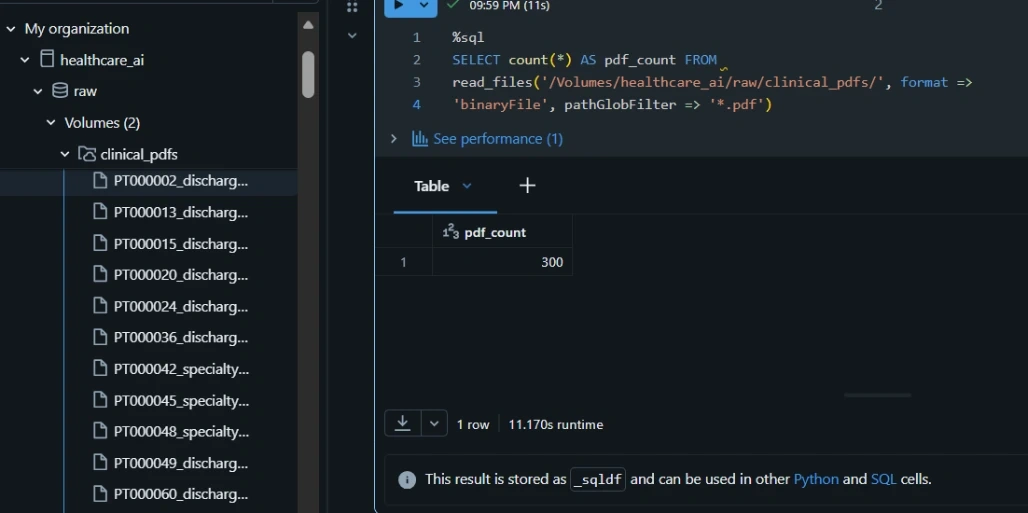
/Volumes/healthcare_ai/raw/clinical_pdfs/This volume contains clinical PDF documents that we want to monitor.
Instead of creating a table, we can execute the following SQL statement directly in a Databricks SQL editor:
SELECT COUNT(*) AS pdf_count
FROM read_files(
  '/Volumes/healthcare_ai/raw/clinical_pdfs/',
  format => 'binaryFile',
  pathGlobFilter => '*.pdf'
)
Let's break down what each part does.
read_files(): Reads files directly from the specified storage location.format => 'binaryFile': Reads each file as a binary object.pathGlobFilter => '*.pdf': Restricts the files returned to those matching the PDF extension.COUNT(*): Counts the number of matching files.pdf_count: Provides a meaningful name for the resulting column.
The output is a single-row result showing the total number of PDF files found in the specified Volume.
3. Why use read_files() instead of creating a table?
One of the things I like about this approach is its simplicity.
You don't always need to persist data in a Delta table just to perform a basic validation or inspection.
Consider these advantages:
1. No table creation required
You can query the files directly from the Volume without creating a managed or external table.
2. Quick file inventory checks
You can quickly determine how many files exist in a particular storage location, which is useful when monitoring incoming datasets.
3. Useful for data quality checks
Before processing documents, you can validate whether the expected files are available.
4. Supports ingestion monitoring
You can incorporate this type of query into your monitoring process to check incoming files before downstream transformations begin.
5. Works with unstructured data
Using the binaryFile format makes it particularly useful when working with PDFs, images, and other binary documents.
4. Practical use cases in data engineering
Imagine you're building a healthcare document processing platform in Databricks.
Every morning, hundreds of clinical PDF documents are uploaded into a Unity Catalog Volume.
Before sending these documents into your document extraction or AI processing pipeline, you may want to perform some basic checks.
For example:
- How many PDF documents were uploaded?
- Are there any files available for processing?
- Did the expected documents arrive?
- Has the number of incoming documents changed significantly compared with previous runs?
Using read_files(), you can perform the initial file inventory check without introducing another table into your architecture.
This can be particularly useful in document ingestion workflows involving OCR, NLP, and Retrieval-Augmented Generation (RAG).
5. Conclusion
The read_files() table-valued function is a simple but powerful feature in Databricks SQL.
For tasks such as counting files, validating incoming datasets, and monitoring document ingestion, you don't necessarily need to create a table or write a separate PySpark script.
Sometimes, a single SQL statement is all you need.
The takeaway: Make use of read_files() when you need to inspect and query files directly from Unity Catalog Volumes. It's a useful addition to your Databricks SQL toolkit.
#Databricks #DataEngineering #DataAnalytics #Azure #UnityCatalog #Lakehouse #BigData #DataPlatform #AnalyticsEngineering #SQLTips #DataOps #DatabricksMVP
Join the conversation! Your thoughts help the community grow.