Are you ready to embark on a transformative journey that will reshape business processes and elevate customer interactions to extraordinary heights? Building and deploying chatbots in Azure holds the key to unleashing unprecedented potential. However, we understand that challenges and obstacles can often accompany this exhilarating endeavor. Fear not! In this groundbreaking article, we will equip you with a wealth of invaluable tips and techniques to troubleshoot and overcome the common issues you may encounter while developing or deploying a chatbot in Azure. Prepare to elevate your skills and seamlessly navigate any obstacles that come your way.
Developing and deploying chatbots in Azure requires finesse, skill, and a thorough understanding of effective troubleshooting techniques. Let's delve into the essential strategies that will empower you to conquer any challenge along the way.
Error Handling
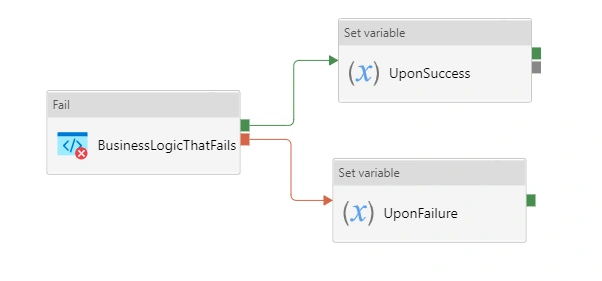
Error handling lies at the heart of a robust chatbot. Discover how to utilize powerful tools such as Azure application insights to log errors and exceptions. Uncover diagnostic insights that will enable you to analyze your chatbot's performance and swiftly address any issues that arise. Gain the expertise to embed proper error handlers within your code, ensuring seamless error capture and exception management.
- Error logging: You can make use of the logging frameworks such as Azure application insight to log errors and exceptions, this can provide you valuable information like diagnostic info which helps in analyzing your chatbot
- Exception handling: It is always a good practice to ensure proper error handlers are embedded in your code to catch the errors and handle the exceptions properly
Testing and Debugging
Testing and debugging are vital components of chatbot development. Explore the art of well-structured unit tests that uncover hidden functionalities and identify issues early in the development cycle. Step into a real-life environment by using emulators and testing tools that simulate user interactions, allowing you to detect and rectify platform-specific challenges. Learn how to employ step-by-step debugging techniques, leveraging variable inspection, breakpoints, and log-based debugging to unravel any mysteries that perplex your code.
Unit testing
- ensure that you have written well-structured unit tests to discover various functionalities cases of your chatbot, which can help in finding the issue in the early stage of development.
- Always remember to write comprehensive test cases.
Emulator and Testing tools
- When developing and testing your chatbot, Remember to use emulators or devices that your chatbot will be using. This will give you a real-life environment to see how your bot works
- You may Mimic the environment and attribute of the target platform using emulators, which helps you identify any platform-specific issues.
- Use the testing tools - there are testing frameworks and technologies that can help automate the testing process and are also easy to use.
- These technologies can produce test data, and mimic user interactions which makes you create a more accurate bot.
Step-by-step debugging
Keep in mind the following steps while you are debugging, it is important as a developer to debug and look out for errors in a proper way, I have mentioned a few things to keep in mind while debugging.
- Inspect variable values
- Use breakpoints
- Log debug information
- Step through the code
-
Monitoring and analytics
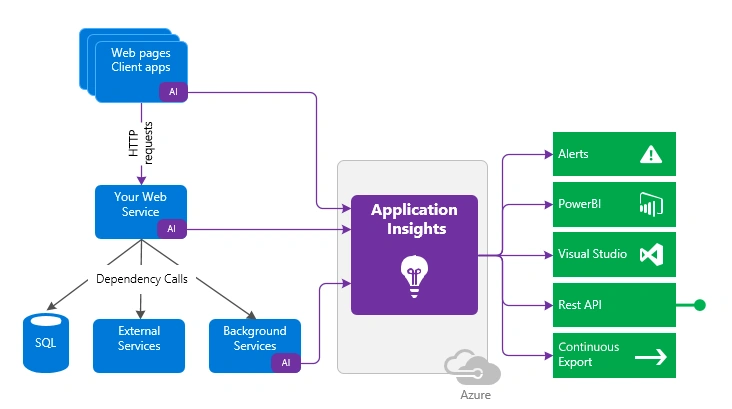
Monitoring and analytics play a pivotal role in ensuring the continued success of your chatbot. Integrate Azure application insights to gather invaluable telemetry data, metrics, and events. Leverage this wealth of information to diagnose and resolve any performance-related issues. By tracking relevant metrics and setting up customizable alerts, you can proactively monitor your chatbot's health and performance, ensuring optimal functionality at all times. Additionally, embrace the power of user feedback as a catalyst for improvement, allowing your chatbot to evolve based on real-world experiences and user insights.
- Monitoring and identifying the problems with your chatbot is important in order to rework and debug those issues,
- Application Insights - if you can integrate the Azure application insight with your chatbot you can see the data like telemetry data, metrics, and events. Which can later be used to diagnose and solve the issues
- Metrics and dashboards- by tracking the relevant metrics of your chatbot you can monitor the health, and performance of your bot you can also setups alerts in case if something exceeds the given threshold.
- User feedback: Always keep an open arm towards user feedback ask the users about their experience with your chatbot and it can really improve your bot for good.
Developing and deploying bots in Azure is tricky sometimes but with efficient skills and knowledge, one can make it powerful and more efficient. Always be prepared to troubleshoot the issue when raised,
Conclusion:
By following and implementing the error handling methods via testing and debugging your code, you can diagnose and resolve these issues with haste, always remember there are tools that can help you monitor and analyze your bot's performance.
Building and deploying bots in Azure may present challenges, but armed with the right knowledge and skills, you have the power to create truly powerful and efficient chatbot experiences. Seamlessly troubleshoot any issue that arises, and unlock a world where customer interactions are transformed beyond imagination.
Embark on this groundbreaking journey, equipped with our expert insights and guidance. Revolutionize the way businesses operate, elevate customer experiences, and uncover the true potential of Azure chatbots. Prepare to conquer obstacles, optimize performance, and emerge as a master in the realm of Azure chatbot excellence. The future is yours to shape, one chatbot at a time.


Join the conversation! Your thoughts help the community grow.