

Introduction
This article explains how to create a Contacts Editor using Knokcoutjs in an ASP.NET Application.
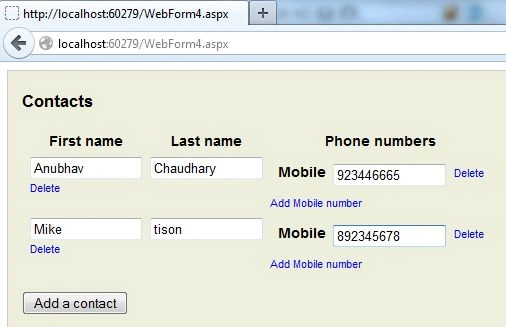
At the end of the article we will create an application that will look something like this:
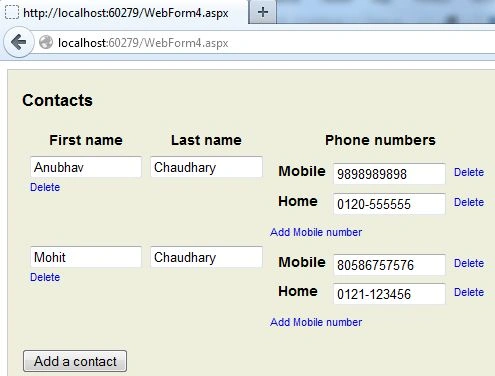
Let's see the procedure to make such an application.
Step 1
First of all you need to add two external files to your application:
- Knockout-2.3.0.js
- jquery-1.3.2.min.js
You can either download them from the internet or can download the Zip file provided at the start of this article.
After adding these files you need to work on the ViewModel of your application.
Step 2
Write the following code in the ViewModel of your application.
<script>
var initialData = [
{
firstName: "Anubhav", lastName: "Chaudhary", contacts: [
{ type: "Mobile", number: "9898989898" },
{ type: "Home", number: "0120-555555" }]
},
{
firstName: "Mohit", lastName: "Chaudhary", contacts: [
{ type: "Mobile", number: "80586757576" },
{ type: "Home", number: "0121-123456" }]
}
];
var MeetingModel = function (meetings) {
var self = this;
self.meetings = ko.observableArray(ko.utils.arrayMap(meetings,
function (meeting) {
return {
firstName: meeting.firstName, lastName: meeting.lastName,
contacts: ko.observableArray(meeting.contacts)
};
}));
self.addMeeting = function () {
self.meetings.push({
firstName: "",
lastName: "",
contacts: ko.observableArray()
});
};
self.removeMeeting = function (meeting) {
self.meetings.remove(meeting);
};
self.addNumber = function (meeting) {
meeting.contacts.push({
type: "Mobile",
number: ""
});
};
self.removeNumber = function (phone) {
$.each(self.meetings(), function () {
this.contacts.remove(phone)
})
};
};
ko.applyBindings(new MeetingModel(initialData));
</script>
Here first I passed some data to be shown when the application is run, this data is passed under the "initialData".
After that I created a function named "MeetingModel", this is the main function in which all the coding is to be done. After that I had an Observable Array named "meetings", this array will hold the information about the user like his First Name, Last Name and his Contact Number.
After that I created a function named "addMeeting", this function will help in adding a new record at runtime, this function will push the First Name, Last Name and his Contact Number that is also an Observable Array.
After that I created a function named "removeMeeting", this function is used to delete a Record of User.
After that I created a function named "addNumber", this function will allow the user to enter Mobile Numbers at run time.
The last function is made for removing the Contact Numbers of a specific User.
At the end I had applied bindings to the Meeting Model Function in which the initial data is passed.
Our work on the ViewModel is bow completed, so now we will move to the View Part of our application.
Step 3
In the View Part of your application write the following code:
<div class='contactEditor'>
<h2>Contacts</h2>
<div id='div1'>
<table class='contactsTable'>
Gowtham RajamanickamPosted Apr 25, 2015, 5:57 AM
sorry great
Gowtham RajamanickamPosted Apr 25, 2015, 5:57 AM
eat
Gowtham RajamanickamPosted Apr 25, 2015, 5:57 AM
good