

Introduction
This article shows how to create a simple Data Entry Form. Here we create a form for storing the details of a student.
The following is the procedure for creating the application.
Step 1
Create a Web API application as in the following:
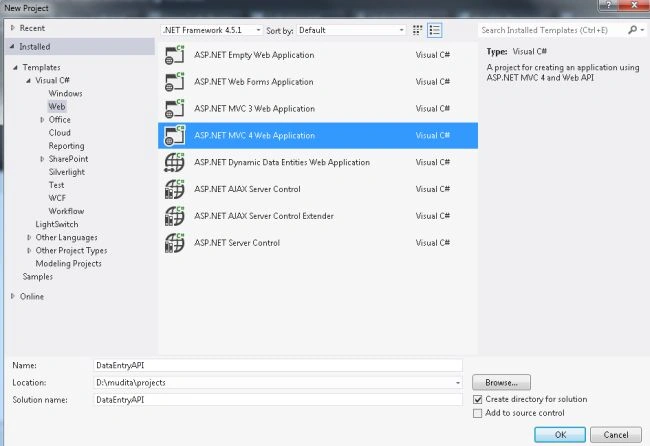
- Start Visual Studio 2012.
- From the start window select "Installed" -> "Visual C#" -> "Web".
- Select "ASP.NET MVC4 Web Application" and click on the "Ok" button.
- From the "MVC4 Project" window select "Web API".
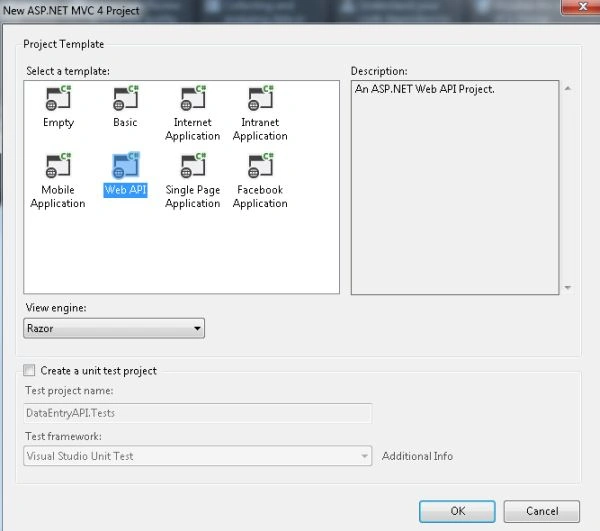
- Click on the "Ok" button.
Step 2
- In the "Solution Explorer".
- Right-click on the Model folder.
- Select "Add" -> "Class".
- Select "Installed" -> "Visual C#" and select class.
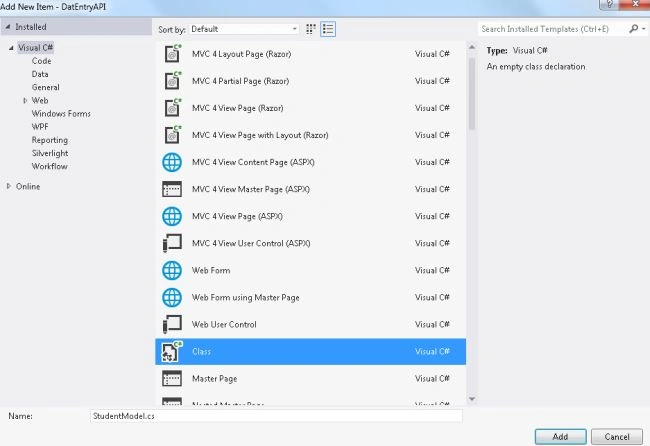
- Click on the "Add" button.
Add the following code:
- using System;
- using System.Collections.Generic;
- using System.ComponentModel.DataAnnotations;
- using System.Linq;
- using System.Web;
- namespace DatEntryAPI.Models
- {
- public class StudentModel
- {
- [Required(ErrorMessage = "Id is required")]
- public string Roll_no { get; set; }
- [Required(ErrorMessage = "Please fill the name of student")]
- public string Std_Name { get; set; }
- [Required(ErrorMessage = "Please fill the address of student")]
- public string Address { get; set; }
- [Required(ErrorMessage = "Select your gender")]
- public bool? Gender { get; set; }
- [Required(ErrorMessage = "Fill the Contact Number")]
- public int Std_Contact { get; set; }
- }
- }
Step 3
In the Controller add some code:
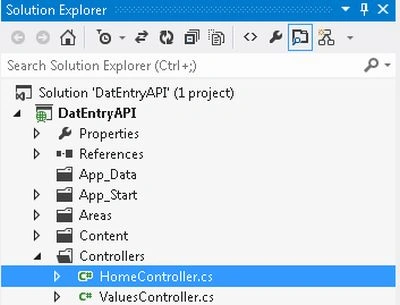
- In the "Solution Explorer".
- Expend the "Controller" folder.
- Select the "HomeController".
Add the following code:
- using System;
- using System.Collections.Generic;
- using System.Linq;
- using System.Web;
- using System.Web.Mvc;
- using DatEntryAPI.Models;
- namespace DatEntryAPI.Controllers
- {
- public class HomeController : Controller
- {
- [HttpGet]
- public ActionResult StudentForm()
- {
- return View();
- }
- [HttpPost]
- public ActionResult StudentForm(StudentModel student)
- {
- if (ModelState.IsValid)
- {
- return View("Display", student);
- }
- else
- {
- return View();
- }
- }
- }
- }
Step 4
Create two Views using the following, one is "StudentForm.cshtml" and the other is "Display.cshtml".
- In the "HomeController".
- Right-click on the "StudentForm" action method.
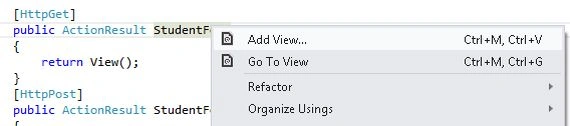
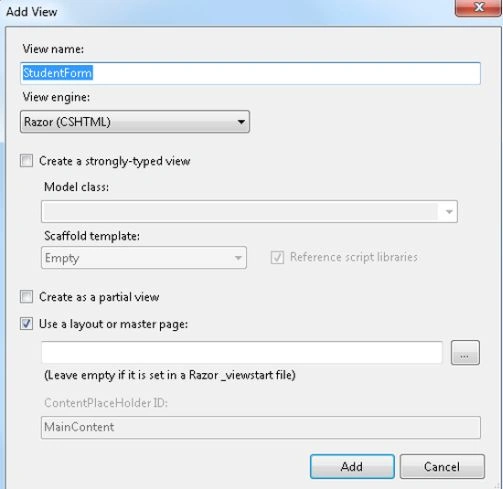
- Select "AddView". Click on the "Add" button.
Add the following code in the "StudentForm.cshtml".
- @model DatEntryAPI.Models.StudentModel
- @{
- ViewBag.Title = "StudentForm";
- }
- <h2>StudentForm</h2>
- <div>
- <fieldset>
- <legend>Student Detail Form</legend>
- @using (Html.BeginForm())
- {
- <div>
- <div class="editor-label ">
- @Html.LabelFor(std => std.Roll_no)
- </div>
- <div class="editor-field">
- @Html.TextBoxFor(std => std.Roll_no)
- @Html.ValidationMessageFor(std => std.Roll_no)
- </div>
- </div>
- <div>
- <div class="editor-label ">
- @Html.LabelFor(std => std.Std_Name)
- </div>
- <div class="editor-field">
- @Html.TextBoxFor(std => std.Std_Name)
- @Html.ValidationMessageFor(std => std.Std_Name)
- </div>
- </div>
- <div>
- <div class="editor-label ">
- @Html.LabelFor(std => std.Address)
- </div>
- <div class="editor-field">
- @Html.TextBoxFor(std => std.Address)
- @Html.ValidationMessageFor(std => std.Address)
- </div>
- </div>
- <div>
- <div class="editor-label ">
- @Html.LabelFor(std => std.Gender)
- </div>
- <div class="editor-field">
- @Html.DropDownListFor(std => std.Gender, new[] {
- new SelectListItem(){Text = "Male" , Value=bool.TrueString},
- new SelectListItem(){Text ="Female" , Value = bool.FalseString},
- }, "Select Your Gender")
- @Html.ValidationMessageFor(std => std.Gender)
- </div>
- </div>
- <div>
- <div class="editor-label ">
- @Html.LabelFor(std => std.Std_Contact)
- </div>
- <div class="editor-field">
- @Html.TextBoxFor(std => std.Std_Contact)
- @Html.ValidationMessageFor(std => std.Std_Contact)
- </div>
- </div>
- <p><input type = "submit" value="Submit Details" /></p>
- }
- </fieldset>
- </div>
And add the following code in the "Display.cshtml":
- @model DatEntryAPI.Models.StudentModel
- @{
- ViewBag.Title = "Display";
- }
- <h2>Display</h2>
- <fieldset>
- <legend>Student</legend>
- <div class="display-label">Name</div>
- <div class="display-field">
- @Html.DisplayFor(model => model.Std_Name)
- </div>
- <div class="display-label">Address</div>
- <div class="display-field">
- @Html.DisplayFor(model => model.Address)
- </div>
- <div class="display-label">Gender</div>
- <div class="display-field">
- @Html.DisplayFor(model => model.Gender)
- </div>
- <div class="display-label">ContactNumber</div>
- <div class="display-field">
- @Html.DisplayFor(model => model.Std_Contact)
- </div>
- </fieldset>
- <p>
- @Html.ActionLink("Back to List", "StudentForm")
- </p>
Step 5
Change some code in the Route.config file.
- namespace DatEntryAPI
- {
- public class RouteConfig
- {
- public static void RegisterRoutes(RouteCollection routes)
- {
- routes.IgnoreRoute("{resource}.axd/{*pathInfo}");
- routes.MapRoute(
- name: "Default",
- url: "{controller}/{action}/{id}",
- defaults: new { controller = "Home", action = "StudentForm", id = UrlParameter.Optional }
- );
- }
- }
- }
Step 6
Execute the application:
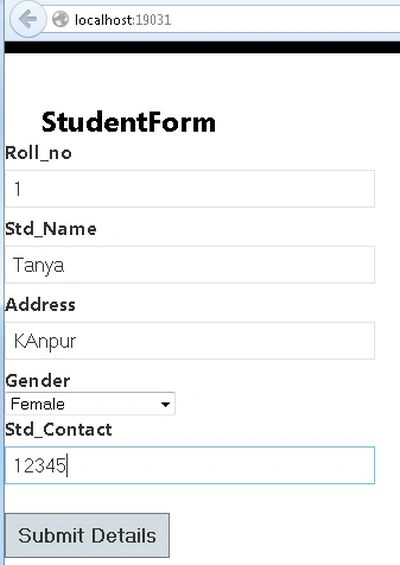
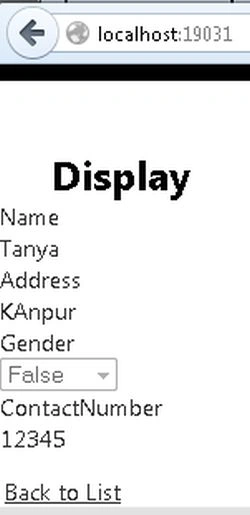
Click on the SubmitDetail button.
Join the conversation! Your thoughts help the community grow.