

First, we will create the XSD schema file programmatically.
Follow these steps to create a Typed DataSet :
- In Visual Studio .NET 2008/2010, click File > New > Project.
- Select your desired programming language and then select the Console Application template.
- Replace your Program.cs code with the code given below:
using System;
using System.Data.SqlClient;
using System.Data;
namespace DataSetST
{
classProgram
{
staticvoid Main(string[] args)
{
string strFileName = @"..\..\StronglyTypedDataSet.xsd";
//Create Connection
string strConnectString = "Data Source=(local);Integrated security=SSPI;Initial Catalog=AdventureWorks;";
string strText = "SELECT * FROM Sales.Customer; SELECT * FROM Sales.CustomerAddress;";
// Create and fill a DataSet schema using a data adapter
SqlDataAdapter objDataAdapter = newSqlDataAdapter(strText, strConnectString);
objDataAdapter.TableMappings.Add("Table", "Customer");
objDataAdapter.TableMappings.Add("Table1", "CustomerAddress");
DataSet objDataSet = newDataSet("StronglyTypedDataSet");
objDataAdapter.FillSchema(objDataSet, SchemaType.Mapped);
// Add the data relation
objDataSet.Relations.Add("Customer_CustomerAddress",
objDataSet.Tables["Customer"].Columns["CustomerID"],
objDataSet.Tables["CustomerAddress"].Columns["CustomerID"]);
// Write the XSD schema for the DataSet
objDataSet.WriteXmlSchema(strFileName);
}
}
}
In this code sample we are first creating a connection string to connect to the AdventureWorksdatabase and then we are using a data adapter to create and fill a DataSet Schema and finally writing DataSet Schema to StronglyTypedDataSet.xsd file using WriteXmlSchema() method of DataSet.
WriteXmlSchema : This method is usedto write the schema for a DataSet to an XML document. The schema includes table, relation, and constraint definitions. The XML schema is written using the XSD standard.
- Press F5 to create the XSD schema file StronglyTypedDataSet.xsd.
Now the next step is generate a strongly typed DataSet using the XML Schema Definition Tool (XSD.exe).
Follow these steps to generate a strongly typed DataSet:
- In Visual Studio .NET 2008/2010, select Visual Studio Tools>Visual Studio Command Prompt.
- On command prompt go to the directory containing the XSD schema file.
- Use the following command to generate the strongly typed DataSet class file from the XSD schema file:
xsd StronglyTypedDataSet.xsd /d /l:CS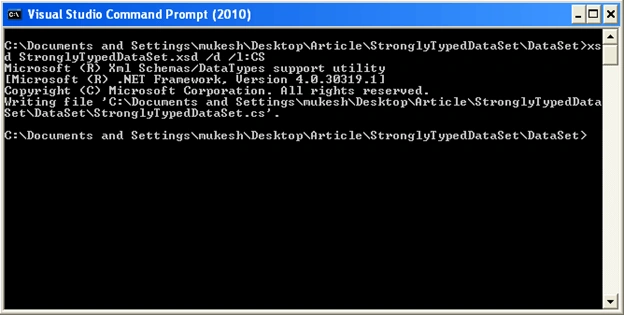
The /d switch specifies that source code for a strongly typed DataSet should be created.
The /l:CS switch specifies that the utility should use the C# language, which is the default if not specified.
Close the command prompt dialog.
- The XML Schema Definition Tool (XSD.exe) generates the class file for the strongly typed DataSet and names it using the DataSet name in the XSD schema with the .cs extension.
- Finally right-click on the project in Solution Explorer and select Add >Existing Item from the context menu and select strongly typed DataSet class to add it to the project. If the strongly typed DataSet file is not visible in the Solution Explorer window, select Show All Files from the Project menu.
The strongly typed DataSet named StronglyTypedDataSet is complete and you can now use it.
dhanesh deshmukhPosted May 25, 2012, 7:57 AM
Hello Sir Can you please help me To generate the view definition i.e. table-name, field-name, data-type and constraint, if any, have to be saved in XML format. Or Schema Using C#.net
Mukesh KumarPosted Jun 29, 2011, 7:23 AM
Thanks Dinesh
Dinesh BeniwalPosted Jun 29, 2011, 6:44 AM
Good work mukesh..