

In this article, we will explore about creating a time-triggered function using the Azure function app. First of all, let’s take an overview of Azure Functions and let’s have a look at creating a time-triggered function using it. Let’s get started! The Azure Functions is a kind of solution for executing small lines of code in the cloud with our own desired programming language. The application may be a few lines of code or it may be a high-level one, it doesn’t matter and we don’t have to worry about running it. The major advantage is that the Azure Functions will provide a way of developing serverless applications.
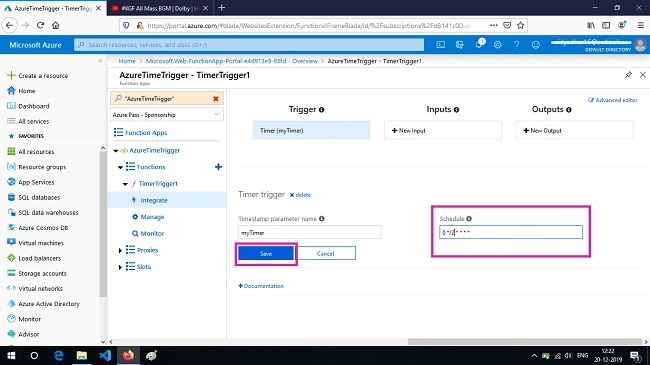
Now let’s take a look at time-triggered functions. The time-triggered functions will allow the users to schedule a time for executing a particular function. In other words, we can describe as the function will be executed at the scheduled time. When we create a time-triggered function, the function must be given time for executing the task. The time is given in the format of CRON expressions. The CRON time format is expressed in the format of the second, minute, hour, month and day. The CRON expression also uses the following expression like,
- The Forward slash (/) for reoccurring the execution time.
- The Hyphen (-) is for indicating the range of values.
- The Asterisk (*) value is used for expressing the expression value
- And finally, comma (,) is used for specification of listing the values.
|
Expression
|
Description
|
|
0*****
|
Execution in every minute
|
|
0*/5****
|
Execution in every five minutes
|
|
*/2*****
|
Execution in every two second
|
|
00****
|
Execution in every hour
|
|
000***
|
Execution in every day
|
|
0 10 10 ***
|
Execution every day at 10:10:00
|
|
000**5
|
Execution at every Friday
|
|
000**FRI
|
Execution at every Friday
|
|
000**1-5
|
Execution at workday
|
|
000**SAT, SUN
|
Execution at every Saturday & Sunday
|
|
0 07-11***
|
Execution at Every hour between 7 to 11
|
|
00011*
|
Execution at every year 1st Jan
|
|
0001-7*SUN
|
Execution at every first Sunday of month
|
Join the conversation! Your thoughts help the community grow.