Introduction
In this article I will show you how to make a Web WhatsApp messenger in ASP.NET application.
Step 1
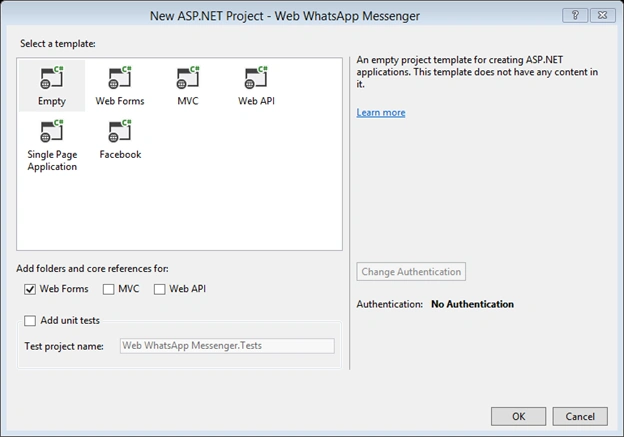
Open The Visual Studio and Choose the ASP.NET Web Application and set any name of project I set Web WhatsApp Messenger and then click on OK Button. Then Select the Empty Template and check the Web Forms and click on OK Button.
Step 2
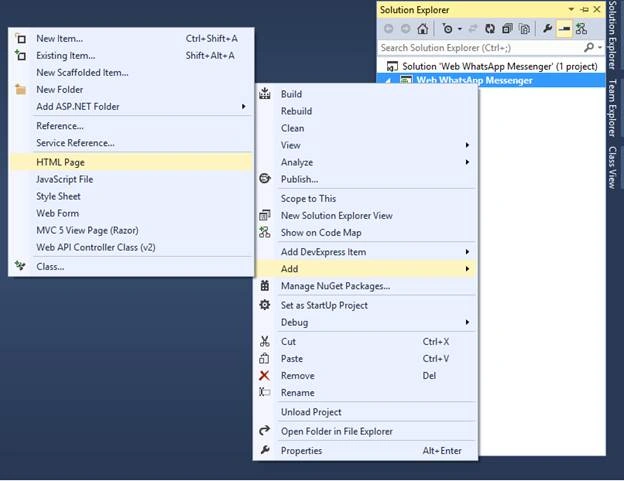
Now add the HTML Page and give the name index.html then left click on index.html file and set the SET START AS PAGE,
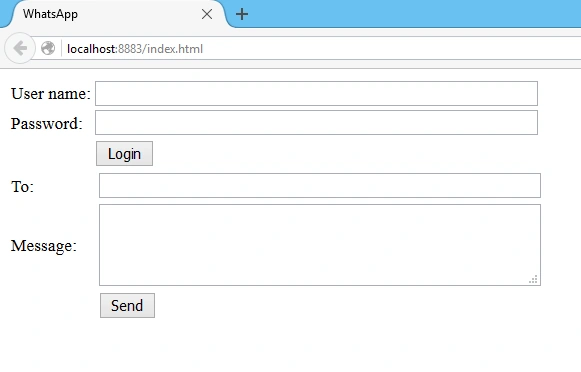
After this click on index.html file and design the form.
Code
- <!DOCTYPE html>
- <html xmlns="http://www.w3.org/1999/xhtml">
- <head>
- <title>WhatsApp</title>
- </head>
- <body>
- <table>
- <tr>
- <td>
- User name:
- </td>
- <td>
- <input type="text" id="txtPhoneNumber" style="width:400px;"/>
- </td>
- </tr>
- <tr>
- <td>
- Password:
- </td>
- <td>
- <input type="password" id="txtPassword" style="width:400px;" />
- </td>
- </tr>
- <tr>
- <td></td>
- <td>
- <input type="button" id="btnLogin" value="Login"/>
- </td>
- </tr>
- </table>
- <table>
- <tr>
- <td>
- To:
- </td>
- <td>
- <input type="text" id="txtTo" style="width:400px;"/>
- </td>
- </tr>
- <tr>
- <td>
- Message:
- </td>
- <td>
- <textarea id="txtMessage" style="width:400px; height:70px;"></textarea>
- </td>
- </tr>
- <tr>
- <td></td>
- <td>
- <input type="button" id="btnSend" value="Send"/>
- </td>
- </tr>
- </table>
- <ul id="status"></ul>
- </body>
- </html>
Step 3
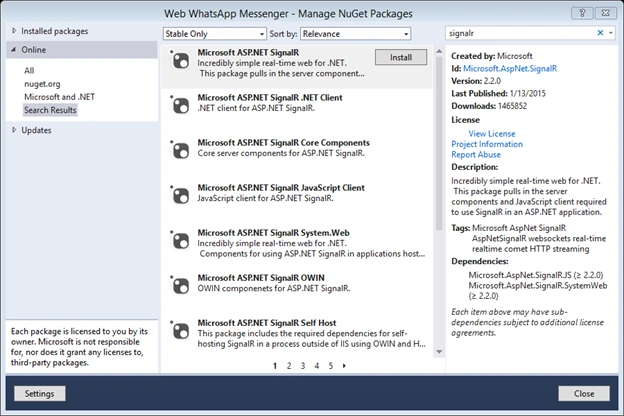
Left click on project and click on Manage NuGet Packages and install the SIGNALR and click on Accept button after installation the readme.txt file is shown copy the content onto it.
Then Simply add a class and set name as Startup.cs and add this code in it,
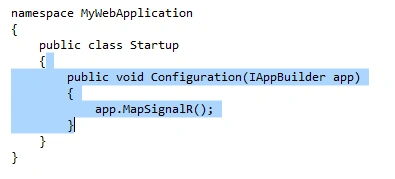
Now move to the index.html file and after creating a design add the following code in it at the bottom after table tag,
- <ul id="status"></ul>
- <script src="Scripts/jquery-1.6.4.min.js"></script>
- <script src="Scripts/jquery.signalR-2.2.0.min" ></script>
-
- <script type="text/javascript">
- $(function()
- {
- var chat = $.connection.chatHub;
- chat.client.notifyMessage = function (message) {
- var endcodeMessage = $('<div />').text(message).html();
- $('#status').append('<li>' + message + '</li>');
- };
-
- $.connection.hub.start().done(function () {
- $('#btnLogin').click(function ()
- {
- var phoneNumber = document.getElementById('txtPhoneNumber').value;
- var password = document.getElementById('txtPassword').value;
- chat.server.login(phoneNumber, password);
- });
- $('#btnSend').click(function ()
- {
- var to = document.getElementById('txtTo').value;
- var message = document.getElementById('txtMessage').value;
- chat.server.send(to, message);
-
- });
-
-
- });
- }
- )
-
-
-
- </script>
You need the WhatsApp Official Api which is available on the internet; if you can’t find it or face any problem I am providing you a WhatsApp Api you can use. Now left click on reference and press add button now press browse button and give the WhatsApp Api location then press OK button now the WhatsApp Api is included in your project which appears in the left side; in your solution add WhatsApp Api.
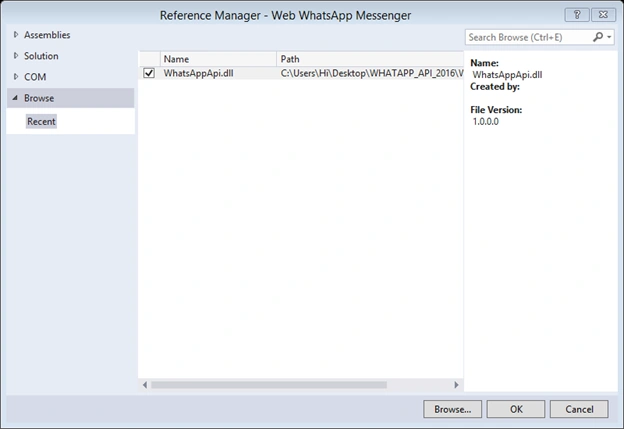
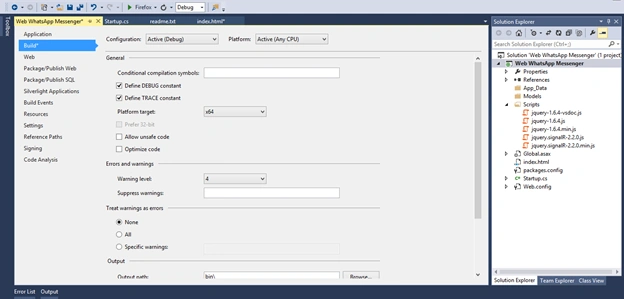
The API has two versions for operating system. Now go to the project property and set platform target. After this add a new class in your project name as ChatHub.cs
 Step 5
Create a new ChatHub class and extend with Hub class and import the threading and WhatsAppApi namespace and paste the code and your WhatsApp Messenger is ready.
- using Microsoft.AspNet.SignalR;
- using System;
- using System.Collections.Generic;
- using System.Linq;
- using System.Web;
- using System.Threading;
- using WhatsAppApi;
-
- namespace Web_WhatsApp_Messenger
- {
- public class ChatHub : Hub
- {
- static WhatsApp wa;
-
- public void Send(string to, string message)
- {
- if(wa.ConnectionStatus== ApiBase.CONNECTION_STATUS.LOGGEDIN)
- {
- wa.SendMessage(to, message);
- Clients.All.notifyMessage(string.Format("{0}: {1}", to, message));
- }
- }
-
- public void Login(string phoneNumber,string password)
- {
- Thread thhread=new Thread(t =>
- {
- wa=new WhatsApp(phoneNumber,password,phoneNumber,true);
- wa.OnConnectSuccess+=() =>
- {
- Clients.All.notifyMessage("Connected......");
- wa.OnLoginSuccess+=(phone,data)=>
- {
- Clients.All.notifyMessage("Login Success !");
- };
- wa.OnLoginFailed +=(data) =>
- {
- Clients.All.notifyMessage(string.Format("Login failed: {0}", data));
- };
- wa.Login();
- };
- wa.OnConnectFailed += (ex) =>
- {
- Clients.All.notifyMessage(string.Format("Connected failed: {0}", ex.StackTrace));
- };
- wa.Connect();
- })
- { IsBackground=true};
- thhread.Start();
- }
-
- }
- }
Now open the
http://www.watools.es and paste your number with the country where you receive messages to your mobile; now paste the code on it and password is generated, now run WhatsApp Messenger, give the Number and password, and now you can send the message to your friend.


Jamil khanPosted Apr 28, 2025, 10:14 AM
Where can I get User Name and Password for send message. ?
Jamil khanPosted Apr 28, 2025, 10:11 AM
This code is running successful, but What are the User Name and Password for sending Message. ?
AMOL AHIREPosted Sep 26, 2022, 4:07 AM
Not working.post ko remove karo
Ashwani BhargavPosted May 16, 2020, 1:41 AM
Http://www.watools.es this site is not working if any other site then reply me.
Abdelrahman AShrafPosted Aug 30, 2018, 11:23 AM
The site http://www.watools.es to get password isn't working
e dPosted Aug 6, 2018, 1:31 AM
Http://www.watools.es not working. How to get password
Sai BhargavaPosted May 4, 2018, 12:21 AM
Is this working..i tried so much
mohamed bensidPosted Jan 19, 2018, 6:10 PM
Hello, have you tested this API, unfortunately the site http://www.watools.es, to generate the login and the password does not work.
Arshinic ChennaiPosted Dec 2, 2017, 2:40 AM
Dear Sir how to generate a password
om prakashPosted Oct 13, 2017, 3:27 AM
Http://www.watools.es site is not open ,Please give another site url
yogi sharmaPosted Sep 5, 2017, 6:10 AM
When can i generate a password from here --- > http://www.watools.es.?
ledaoukPosted Jun 25, 2017, 12:17 PM
Is this api still functioning?
waris khanPosted Jan 13, 2017, 12:35 AM
Why you post any think if you already don't know first you learn then post right article.
atulPosted Dec 22, 2016, 1:35 AM
Everyone is saying about sending message on whatsapp from website but I need to receive whatsapp msg on my website. How this is possible?
Soumalya DasPosted Oct 27, 2016, 1:43 PM
Where i check my no is block or not..give the link...i cant find any link
Deepak SahaniPosted Aug 28, 2016, 11:00 AM
I am getting the error "Seems there was an error! We don't support spammers" in wattools website
Shobana JPosted Jul 7, 2016, 7:26 AM
Nice explanation
Ranjit PowarPosted Jun 19, 2016, 10:28 AM
There is no option to check no is block or not
Luis ArmandoPosted Jun 10, 2016, 7:44 PM
Hi, I have the same problem, I can't get the password, Do you know another way to get it?
jorgePosted May 12, 2016, 10:32 AM
good article but i open the http://www.watools.es and paste my number with my country (Spain) and push de botton SMS and does nothing, Can you help me? Thank you