

In this article we are learning how to set up a data connection from the Dashboard Designer to an Analysis Services data cube.
In PerformancePoint Services, the security settings for data sources are stored in each data source. For Analysis Services, you have the choice of three authentication options: using the Unattended Service Account, using credentials stored in a Secure Store target application, using a Per-User Identity (that requires either the Kerberos protocol or setting the EffectiveUserName property in PerformancePoint Application Settings in Central Administration).
PerformancePoint Services
PerformancePoint Services lets you create rich dashboards, aggregating content from multiple sources and displaying it in a web browser in an understandable and collaborative environment. The rich interactivity of the dashboards lets you analyze the latest information and work with the data quickly and easily to identify key opportunities and trends. PerformancePoint Services and its authoring tool Dashboard Designer let you display Key Performance Indicators (KPIs) and data visualizations in the form of scorecards, analytic reports, and filters. You can integrate with SQL Server Reporting Services (SSRS) and Excel Services in addition to create scorecards that bring together data from multiple data sources to track and monitor key drivers of your business.
New features and improvements
In SharePoint Server 2013, PerformancePoint Services offers certain new features to support business intelligence applications. These include the following.
Dashboard Migration
Users will be able to copy complete dashboards and dependencies. This includes the .aspx file, to other users, servers, or site collections. This feature also allows the ability to migrate single items to other environments and migrate content using Windows PowerShell commands.
Filter Enhancements and Filter Search
The UI is improved to allow users to easily view and manage filters, including allowing users to search for items within filters without having to navigate through the tree.
BI Center Update
The new BI Center is cleaner and easier to use with folders and libraries configured for easy use.
Support for Analysis Services Effective User
This new feature eliminates the need for Kerberos delegation when per-user authentication is used for Analysis Services data sources. By supporting the Analysis Services Effective User feature, authorization checks will be based on the user specified by the EffectiveUserName property instead of using the currently authenticated user.
PerformancePoint Support on iPad
PerformancePoint dashboards can now be viewed and interacted with on iPad devices that are using the Safari web browser.
Create a New Analysis Services Data Source
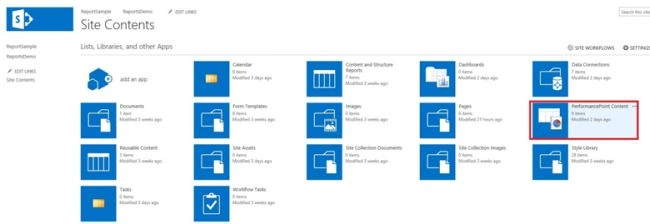
Create a new site and use the Business Intelligence templates. Inside the site contents click on the PerformancePoint Content.
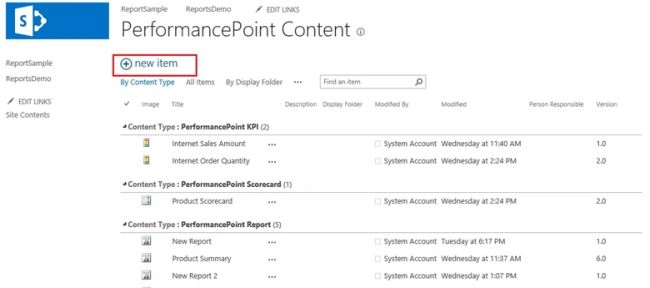
In the PerformancePoint Content click on the new item.
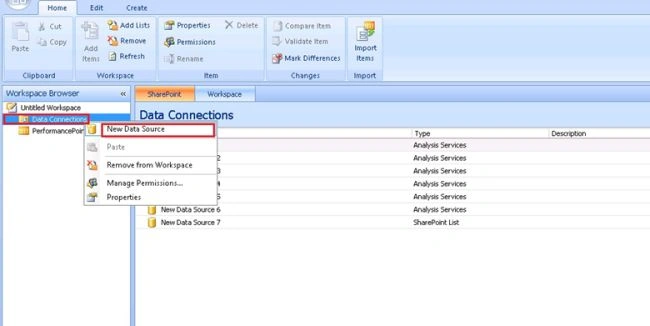
Now the new Dashboard Designer will open. Right-click on the Data Connections and click on the new Data Source.
Now the new screen Data Source Template will open. In the Category there are two options like Multidimensional and Tabular List. When we are selecting the multidimensional, under the Template its showing only the Analysis Services.
Click on Analysis Services.

Here we need to enter the server name and database name.
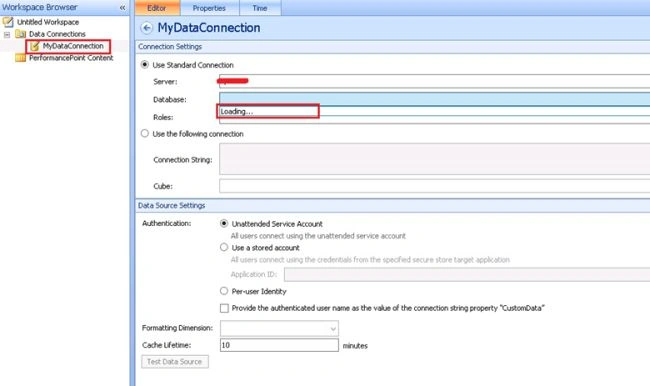
There is a chance to getting the error here like it’s only showing the “Loading…”, not a database name.
ERROR: The data source provider for data sources of type 'ADOMD.NET' is not registered. Please contact an administrator. PerformancePoint Services error code 10115
Solution
On SQL Server you need to install SQL Server 2012 ADOMD.NET
ADOMD.NET is a Microsoft .NET Framework data provider designed to communicate with Microsoft SQL Server Analysis Services. ADOMD.NET uses the XML for Analysis protocol to communicate with analytical data sources using either TCP/IP or HTTP connections to transmit and receive SOAP requests and responses that are compliant with the XML for Analysis specification. Commands can be sent in Multidimensional Expressions (MDX), Data Mining Extensions (DMX), Analysis Services Scripting Language (ASSL), or even a limited syntax of SQL, and may not return a result. Analytical data, key ADOMD.NET object model. Using ADOMD.NET, you can also view and work with metadata either by retrieving OLE DB-compliant schema row sets or by using the ADOMD.NET object model.
The ADOMD.NET data provider is represented by the Microsoft.AnalysisServices.AdomdClient Key Performance Indicators (KPIs), and mining models can be queried and manipulated using the Namespace.
Download and install ADOMD.NET
On the SQL Server Feature Pack page, find Microsoft ADOMD.NET.
Download the x64 Package and install it.
Reset IIS after installation is finished. To do this, open an administrative command prompt and type IISRESET.
And we expect another error as in the following:
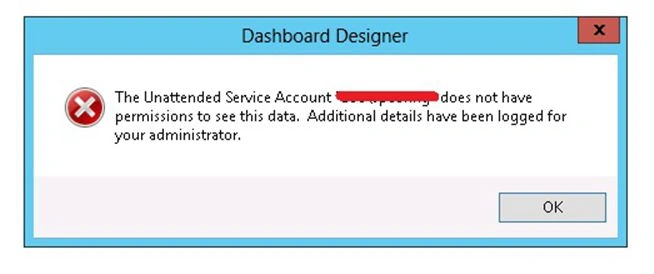
Or:
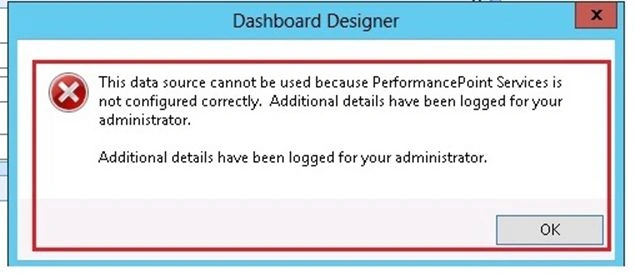
Unattended Service Account
The unattended service account is an Active Directory account for accessing PerformancePoint Services data sources. This account is used by PerformancePoint Services on behalf of authorized users to provide access to external data sources for the purposes of creating and using dashboards and other PerformancePoint Services content.
Configure the unattended service account for PerformancePoint Services
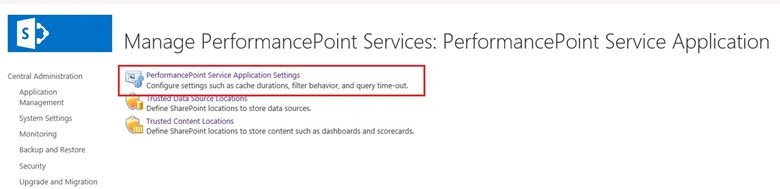
Open the SharePoint Central Administration in the Application Management section, click "Manage Service Applications".
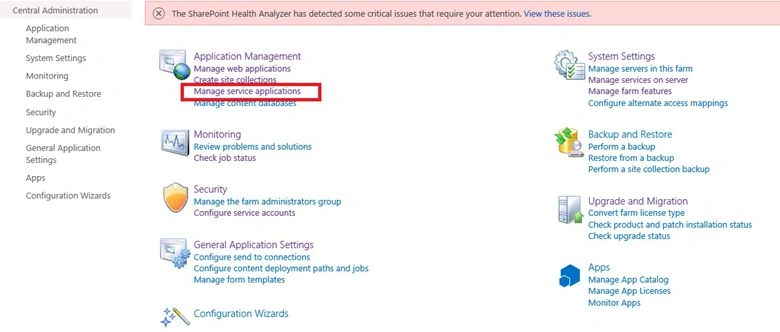
And then click the PerformancePoint Services application.
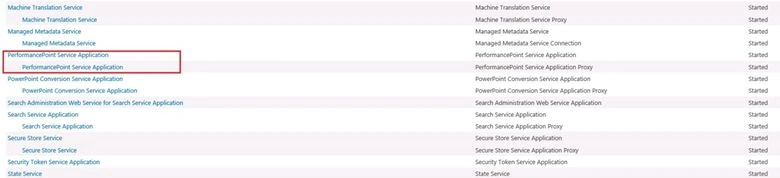
Click on the PerformancePoint Service Application Setting.
Enter the user name and password for the account that you want to use as the unattended service account.
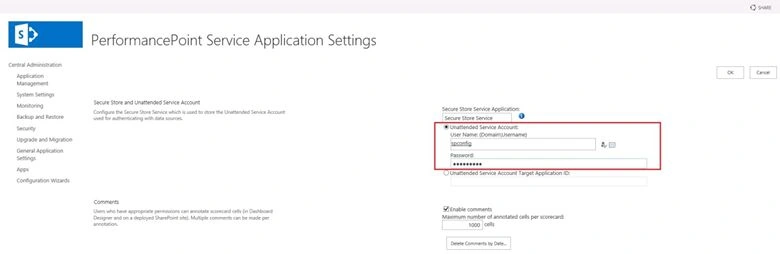
You will see the Secure Store Service name and the user name that represents the unattended service account.
Once the unattended service account has been configured, you must grant that account access to your data sources:
- For SQL Server data, the account must have a SQL logon with db_datareader permissions on each database that you want to access.
- For SQL Server Analysis Services data, the account must have read access to the cube or an appropriate portion of the cube, depending on your needs.
- For Excel Services data, the account must have access to the Excel workbook in a SharePoint Document Library.
- For data in a SharePoint list, the account must have read access to the list.
Again it’s showing the error we need to edit the config file.
Go to the path as in the following:
C:\Program Files\Microsoft Office Servers\15.0\WebServices\PpsMonitoringServer
In the Web.config file:
<runtime>
  <assemblyBinding xmlns="urn:schemas-microsoft-com:asm.v1">
    <dependentAssembly>
      <assemblyIdentity name="Microsoft.AnalysisServices.AdomdClient" publicKeyToken="89845dcd8080cc91" culture="neutral" />
      <bindingRedirect oldVersion="9.0.0.0" newVersion="10.0.0.0" />
    </dependentAssembly>
  </assemblyBinding>
</runtime>
This code is just changed to:
<runtime>
  <assemblyBinding xmlns="urn:schemas-microsoft-com:asm.v1">
    <dependentAssembly>
      <assemblyIdentity name="Microsoft.AnalysisServices.AdomdClient" publicKeyToken="89845dcd8080cc91" culture="neutral" />
      <bindingRedirect oldVersion="10.0.0.0" newVersion="11.0.0.0" />
    </dependentAssembly>
  </assemblyBinding>
</runtime>
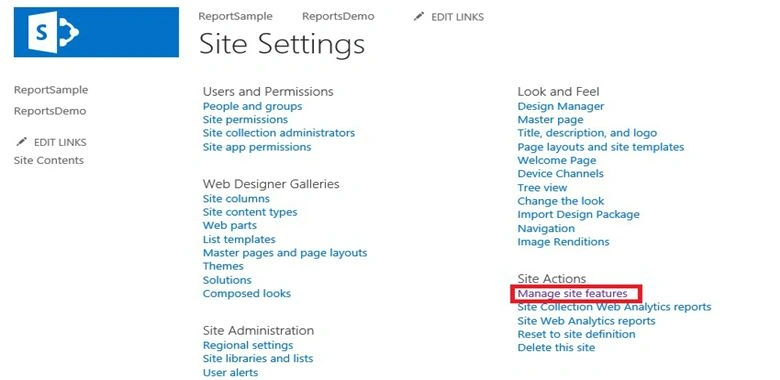
Then go to the Site Settings then click on "Manage Site Features".
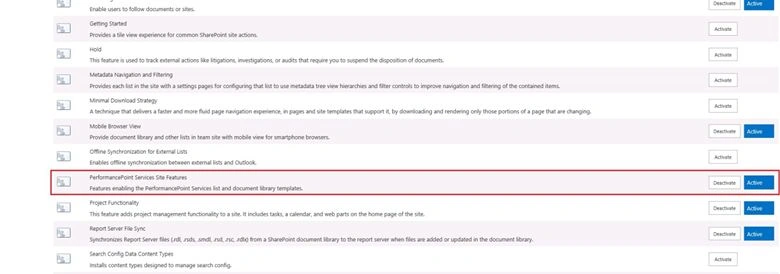
Activate the PerformancePoint Services Site Features as in the following:
Now it lists the database names as in the following:
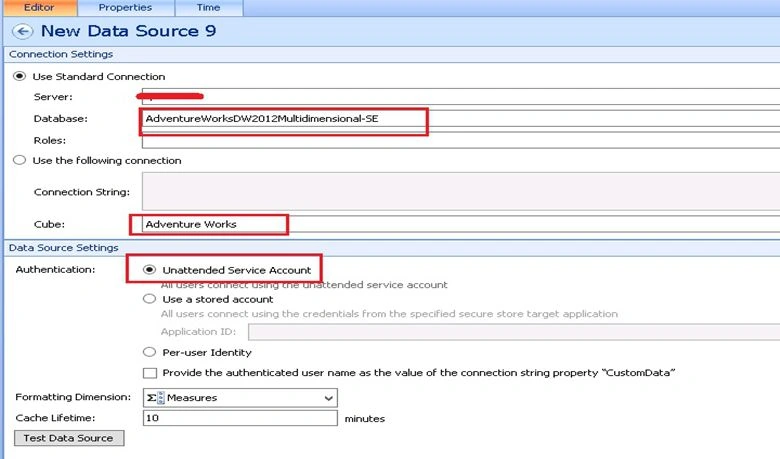
Test the Data Source connection as in the following:

It’s showing "Connection successful!".
References
Summary
In this article we explored how to set up a data connection from Dashboard Designer to an Analysis Services data cube.
Sanket JaiswalPosted Feb 2, 2016, 7:05 AM
Hi.. I am using SQL Server 2014 and I have installed SQL Server 2014 ADOMD.NET also updated web.config file to new version as 12.0.0.0 . later did iisreset, Server reboot but no luck. Tried to give default as well as PowerPivot instance name in Server name but it is still loading. Please suggest any thought
Jean PaulPosted Feb 4, 2014, 8:28 PM
Good Work Shiju!