

I am back with an important idea and to begin I want to describe the situation. Imagine that you have developed an application using a Microsoft Access database and you have deployed it. What if you change your mind about your database, instead of Access you would like to use a SQL Server database. Wow! Well don't panic, the simple solution is to use the class "DbProviderFactory" from the namespace "System.Data.Common", so instead of fixing your provider you specify which provider you want to use at runtime; that's wonderful.
The code is the following:
- using System;
- using System.Collections.Generic;
- using System.ComponentModel;
- using System.Data;
- using System.Drawing;
- using System.Linq;
- using System.Text;
- using System.Windows.Forms;
- using System.Data.Common;
- namespace DDbProviderFactory
- {
- public partial class Form1 : Form
- {
- //a methode receiving the provider we intend to use at run time MyProvider
- // and the connection string to the databde we are targeting
- public DataSet loadData(string Myprovider, string conStr)
- {
- DbProviderFactory connecteur; // create an instance of DbProviderFactory
- DbConnection conx; // create an instance of a connection whih we dont
- //know the driver yet it could be ole or odbc in this example
- DataSet ds = new DataSet();// dataset to collect data
- connecteur = DbProviderFactories.GetFactory(Myprovider); // here the DbProviderFactory gonna know
- // it's provider we use ole or odbc in this example
- conx = connecteur.CreateConnection(); // instance a connection depending on the provider
- conx.ConnectionString = conStr; // assign the conection string
- DbCommand command = connecteur.CreateCommand(); // create a dbcommand depending on provider we specifyed MyProvider
- DbDataAdapter adap = connecteur.CreateDataAdapter(); // create a dataAdapter
- command.CommandText = "select * from student"; // assign the query
- command.Connection = conx; // assign the connectio,
- adap.SelectCommand = command;
- adap.Fill(ds, "student"); // collect data
- return ds;
- }
- public Form1()
- {
- InitializeComponent();
- txconnection.Items.Add(@"Driver={Microsoft dBASE Driver (*.dbf)};DriverID=277;Dbq=" + Application.StartupPath);
- }
- private void Form1_Load(object sender, EventArgs e)
- {
- DataSet ds = new DataSet();
- txprovider.SelectedIndex = 0;
- txconnection.SelectedIndex = 0;
- ds = loadData(txprovider.Text, txconnection.Text);
- dataGridView1.DataSource = ds.Tables["student"];
- }
- private void txprovider_SelectedIndexChanged(object sender, EventArgs e)
- {
- txconnection.SelectedIndex = txprovider.SelectedIndex;
- DataSet ds = new DataSet();
- ds = loadData(txprovider.Text, txconnection.Text);
- dataGridView1.DataSource = ds.Tables["student"];
- }
- }
- }
The UI
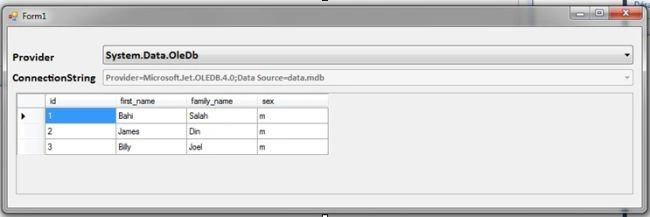
So as you can see the same code works with two different databases but with one condition, the database structure is the same, be sure of that.
The source will be included, try to look much more to the "loadData()" method the secret lies there.
I was in front my computer for two hours just to make that look easy, I hope you find it like that, see you soon and try to leave a comment.
Join the conversation! Your thoughts help the community grow.