Abstract / Overview
Purpose: Acknowledge support emails and new leads instantly while keeping replies accurate and traceable.
Approach: Use Gmail filters to label qualifying messages, then trigger a Make.com scenario that decides whether to respond, selects a template, replies in-thread, and logs outcomes. No custom servers. Free-friendly design.
Scope: “Auto email reply” for first-touch acknowledgments and after-hours responses. “Free auto-responder” constraints are respected through operations and send-limit budgeting.
Assumption. Gmail web interface, a Google Workspace or standard Gmail mailbox, Make.com Free plan, and an optional Google Sheet for state.
Outcomes
Consistent, on-brand acknowledgments within seconds.
Loop protection, deduplication, and logging.
Easy edits to templates without code.
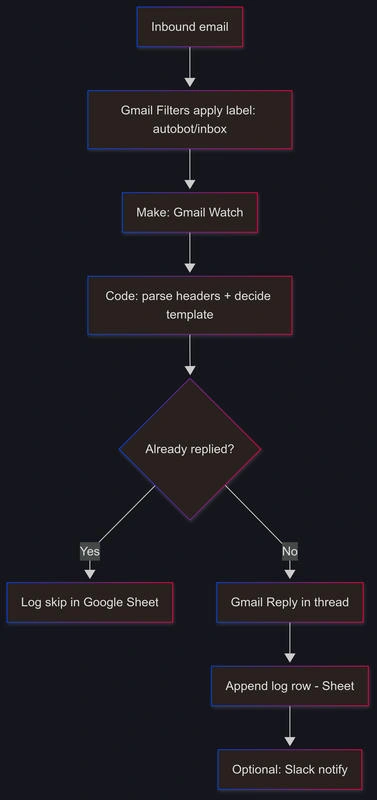
Diagram
Conceptual Background
Email auto-replies need guardrails:
Trigger accuracy: Filters and labels define the universe of eligible messages.
Intent routing: Rules map an email to one template (support vs lead).
Idempotency: Reply once per thread or per sender within a window.
Safety: Skip lists, bulk-list detection, and “no-reply” checks prevent loops.
Deliverability: Use the same thread, correct headers, and a verified From domain.
System overview
Gmail filter labels an inbound message.
Make watches the label, reads headers, and content.
Code module decides reply eligibility and selects a template.
Gmail “Reply to an email” sends the message with the right thread ID.
A Google Sheet stores a lightweight log: one row per replied thread.
Optional Slack post to notify humans.
Data model (Google Sheet AutoReply_Log):
ThreadID (text, primary key)
MessageID (text)
FromEmail (text)
FirstSeenAt (datetime)
LastRepliedAt (datetime)
TemplateID (text)
Reason (text: e.g., “ok”, “skip-no-reply”, “skip-list”, “skip-window”)
Idempotency strategy:
Step-by-Step Walkthrough
1. Prepare Gmail
2. Create Gmail filters
Create narrowly targeted filters to avoid false positives. Example patterns:
Support queue:
Lead capture:
For each filter:
Apply label autobot/inbox.
Do not select “Send template” in Gmail; replies will be sent by Make to keep dedupe and safety logic centralized.
Skip Spam. Ensure “Never send to Spam” when safe.
3. Create a Google Sheet
4. Build the Make.com scenario
Modules in order:
Gmail > Watch emails
Tools > Text aggregator (optional)
Code (JavaScript)
Parse headers.
Select template.
Enforce cooldown and exclusions.
Output a single object with: shouldReply, templateId, subject, body, threadId, messageId, fromEmail, reason.
Google Sheets > Search rows
Router
Gmail > Reply to an email
When shouldReply=true.
Thread: {{threadId}}.
Subject: preserve existing, or prepend [Ack].
Body: HTML from Code output.
From alias: support or sales alias.
Google Sheets > Add a row
Slack > Send message (optional)
Rules of thumb
Do not reply to no-reply@, mailer-daemon@, postmaster@.
Skip bulk-list mail using List-Id or Precedence: bulk/list.
Detect auto-generated mail via Auto-Submitted header.
5. Author templates in Make
Use short, respectful acknowledgments. Keep content factual and avoid promises. Two examples:
Template support_ack_v1
<p>Hi {{firstName}},</p>
<p>Thanks for contacting support. We created a ticket for your message titled “{{subject}}”.</p>
<p>Working hours: {{businessHours}}. Typical first response: {{slaHours}} hours.</p>
<p>Reference ID: {{caseId}}</p>
<p>For urgent items, reply with “URGENT” in the subject.</p>
<p>– {{teamName}}</p>
Template lead_ack_v1
<p>Hi {{firstName}},</p>
<p>Thanks for reaching out about {{product}}. A teammate will send options shortly.</p>
<p>If helpful, pick a time here: {{bookingLink}}</p>
<p>– {{teamName}}</p>
6. Test the system
Send a message to each target address from an external mailbox.
Confirm label assignment in Gmail.
Run scenario once, then switch to “On”.
Verify one reply per thread and a single row in the log.
7. Harden production
Add a Make Array aggregator to collapse multiple triggers from the same thread that arrive within 60 seconds.
Add a Rate limiter (Tools → Sleep) when Sheets or Gmail throttles.
Log Reason for each skip path to diagnose filters later.
Code / JSON Snippets
Gmail filter queries
Apply label autobot/inbox with these examples. Edit domains.
(to:[email protected] OR to:[email protected])
 -from:*.yourdomain.com
 -from:noreply@*
 -from:mailer-daemon@*
(to:[email protected] OR subject:(demo OR pricing OR quote))
 -from:*.yourdomain.com
 -from:noreply@*
 -from:mailer-daemon@*
Gmail filter import (XML)
Import under Gmail → Settings → Filters → Import. Replace labels and addresses.
<?xml version='1.0' encoding='UTF-8'?>
<feed xmlns='http://schemas.google.com/apps/2006'>
  <entry>
    <category term='filter'/>
    <title>Support AutoReply</title>
    <apps:property xmlns:apps='http://schemas.google.com/apps/2006' name='to' value='[email protected] OR [email protected]'/>
    <apps:property xmlns:apps='http://schemas.google.com/apps/2006' name='from' value='-noreply@* -mailer-daemon@*'/>
    <apps:property xmlns:apps='http://schemas.google.com/apps/2006' name='label' value='autobot/inbox'/>
    <apps:property xmlns:apps='http://schemas.google.com/apps/2006' name='shouldNeverSpam' value='true'/>
  </entry>
  <entry>
    <category term='filter'/>
    <title>Sales AutoReply</title>
    <apps:property xmlns:apps='http://schemas.google.com/apps/2006' name='to' value='[email protected]'/>
    <apps:property xmlns:apps='http://schemas.google.com/apps/2006' name='subject' value='demo OR pricing OR quote'/>
    <apps:property xmlns:apps='http://schemas.google.com/apps/2006' name='label' value='autobot/inbox'/>
  </entry>
</feed>
Make.com Code module: decision and template merge
Paste into a Code module. Inputs: the Gmail bundle. Outputs: one object.
// Helpers
const get = (o, k, d="") => (o && k in o) ? o[k] : d;
const hdr = (h, name) => {
  if (!h) return "";
  const k = Object.keys(h).find(x => x.toLowerCase() === name.toLowerCase());
  return k ? h[k] : "";
};
const emailRegex = /<?([A-Z0-9._%+-]+@[A-Z0-9.-]+\.[A-Z]{2,})>?/i;
const nameRegex = /^"?([^"<]+)"?\s*</;

// Config
const COOLDOWN_DAYS = 7;
const businessHours = "Mon–Fri 9:00–17:00 UTC";
const slaHours = "24";
const bookingLink = "https://cal.example.com/yourteam";
const teamName = "Your Team";
const product = "Your Product";

// Input
const msg = input; // Make passes Gmail fields on bundle
const headers = get(msg, "headers", {});
const from = hdr(headers, "From") || msg.from || "";
const subject = msg.subject || hdr(headers, "Subject") || "(no subject)";
const threadId = msg.threadId;
const messageId = hdr(headers, "Message-Id") || msg.id || "";
const listId = hdr(headers, "List-Id");
const precedence = hdr(headers, "Precedence");
const autoSubmitted = hdr(headers, "Auto-Submitted");

// Parse sender
const fromEmail = (from.match(emailRegex) || ["",""])[1];
const firstName = (from.match(nameRegex) || ["",""])[1].split(" ")[0] || fromEmail.split("@")[0];

// Safety checks
const lower = (fromEmail || "").toLowerCase();
const isNoReply = lower.includes("no-reply") || lower.includes("noreply");
const isDaemon = lower.includes("mailer-daemon") || lower.includes("postmaster");
const isList = (listId && listId.trim().length > 0) || /list|bulk/i.test(precedence);
const isAuto = /auto/i.test(autoSubmitted);

let reason = "ok";
if (!fromEmail) reason = "skip-no-from";
if (isNoReply) reason = "skip-no-reply";
if (isDaemon) reason = "skip-daemon";
if (isList) reason = "skip-list";
if (isAuto) reason = "skip-auto";

// Route
let templateId = "";
if (/sales@yourdomain\.com/i.test(msg.to || "") || /\b(demo|pricing|quote)\b/i.test(subject)) {
  templateId = "lead_ack_v1";
} else {
  templateId = "support_ack_v1";
}

// Merge templates
const caseId = "C-" + (Date.now() % 1000000).toString().padStart(6, "0");
const tokens = { firstName, subject, businessHours, slaHours, caseId, teamName, bookingLink, product };

const templates = {
  support_ack_v1: {
    subject: "We received your support request",
    body: `<p>Hi ${tokens.firstName},</p>
<p>Thanks for contacting support. We created a ticket for “${tokens.subject}”.</p>
<p>Working hours: ${tokens.businessHours}. Typical first response: ${tokens.slaHours} hours.</p>
<p>Reference ID: ${tokens.caseId}</p>
<p>– ${tokens.teamName}</p>`
  },
  lead_ack_v1: {
    subject: "Thanks for your interest",
    body: `<p>Hi ${tokens.firstName},</p>
<p>Thanks for reaching out about ${tokens.product}. A teammate will send options shortly.</p>
<p>You can also pick a time: <a href="${tokens.bookingLink}">${tokens.bookingLink}</a></p>
<p>– ${tokens.teamName}</p>`
  }
};

const tpl = templates[templateId];

// Output
return {
  shouldReply: reason === "ok",
  reason,
  templateId,
  subject: tpl.subject,
  body: tpl.body,
  threadId,
  messageId,
  fromEmail
};
Google Sheets search and cooldown check (optional)
Use this formula in a Google Sheets > Search rows module to enforce per-thread uniqueness on your side. If you also want per-sender cooldown, add another search where FromEmail = {{fromEmail}} AND LastRepliedAt > NOW()-COOLDOWN_DAYS.
Gmail “Reply to an email” mapping
Thread: {{Code[1].threadId}}
Body: {{Code[1].body}} (HTML enabled)
Subject: {{subject}} from the original, or {{Code[1].subject]}} if you prefer a titled ack
From: choose alias [email protected] or [email protected]
Sample workflow JSON code
This platform-agnostic JSON describes modules and guards. Adapt to Make or n8n.
{
  "workflow": {
    "name": "gmail-autoreply-free",
    "assumptions": {
      "gmailFiltersApplyLabel": true,
      "replyOncePerThread": true,
      "cooldownDays": 7
    },
    "nodes": [
      {
        "id": "trigger_gmail_watch",
        "type": "trigger.gmail.watch",
        "config": { "label": "autobot/inbox", "includeHeaders": true, "includeHtml": true, "includeText": true },
        "outputs": ["email"]
      },
      {
        "id": "code_decision",
        "type": "function.javascript",
        "inputs": ["email"],
        "config": { "source": "// Code from snippet above" },
        "outputs": ["decision"]
      },
      {
        "id": "sheets_lookup_thread",
        "type": "db.googlesheets.search",
        "inputs": ["decision.threadId"],
        "config": {
          "spreadsheet": "AutoReply_Log",
          "sheet": "AutoReply_Log",
          "where": "ThreadID = '{{decision.threadId}}'"
        },
        "outputs": ["thread_rows"]
      },
      {
        "id": "router_decide",
        "type": "router",
        "branches": [
          { "when": "decision.shouldReply && thread_rows.count == 0", "to": "gmail_reply" },
          { "when": "true", "to": "log_skip" }
        ]
      },
      {
        "id": "gmail_reply",
        "type": "mail.gmail.reply",
        "inputs": ["decision"],
        "config": {
          "threadId": "{{decision.threadId}}",
          "htmlBody": "{{decision.body}}",
          "subjectMode": "preserve"
        },
        "outputs": ["sent"]
      },
      {
        "id": "log_write",
        "type": "db.googlesheets.append",
        "inputs": ["decision", "sent"],
        "config": {
          "spreadsheet": "AutoReply_Log",
          "sheet": "AutoReply_Log",
          "values": {
            "ThreadID": "{{decision.threadId}}",
            "MessageID": "{{decision.messageId}}",
            "FromEmail": "{{decision.fromEmail}}",
            "FirstSeenAt": "{{now()}}",
            "LastRepliedAt": "{{now()}}",
            "TemplateID": "{{decision.templateId}}",
            "Reason": "{{decision.reason}}"
          }
        }
      },
      {
        "id": "log_skip",
        "type": "db.googlesheets.append",
        "optional": true,
        "inputs": ["decision"],
        "config": {
          "spreadsheet": "AutoReply_Log",
          "sheet": "AutoReply_Log",
          "values": {
            "ThreadID": "{{decision.threadId}}",
            "MessageID": "{{decision.messageId}}",
            "FromEmail": "{{decision.fromEmail}}",
            "FirstSeenAt": "{{now()}}",
            "LastRepliedAt": "",
            "TemplateID": "{{decision.templateId}}",
            "Reason": "{{decision.reason}}"
          }
        }
      },
      {
        "id": "slack_notify",
        "type": "notify.slack.send",
        "optional": true,
        "inputs": ["decision"],
        "config": {
          "channel": "#inbox",
          "text": "Auto-replied with {{decision.templateId}} to {{decision.fromEmail}}"
        }
      }
    ]
  }
}
Fallback: direct Gmail reply via HTTP (advanced)
If you prefer pure HTTP, use Google’s Gmail API through Make’s HTTP module. Replace placeholders. The API requires OAuth and base64url-encoded MIME.
POST https://gmail.googleapis.com/gmail/v1/users/me/messages/send
Authorization: Bearer YOUR_OAUTH_TOKEN
Content-Type: application/json

{
  "raw": "BASE64URL_ENCODED_MIME"
}
Example MIME skeleton for reply
Headers preserve the thread and avoid a new conversation.
Subject: Re: {{originalSubject}}
In-Reply-To: {{originalMessageId}}
References: {{originalMessageId}}
To: {{fromEmail}}
Content-Type: text/html; charset=UTF-8

<html><body>...your HTML here...</body></html>
Use Cases / Scenarios
Support acknowledgment: Promise a realistic first-response time and include a case ID.
After-hours leads: Confirm receipt and share a booking link.
Event campaigns: Create a temporary filter for promo replies, then disable post-campaign.
VIP routes: If From matches a list, skip auto-reply and alert humans only.
Multi-brand inboxes: Choose a template by To: domain and send from the matching alias.
Limitations / Considerations
Gmail send limits apply per account and per day. Plan within your domain policy.
Free Make plans have monthly operation caps. Heavy inboxes require a paid tier or batching.
Filters must stay precise. Broad filters cause off-target replies.
List traffic and auto-generated mail need strict skip logic.
Legal and compliance. Include the company address and unsubscribe where your jurisdiction requires in marketing contexts.
Language detection is basic unless you add a detection API.
HTML-only replies can trigger plain-text fallbacks. Provide simple markup.
Fixes (common pitfalls with solutions and troubleshooting tips)
Looping with other auto-responders: Check Auto-Submitted, Precedence, and List-Id. If set, skip. Add “X-Autobot: v1” header and skip when present.
Many duplicates: Confirm the Sheets lookup by ThreadID. Ensure the Gmail module is “Reply to” not “Send email.”
Reply sent to an alias instead of the sender: Map To as the original sender from message headers, not your alias. Use the Reply module, which preserves the thread.
Gmail throttling: Insert a 200–500 ms Sleep between replies during spikes.
Templates missing tokens: Keep defaults for all tokens in the Code module. If a token is empty, degrade gracefully.
Wrong route: Log Reason and TemplateID for each message. Review top subjects or recipient domains and refine filters.
HTML rendering issues: Validate with a simple <p> structure and absolute links. Avoid heavy CSS.
Timezone confusion in SLAs: Render business hours as “UTC” or include the region explicitly.
Budget Calculation
Assumptions. Replace with your real quotas.
Variables
M = monthly inbound messages that match filters.
O = operations per handled message. Typical path without Slack: Gmail Watch (1) + Code (1) + Sheets Search (1) + Gmail Reply (1) + Sheets Append (1) = 5. With Slack, 6.
OpsTotal = M × O.
Examples
Light inbox: M = 120, O = 5 → OpsTotal = 600. Fits many free plans.
Busy inbox: M = 800, O = 6 → OpsTotal = 4,800. Upgrade or reduce scope.
Gmail send-limit guard
Let S be daily send limit for your account type.
DailyReplies = M / 30. Keep DailyReplies ≤ 0.8 × S for safety.
Example: M = 900 → DailyReplies = 30. If S = 500 you are safe.
Storage
Cost control levers
Narrow filters to the most valuable routes.
Apply a cooldown per sender to reduce repeat replies.
Disable Slack notifications or batch them to summaries.
No-Code Alternative (Free)
This logic can be replicated in Make using Gmail triggers and conditional routing, without relying on complex filter chains. Use: https://www.make.com/en/register?pc=rohit9910
Conclusion
The Gmail Filters + Make.com pattern gives you a dependable “free auto-responder” for first-touch support and lead intake. Filters select candidates. Make decisions with explicit logic, reply in-thread, and write a log for audit. The design avoids loops, enables clear SLAs, and scales from dozens to hundreds of messages per month without servers. Extend it incrementally as your inbox grows.


Join the conversation! Your thoughts help the community grow.