Introduction
In one of my previous articles I explained How you can show your Data in Grid format using the WebGrid in MVC4.
In today's article I explain how to create an editable WebGrid in MVC4 to implement CRUD operations.
I will show you inline operations through which you will be able to Edit, Delete and Update the data in the Grid itself.
Use the following procedure to create a sample of such an interesting application.
Step 1
First of all I added a Model class in the Model folder. This can be done by right-clicking the Model folder and then selecting to Add a new class.
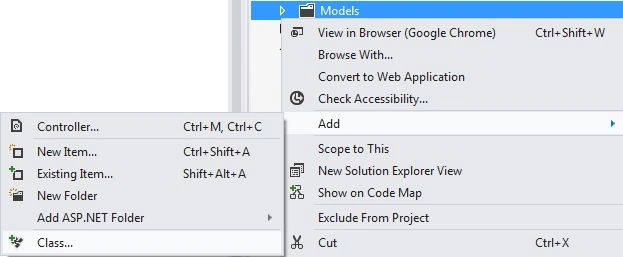
I named it "UserModel".

Step 2
Then I added the variables in this class and assigned some static values to these variables.
- using System;
- using System.Collections.Generic;
- using System.Linq;
- using System.Web;
-
- namespace EditableWebgrid.Models
- {
- public class UserModel
- {
- public int ID { get; set; }
- public string Name { get; set; }
- public string SurName { get; set; }
-
- public static List<UserModel> getUsers()
- {
- List<UserModel> users = new List<UserModel>()
- {
- new UserModel (){ ID=1, Name="Anubhav", SurName="Chaudhary" },
- new UserModel (){ ID=2, Name="Mohit", SurName="Singh" },
- new UserModel (){ ID=3, Name="Sonu", SurName="Garg" },
- new UserModel (){ ID=4, Name="Shalini", SurName="Goel" },
- new UserModel (){ ID=5, Name="James", SurName="Bond" },
- };
- return users;
- }
- }
- }
Three variables are used named ID, Name and SurName, then a list is created that is applied to the UserModel class.
Step 3
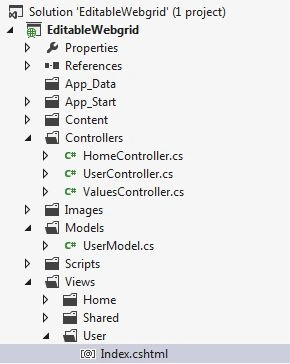
Now I will add a View Class to a folder named "Home".

Until now I had just created the class, I will work on it later. Before that we will work on the Controller of this application.
For working on the Controller you again need to add a Controller class in the Controller Folder, I had named this class UserController.
- using System;
- using System.Collections.Generic;
- using System.Linq;
- using System.Web;
- using System.Web.Mvc;
- using EditableWebgrid.Models;
-
- namespace EditableWebgrid.Controllers
- {
- public class UserController : Controller
- {
- public ActionResult Index()
- {
- List<UserModel> users = UserModel.getUsers();
- return View(users);
- }
- }
- }
In this class I created an ActionResult that should be named the same as your View file, that's why this ActionResult is named "Index" because my View File was named "Index".
Through this action the result value present in the user Model is passed to the Index Class.
Step 4
Now we can work on the Index file, here first of all a WebGrid is created:
- @{
- var grid = new WebGrid(Model);
- }
-
- <div id="gridContent" style=" padding:20px; " >
- @grid.GetHtml(
- tableStyle: "webgrid-table",
- headerStyle: "webgrid-header",
- footerStyle: "webgrid-footer",
- alternatingRowStyle: "webgrid-alternating-row",
- selectedRowStyle: "webgrid-selected-row",
- rowStyle: "webgrid-row-style",
- mode: WebGridPagerModes.All,
- columns:
- grid.Columns(
- grid.Column("ID", format: @<text> <span class="display-mode">@item.ID </span> <label id="UserID" class="edit-mode">@item.ID</label> </text>, style: "col1Width" ),
- grid.Column("Name", "Name", format: @<text> <span class="display-mode"> <label id="lblName" >@item.Name</label> </span> <input type="text" id="Name" value="@item.Name" class="edit-mode" /></text>, style: "col2Width"),
- grid.Column("SurName", "Sur Name", format: @<text> <span class="display-mode"> <label id="lblSurName">@item.SurName</label> </span> <input type="text" id="SurName" value="@item.SurName" class="edit-mode" /> </text>, style: "col2Width"),
- grid.Column("Action", format: @<text>
- <button class="edit-user display-mode" >Edit</button>
- <button class="save-user edit-mode" >Save</button>
- <button class="cancel-user edit-mode" >Cancel</button>
- </text>, style: "col3Width" , canSort: false)
- ))
First some CSS is applied to the WebGrid that you can find in the Downloadable Zip File present in the starting of this article.
Then I had created the columns, in the columns you can see that I had done some typical coding. That's because I will hide the Span whenever the user clicks on the Edit button and will display the TextBox so that he can enter a new Value then the update will be done that will replace the existing text with the new text.
You can simply write in this format: "grid.column("Name","Name"), this will show you the data available in the Name but can't be edited since this will be in Label or Span format and not in the TextBox.
After creating the columns I had created some buttons that will be used to Edit, Save and Cancel the Record. On these buttons jQuery is applied that will allow them to work as expected, it's script is as follows:
- <script type="text/javascript" >
- $(function () {
- $('.edit-mode').hide();
- $('.edit-user, .cancel-user').on('click', function () {
- var tr = $(this).parents('tr:first');
- tr.find('.edit-mode, .display-mode').toggle();
- });
-
- $('.save-user').on('click', function () {
- var tr = $(this).parents('tr:first');
- var Name = tr.find("#Name").val();
- var SurName = tr.find("#SurName").val();
- var UserID = tr.find("#UserID").html();
- tr.find("#lblName").text(Name);
- tr.find("#lblSurName").text(SurName);
- tr.find('.edit-mode, .display-mode').toggle();
- var UserModel =
- {
- "ID": UserID,
- "Name": Name,
- "SurName": SurName
- };
- $.ajax({
- url: '/User/ChangeUser/',
- data: JSON.stringify(UserModel),
- type: 'POST',
- contentType: 'application/json; charset=utf-8',
- success: function (data) {
- alert(data);
- }
- });
-
- });
- })
- </script>
Here as you can see that through Edit User the Label is changed to the TextBox and Cancel will again change the TextBox to Label.
Then an Ajax call is applied that is calling the Controller class and the Action created in that class, now you will be thinking that I had only created an Action Class named as Index!! Actually I had also created one more Action just below the Index Action result, so the complete code is as follows:
- sing System.Collections.Generic;
- using System.Linq;
- using System.Web;
- using System.Web.Mvc;
- using EditableWebgrid.Models;
-
- namespace EditableWebgrid.Controllers
- {
- public class UserController : Controller
- {
- public ActionResult Index()
- {
- List<UserModel> users = UserModel.getUsers();
- return View(users);
- }
-
- public JsonResult ChangeUser(UserModel model)
- {
-
- string message = "Success";
- return Json(message, JsonRequestBehavior.AllowGet);
- }
-
- }
- }
In this ChangeUser you need to create an object of the Model class in which changes are to be done. That's why I had created an object of UserModel as model.
Now this change the user will show a message whenever there will be a successful update in the Model Class.
Now our application is completely created and is ready to go.
Output
On running the application you will see an output like this one:

Now if you click on the Edit button then you will see that the labels will be converted into the TextBox and the Save and Cancel buttons will become visible.

If you click on the Cancel button then no update will be made but if you click on the Save button then the data will be changed.



mjasriPosted Feb 9, 2020, 12:17 AM
It is Not Working in Mvc Core 2 , Pleaase Update and share...
Born To Be BomPosted Nov 15, 2019, 4:21 AM
Thank you. It's very nice. But I have something to share when we use paging in webgrid. The script will not working when we click to next page. We should use delegate to solve this problem.
احمد صدقیPosted Feb 25, 2019, 7:02 AM
Where can i add Script code?
vidya nagarajPosted Nov 23, 2017, 2:25 AM
Thanks for sharing this. I also wanted to know how can we add new row on click of AddNew User button Dynamically.
Binal ShahPosted Jun 12, 2017, 3:44 PM
I need help!!! I am trying to implement this code but I am getting 2 raws for each line and its not showing same page as displayed here like first it shows only edit button and when you click on edit grid is editable with save and cancel buttons. Please please help me fix this issue with your code.
Rachna MehtaPosted Feb 7, 2017, 12:37 PM
Thanks a lot for the idea and help. very much appreciated. It helped me learn so much today.
Manav PandyaPosted Jan 19, 2017, 11:55 AM
I need example with sql server ado.net grid if you have
Manav PandyaPosted Jan 19, 2017, 11:54 AM
Thanks for sharing this sir ...
Amit MohantyPosted Jul 23, 2016, 2:12 AM
Hey i am unable to download the rar file..because i need the style sheet of the grid...so please help me
kalu singh raoPosted Jul 13, 2016, 1:41 AM
Nice...
chandan kaviPosted Mar 22, 2016, 6:22 AM
hey dude nice article but the download link is broken or moved, i need css file..pls help
Harshitha.R. ChandraPosted Mar 2, 2016, 5:37 AM
Hi thanks for the example,its working fine. Can u please guide me to add filtering to this grid.
Navin Kumar SinhaPosted Mar 1, 2016, 4:57 AM
Edit button not working, can u please send the jquery file and css file. i think there is a problem with css and js only
Naveenkumar ShindhePosted Jan 4, 2016, 1:22 AM
this is good but for me save ,edit and delete buttons are not working along with i am getting 2 edit box in the application
Sonwabo MbuqePosted Nov 18, 2015, 7:15 AM
This is great, but your css file is broken and i had to implement my own model for the update to take place
kotesh raoPosted Sep 3, 2015, 8:02 AM
hi bro my action buttons are not working please help me that
Ranajoy RoyPosted Jul 21, 2015, 5:13 AM
love youuuuuuuuu..working great...thanks a lottttttttttttttttt Sir...
Naved AnsariPosted Apr 15, 2015, 3:45 AM
Its working but Im not able to update the changes in database can you please helpThanks
michael twedePosted Apr 7, 2015, 3:26 PM
link i meant to say
michael twedePosted Apr 7, 2015, 3:24 PM
looks like the download like is broken or moved. where can i get the .css file? or just the style elements?
Mahdis DezfuolliPosted Feb 8, 2015, 12:11 AM
Hi, Thanks for this article. I have problem. My jquery script doesn't work for me.Please help me
John BunyanPosted Jan 29, 2015, 1:40 PM
Hi, thanks for this example. I have a question: My first row updates perfectly, but not the second and so on...do you have an Idea why this is happening? Thanks!
Hessam FarahbakhshPosted Jan 28, 2015, 2:32 PM
Hello, do I have to use @grid.GetHtml or can I just use regular HTML Table tags? Ofcourse I will put in the lables, inputs and the css
Omprakash KurmiPosted Dec 22, 2014, 8:33 AM
Thank you,i solve the toggle() error i.e replace the code by 'var tr = $(this).parent().parent();' now editing is working fine.now working on save functionality because in which it not find the value of change row ie " var Name = tr.find("#Name").val(); var Year = tr.find("#Year").val(); var ID = tr.find("#Id").html(); tr.find("#lblName").text(Name); tr.find("#lblYear").text(Year);" here i not found data of name,year and id.
Anubhav ChaudharyPosted Dec 22, 2014, 6:43 AM
This can happen because of various reasons, so you need to try different solutions:- First: I think two or more jquery library are used and first one is not allowing the second one to execute, so place second one above the first one. Second Soln:- I think your code is getting conflicted so use $.noConflict() at the starting of jquery code i.e. inside the script tag. Third:- Check the console of your browser and check if any error is coming, if yes then tell me the error.
Omprakash KurmiPosted Dec 22, 2014, 4:32 AM
Hi Now javascript is working but something went wrong in toggle functionality which not change the display-mode to edit-mode and vise-versa and also on save button click value is not assigne in model.
Anubhav ChaudharyPosted Dec 19, 2014, 7:50 AM
First of all check if you have add Jquery library in your code or not, and after that check the console of your browser, if some type of error is coming over there then tell it to me after that I might become able to help you.
Omprakash KurmiPosted Dec 19, 2014, 4:58 AM
Hi Anubhav i follow all above step and application run successfully but issue in javascript which not call on button click of edit,save or cancel.please can you suggest how can we call javascript.Thank you.
nijith poovaliPosted Apr 2, 2014, 11:29 PM
Hi Anubhav, here you are updating each row by row. But I want all rows to be updated using update button outside the grid, so that users of my application can click on that update button after they complete editing of the entire grid.Can you please let me know how to achieve this functionality.
balram khadkaPosted Mar 24, 2014, 1:15 PM
Hi, I read this article but where is the css file you said that css file is available in EditableWebGrid.rar file but there is no css file.So, can you please send me the related css file which is displayed same page as shown in above page.If you provide to me that is good for me.Thanks in advance
Anubhav ChaudharyPosted Feb 11, 2014, 6:15 AM
That's Obvious Harsha, In this Article I haven't provided the Database Connectivity, if no connectivity is provided then how can a data can be updated permanently, it was left on the reader that he will create a database and will provide the connectivity after which it will store the new value. But i saw that mostly user were unable to do that that's why I again created an Application where complete process is provided. You can follow this link for the same: http://www.c-sharpcorner.com/UploadFile/cd7c2e/implement-insert-update-and-delete-functionality-in-the-web/ This Article has three parts but all the parts have downloadable code attached with them. So you can download the code and can use it
Harsha ChunduriPosted Feb 11, 2014, 1:51 AM
Hi, I have got an issue while saving the modified value and displaying it. I could edit the textbox but when I am saving it, the grid is still displaying the old values. Please give your suggestion on this.