This article is about how to create and manage a SharePoint blog in SharePoint Online.
Note
This is the same procedure which we can follow for SharePoint 2016.
As we know, a blog is a Website that enables us or our organization to share ideas and information quickly. A blog is a regularly updated online personal journal or diary, a place to share your thoughts and your passions. We can comment on your posts, as well as provide links to interesting sites, photos, and related blogs.
This article contains the points given below.
- Creating a blog site.
- How to publish a posted blog.
- How to add a category.
- Break inheritance from the parent site for a blog.
- Create unique permissions for the lists and libraries in a blog.
- Change a blog post layout.
- How to manage the post.
Let’s go through the above points one-by-one.
Creating a blog site
We have already posted about creating a blog site in an earlier article, kindly refer to this path.
Here, we will start creating a blog site.
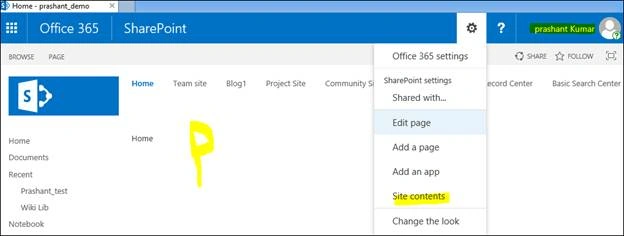
- Open your SharePoint site collection, click setting menu and select site contents.
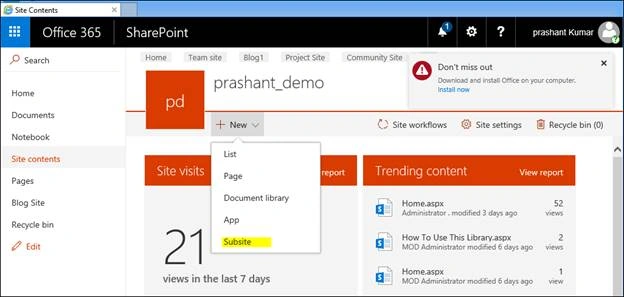
- Here, we need to select Subsite by clicking New on site content page, as shown below.
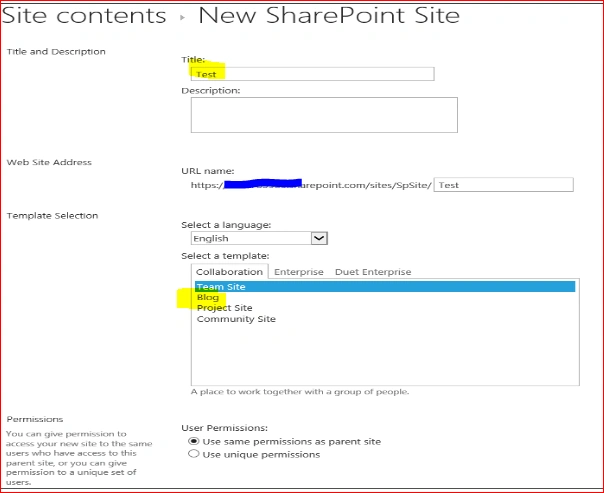
- Enter a title, description and a URL. After selecting a template, select blog.
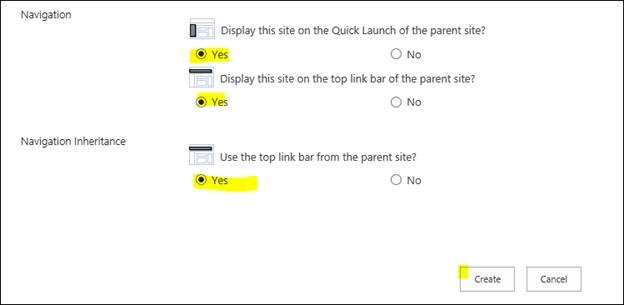
- Once everything is done, as shown above, click create button, wait for some time and your blog site will be created soon.
- Here, we will go with our first blog site, as shown below, which shows welcome or landing page.
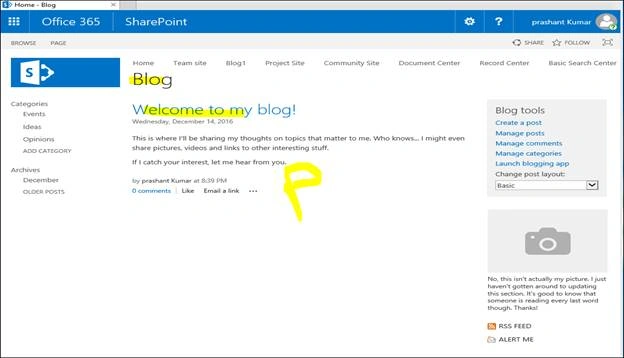
How to create and publish a posted blog
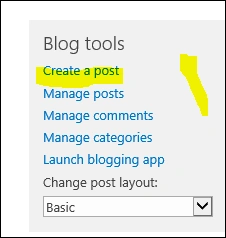
- On the home page of the SharePoint Blog page, select create a Post under the Blog tools.
- Here, enter a title and an optional description. In the next box BODY, enter your blog contents, categories and the published date.
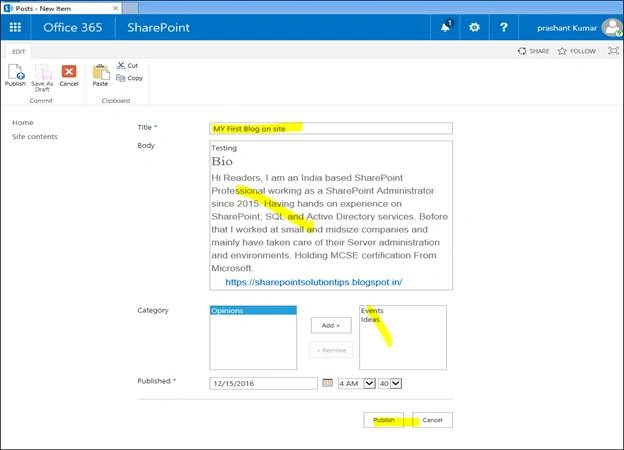
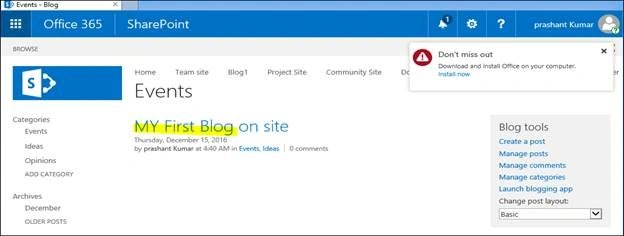
- Once everything is done, click Publish button and wait for a second. Here, we can see our first blog will be created.
How to add Category
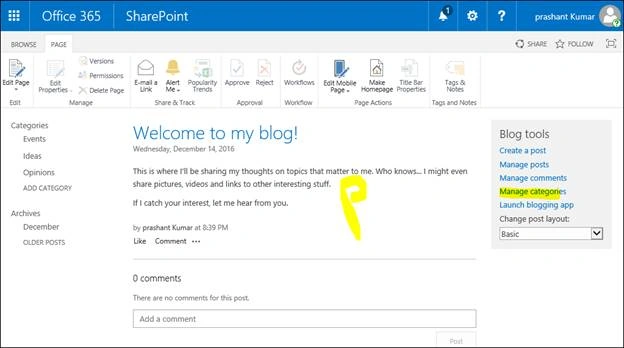
- To add the category, we need to select Manage Categories under the Blog Tools from the Home page of the blog site.
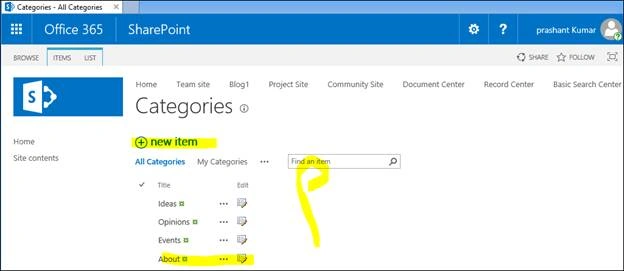
- Click New Items from Categories page and type the name of the category which you want to add. Click Save button.
- We can modify default category name from the same page, select next to title. Click Edit, rename and save.
How break inheritance from the parent site for a blog
- We are breaking inheritance from the parent site for a blog to restrict access from the other user and maintain security.
- To do the same, open SharePoint Blog page, select setting menu and select site settings option.
- Here, we will be getting the site setting wizard page.
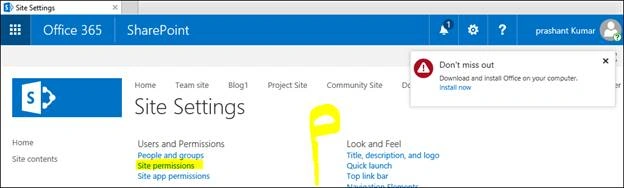
- Select site permission under the Users and Permissions option, as shown above. It will take us to site permissions.
- Click Stop inheriting the permissions option from the Permission ribbon.
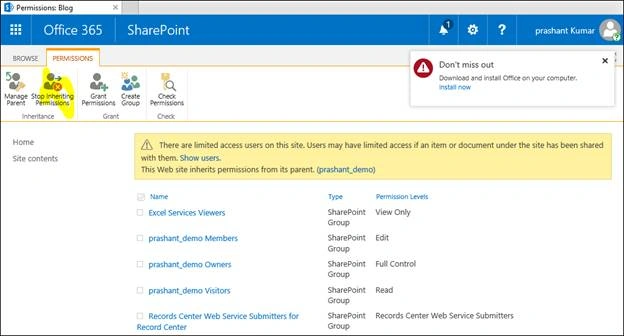
- It will ask for confirmation, click OK to configure.
How to create unique permissions for the lists and libraries in a blog
- Open SharePoint Blog page, select setting menu and select site contents options.
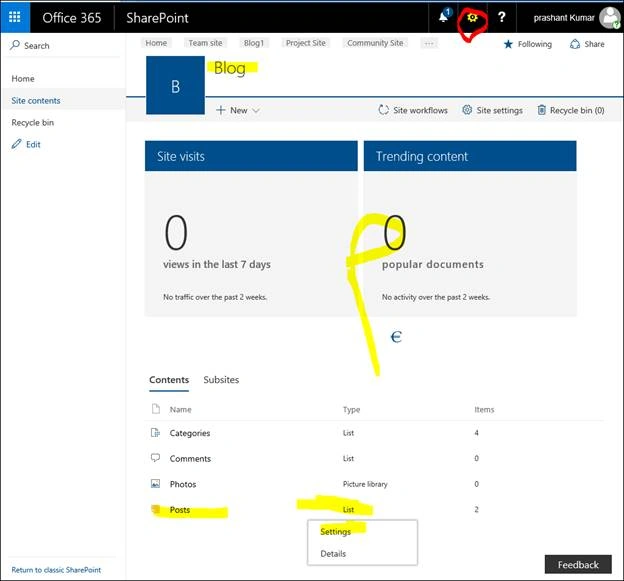
- On the site content page, select Post page and click ellipsis, which is next to the Post and click setting, as shown below.
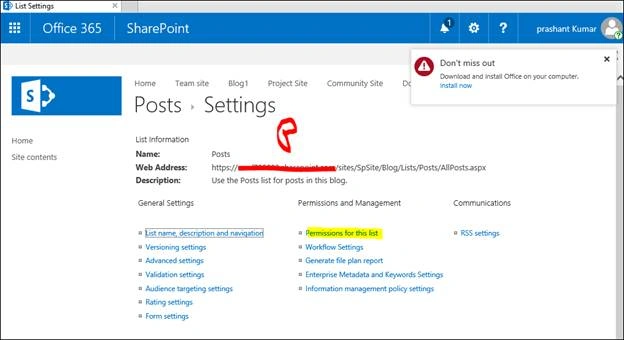
- On the setting page, click Permission for the list.
- On the Permission Ribbon option, select stop Inheriting the permission.
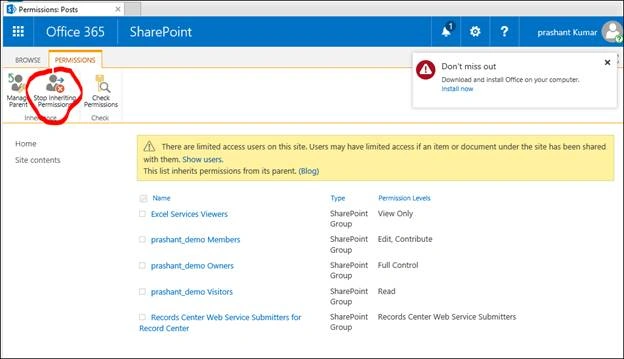
- It will ask for the confirmation, just click OK.
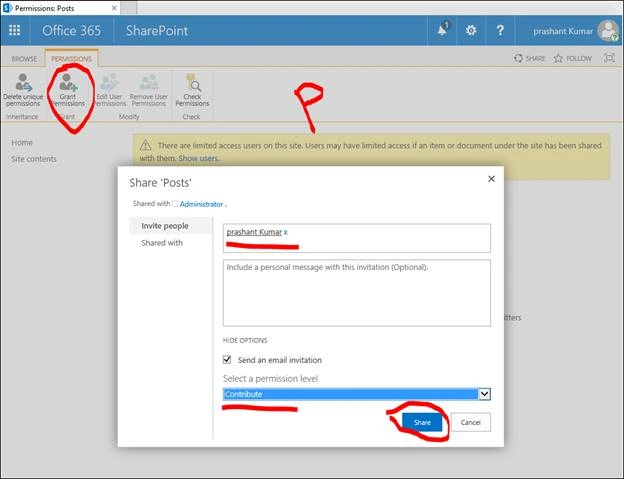
- Now, you can notice Grant permission option is enabled. Here, we can add users and Groups and give them the specific permission. To add it, click Grant permission on the ribbon.
- Now, enter a user or Group name or an E-email address and click Show option and then select permission level from the dropdown templates, followed by clicking on share.
How to change a blog post layout
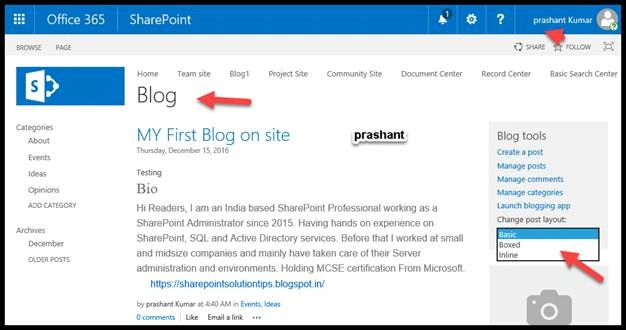
- Select Post Layout from Blogs tools on the Home page of SharePoint's Blog page.
- Select Post layout from the dropdown box, as shown below.
How to Manage Post
- We can manage the created post on SharePoint Online.
- Login to the Blog site with the required permission.
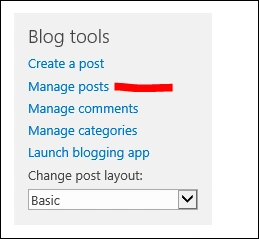
- Select Manage Post from Blog tools option on the SharePoint Blog home page.
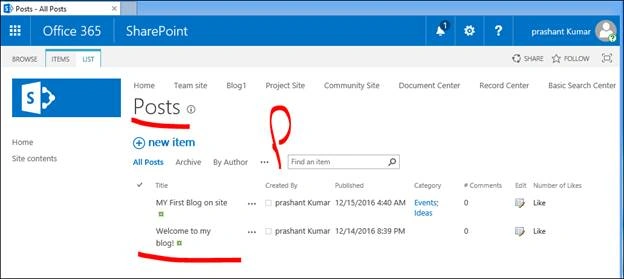
- We will be redirected to the post's page. Here, we can add new items, delete, edit or rename the properties of the blogs.


Randy NieukirkPosted Jul 23, 2021, 5:12 PM
I would love to be able to do this but I do not have the Blog option listed on the Collaboration Tab when trying to create a new subsite. My SharePoint site is one that was created in Teams. How do I get theBlog option to show up under teh Collaboration tab?
Dinesh GabhanePosted Nov 12, 2019, 1:25 AM
Nice Article. Thanks
Joshua LittlePosted Sep 22, 2017, 8:30 AM
Thanks for the post! I have a problem with the Categories web part. I accidentally changed the list view settings, and now it will not return to the default Categories view; if I click on a category from the new list view, it takes me to the categories list, instead of to the posts which have been tagged with that category... Any tips on fixing this??
Rajesh MPosted Sep 14, 2017, 10:11 AM
Hi,This is a great information.But i have one question Publish Blog Posts in future date is working fine but Publish Blog Posts in future on specific time is not working.Can you please help me on that.
Prashant KumarPosted Dec 20, 2016, 5:51 AM
Hi Humayun,there is way to share team site as well document, i am working on to do same for Blog
Humayun Kabir MamunPosted Dec 20, 2016, 5:00 AM
Nice article, it will be very helpful if you describe how the outside user will interact with this blog-site.
Madhanmohan DevarajanPosted Dec 19, 2016, 3:36 PM
Thanks for explaining about blog creation in SharePoint Online.