

In this article we will see how to create a NuGet Package after each build and push the package to NuGet in Visual Studio 2013.
NuGet
NuGet is a Visual Studio extension that makes it easy to pull in libraries, components and most importantly their configuration into your Visual Studio project. This is a tool that is installed with MVC 3 and it is used to bring in various components to make developing on MVC easier. These components are called NuGet Packages and they can include .NET assemblies, JavaScript files, HTML/Razor files, CSS files, images and even files that can add configuration to your project's web.config. The goal of NuGet is to make it super-easy to bring in or update a component in your existing projects.
More info: Using NuGet Packages.
First of all let's make an MVC project.
Getting Started
- Create a new Project. Open Visual Studio 2013.
- Go to "File" -> "New" -> "Project".
- Select "Web" in the installed templates.
- Select "MVC".
- Enter the Name and choose the location.
- Click "OK"
In this small sample I am building CRUD operations using Entity Framework.
Model classes:
- public class Friend
- {
- [Key]
- [DatabaseGeneratedAttribute(DatabaseGeneratedOption.Identity)]
- public int FriendId { get; set; }
- public string FirstName { get; set; }
- public string LastName { get; set; }
- public string Address { get; set; }
- public string City { get; set; }
- public string PostalCode { get; set; }
- public string Country { get; set; }
- public string Notes { get; set; }
- }
- public class FriendsContext : DbContext
- {
- public FriendsContext()
- : base("name=DefaultConnection")
- {
- base.Configuration.ProxyCreationEnabled = false;
- }
- public DbSet<Friend> Friends { get; set; }
- }
- public class FriendsController : Controller
- {
- private FriendsContext db = new FriendsContext();
- // GET: Friends
- public async Task<ActionResult> Index()
- {
- return View(await db.Friends.ToListAsync());
- }
- // GET: Friends/Details/5
- public async Task<ActionResult> Details(int? id)
- {
- if (id == null)
- {
- return new HttpStatusCodeResult(HttpStatusCode.BadRequest);
- }
- Friend friend = await db.Friends.FindAsync(id);
- if (friend == null)
- {
- return HttpNotFound();
- }
- return View(friend);
- }
- // GET: Friends/Create
- public ActionResult Create()
- {
- return View();
- }
- // POST: Friends/Create
- // To protect from overposting attacks, please enable the specific properties you want to bind to, for
- // more details see http://go.microsoft.com/fwlink/?LinkId=317598.
- [HttpPost]
- [ValidateAntiForgeryToken]
- public async Task<ActionResult> Create([Bind(Include = "FriendId,FirstName,LastName,Address,City,PostalCode,Country,Notes")] Friend friend)
- {
- if (ModelState.IsValid)
- {
- db.Friends.Add(friend);
- await db.SaveChangesAsync();
- return RedirectToAction("Index");
- }
- return View(friend);
- }
- // GET: Friends/Edit/5
- public async Task<ActionResult> Edit(int? id)
- {
- if (id == null)
- {
- return new HttpStatusCodeResult(HttpStatusCode.BadRequest);
- }
- Friend friend = await db.Friends.FindAsync(id);
- if (friend == null)
- {
- return HttpNotFound();
- }
- return View(friend);
- }
- // POST: Friends/Edit/5
- // To protect from overposting attacks, please enable the specific properties you want to bind to, for
- // more details see http://go.microsoft.com/fwlink/?LinkId=317598.
- [HttpPost]
- [ValidateAntiForgeryToken]
- public async Task<ActionResult> Edit([Bind(Include = "FriendId,FirstName,LastName,Address,City,PostalCode,Country,Notes")] Friend friend)
- {
- if (ModelState.IsValid)
- {
- db.Entry(friend).State = EntityState.Modified;
- await db.SaveChangesAsync();
- return RedirectToAction("Index");
- }
- return View(friend);
- }
- // GET: Friends/Delete/5
- public async Task<ActionResult> Delete(int? id)
- {
- if (id == null)
- {
- return new HttpStatusCodeResult(HttpStatusCode.BadRequest);
- }
- Friend friend = await db.Friends.FindAsync(id);
- if (friend == null)
- {
- return HttpNotFound();
- }
- return View(friend);
- }
- // POST: Friends/Delete/5
- [HttpPost, ActionName("Delete")]
- [ValidateAntiForgeryToken]
- public async Task<ActionResult> DeleteConfirmed(int id)
- {
- Friend friend = await db.Friends.FindAsync(id);
- db.Friends.Remove(friend);
- await db.SaveChangesAsync();
- return RedirectToAction("Index");
- }
- protected override void Dispose(bool disposing)
- {
- if (disposing)
- {
- db.Dispose();
- }
- base.Dispose(disposing);
- }
- }
- @model IEnumerable<RajNugetPackage.Models.Friend>
- @{
- ViewBag.Title = "Index";
- Layout = "~/Views/Shared/_Layout.cshtml";
- }
- <h2>Index</h2>
- <p>
- @Html.ActionLink("Create New", "Create")
- </p>
- <table class="table">
- <tr>
- <th>
- @Html.DisplayNameFor(model => model.FirstName)
- </th>
- <th>
- @Html.DisplayNameFor(model => model.LastName)
- </th>
- <th>
- @Html.DisplayNameFor(model => model.Address)
- </th>
- <th>
- @Html.DisplayNameFor(model => model.City)
- </th>
- <th>
- @Html.DisplayNameFor(model => model.PostalCode)
- </th>
- <th>
- @Html.DisplayNameFor(model => model.Country)
- </th>
- <th>
- @Html.DisplayNameFor(model => model.Notes)
- </th>
- <th></th>
- </tr>
- @foreach (var item in Model) {
- <tr>
- <td>
- @Html.DisplayFor(modelItem => item.FirstName)
- </td>
- <td>
- @Html.DisplayFor(modelItem => item.LastName)
- </td>
- <td>
- @Html.DisplayFor(modelItem => item.Address)
- </td>
- <td>
- @Html.DisplayFor(modelItem => item.City)
- </td>
- <td>
- @Html.DisplayFor(modelItem => item.PostalCode)
- </td>
- <td>
- @Html.DisplayFor(modelItem => item.Country)
- </td>
- <td>
- @Html.DisplayFor(modelItem => item.Notes)
- </td>
- <td>
- @Html.ActionLink("Edit", "Edit", new { id=item.FriendId }) |
- @Html.ActionLink("Details", "Details", new { id=item.FriendId }) |
- @Html.ActionLink("Delete", "Delete", new { id=item.FriendId })
- </td>
- </tr>
- }
- </table>
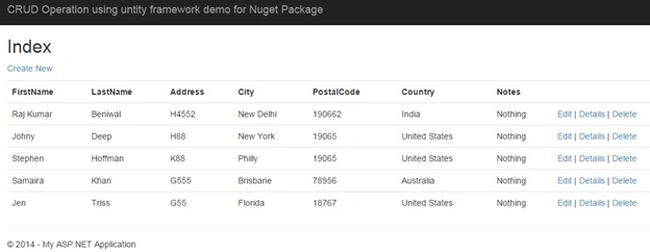
Image 1
Add The NuGet Package to you Project
- Right-click on the project's References and click Manage NuGet Packages.
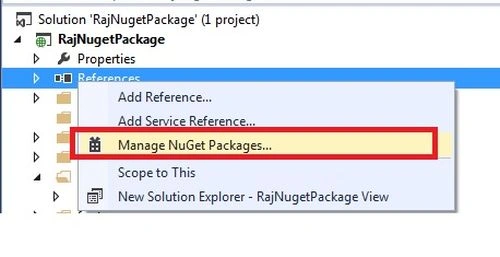
Image 2
- In the NuGet Package Manager, select online from the menu and search “New NuGet Package” and click Install.
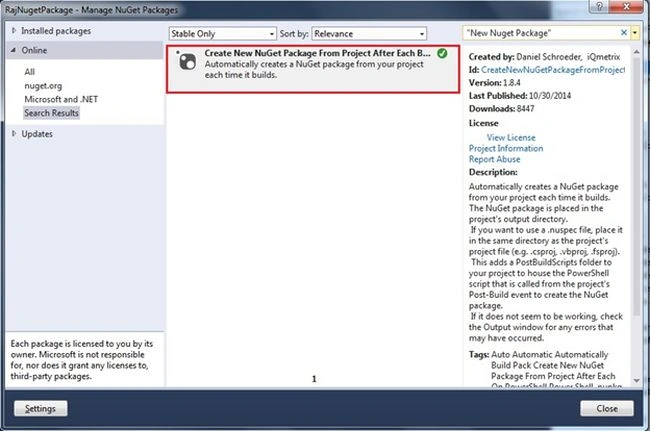
Image 3
- Now you can see that the _CreateNewNuGetPackage folder was added to your project that contains the files used to create a NuGet package from your project after each build.

Image 4
- Now build your project to generate the package, as you can see the NuGet Package file (.nupkg) was created in the project's output directory.
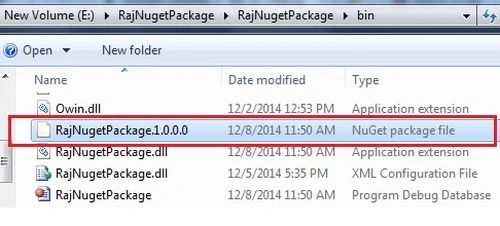
Image 5
- If you want to change your package's version number, apiKey, Platform, release note and so on then you can edit the Config.ps1 file.
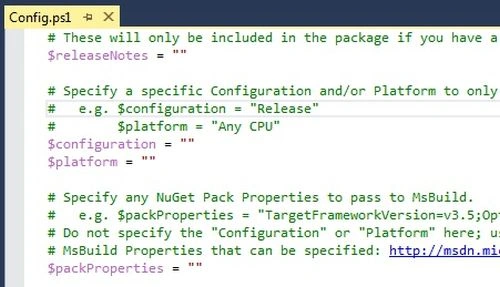
Image 6
Push Package to NuGet Gallery
Right-click on RunMeToUploadNuGetPackage under the _CreateNewNuGetPackage folder and click Run.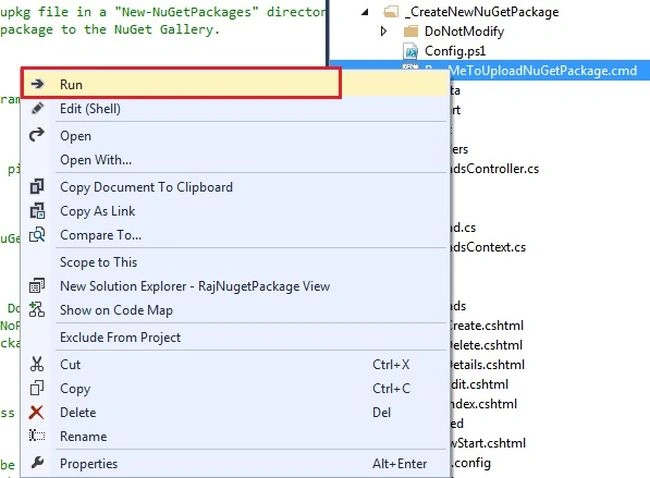
Image 7
If you don't see the Run command then download and install, you can get this functionality by installing the VSCommands Visual Studio extension; otherwise you will need to run the batch file from the Windows/File Explorer.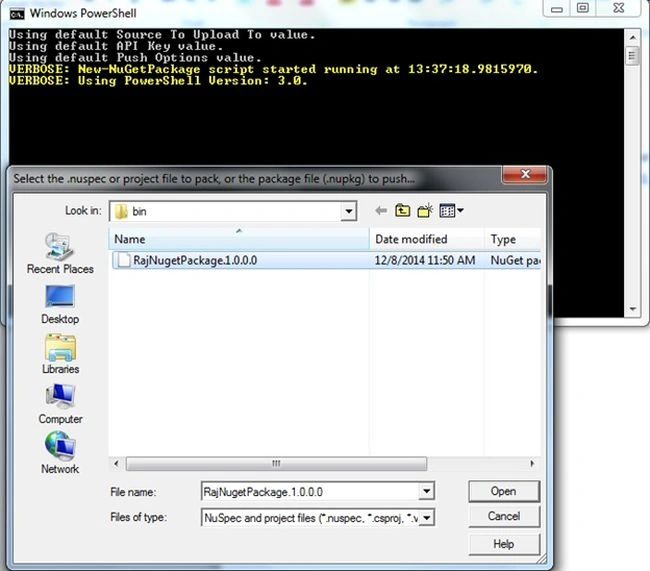
Image 8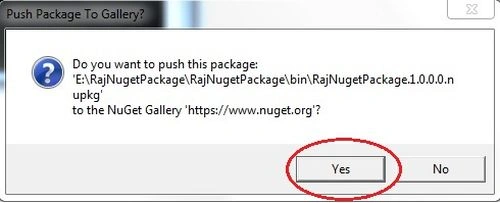
Image 9.
Make sure that when you build the application there is no error that occurrs.
*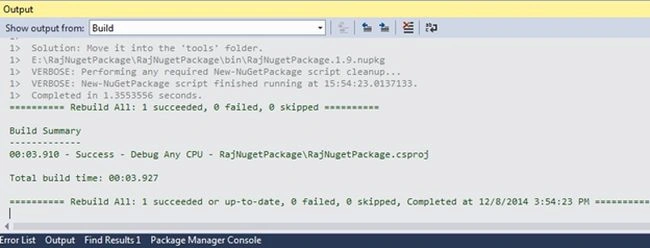
Image 10
You can see your package list on: Nuget after logging in on my packages.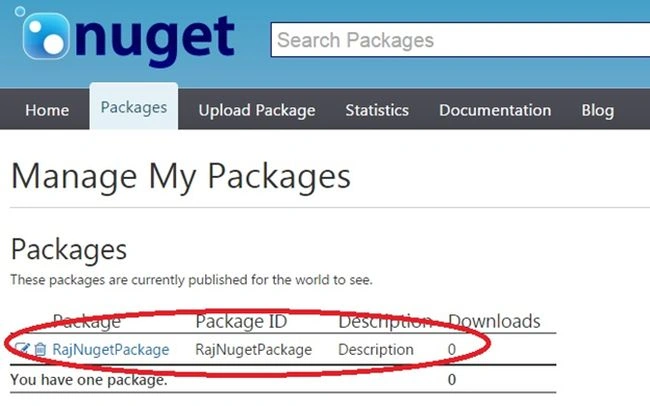
Image 11
You can search online on the Nuget package using the name.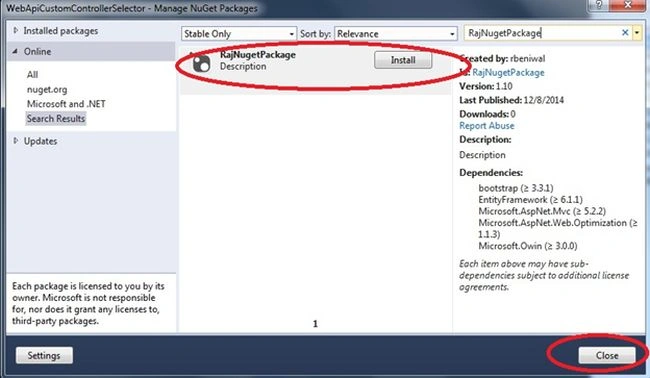
Image 12
Note: You need to provide the NuGet ApiKey that is available in my account when you login into the Nuget website.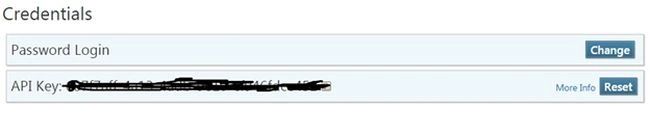
Image 13
Conclusion
In this article we have learned how to create a NuGet Package and how to push that package to the NuGet Gallery.
Antha ChettaPosted Jun 10, 2015, 1:03 PM
https://www.youtube.com/watch?v=8pVrkbgyqgg
Antha ChettaPosted Jun 10, 2015, 1:03 PM
BTW, came across this video which teaches on how to use nuget from within visual studio using both Nuget dialog and Nuget console options...
Sander SchuttenPosted Apr 3, 2015, 9:43 AM
I had to manually modify the reference to the target file in the .csproj file. The reference is to VS.NET 2010 and i only have 2013 installed.
Prasham SabadraPosted Feb 23, 2015, 5:12 AM
Nice article. Thanks for sharing!
Gaurav Kumar AroraPosted Dec 10, 2014, 9:28 AM
awesome
Ramchand RepallePosted Dec 10, 2014, 4:03 AM
Good one...
Nimit JoshiPosted Dec 9, 2014, 11:05 PM
Nice Article..
Manish Kumar ChoudharyPosted Dec 9, 2014, 1:59 AM
Nice one..