
Introduction:
Composite Custom Controls are those controls which contain other controls. It is almost like a custom user control in ASP.NET which is used like a a container to keep another control in it. Here we are going to discuss about the composite custom control, how can we make it and used them later inside a web application. For this we have to inherit the Composite Control Class, It is very useful class we can use it's functionality or features which becomes very helpful to us. In the Composite Control you will have to create the instance of the control for which control you want to add into the container. Let we move forward that how will we create and use later, Now follow some step which is given below.
Step 1: Firstly we are going to open the Web server Control application.
-
Go to visual studio and open File->New->Project->Add ASP.NET Server Control application.
-
Click OK.
-
Give the name as Composite_control.
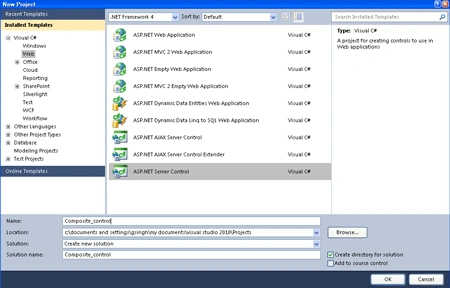
Step 2: Now you have to change the name of the ServerControl.cs file to MC_Control.cs.
Step 3: Further Toolbox Data attribute for the class, change the string "ServerCOntrol1" to "MC_Control" in both places where it occurs. let see how we will add it.
[ToolboxData("<{0}:MC_Control runat=server></{0}:MC_Control>")]
Step 4: Now write code for the class named as MC_Control.cs which inherits the base class name as Composite Control.
Code:
using
System;
using
System.Collections.Generic;
using
System.ComponentModel;
using
System.Linq;
using
System.Text;
using System.Web;
using
System.Web.UI;
using
System.Web.UI.WebControls;
using
System.Drawing;
namespace
Composite_control
{
[ToolboxData("<{0}:MC_Control
runat=server></{0}:MC_Control>")]
public class
MC_Control :
CompositeControl
{
protected
TextBox txtbox = new
TextBox();
protected Label
lbl = new Label();
protected
Button btn = new
Button();
[Bindable(true)]
[Category("Appearance")]
[DefaultValue("")]
[Localizable(true)]
public
string text
{
get
{
EnsureChildControls();
return txtbox.Text;
}
set
{
EnsureChildControls();
txtbox.Text = value;
}
}
protected override
void CreateChildControls()
{
base.CreateChildControls();
lbl.Text = "User Name:<br>";
btn.Text = "Submit";
btn.BackColor = Color.Red;
this.Controls.Add(lbl);
this.Controls.Add(txtbox);
this.Controls.Add(btn);
}
}
}
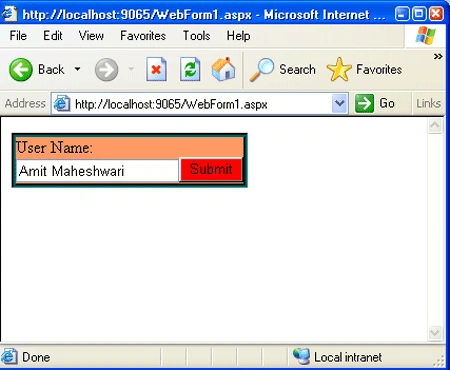
In this code given above we are using two things; first a property and second a method, Property which named is text which will set the text property of the textbox whatever we write in the text property of the textbox it will display value inside the textbox. Further we have to make a method named as CreateChildControls (which is a method of base class Composite Control), will override to implement some other changes into the controls we are making. It is used to add the instances of the Controls which we have made above to the container. In this method we can implement the text and color properties of the controls that will apply to your composite control. You can add also more properties which is you want to implement.
Step 5: Now after doing all that we have to open a file named AssemblyInfo.cs and write the code given below.
-
Firstly add a namespace to the Top of the AssemblyInfo.cs file named as
using System.Web.UI;
-
Now write the assembly name at the end of the AssemblyInfo.cs file.
dgPosted Apr 17, 2014, 10:04 AM
The download file does not contain the CompositeControl project. Also, how do you make the button in the control respond to the click event?