
Introduction: In this article we will discuss how to create and use a custom control in an WPF application. WPF is the abbreviated form of Windows Presentation Foundation in which we can build the better application which have great look and feel. WPF application are used to make better presentation of the project which is being made by you. Here we will create a WPF custom control which have better presentation. In WPF we can build the application in 3D and can build the animated application. It makes the window application graphically strong and provide better user interface for window applications. Let's see how it will use to make the custom control and later use controls in it's own application.
There are some steps which you may follow to build the custom control in WPF.
Step 1: Firstly I would like to open the WpfCustomControlLibrary.
-
Go to Visual Studio and open the project.
-
Select the WpfCustomControlLibrary.
-
Click OK.
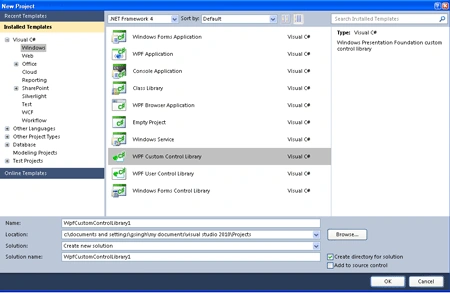
Step 2: Further you have to open the CustomControl1.cs file and write the code given below.
Code:
using
System;
using
System.Collections.Generic;
using
System.Linq;
using
System.Text;
using
System.Windows;
using
System.Windows.Controls;
using
System.Windows.Data;
using
System.Windows.Documents;
using
System.Windows.Input;
using
System.Windows.Media;
using
System.Windows.Media.Imaging;
using
System.Windows.Navigation;
using
System.Windows.Shapes;
namespace
WpfCustomControlLibrary1
{
[TemplatePart(Name =
"Main", Type =
typeof(Border))]
[TemplatePart(Name =
"body", Type =
typeof(ContentControl))]
public class
CustomControl1 :
Control
{
static CustomControl1()
{
DefaultStyleKeyProperty.OverrideMetadata(typeof(CustomControl1),
new
FrameworkPropertyMetadata(typeof(CustomControl1)));
CommandManager.RegisterClassCommandBinding(typeof(CustomControl1),
new CommandBinding(CustomControl1.CustomCommand,
C_Command));
EventManager.RegisterClassHandler(typeof(CustomControl1),
Mouse.MouseDownEvent,
new
MouseButtonEventHandler(M_Down));
}
public static
readonly
DependencyProperty C_prt =
DependencyProperty.Register("Color",
typeof(Color),
typeof(CustomControl1),new
PropertyMetadata(Colors.AliceBlue));
public
Color Color
{
get
{
return (Color)this.GetValue(C_prt);
}
set
{
this.SetValue(C_prt,
value);
}
}
Border MB;
ContentControl Body;
public
override void OnApplyTemplate()
{
base.OnApplyTemplate();
if (this.Template
!= null)
{
Border mainBorder =
this.Template.FindName("Main",
this) as
Border;
if (mainBorder != MB)
{
//Firstly you have to unhook
existing handler
if (MB !=
null)
{
MB.MouseEnter -= new
MouseEventHandler(MB_MEnter);
MB.MouseLeave -= new
MouseEventHandler(MB_MLeave);
}
MB = mainBorder;
if (MB !=
null)
{
// Now we have to Add a
default basecolor
MB.Background = new
LinearGradientBrush(this.Color,this.Color,.5);
MB.MouseEnter += new
MouseEventHandler(MB_MEnter);
MB.MouseLeave += new
MouseEventHandler(MB_MLeave);
}
}
Body = this.Template.FindName("body",
this) as
ContentControl;
}
}
void MB_MLeave(object
sender, MouseEventArgs e)
{
Border thisBorder = sender
as Border;
if (thisBorder !=
null)
{
thisBorder.Background = new
SolidColorBrush(Colors.HotPink);
if (Body !=
null)
{
Run r =
new Run("Mouse
Has Been Left!");
r.Foreground = new
SolidColorBrush(Colors.Yellow);
Body.Content = r;
}
}
}
void MB_MEnter(object
sender, MouseEventArgs e)
{
Border thisBorder = sender
as Border;
if (thisBorder !=
null)
{
thisBorder.Background = new
SolidColorBrush(Colors.Tomato);
if (Body !=
null)
{
Run r =
new Run("Mouse
Has Entered!");
r.Foreground = new
SolidColorBrush(Colors.Silver);
Body.Content = r;
}
}
}
static void
M_Down(object sender,
MouseButtonEventArgs e)
{
CustomControl1 invoker = sender
as CustomControl1;
//Do handle event
//Raise your event
invoker.OnInvertCall();
//Do Rest
}
public
static readonly
RoutedEvent InvertCallEvent =
EventManager.RegisterRoutedEvent("InvertCall",
RoutingStrategy.Bubble,
typeof (RoutedEventHandler),
typeof(CustomControl1));
public event
RoutedEventHandler InvertCall
{
add { AddHandler(InvertCallEvent,
value); }
remove {
RemoveHandler(InvertCallEvent, value); }
}
private void
OnInvertCall()
{
RoutedEventArgs args =
new
RoutedEventArgs(InvertCallEvent);
RaiseEvent(args);
}
static void
C_Command(object sender,
ExecutedRoutedEventArgs e)
{
//Need to first retrieve the control
CustomControl1 invoker =
sender as
CustomControl1;
//Do whatever you need
}
public static
readonly ICommand
CustomCommand = new
RoutedUICommand("CustomCommand",
"CustomCommand"
typeof(CustomControl1),
new InputGestureCollection(new
InputGesture[] {
new KeyGesture(Key.Enter),
new MouseGesture(MouseAction.LeftClick)
}));
}
}
Code Description: Here we have declare two template name as Main and body which is type of border and ContentControl. Command manager provides the command related utility whereas the Event manager provides event related utilities to the class handler which is a type of custom control. After that we have to make a static property known as Dependency Property that can be set through methods such as data binding, animation etc. Further we have to override a method name as OnApplytemplate in which we have to unhook the existing event and we have to add a default basecolor and also events. Now we will make two method name as MB_MLeave and MB_MEnter which will set the color of the control by using solid color brush and also set the text which will display on click the control. At last we have to make two property name as RoutedEvent which identified and routed an event and ICommand defines the command for the control.
Step 3: Now build the application by click on build option.
Step 4: Now you have to take a Wpf application.
-
Go to visual studio and take anew project.
-
Select the Wpf Application.
-
Click OK.
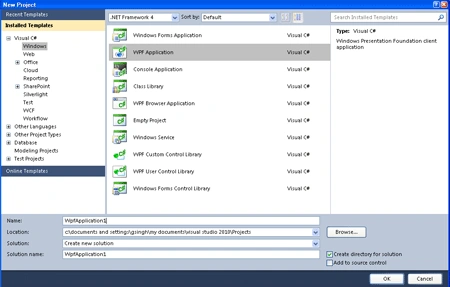
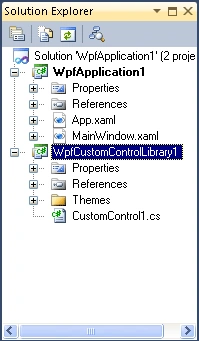
Step 5: Now add the existing project to the wpf application let's look how it look's like
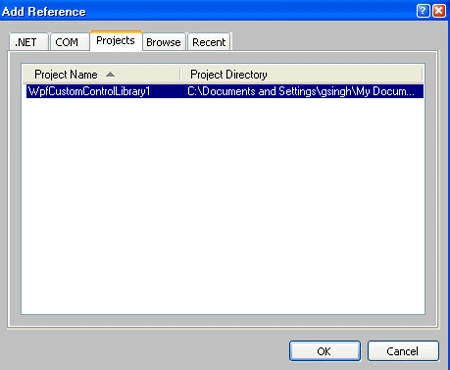
Step 6: After that add the project reference to the Wpf application.
Step 7: Now the control component will appear at the top of tool box.
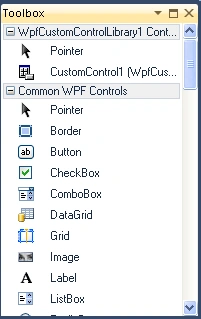
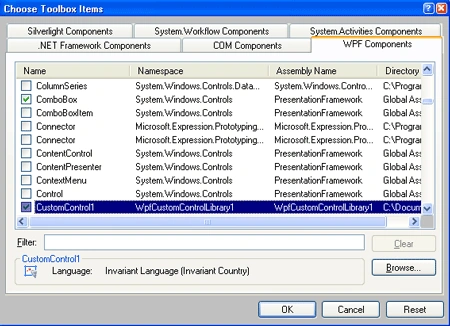
Step 8: If we want to add this control to the Toolbox then we have to follow some step
-
Go to toolbox.
-
Right click on any control from the toolbox.
-
Select choose item and add the reference of WpfControlLibrary.dll file
-
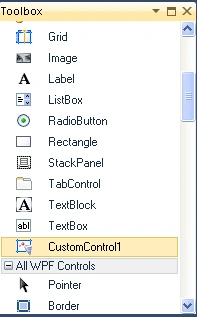
Now control will appear into the toolbox.
Step 9: Now you have to write the code for MainWindow.xaml file.
Code:
<Grid>
<my:CustomControl1
Color="#FF2B2124"
InvertCall="CustomControl1_InvertCall"
Background="#FF8D6767"
Margin="206,110,177,98">
<my:CustomControl1.Template>
<ControlTemplate>
<Border
x:Name="Main">
<Button
x:Name="body"
HorizontalAlignment="Center"
VerticalAlignment="Center"
Background="Black">
</Button>
</Border>
</ControlTemplate>
</my:CustomControl1.Template>
</my:CustomControl1>
</Grid>
Step 10: Now you have to open the MainWindow.xaml.cs file and write the code given below.
Code:
using System;
using
System.Collections.Generic;
using
System.Linq;
using
System.Text;
using
System.Windows;
using
System.Windows.Controls;
using
System.Windows.Data;
using
System.Windows.Documents;
using
System.Windows.Input;
using
System.Windows.Media;
using
System.Windows.Media.Imaging;
using
System.Windows.Navigation;
using
System.Windows.Shapes;
namespace
WpfApplication1
{
public
partial class
MainWindow : Window
{
public MainWindow()
{
InitializeComponent();
}
private void
CustomControl1_ICall(object sender,
RoutedEventArgs e)
{
MessageBox.Show("Inverted
call of mouse");
}
}
}
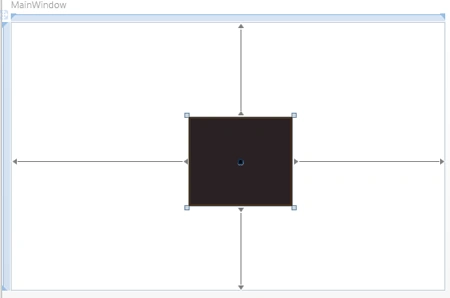
Step 11: Now we have to build the application and the MainWindow.xaml looks like before run
Before Run:
Step 12: Run the application by pressing F5.
After Run:
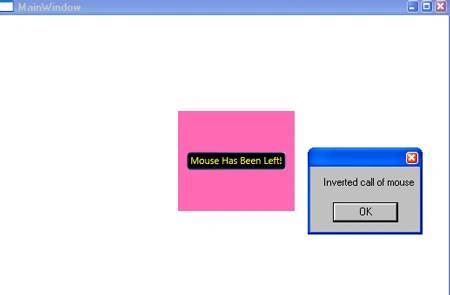
evladik keditedPosted Apr 9, 2013, 3:04 AMEdited Apr 9, 2013, 3:04 AM
Please add the custom control source code also!!!
Sam HobbseditedPosted Mar 5, 2012, 9:52 PMEdited Mar 5, 2012, 9:57 PM
There is a comma missing from the code for creating CustomCommand near the bottom of the code for the CustomControl1.cs file. There should be a comma preceding typeof(CustomControl1). Also it should be noted that the sample project for downloading is only the project for testing the custom control; the custom control project must be created from the code in this article. Other than that, it works for me.