

Introduction
In this article, I will show steps to create an Interactive Credit Card Component using using the react-credit-cards-2 library. In React, We can build animated credit card UI interface for a payment system, we can utilize the react-credit-cards-2 library. It will allow users to use credit cards in React to authorize transactions with specific card details such as the card number, cardholder name, expiry date, and security code. Here, we learn how to make a visually appealing credit card UI component in React, enhancing the user experience that adds dynamic beauty to React projects.
Note. Before going through this session, please visit my previous article related to React applications, as mentioned below.
Step 1. Install React Required Packages
We have to install the react-credit-cards-2, payment, and Bootstrap libraries. You can do this by executing the below commands,
PS D:\EmployeeManagement\React\1\my-react-app> npm install react-credit-cards-2 bootstrap --legacy-peer-deps
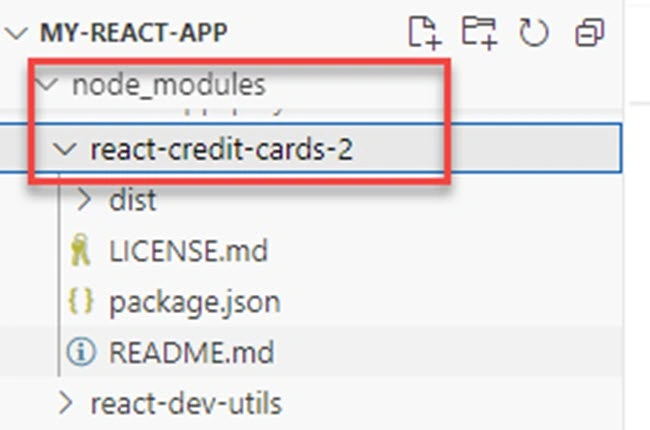
We can see the installed library under the node_modules folder.
D:\EmployeeManagement\React\1\my-react-app\node_modules\react-credit-cards-2
Step 2. Build React Credit Card Form Component
Create the components folder and then create the BankCreditCardForm.js file. This JavaScript function handles the credit card component in our React environment. This will show you how to create a credit card form using an external library. The React credit card component offers credit card input that is easy to integrate into React and offers extensive props to validate the credit card module in React.
Code Description
Here, we need to import the credit cards module in css.
import "react-credit-cards-2/dist/es/styles-compiled.css";
To manage to react credit card form values, we need to define a state. This state manages Number, Name, Expiry, CVC, and focus values. So, make sure to define these values inside the credit card component. These are the values as shown below,
const [state, setState] = useState({
    number: "",
    name: "",
    expiry: "",
    cvc: "",
    name: "",
    focus: "",
  });
Here we need 2 event handlers i.e. handleInputChange and handleInputFocus. So that we can update the card component values in real-time. Here, we are extracting the name and value of input control and setting it in state using the Destructuring and spread operator.
- Destructuring: React components receive data through props. Destructuring can be used to unpack values from these props.
- Spread operator: allows us to quickly copy all or part of an existing array or object into another array or object. It is used for passing props, copying objects, and managing state. The spread operator is often used in combination with destructuring.
const handleInputChange = (e) => {
    const { name, value } = e.target;
    setState((prev) => ({ ...prev, [name]: value }));
  };
  const handleInputFocus = (e) => {
    setState((prev) => ({ ...prev, focus: e.target.name }));
  };
Now, We define the card components take certain properties that will be showing you in real-time. So, when someone enters the card value, card numbers. So, it will display the card company name through an animation. So, it takes name, number, expiry, cvc and focus properties. So, we have defined these values.
<Cards
   number={state.number}
   expiry={state.expiry}
   cvc={state.cvc}
   name={state.name}
   focused={state.focus}
/>
Now, we create the form input controls. Here, we have defined the form components. inside the form tag, the first input control is for displaying the card number. We are using the value property, and by using the state, we are getting the latest card values entered by the user. We are managing these values through change and on focus event handler. We are doing the same process for name, expiry, and CVC numbers. The next step is to add the button control called submit.
<div className="mt-3">
        <form>
          <div className="mb-3">
            <input
              type="number"
              name="number"
              className="form-control"
              placeholder="Card Number"
              value={state.number}
              onChange={handleInputChange}
              onFocus={handleInputFocus}
              required
            />
          </div>
          <div className="mb-3">
            <input
              type="text"
              name="name"
              className="form-control"
              placeholder="Name"
              onChange={handleInputChange}
              onFocus={handleInputFocus}
              required
            />
          </div>
          <div className="row">
            <div className="col-6 mb-3">
              <input
                type="number"
                name="expiry"
                className="form-control"
                placeholder="Valid Thru"
                pattern="\d\d/\d\d"
                value={state.expiry}
                onChange={handleInputChange}
                onFocus={handleInputFocus}
                required
              />
            </div>
            <div className="col-6 mb-3">
              <input
                type="number"
                name="cvc"
                className="form-control"
                placeholder="CVC"
                pattern="\d{3,4}"
                value={state.cvc}
                onChange={handleInputChange}
                onFocus={handleInputFocus}
                required
              />
            </div>
          </div>
          <div className="d-grid">
            <button className="btn btn-primary">Submit</button>
          </div>
        </form>
      </div>
Here, we define the use state hook of your function component for React.
import React, { useState } from "react";
Import the credit card feature from the library, as shown below.
import Cards from "react-credit-cards-2";
Code in components/BankCreditCardForm.js
import React, { useState } from "react";
import Cards from "react-credit-cards-2";
import "react-credit-cards-2/dist/es/styles-compiled.css";
const CreditCardForm = () => {
  const [state, setState] = useState({
    number: "",
    name: "",
    expiry: "",
    cvc: "",
    name: "",
    focus: "",
  });
  const handleInputChange = (e) => {
    const { name, value } = e.target;
    setState((prev) => ({ ...prev, [name]: value }));
  };
  const handleInputFocus = (e) => {
    setState((prev) => ({ ...prev, focus: e.target.name }));
  };
  return (
    <div>
      <Cards
        number={state.number}
        expiry={state.expiry}
        cvc={state.cvc}
        name={state.name}
        focused={state.focus}
      />
      <div className="mt-3">
        <form>
          <div className="mb-3">
            <input
              type="number"
              name="number"
              className="form-control"
              placeholder="Card Number"
              value={state.number}
              onChange={handleInputChange}
              onFocus={handleInputFocus}
              required
            />
          </div>
          <div className="mb-3">
            <input
              type="text"
              name="name"
              className="form-control"
              placeholder="Name"
              onChange={handleInputChange}
              onFocus={handleInputFocus}
              required
            />
          </div>
          <div className="row">
            <div className="col-6 mb-3">
              <input
                type="number"
                name="expiry"
                className="form-control"
                placeholder="Valid Thru"
                pattern="\d\d/\d\d"
                value={state.expiry}
                onChange={handleInputChange}
                onFocus={handleInputFocus}
                required
              />
            </div>
            <div className="col-6 mb-3">
              <input
                type="number"
                name="cvc"
                className="form-control"
                placeholder="CVC"
                pattern="\d{3,4}"
                value={state.cvc}
                onChange={handleInputChange}
                onFocus={handleInputFocus}
                required
              />
            </div>
          </div>
          <div className="d-grid">
            <button className="btn btn-primary">Submit</button>
          </div>
        </form>
      </div>
    </div>
  );
};
export default CreditCardForm;
Step 3. Update the Main Entry and Register the BankCreditCardForm.js
Here, we need to register BankCreditCardForm.js in the App.js file. So that it can be available throughout the React application.
Code Description
In the App.js file, We have imported the credit card form component.
import CreditCardForm from "./components/BankCreditCardForm";
And then registered in the app function.
function App() {
  return (
    <div className="container mt-3">
      <h4 className="mb-3 card bg-danger text-white text-center">
      Create Animated Credit Cards Using React & Bootstrap By Satyaprakash
      </h4>
      <CreditCardForm />
    </div>
  );
}
Here, The React component is <CreditCardForm />. Also, we import Bootstrap and CSS for responsive and interactive UI design.
import "bootstrap/dist/css/bootstrap.min.css";
import "./App.css";
Note. We can create the function component using the shorthand called rfce using Visual Studio Code.
Code in App.js
import React from "react";
import "bootstrap/dist/css/bootstrap.min.css";
import "./App.css";
import CreditCardForm from "./components/BankCreditCardForm";
function App() {
  return (
    <div className="container mt-3">
      <h4 className="mb-3 card bg-danger text-white text-center">
      Create Animated Credit Cards Using React & Bootstrap By Satyaprakash
      </h4>
      <CreditCardForm />
    </div>
  );
}
export default App;
About react-credit-cards-2
I am making a React credit card component capable of showcasing real-time updates of all entered credit card values on the screen. This component not only displays the user’s credit card details as they enter them into the form, but it also showcases the specific credit card company being used for the payment through an elegant animation. The react-credit-cards-2 is a library specifically designed for React. I took the help of this versatile library to create and manage credit card components or user interfaces within React applications.
Why do we use the react-credit-cards-2 library?
We can use features of this plugin to build animated credit card forms in React, to show credit card forms, manage card details, and potentially simulate transactions or payment-related animations within a React-based environment.
Step 4. Compile and Run the React Server
To start a server for a React application, you have to type and execute a command in the terminal that starts the development server. After the command got executed, the server starts. The terminal will display messages indicating that the server is starting and it will automatically serve the app in your default web browser.
PS D:\EmployeeManagement\React\1\my-react-app> npm start
Output

Once the server is started, The react app will be shown below.
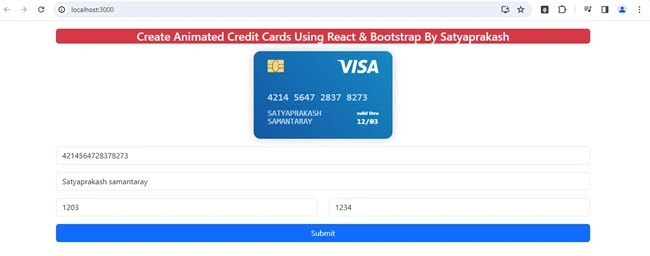
How this React app works is shown below. We can check the animated credit cards of different brands with card input details.
| Number starts with | Brand names |
| 23 | Mastercard |
| 34 | American Express |
| 42 | Visa |
| 56 | Maestro |
| 81 | UnionPay |
Summary
In this write-up, we have learned the details below.
- Know about the react-credit-cards-2 library in React.
- Learn about the React component.
- Steps to install and import react-credit-cards-2 library in the React application.
- Build interactive ATM cards from the UI component in the React application.
Thank You & Stay Tuned For More
Join the conversation! Your thoughts help the community grow.