

Let us start writing MVC applications now, and why don’t we start with a small invitation from CsharpCorner Delhi event? I am not using an image and it’s just a very basic application.
In this application we will learn about Modal and View (that include strongly type views).
Let see the agenda for this application below:
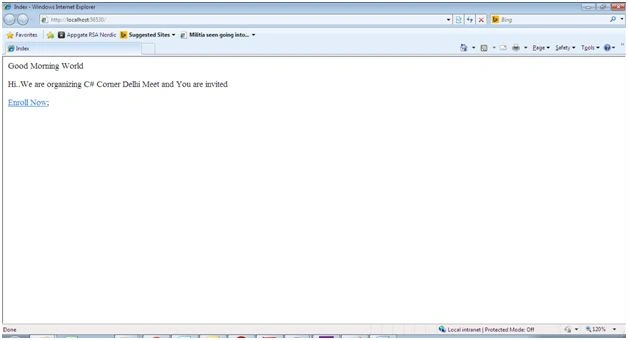
- A Home page with details of the Invite.
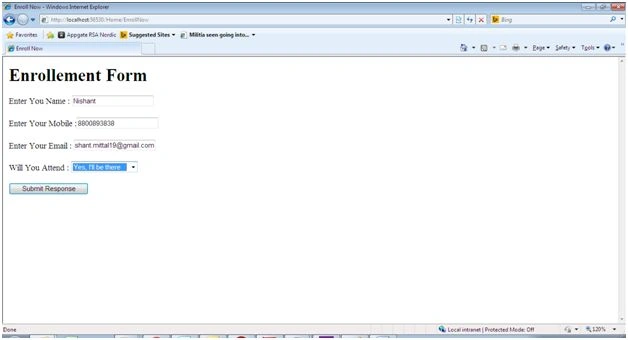
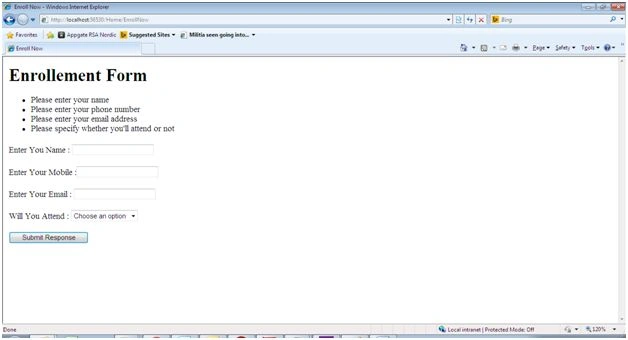
- A form from where you can confirm your enrollment.
- Few basic validations, with thanks page.
- You can add Email functionality as well. I am escaping the same.
I am using strongly typed view in this application. Let’s first discuss what that is.
Strongly typed views are used for rendering specific types of model objects. By specifying type of data, visual studio provides IntelliSense for that class. View inherits from View Page whereas strongly typed view inherits from ViewPage<T> where T is type of the model.
Let us start making the invite:
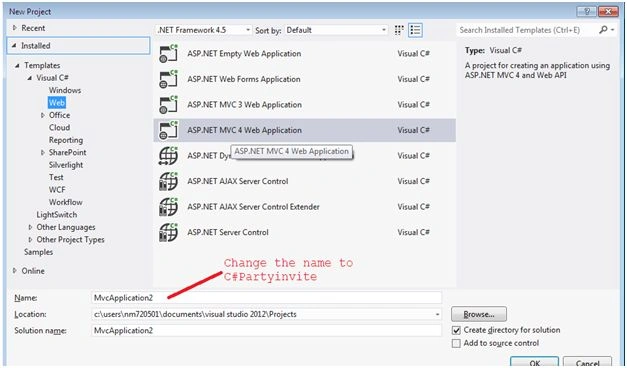
Step 1: Select the MVC 4 empty project and name it as C#PartyInvite.
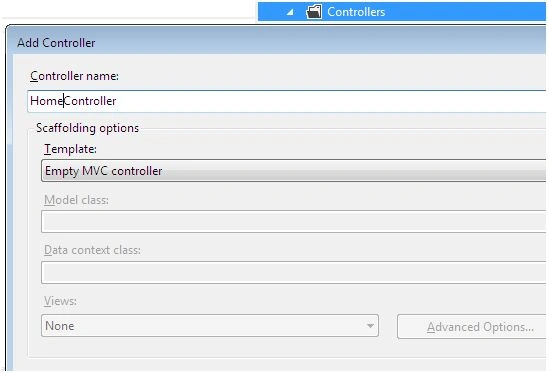
Step 2: Add an empty “Home” Controller by right click on controller and add new controller.
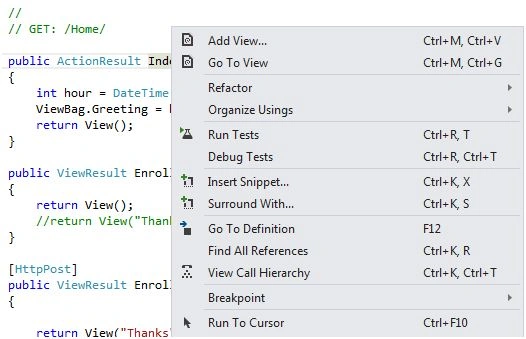
Step 3: Right click on index method and add View as shown below:
Let the name remain “Index” only.
Add the following code:
- @{
- Layout = null;
- }
- <!DOCTYPE html>
- <html>
- <head>
- <meta name="viewport"content="width=device-width"/>
- <title>Index</title>
- </head>
- <body>
- <div>
- @ViewBag.Greeting World
- <p> Hi..We are organizing C# Corner Delhi Meet and You are invited</p>
- @Html.ActionLink("Enroll Now", "EnrollNow");
- </div>
- </body>
- </html>
- public class Response
- {
- public string Name { get; set; }
- public string MobileNumber { get; set; }
- public string Email { get; set; }
- public bool? AttendOrNot { get; set; }
- }
If you remember we have added the following line on Index view:
- @Html.ActionLink("Enroll Now", "EnrollNow");
- public ViewResult EnrollNow( )
- {
- return View();
- //return View("Thanks" , response);
- }
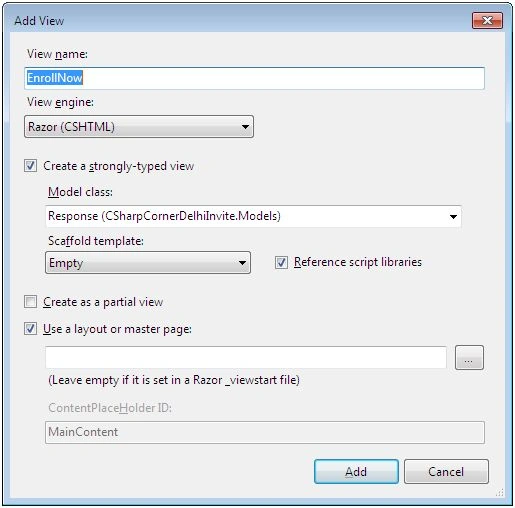
Step 7: Add the following code on the “EnrollNow” view:
- @model CSharpCornerDelhiInvite.Models.Response
- @{
- Layout = null;
- }
- <h1>Enrollment Form </h1>
- <!DOCTYPE html>
- <html>
- <head>
- <meta name="viewport"content="width=device-width"/>
- <title>Enroll Now</title>
- </head>
- <body>
- @using (Html.BeginForm())
- {
- <p>Enter You Name : @Html.TextBoxFor(x => x.Name )</p>
- <p>Enter Your Mobile :@Html.TextBoxFor(x => x.MobileNumber )</p>
- <p>Enter Your Email : @Html.TextBoxFor(x => x.Email )</p>
- <p>
- Will You Attend : @Html.DropDownListFor(x => x.AttendOrNot, new[] {newSelectListItem() {Text = "Yes, I'll be there",Value = bool.TrueString},newSelectListItem() {Text = "No, I can't come",
- Value = bool.FalseString}}, "Choose an option")
- </p>
- <inputtype="submit"value="Submit Response"/>
- }
- </body>
- </html>
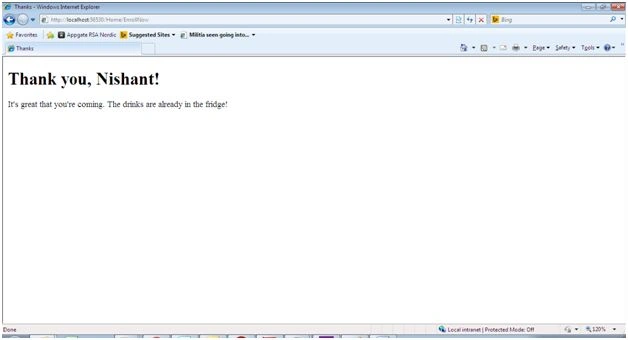
Step 8: Now we have thank user for the input, so for the same create one more method under home controller as in the following:
- [HttpPost]
- public ViewResult EnrollNow(Response response)
- {
- return View("Thanks", response);
- }
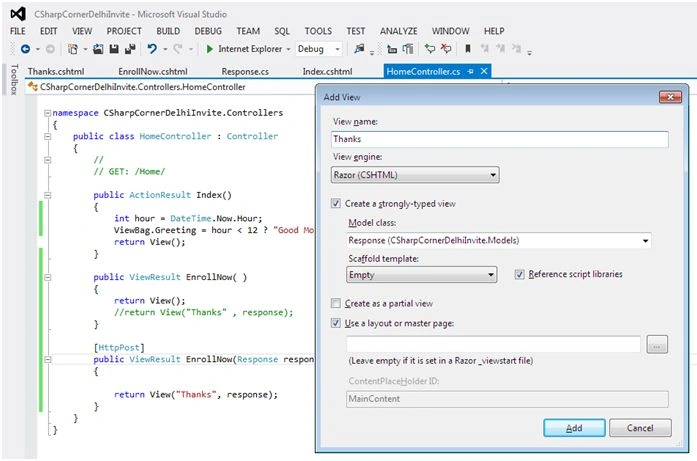
Step 9: Last step is to thank user for their response. For the same add the following code on view:
- @model CSharpCornerDelhiInvite.Models.Response
- @
- {
- Layout = null;
- }
- < !DOCTYPE html >
- < html >
- < head >
- < meta name = "viewport" content = "width=device-width" / >
- < title > Thanks < /title>
- < /head>
- < body > < div > < h1 > Thank you, @Model.Name! < /h1>
- @if(Model.AttendOrNot == true)
- {
- @: It 's great that you'
- re coming.The drinks are already in the fridge!
- }
- else
- {
- @: Sorry to hear that you can 't make it, but thanks for letting us know.
- }
- < /div>
- < /body>
- < /html>
We can add validations in the model as shown below:
- public classResponse
- {
- [Required(ErrorMessage = "Please enter your name")]
- public string Name
- {
- get;
- set;
- }
- [Required(ErrorMessage = "Please enter your phone number")]
- public string MobileNumber
- {
- get;
- set;
- }
- [Required(ErrorMessage = "Please enter your email address")]
- [RegularExpression(".+\\@.+\\..+", ErrorMessage = "Please enter a valid email address")]
- public string Email
- {
- get;
- set;
- }
- [Required(ErrorMessage = "Please specify whether you'll attend or not")]
- public bool ? AttendOrNot
- {
- get;
- set;
- }
- }
I am adding the entire code for reference.
Nishant MittalPosted Jan 24, 2016, 10:11 PM
Thanks Guys...
Arul RPosted Jan 24, 2016, 1:13 AM
Nice share
Santhakumar MunuswamyPosted Jan 23, 2016, 2:01 AM
Thanks for nice share
sreenivasa kPosted Jan 22, 2016, 11:06 AM
nice
Nishant MittalPosted Jan 22, 2016, 10:30 AM
Yes sir...I took the idea from there
Debasis SahaPosted Jan 22, 2016, 9:58 AM
Good..Keep posting...
Jon HiderPosted Jan 22, 2016, 9:27 AM
Nice simple project to demo how mvc works, but you simply copied and slightly modified chapter two of Pro Asp.Net MVC 5, written by Adam Freeman (Apress Books)